Unicode Character Reference

Just a quick reference to all those delicious unicode characters and how they render on the web‽‽
Just a quick reference to all those delicious unicode characters and how they render on the web‽‽
There are a total of 57 HTTP Status Codes recognized by the Apache Web Server. Wouldn't you like to see what all those headers and their output, ErrorDocuments look like?
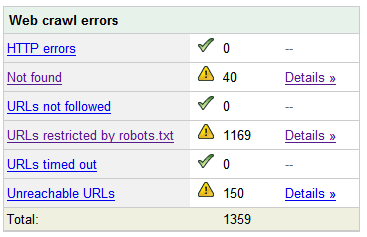 Nifty SEO tip to get Search Engine Bots to check your site every hour until you finish working on it and tell them you are finished.
 This is a big update from the last time I looked into this, when I enumerated 57 Status Codes that Apache 2.x was capable of handling. This list contains 83 Status Codes recognized by Apache. I compiled the latest 2.4.4 Apache in order to view the actual codes sent by a live server.. very cool. You can read about the newest HTTP Status Codes in RFC 6585.
#### No https except to wp-admin -
# If the request is empty ( implies fopen or normal file access by a php script )
RewriteCond %{THE_REQUEST} ^$ [OR]

# OR if the request if for wp-admin or wp-login.php
RewriteCond %{REQUEST_URI} ^/(wp-admin|wp-login.php).*$ [NC,OR]

# OR if the Referer is https
RewriteCond %{HTTP_REFERER} ^https://www.askapache.com/.*$ [NC]

# THEN skip the following rule, basically all this does is force https or badhost to be redirected
# BUT because of the above 3 rewritecond's, this won't break poorly written admin scripts
RewriteRule .* - [S=1]

RewriteCond %{HTTPS} =on [OR]
RewriteCond %{HTTP_HOST} !^www.askapache.com$ [NC]
RewriteRule .* https://www.askapache.com%{REQUEST_URI} [R=301,L]

RewriteCond %{THE_REQUEST} ^[A-Z]{3,9} /(wp-admin/.*|wp-login.php.*) HTTP/ [NC]
RewriteCond %{HTTPS} !=on
RewriteRule .* https://%{SERVER_NAME}%{REQUEST_URI} [R=301,L]
Web Professionals use mod_rewrite to issue 301 and 302 Redirects for Search Engines. Sometimes you may not have mod_rewrite.c or you want an alternative redirect method. Using mod_alias RedirectMatch you can use REGEX in Redirect commands!
Apache Security tips and tricks for securing Apache Web Servers using htaccess, httpd.conf, and other built-in techniques to thwart attackers. This really should be required reading for any Apache admin or user because these little tricks are so easy to do.
Mod_Security rivals Mod_Rewrite in the amount of features it provides. I decided to go ahead and post what I learned about it today, even though its tough to give away such awesome htaccess and apache tricks.. Learn how to control spam once and for all, conditionally log/deny/allow/redirect requests based on IP, username, etc.. Mod_Security is so fine!

 3-Part article covering practical implementation of 3 advanced .htaccess features. Discover an easy way to boost your SEO the AskApache way (focus on visitors), a tip you might keep and use for life. Get some cool security tricks to use against spammers, crackers, and other nefarious sorts. Take your site's error handling to the next level, enhanced ErrorDocuments that go beyond 404's.
This is all new, experimental, and very very cool. It literally uses .htaccess techniques to create several virtual "locked gates" that require a specific key to unlock, in a specific order that cannot be bypassed. It uses whitelisting .htaccess tricks to specify exactly what is allowed, instead of trying to specify everything that isn't allowed. Also, by setting specific cookies/tokens after successfully passing through a gate, we can then require the exact cookie/token from the previous gate, which stops an attacker from skipping or bypassing gates.
As a security nut myself, and also a Linux admin, one of my biggest pet peeves is when I've taken the time and care to segment all the users on a server into separate home directories, and then some developer comes along, logs in as root, and changes the ownership of files. Other things can cause this, like Apache, PHP, Mutt, etc.. So I've always used a cron job that executes daily (and on demand) which automatically fixes all the permissions back to what they should be.
The goal is to add the HostGator server to be an exact mirror of the s.askapache.net domain, then to add that server as a 2nd A record to my DNS zone. That way half the visitors to the size will be taking up resources and bandwidth on the HostGator server instead of mine.
Round Robin A records in DNS are intended to evenly distribute queries between each host of the same name. Using some tricks straight out of a hackers toolbox we can verify if the distribution is taking place. (It is.)
 .htaccess is a very ancient configuration file for web servers, and is one of the most powerful configuration files most webmasters will ever come across. This htaccess guide shows off the very best of the best htaccess tricks and code snippets from hackers and server administrators.
You've come to the right place if you are looking to acquire mad skills for using .htaccess files!
thought I'd take a break from coding and post about how open-source is such a great tool for finding the best answers to the toughest questions,
/** is the status code informational */
#define ap_is_HTTP_INFO(x)         (((x) >= 100)&&((x) < 200))
/** is the status code OK ?*/

#define ap_is_HTTP_SUCCESS(x)      (((x) >= 200)&&((x) < 300))
/** is the status code a redirect */
#define ap_is_HTTP_REDIRECT(x)     (((x) >= 300)&&((x) < 400))

/** is the status code a error (client or server) */
#define ap_is_HTTP_ERROR(x)        (((x) >= 400)&&((x) < 600))
/** is the status code a client error  */

#define ap_is_HTTP_CLIENT_ERROR(x) (((x) >= 400)&&((x) < 500))
/** is the status code a server error  */
#define ap_is_HTTP_SERVER_ERROR(x) (((x) >= 500)&&((x) < 600))

/** is the status code a (potentially) valid response code?  */
#define ap_is_HTTP_VALID_RESPONSE(x) (((x) >= 100)&&((x) < 600))
Comprehensive .htaccess example file with advanced examples in 1 htaccess sample skeleton .htaccess file with the very best apache htaccess examples... Updated frequently based on detailed info from the Apache htaccess tutorial.
DreamHost PS gives you your own "virtual machine", protecting your CPU and RAM on your physical machine for faster websites. Here's what I like and dislike about DreamHostPS, and some of the issues and solutions for migrating.
Unix file permissions are one of the more difficult subjects to grasp.. Well, ok maybe "grasp" isn't the word.. Master is the right word.. Unix file permissions is a hard topic to fully master, mainly I think because there aren't many instances when a computer user encounters them seriously, and bitwise is oldschool. This contains a listing of all possible permission masks and bits from a linux, php, and web hosting view.... cuz you guys AskApache Regs Rock!
For the AskApache Google 404 WordPress Plugin update I added a new 404.php that is more advanced than anything previously seen for a 404.php
To prepare for several upcoming articles on AskApache that are focused on optimizing Servers and Sites from a server admin level, here is an article to introduce the main tools that we will be using. These tools are used to optimize CPU time for each process using nice and renice, and other tools like ionice are used to optimize the Disk IO, or Disk speed / Disk traffic for each process. Then you can make sure your mysqld and httpd processes are always fast and prioritized.
Some of my favorite htaccess examples from some of my favorite .htaccess tutorials. These cut-and-paste ready htaccess code snippets are very useful for website and server administrators.
 Recently I had to setup a script to curl 10k urls, but it could only do 500 requests at any one time. In order to work under that limit, I created a function that returns the number of currently running processes on the machine in an extremely fast and efficient way, thus allowing the curl_multi requests to queu themselves such as GNU xargs.
