 Time-dependant rewriting uses mod_rewrite and apache server time variables to display different files depending on the time, while the URL stays the same. An often requested implementation of this is to display a different home page or image depending on if its morning, noon, or night.
Htaccess
This past week I updated my sites apache.css file for a site-redesign. I wanted to make changes to the .css file that only I could see, so that my regular traffic and site-visitors would still see the old version. Here's the elegant solution I came up with using .htaccess and mod_rewrite that works so well I'm sharing it with all you wonderful and incredible people reading my blog :)
Htaccess
 So here's the basic idea: There are 2 sites, a development site and a live site. They are essentially mirrors of each other in terms of they have the same files. You need to disallow all search engine robots from indexing and crawling the development site, while allowing full crawling of your live site. Htaccess to the rescue!
Htaccess Htaccess RewriteRule robots.txt
An image and technicacl achievement so profound, it will touch yoour heart.. So 3D... it'll hurt you eyes! LOL.. lol.. Man I am cracking up here. haha Ha definately the best intro ever, those really do look 3D for terminal though huh.. Sweet. Here is the little function I wrote to output that grey marble.

Linux ANSI escape code ANSI.SYS Control characters Escape sequence Stty Termcap Terminfo Tput
 .htaccess is a very ancient configuration file for web servers, and is one of the most powerful configuration files most webmasters will ever come across. This htaccess guide shows off the very best of the best htaccess tricks and code snippets from hackers and server administrators.
You've come to the right place if you are looking to acquire mad skills for using .htaccess files!
Apache, Hosting, Htaccess, Optimization, Security, SEO, Web Development, WordPress .htpasswd 301 Redirect Apache Apache HTTP Server Cache Hosting Htaccess Htaccess Software HTTP Headers httpd.conf HyperText Transfer Protocol mod_rewrite Redirect RewriteCond RewriteRule SSL
 One of the first things that I do upon receiving a new Windows computer is immediately create a poweruser-style customized boot menu. Then every time I boot I can choose Safe Mode, Recovery Console, Debug, whatever I want! It's quick and easy to set-up and everyone should have one, soo sweet!
Windows
List of the directives available to Powweb users for use in htaccess files Htaccess
Windows boot.ini
FYI, using the Mod_Rewrite Variables Cheatsheet makes this example, and all advanced .htaccess code easier to understand. This demo lets you set a cookie with 1 of 3 values, then you just request the pdf file with a normal link click and get 1 of 3 different responses. This is accomplished with a nice bit of .htaccess code.
Htaccess Htaccess HTTP cookie JavaScript PDF pdf.js Portable Document Format
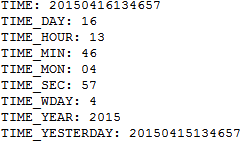 Say you want to Serve Alternate Content based on Time, but instead of serving based off the current time, you want to serve based off yesterdays time, and using .htaccess mod_rewrite rules?
Htaccess Htaccess mod_rewrite RewriteCond RewriteRule TIME TIME_DAY TIME_MIN TIME_MON TIME_SEC
If you want to redirect to a different version of a file based on the time, this code is for you! Please read: Serve Alternate Content based on Time
Htaccess
To prepare for several upcoming articles on AskApache that are focused on optimizing Servers and Sites from a server admin level, here is an article to introduce the main tools that we will be using. These tools are used to optimize CPU time for each process using nice and renice, and other tools like ionice are used to optimize the Disk IO, or Disk speed / Disk traffic for each process. Then you can make sure your mysqld and httpd processes are always fast and prioritized.
Optimization CFQ Idle linux Linux scheduler Load Nice RAM Scheduling algorithms
 Want to block a bad robot or web scraper using .htaccess files? Here are 2 methods that illustrate blocking 436 various user-agents.
Htaccess
Hacking Cheat sheet linux
Apache, Hosting 2.4 Apache Error
Comprehensive .htaccess example file with advanced examples in 1 htaccess sample skeleton .htaccess file with the very best apache htaccess examples... Updated frequently based on detailed info from the Apache htaccess tutorial.
Htaccess Allow AuthUserFile Deny Htaccess Redirect RewriteCond RewriteEngine RewriteRule
SEO
Some of my favorite htaccess examples from some of my favorite .htaccess tutorials. These cut-and-paste ready htaccess code snippets are very useful for website and server administrators.
Htaccess
 WordPress uses a file named
 .htaccess to rewrite all requests to the main index.php file. This article explains what the htaccess file rules look like and what they actually do.
Htaccess Htaccess wordpress
Web Developers sometimes use file.ext?v=004 as a version control system to force visitors to use updated files. This is terrible. Instead link to apache-003.css and set it to be cached forever. When you change the file you just change the links to apache-004.css. That eliminates millions of bandwidth and resource robbing If-Modified-Since requests. You only need Apache with mod_rewrite, and 1-10 minutes!
Htaccess Apache HTTP Server Cache Caching Htaccess httpd.conf
 Quick and easy method to get a list of all Apache Modules currently loaded, a list of all the directives each module provides, a list of currently used directives, etc... These directives can be used in httpd.conf and/or .htaccess files so it is definately useful to know which ones are available and which ones are currently being used.
Htaccess Apache bash lynx mod_rewrite mod_status server-info server-status
 If you want to pre-load
 .flv / .mp3 files into a visitors browser cache using flash, here's the actionscript I use to do it, and some ideas behind a good javascript implementation using swfobject or ufo.
Optimization
Htaccess mobile devices mobile proxy server Mobile web analytics
#### No https except to wp-admin -
# If the request is empty ( implies fopen or normal file access by a php script )
RewriteCond %{THE_REQUEST} ^$ [OR]

# OR if the request if for wp-admin or wp-login.php
RewriteCond %{REQUEST_URI} ^/(wp-admin|wp-login.php).*$ [NC,OR]

# OR if the Referer is https
RewriteCond %{HTTP_REFERER} ^https://www.askapache.com/.*$ [NC]

# THEN skip the following rule, basically all this does is force https or badhost to be redirected
# BUT because of the above 3 rewritecond's, this won't break poorly written admin scripts
RewriteRule .* - [S=1]

RewriteCond %{HTTPS} =on [OR]
RewriteCond %{HTTP_HOST} !^www.askapache.com$ [NC]
RewriteRule .* https://www.askapache.com%{REQUEST_URI} [R=301,L]

RewriteCond %{THE_REQUEST} ^[A-Z]{3,9} /(wp-admin/.*|wp-login.php.*) HTTP/ [NC]
RewriteCond %{HTTPS} !=on
RewriteRule .* https://%{SERVER_NAME}%{REQUEST_URI} [R=301,L]
Htaccess RewriteCond RewriteEngine RewriteRule
Apache .htaccess Directives and Loaded Modules allowed on DreamHost Apache Server 2 Setups.
Hosting
While researching a unix/linux tool awk I came upon one of the most thorough and helpful tutorials I've ever seen devoted to a particular topic. It's old-school just the way I like it. I contacted the author, Bruce Barnett because I just HAD to have this article for my readers, who are predominantly running solaris/unix/bsd/linux and he kindly gave permission.
Linux
One of the most cost-effective ways to drive traffic to your Web site is to optimize it for search engines. Many of them use automated programs called "crawlers" or "spiders" to create an index of the Web, which they use to determine what sites are most relevant to users' queries. These programs essentially visit Web sites, read the pages' content, and follow any links to other pages, repeating the process
SEO
 Google AdSense calles their AdSense Ads, "Sponsored Links", while Text-Link-Ads.com recommends "Sponsored By". Of course it is against the Google Adsense TOS to rename your ads, but in general, for non-adsense, what do you like to call your sponsored links?
SEO
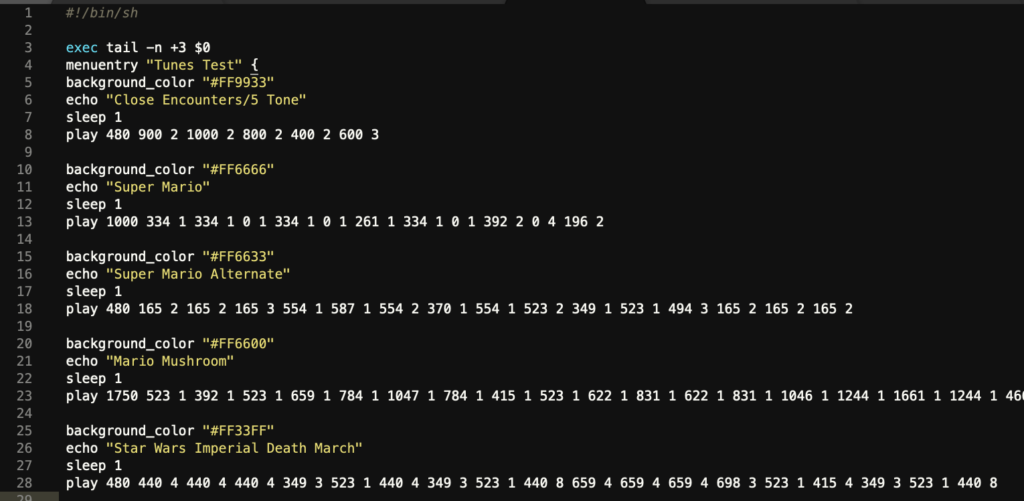 Play a tune directly on your pcspeaker right before the grub boot manager loads.
Linux GRUB GRUB_INIT_TUNE grub.cfg speaker

