Advanced Web Development by AskApache is a Firefox Collection I created since I'm always trying new Addons out and using multiple computers and I wanted a quick and easy way to install my favorite's and keep a running list. Firebug, YSlow, LastPass, and Web Developer are the only ones I always use regularly.
I like the idea of the last.fm but it's not as powerful as the site, which is awesome. Lately listening to Kings of Leon Radio...
Software Addons Firefox Mozilla
 If your WordPress blog uses AdSense, and you love Firefox you will love this plugin. When a user downloads and installs Firefox through your referral, we'll credit your account with up to $1.00 (more details).
WordPress
Windows Batch File
A lot of the past and upcoming articles on AskApache are focused on speeding up a server or website, or just making things more efficient. I'm starting several speed tip articles that require the following 3 programs if you want to follow along, that is... if you can keep up! ;)
Software
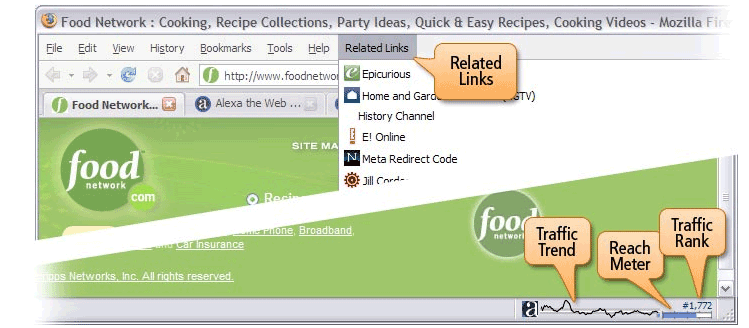
 This is the 10th anniversary of the Alexa Toolbar, July 17, 1997. Do you remember what the Net looked like back then? Netscape was the most popular browser. AOL had released it's first Instant Messenger program in Beta. Jodie Foster's new movie Contact was number one at the box office.
Software
 The collusion add-on for Firefox is super-legit. Just navigate to any website normally, then just click the little collusion icon in the status bar and a full detailed report pops up in a new tab describing all the sites that the current site shared your data with (shared as in connected).
View the full introduction to Collusion on mozilla.org, or view my Firefox Add-on Collection: AskApache Web Development (Advanced)
Software Add-on Collusion Cookie Firefox Mozilla Privacy
 Tor is a network of virtual tunnels that give you a very good level of anonymity, using Tor with privoxy and FoxTor for firefox gives you privacy at the touch of a button.
Software
Before
 After trick
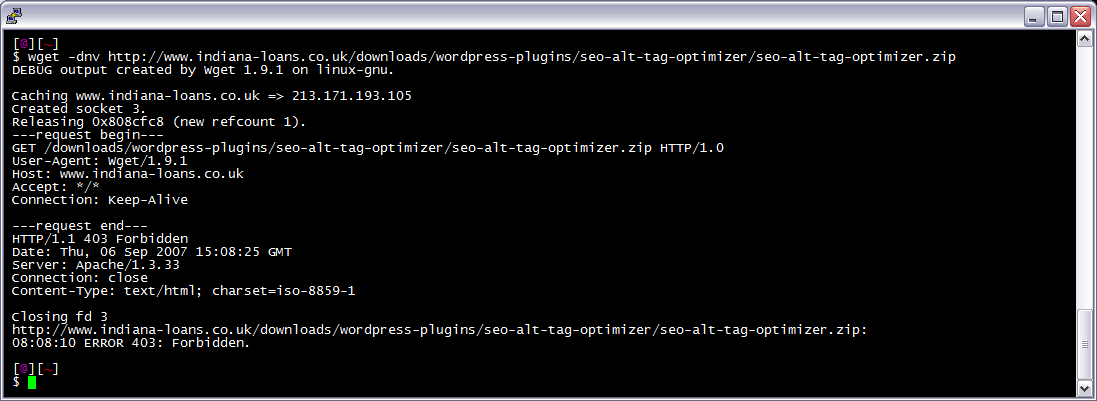
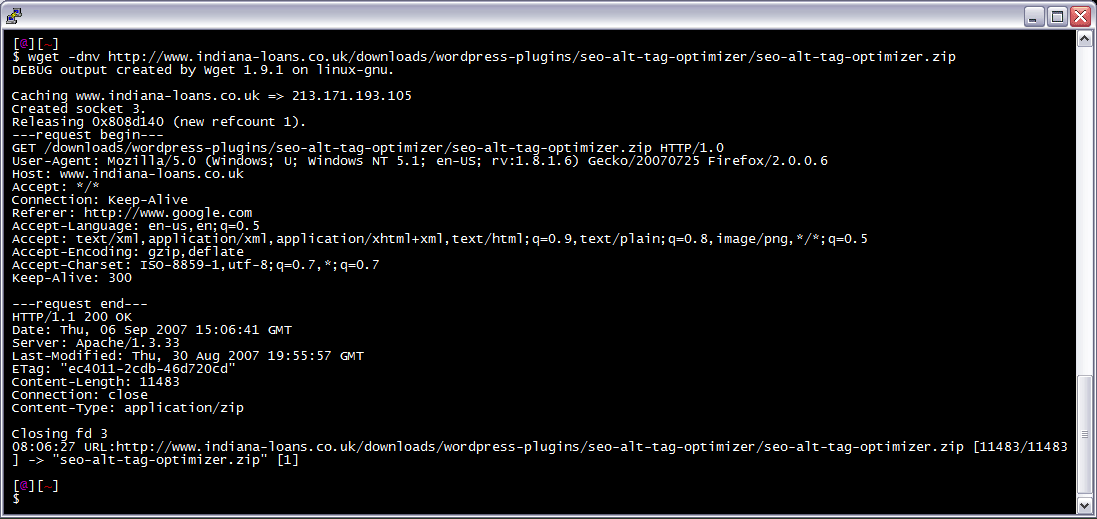
 I am often logged in to my servers via SSH, and I need to download a file like a WordPress plugin. I've noticed many sites now employ a means of blocking robots like wget from accessing their files. Most of the time they use .htaccess to do this. So a permanent workaround has wget mimick a normal browser.
Linux bash wget
 What I used to do when I was still learning CSS was to check the web page in each of the various problematic browsers to make sure the display stayed the same. I have several actual machines and several vmware virtual machines running various browers but I decided to skip all that extra time and effort and just use an online tool to do it for me. The tool views my page in all the various browsers and generates a screenshot image from each browser so that I can see if there are issues with my CSS.
Software
 If for some reason you need to use windows .bat batch file scripting to do some task, or you just want to learn the most universal batch programming language on Windows machines, you lucked out and found the AskApache example. My expertise is the shell, in this article the shell is Windows
 cmd.exe. It has some pretty advanced windows shell usage, including pipes and redirection, but it's the modular linux-like coding approach that earns this script it's "advanced" title.
:SETPROMPT
set PROMPT=$_[%USERNAME%@%USERDOMAIN%]$S[$P]$_$M$G && EXIT /B
 My favorite tool (and I've tried sooo many) for editing most Windows files and especially .bat files is the free and open-source Notepad++. Set that up and you will have a color-syntax-highlighted editor for Batch Scripting that works very very well.
Windows Batch File Batch Scripting Command Prompt Microsoft Windows
Google DNS Google Google Public DNS performance tools web performance
NOT a typo.. 30x is measurable, well-documented, and easily tested. This is what open-source is about. I haven’t had time to post much the past year, I'm always working! So I wanted to make up for that by publishing an article on a topic that would blow your mind and be something that you could actually start using and really get some benefit out of it. This is one of those articles that the majority of web hosting companies would love to see in paperback, so they could burn it.
Optimization tmpfs
Ok I just came back up to write the intro.. I'm trying to keep it short to avoid getting bogged down by the coolness of each step. Here is what goes on. When I logon to my XP machine at work, I bring my usb key and plug it in first. On logging a window pops up first and it's a password prompt to mount my encrypted drive leonardo. It also checks a keyfile that is located on my usb key, but all I do now is type in my password. That causes my encrypted folder to be accessible to me like a normal drive, and it autoruns a startup batch file.
The batch file causes Portable versions of Firefox (all my bookmarks, my settings) to load, and launches Portable Mozilla Thunderbird (IMAP makes this work well), which is my favorite program (great GPG features and open-source!). Also Some Adobe CS4 software is loaded from the hard drive, like DreamWeaver. In the background, a service we created executes a PortaPuttY plink command to create forwarded tunnels from various remote servers and accounts, all using key-based encryption. These tunnels are automatically reconnected if they are disconnected, meaning you can use a socks 5 if you want or even better!
Hacking Backup encryption Microsoft Windows Secure Shell ssh TrueCrypt USB USB flash drive windows builtin command-line tools
Request to https://www.askapache.com/cg/rewrite-test/?catch=caught&this=that
RewriteCond %{THE_REQUEST} = GET /cgi-bin/php/pro/rewrite-test/?catch=caught&this=that HTTP/1.1
RewriteCond %{REQUEST_URI} = /cg/rewrite-test/?catch=caught&this=that
RewriteCond %{QUERY_STRING} = catch=caught&this=that
RewriteCond %{HTTP_HOST} = www.askapache.com
RewriteCond %{HTTP_USER_AGENT} = Mozilla/5.0 (Windows NT 6.1; WOW64; rv:18.0) Gecko/20100101 Firefox/18.0
RewriteCond %{REMOTE_ADDR} = 8.8.8.8
Htaccess
 One of the biggest speed bottlenecks of sites today are images, specifically unoptimized images or large scaled images. With Apaches Rewrite module we can convert all existing jpegs and png files (and most gifs) to webp, then transparently rewrite them so that a request for img.png from a browser that supports webp will receive img.webp.
Hosting, Htaccess, Optimization accept Header png RewriteCond RewriteRule vary webp
 htaccess rewrite Master Class! If you understand the basics of mod_rewrite, or if you literally write the mod_rewite.c code, this article will transform your thinking. The transformation is profound. Deeply effective. Culmination of the best of the best mod_rewrite tricks for understanding and learning exactly what rewrite is doing.
Htaccess Htaccess mod_rewrite PHP RewriteCond RewriteRule
Web Design
 Check out this free online SEO site-scoring tool. The SEO generated report is simple, neat, and helpful. The main thing I like about it is how it is a stand-alone website, a residual money making machine.
Software
If you have files on your site that you don't want indexed by malicious search engines, grabbed and leeched by malicious spammers, or stolen and made available elsewhere, you can use mod_rewrite to drastically reduce or totally reduce that activity.
Htaccess Htaccess malicious search engines mod_rewrite Spamming
If you ever wanted to know the best way to defragment and speed up your Windows-Based PC, I mean you really wanted to know, here is the 2nd part to my article on Windows Speed Optimizing that details the process I have found works really well. Definately not a quick process, and certainly not the best ever, just my best ever and one that you only have to do once to get the benefits.
This article has a lot of incredibly useful (and FREE) tools I recommend, which you can grab and use without reading the article..
Windows Defragmentation Defragmentation software Disk Defragmenter ERUNT JkDefrag Microsoft MyDefrag PageDefrag Registry cleaner UltraDefrag Windows Registry Windows XP
 The Alexa Toolbar is a free search and navigation companion that accompanies you as you surf, providing useful information about the sites you visit without interrupting your Web browsing.
SEO Alexa rank SEO traffic
Here's a nifty little idea I had that has some merit and is super easy. Separate favicons for separate areas of a site. Basically, I can't live without Firefox or Chrome and the way they use multiple tabs, having about 20-50 open at any one time.. But that makes it more difficult to find the right tab!

WordPress favicon PHP wordpress
Its really nice to be able to print out a webpage you are reading using your browsers built-in print feature. Using CSS you can easily transform your site into a print-friendly site.
Today I received an email from a visitor to my site requesting that I add a way to print site articles on AskApache
CSS Cascading Style Sheets nicer printing Style sheet
 pdf.js is an HTML5 technology experiment that explores building a faithful and efficient Portable Document Format (PDF) renderer without native code assistance.
Javascript PDF pdf.js Portable Document Format
 Even though at the moment I'm more into AJAX and simple behavioural unobtrusive javascript more than java, I still remember how excited I was back in 1995 when Sun released both beta and alpha Java versions to the public.. In fact I still have my Java 1.0 Unleashed book, which I'm looking at right now.
Javascript
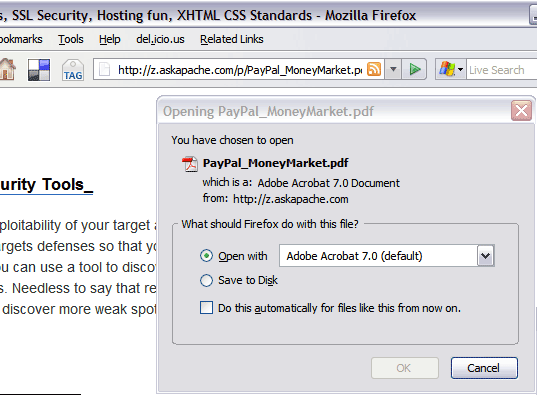
.htaccess and php example serves .pdf files to give visitors the choice to open in an external program or save to disk without having to open it in the browser
PDF Before and after Fix - Firefox


Htaccess
Ok, so on a site like this one, there is a tremendous amount of 'code' styled with CSS fonts in a pre, code, var, tt, samp, or kbd html tag. When using an programming tool like VIM to write code it is shown beautifully using your OS fonts. So then, how can we get that same font beauty to be there on the web? And, of course the solution must use best-practices (and preferably only use CSS and (X)HTML).
Also, text effects! --> View Solution
CSS font Google
If you examine the preferences dialog of any modern Web browser (like Internet Explorer, Safari or Mozilla), you'll probably notice a 'cache' setting. This lets you set aside a section of your computer's hard disk to store representations that you've seen, just for you. The browser cache works according to fairly simple rules. It will check to make sure that the representations are fresh, usually once a session (that is, the once in the current invocation of the browser).
Optimization
 This is a brief explanation of what is needed for an awesome theme, well awesome from my perspective. This is good stuff, memorize it.
Web Development, WordPress css web builder
 Google Analytics for your clients sites is a no-brainer, it ROCKS! I have 100+ client sites running Analytics and all of them have trouble-free (no password or username to remember) access to their site reports. Thanks to the method in this post, my clients couldn't be happier..
Google
 This is a big update from the last time I looked into this, when I enumerated 57 Status Codes that Apache 2.x was capable of handling. This list contains 83 Status Codes recognized by Apache. I compiled the latest 2.4.4 Apache in order to view the actual codes sent by a live server.. very cool. You can read about the newest HTTP Status Codes in RFC 6585.
Net Apache cURL ErrorDocument Htaccess HTTP HTTP Headers Redirect Status Code
Wouldn't it be great if you could use php and curl to download multiple files simultaneously using built-in curl functions? You can!
PHP
 .htaccess is a very ancient configuration file for web servers, and is one of the most powerful configuration files most webmasters will ever come across. This htaccess guide shows off the very best of the best htaccess tricks and code snippets from hackers and server administrators.
You've come to the right place if you are looking to acquire mad skills for using .htaccess files!
Apache, Hosting, Htaccess, Optimization, Security, SEO, Web Development, WordPress .htpasswd 301 Redirect Apache Apache HTTP Server Cache Hosting Htaccess Htaccess Software HTTP Headers httpd.conf HyperText Transfer Protocol mod_rewrite Redirect RewriteCond RewriteRule SSL
Using FastCGI on DreamHost and .htaccess
Shell Scripting
Google
Server and Environment Variables are used by The Apache HTTP Server by provides a mechanism for storing information. This information can be used to control various operations such as logging or access control.
Htaccess
These are a few of the mod_rewrite uses that BlogSecurity declared pushed the boundaries of Mod_Rewrite! Some of these snippets are quite exotic and unlike anything you may have seen before, also only for those who understand them as they can kill a website pretty quick.
Htaccess Htaccess mod_rewrite RewriteCond RewriteRule wordpress
 Quick and easy method to get a list of all Apache Modules currently loaded, a list of all the directives each module provides, a list of currently used directives, etc... These directives can be used in httpd.conf and/or .htaccess files so it is definately useful to know which ones are available and which ones are currently being used.
Htaccess Apache bash lynx mod_rewrite mod_status server-info server-status