#### No https except to wp-admin -
# If the request is empty ( implies fopen or normal file access by a php script )
RewriteCond %{THE_REQUEST} ^$ [OR]

# OR if the request if for wp-admin or wp-login.php
RewriteCond %{REQUEST_URI} ^/(wp-admin|wp-login.php).*$ [NC,OR]

# OR if the Referer is https
RewriteCond %{HTTP_REFERER} ^https://www.askapache.com/.*$ [NC]

# THEN skip the following rule, basically all this does is force https or badhost to be redirected
# BUT because of the above 3 rewritecond's, this won't break poorly written admin scripts
RewriteRule .* - [S=1]

RewriteCond %{HTTPS} =on [OR]
RewriteCond %{HTTP_HOST} !^www.askapache.com$ [NC]
RewriteRule .* https://www.askapache.com%{REQUEST_URI} [R=301,L]

RewriteCond %{THE_REQUEST} ^[A-Z]{3,9} /(wp-admin/.*|wp-login.php.*) HTTP/ [NC]
RewriteCond %{HTTPS} !=on
RewriteRule .* https://%{SERVER_NAME}%{REQUEST_URI} [R=301,L]
Htaccess RewriteCond RewriteEngine RewriteRule
 htaccess rewrite Master Class! If you understand the basics of mod_rewrite, or if you literally write the mod_rewite.c code, this article will transform your thinking. The transformation is profound. Deeply effective. Culmination of the best of the best mod_rewrite tricks for understanding and learning exactly what rewrite is doing.
Htaccess Htaccess mod_rewrite PHP RewriteCond RewriteRule
 We've figured out what mod_rewrite variables look like, a cheatsheet of the actual value.
Htaccess Apache cheatsheet Htaccess htaccess file mod_rewrite PHP rewrite Rewriting
Htaccess Apache HTTP Server Htaccess Redirect rewrite RewriteBase RewriteCond RewriteEngine RewriteLock RewriteLog RewriteMap RewriteOptions RewriteRule
 .htaccess is a very ancient configuration file for web servers, and is one of the most powerful configuration files most webmasters will ever come across. This htaccess guide shows off the very best of the best htaccess tricks and code snippets from hackers and server administrators.
You've come to the right place if you are looking to acquire mad skills for using .htaccess files!
Apache, Hosting, Htaccess, Optimization, Security, SEO, Web Development, WordPress .htpasswd 301 Redirect Apache Apache HTTP Server Cache Hosting Htaccess Htaccess Software HTTP Headers httpd.conf HyperText Transfer Protocol mod_rewrite Redirect RewriteCond RewriteRule SSL
mod_rewrite is very useful in many situations. Yet some behaviors were not so obvious when I started to mess with it. After many testings, I understand it much better, now. Having said that, I do not pretend to know it perfectly. I also make mistakes.
Htaccess
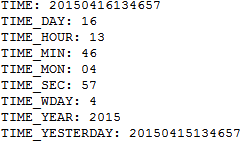 Say you want to Serve Alternate Content based on Time, but instead of serving based off the current time, you want to serve based off yesterdays time, and using .htaccess mod_rewrite rules?
Htaccess Htaccess mod_rewrite RewriteCond RewriteRule TIME TIME_DAY TIME_MIN TIME_MON TIME_SEC
These are a few of the mod_rewrite uses that BlogSecurity declared pushed the boundaries of Mod_Rewrite! Some of these snippets are quite exotic and unlike anything you may have seen before, also only for those who understand them as they can kill a website pretty quick.
Htaccess Htaccess mod_rewrite RewriteCond RewriteRule wordpress
Want to redirect all links with any uppercase characters to lowercase using pure mod_rewrite within an .htaccess file? Sure why not! OR how to use RewriteMap and mod_speling for those with access to httpd.conf
Htaccess Htaccess httpd.conf mod_rewrite mod_speling RewriteCond RewriteRule
A hit-list of some of my favorite mod_rewrite code snippets for .htaccess files
Htaccess
 WordPress uses a file named
 .htaccess to rewrite all requests to the main index.php file. This article explains what the htaccess file rules look like and what they actually do.
Htaccess Htaccess wordpress
 Here is even more information from the Ultimate Htaccess Part I. For now this is very rough and you will want to come back later to read it.
Htaccess Apache HTTP Server Htaccess World Wide Web
 FallBackResource is a great alternative to using mod_rewrite to direct Apache to send all requests for non-existing files/directories to a script in WordPress. Htaccess and Server Config enabled.
Apache, httpd 2.4 FallbackResource Htaccess mod_dir mod_rewrite RewriteBase RewriteRule wordpress
This is freaking sweet if you use SSL I promise you! Basically instead of having to check for HTTPS using a RewriteCond %{HTTPS} =on for every redirect that can be either HTTP or HTTPS, I set an environment variable once with the value "http" or "https" if HTTP or HTTPS is being used for that request, and use that env variable in the RewriteRule.
Htaccess HTTPS RewriteRule SSL
FYI, using the Mod_Rewrite Variables Cheatsheet makes this example, and all advanced .htaccess code easier to understand. This demo lets you set a cookie with 1 of 3 values, then you just request the pdf file with a normal link click and get 1 of 3 different responses. This is accomplished with a nice bit of .htaccess code.
Htaccess Htaccess HTTP cookie JavaScript PDF pdf.js Portable Document Format

Well what can I say, other than this is sooo DOPE! Here is a list of the modules this plugin (version 4.7 unreleased) will automatically detect. I compiled the list myself using every module included with any default Apache installation for ALL the versions listed below, 1.3 to 2.2+
Want to know something else I'm including in this plugin? For each and every module that is detected, this plugin can then detect ALL of the modules .htaccess Directives! For instance, RewriteRule, AccessFileName, AddHandler, etc.. are each a directive belonging to a module that is allowed to be used from within .htaccess files.
Talk about sick.. these tricks have the diamond disease!
WordPress Advanced Anti-Exploit Anti-Spam Htaccess RewriteCond RewriteRule security SSL THE_REQUEST
If you have files on your site that you don't want indexed by malicious search engines, grabbed and leeched by malicious spammers, or stolen and made available elsewhere, you can use mod_rewrite to drastically reduce or totally reduce that activity.
Htaccess Htaccess malicious search engines mod_rewrite Spamming
Fighting Blog Spam with Apache htaccess and other methods.
Htaccess
Apache, Hosting 2.4 Apache Error
Replace underscores in URLs with hyphens using Apache .htaccess.
Htaccess
301 Redirects using Apache mod_rewrite or RedirectMatch in .htaccess or httpd.conf
Htaccess
Web Professionals use mod_rewrite to issue 301 and 302 Redirects for Search Engines. Sometimes you may not have mod_rewrite.c or you want an alternative redirect method. Using mod_alias RedirectMatch you can use REGEX in Redirect commands!
Htaccess 301 Redirect SEO
Request to https://www.askapache.com/cg/rewrite-test/?catch=caught&this=that
RewriteCond %{THE_REQUEST} = GET /cgi-bin/php/pro/rewrite-test/?catch=caught&this=that HTTP/1.1
RewriteCond %{REQUEST_URI} = /cg/rewrite-test/?catch=caught&this=that
RewriteCond %{QUERY_STRING} = catch=caught&this=that
RewriteCond %{HTTP_HOST} = www.askapache.com
RewriteCond %{HTTP_USER_AGENT} = Mozilla/5.0 (Windows NT 6.1; WOW64; rv:18.0) Gecko/20100101 Firefox/18.0
RewriteCond %{REMOTE_ADDR} = 8.8.8.8
Htaccess
Comprehensive .htaccess example file with advanced examples in 1 htaccess sample skeleton .htaccess file with the very best apache htaccess examples... Updated frequently based on detailed info from the Apache htaccess tutorial.
Htaccess Allow AuthUserFile Deny Htaccess Redirect RewriteCond RewriteEngine RewriteRule
Web Developers sometimes use file.ext?v=004 as a version control system to force visitors to use updated files. This is terrible. Instead link to apache-003.css and set it to be cached forever. When you change the file you just change the links to apache-004.css. That eliminates millions of bandwidth and resource robbing If-Modified-Since requests. You only need Apache with mod_rewrite, and 1-10 minutes!
Htaccess Apache HTTP Server Cache Caching Htaccess httpd.conf
 Fresh .htaccess code for you! Check out the Cookie Manipulation and environment variable usage with mod_rewrite! I also included a couple Mod_Security .htaccess examples. Enjoy!
Originally Posted: 3/29/2008
Htaccess
Control htaccess Basic Authentication with PHP and mod_rewrite Htaccess
 Get your real server info
Htaccess
SSLOptions +StrictRequire
SSLRequireSSL
SSLRequire %{HTTP_HOST} eq "google.com"
ErrorDocument 403 https://google.com
Some of the Ins and Outs of using SSL Connections with Apache.
Htaccess 301 Redirects Htaccess mod_rewrite SSL
 Use mod_rewrite to enable phpMyAdmin links in the form:
 /dbname/table/
Htaccess phpMyAdmin RewriteRule