Ultimate Htaccess Part II
 Here is even more information from the Ultimate Htaccess Part I. For now this is very rough and you will want to come back later to read it.
Here is even more information from the Ultimate Htaccess Part I. For now this is very rough and you will want to come back later to read it.
 .htaccess is a very ancient configuration file for web servers, and is one of the most powerful configuration files most webmasters will ever come across. This htaccess guide shows off the very best of the best htaccess tricks and code snippets from hackers and server administrators.
You've come to the right place if you are looking to acquire mad skills for using .htaccess files!
The bottom line for this article is that I want to make WordPress as fast, secure, and easy to install, run, and manage because I am using it more and more for client production sites, I will work for days in order to solve an issue so that I never have to spend time on that issue again. Time is money in this industry and that is ultimately (time) what there is to gain by tweaking WordPress.
Note: I spent no time on readability, this is primarily a read the code and figure it out article.. This is for advanced users looking for a reference or discussion and for those of you looking to advance. Feedback would be great if you make it that far..
If you ever wanted to know the best way to defragment and speed up your Windows-Based PC, I mean you really wanted to know, here is the 2nd part to my article on Windows Speed Optimizing that details the process I have found works really well. Definately not a quick process, and certainly not the best ever, just my best ever and one that you only have to do once to get the benefits.
This article has a lot of incredibly useful (and FREE) tools I recommend, which you can grab and use without reading the article..
 Ultimate Redirect Cheatsheet for multiple programming languages. Redirecting Users with Javascript redirect, meta refresh redirect, and php redirect, also htaccess methods, python, coldfusion, asp, perl, etc.
#### No https except to wp-admin -
# If the request is empty ( implies fopen or normal file access by a php script )
RewriteCond %{THE_REQUEST} ^$ [OR]

# OR if the request if for wp-admin or wp-login.php
RewriteCond %{REQUEST_URI} ^/(wp-admin|wp-login.php).*$ [NC,OR]

# OR if the Referer is https
RewriteCond %{HTTP_REFERER} ^https://www.askapache.com/.*$ [NC]

# THEN skip the following rule, basically all this does is force https or badhost to be redirected
# BUT because of the above 3 rewritecond's, this won't break poorly written admin scripts
RewriteRule .* - [S=1]

RewriteCond %{HTTPS} =on [OR]
RewriteCond %{HTTP_HOST} !^www.askapache.com$ [NC]
RewriteRule .* https://www.askapache.com%{REQUEST_URI} [R=301,L]

RewriteCond %{THE_REQUEST} ^[A-Z]{3,9} /(wp-admin/.*|wp-login.php.*) HTTP/ [NC]
RewriteCond %{HTTPS} !=on
RewriteRule .* https://%{SERVER_NAME}%{REQUEST_URI} [R=301,L]
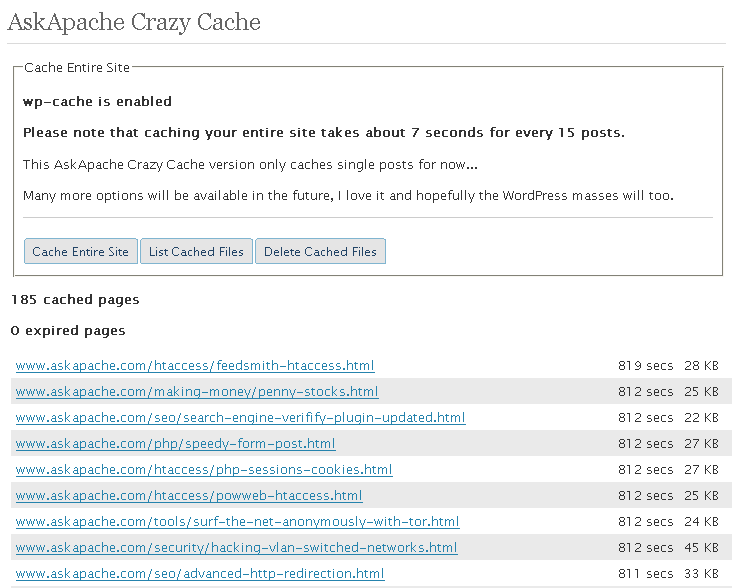 A WordPress plugin that caches your entire blog for WP-Cache, I love this plugin and finally released it to the public!
Wanted to stick this here for a reference, mostly for me. I use ASCII alot in bash, preg_matches, preg_replace, etc..
The idea is to use CSS to have the browser display programming and code similar to the high-quality look of a developers machine, like this older screenshot of my VIM.
The following is a transcript of a chat I had with a company called tektonic, and at that time I was looking for a cheap linux host to use for some redundancy/failover operations. I generally contact a new hosting company like this every few months.. I like to have options available in case of some kind of failure or network attack, so it's always a good idea to have a few ace linux servers in your back pocket.
If you've read any other articles on AskApache, you can see a certain obsession towards optimization, speed, and security -- so that is the purpose of the following questions.
 Advanced Web Development by AskApache is a Firefox Collection I created since I'm always trying new Addons out and using multiple computers and I wanted a quick and easy way to install my favorite's and keep a running list. Firebug, YSlow, LastPass, and Web Developer are the only ones I always use regularly.
I like the idea of the last.fm but it's not as powerful as the site, which is awesome. Lately listening to Kings of Leon Radio...
 So my blog as been rather quiet for almost a year now, and very few updates if any have been released for my Password Protection PLugin, my Google 404 Plugin, and definately not for my AskApache CrazyCache plugin, which I will be releasing last... So for all of you who've helped me out by sending me suggestions and notifying me of errors and sticking with it... Just wanted to say sorry about that, and thanks for all the great ideas.. Well, I've been sticking with it as well believe it our not. I manage to get free days once in a while, and then its time to jam.
If you have a php.cgi or php.ini file in your /cgi-bin/ directory or other pub directory, try requesting them from your web browser. If your php.ini shows up or worse you are able to execute your php cgi, you'll need to secure it ASAP. This shows several ways to secure these files, and other interpreters like perl, fastCGI, bash, csh, etc.
The proponents of this scheme have given it names such as "trusted computing" and "palladium". We call it "treacherous computing", because the effect is to make your computer obey companies instead of you. This was implemented in 2007 as part of Windows Vista; we expect Apple to do something similar. In this scheme, it is the manufacturer that keeps the secret code, but the FBI would have little trouble getting it.
301 Redirects using Apache mod_rewrite or RedirectMatch in .htaccess or httpd.conf
How to password-protect, Allow or Deny a visitor based on a condition. If you are having trouble getting htaccess-based password protection to work see: Troubleshooting htaccess Authentication: Getting it to work
Web Professionals use mod_rewrite to issue 301 and 302 Redirects for Search Engines. Sometimes you may not have mod_rewrite.c or you want an alternative redirect method. Using mod_alias RedirectMatch you can use REGEX in Redirect commands!
Apache Web Server users have problems getting Apache Authentication/password-protection in htaccess working, this is a troubleshooting guide to get Password Protection working!
Originally Posted: 1/22/2003
Here are the steps that I take to get an SPF Record going on DreamHost
v=spf1 mx ip4:64.111.100.0/24 ip4:66.33.201.0/24 ip4:66.33.216.0/24 ip4:208.97.1 32.0/24 ip4:208.97.187.0/24 ip4:208.113.200.0/24 ip4:208.113.244.0/24 ip4:64.18.0.0/20 ip4:74.125.148.0/22 include:aspmx.googlemail.com include:_spf.google.com ~all
