Advanced WordPress wp-config.php Tweaks
The bottom line for this article is that I want to make WordPress as fast, secure, and easy to install, run, and manage because I am using it more and more for client production sites, I will work for days in order to solve an issue so that I never have to spend time on that issue again. Time is money in this industry and that is ultimately (time) what there is to gain by tweaking WordPress.
Note: I spent no time on readability, this is primarily a read the code and figure it out article.. This is for advanced users looking for a reference or discussion and for those of you looking to advance. Feedback would be great if you make it that far..
Vetted – Top 3 WordPress Speed Plugins
There are so many WordPress plugins out there now that I wanted to post my favorite 3 plugins for speeding up a WP-Powered blog. These are the 3 plugins that I install for pretty much all of my WP-Powered sites, which I run about 300 now. They work together to provide a very optimized blog for speed.
DB-Cache Reloaded does something entirely different, it saves the mysql queries that are made to the WP-database, as well as the mysql results to static files, and then through php serves those cached-files instead of re-querying the mysql database. Most mysql databases are stored on separate servers, and although many are on the same local network there is a limit to how many queries, and how many connections can take place.
So DB-Cache Reloaded basically makes WP-Super Cache work alot faster when generating the cache files, and DB-Cache Reloaded helps in a number of areas un-related to WP-Super Cache, like in the admin panel. And DB-Cache without WP-Super-Cache is a joke because it still uses the application-level and php for everything. Gotta use both (or just WPSC).
View all MySQL Variables for Pasting into my.cnf
 This is really useful for me because I work with dozens of different database servers. The first thing I do is run this command and paste it into the servers
 /etc/my.cnf file. That way I will always know the original value and it just makes life much easier.
$ mysql -NBe 'SHOW VARIABLES' |sed 's,\t,^=,'|column -ts^|tr "\n" '@'|eval $(echo "sed '" "s,@\("{a..z}"\),\n\n\1,;" "'")|tr '@' "\n"|sed 's,^,# ,g'
Internet Census 2012 – Port scanning using insecure embedded devices – Carna Botnet
 While playing around with the Nmap Scripting Engine (NSE) we discovered an amazing number of open embedded devices on the Internet. Many of them are based on Linux and allow login to standard BusyBox with empty or default credentials. We used these devices to build a distributed port scanner to scan all IPv4 addresses. These scans include service probes for the most common ports, ICMP ping, reverse DNS and SYN scans. We analyzed some of the data to get an estimation of the IP address usage.
FastCGI on DreamHost
Using FastCGI on DreamHost and .htaccess
Speed Up init_connect in my.cnf for UTF8
Before
init-connect='SET NAMES utf8'
init_connect='SET CHARACTER SET=utf-8'
After
init_connect='SET collation_connection = utf8_general_ci,NAMES utf8'
MySQL
On-Demand MySQL Backup Shell Script
On-Demand WordPress MySQL database Backup Shell Script for DreamHostCOMPUTER SECURITY TOOLBOX
List of mainly obscure security software geared more for the master pentester. These are mostly for unix, bsd, and mac and many are difficult to install and setup (require custom servers, inside access points, obscure libraries). Only programs that output data are included, so no actual exploits or anything. Most of these output extremely useful albeit extremely technical information.Encrypted WordPress / phpBB Backups
Enter your DOMAIN_ROOT and the location of your wp-config.php or config.php, and this script finds all the mysql settings by parsing the phpbb or wordpress config file, then creates GPG encrypted backups, and saves your settings for future automation.
WordPress
MariaDB with LZ4 Compression Howto for CentOS
I really really wanted to run the latest MariaDB with LZ4 Page Compression.. it is a game changer for many types of large databases I deal with. So I compiled it manually in a way that is repeatable and follows best-practices and it's now powering this site. Now I can use InnoDB Page Compression with lzo, lzma, bzip2, snappy, or my favorite algorithm: LZ4.

Thought this would be a good chance to post a howto, and show that there is a lot you can do by compiling software yourself and breaking the package management one-click install shackles.
phpMyAdmin Shortcuts with .htaccess
 Use mod_rewrite to enable phpMyAdmin links in the form:
 /dbname/table/
Security with Apache htaccess Tutorial
Apache Security tips and tricks for securing Apache Web Servers using htaccess, httpd.conf, and other built-in techniques to thwart attackers. This really should be required reading for any Apache admin or user because these little tricks are so easy to do.
Caching WordPress with Batcache and Memcache
 Using memcache for me personally and the client sites I work on, has improved performance by over 1000%, in some cases even higher than that. It is a truly revolutionary way to optimize the performance of MySQL queries, remote requests such as to twitter or other apis, and this article is step 1. Plan is to go all the way to step 10 in future articles, it it grossly underused and misused in the WP world.
Web Development Glossary
Optimizing Servers and Processes for Speed with ionice, nice, ulimit
To prepare for several upcoming articles on AskApache that are focused on optimizing Servers and Sites from a server admin level, here is an article to introduce the main tools that we will be using. These tools are used to optimize CPU time for each process using nice and renice, and other tools like ionice are used to optimize the Disk IO, or Disk speed / Disk traffic for each process. Then you can make sure your mysqld and httpd processes are always fast and prioritized.
Custom PHP.ini tips and tricks
- When php run as Apache Module (mod_php)
- When php run as CGI
- When cgi?d php is run with wrapper (for FastCGI)
Optimize a Website for Speed, Security, and Easy Management
Learn how to setup, configure, secure, optimize, and create a low-maintenance website the AskApache way. I'm piecing together all the hacks, tricks, methods, and ideas discussed throughout this blog and all across Netdom and glueing them all together to show you how to have the most optimized, crazy fastest, and best website setup I can think of.
Caching Tutorial for Webmasters
If you examine the preferences dialog of any modern Web browser (like Internet Explorer, Safari or Mozilla), you'll probably notice a 'cache' setting. This lets you set aside a section of your computer's hard disk to store representations that you've seen, just for you. The browser cache works according to fairly simple rules. It will check to make sure that the representations are fresh, usually once a session (that is, the once in the current invocation of the browser).
Easy boot.ini Hacks for Windows SysOps
Mod_Status tricks to View Apache Module Directives
 Quick and easy method to get a list of all Apache Modules currently loaded, a list of all the directives each module provides, a list of currently used directives, etc... These directives can be used in httpd.conf and/or .htaccess files so it is definately useful to know which ones are available and which ones are currently being used.
SUDO – sudoers Config File
Faster POST and GET Form Submissions… Shazam
 Just a very brief look at speeding up form submission by delegating the processing and bandwidth to your server, not your client.
Chmod, Umask, Stat, Fileperms, and File Permissions
Unix file permissions are one of the more difficult subjects to grasp.. Well, ok maybe "grasp" isn't the word.. Master is the right word.. Unix file permissions is a hard topic to fully master, mainly I think because there aren't many instances when a computer user encounters them seriously, and bitwise is oldschool. This contains a listing of all possible permission masks and bits from a linux, php, and web hosting view.... cuz you guys AskApache Regs Rock!
Unicode Character Reference

Just a quick reference to all those delicious unicode characters and how they render on the web‽‽
The Latest and Greatest php.ini
Grab the latest php.ini developmental version and discover new or previously hidden php runtime configuration settings... ahead of everyone else!
Advanced HTTP Request and Response Header Viewer
WordPress .htaccess in-depth
 WordPress uses a file named
 .htaccess to rewrite all requests to the main index.php file. This article explains what the htaccess file rules look like and what they actually do.
27 Request Methods for Apache rewritecond htaccess
Speed Up Sites with htaccess Caching
2 awesome ways to implement caching on your website using Apache .htaccess or httpd.conf. Both methods are extremely simple to set up and will dramatically speed up your site!THE Ultimate Htaccess
 .htaccess is a very ancient configuration file for web servers, and is one of the most powerful configuration files most webmasters will ever come across. This htaccess guide shows off the very best of the best htaccess tricks and code snippets from hackers and server administrators.
You've come to the right place if you are looking to acquire mad skills for using .htaccess files!
MySQL Performance Tuning Scripts and Know-How
 Unless you are a total linux-freak-guru like myself, and even if you are, it can be enormously challenging and somewhat overwhelming to locate and eliminate MySQL bottlenecks. While many DBAs focus on improving the performance of the queries themselves, this post will focus on the highest-impact items: MySQL Server Performance and OS Performance for MySQL. Specifically showing 4 awesome tools to auto-tune your MySQL and a few more tools just for monitoring!
Ultimate Htaccess Part II
 Here is even more information from the Ultimate Htaccess Part I. For now this is very rough and you will want to come back later to read it.
PortaPutty Auto-Reconnecting SSH Tunnels on an Encrypted TrueCrypt Portable USB Key w GPG
Ok I just came back up to write the intro.. I'm trying to keep it short to avoid getting bogged down by the coolness of each step. Here is what goes on. When I logon to my XP machine at work, I bring my usb key and plug it in first. On logging a window pops up first and it's a password prompt to mount my encrypted drive leonardo. It also checks a keyfile that is located on my usb key, but all I do now is type in my password. That causes my encrypted folder to be accessible to me like a normal drive, and it autoruns a startup batch file.
The batch file causes Portable versions of Firefox (all my bookmarks, my settings) to load, and launches Portable Mozilla Thunderbird (IMAP makes this work well), which is my favorite program (great GPG features and open-source!). Also Some Adobe CS4 software is loaded from the hard drive, like DreamWeaver. In the background, a service we created executes a PortaPuttY plink command to create forwarded tunnels from various remote servers and accounts, all using key-based encryption. These tunnels are automatically reconnected if they are disconnected, meaning you can use a socks 5 if you want or even better!
Discover who’s tracking you online with Collusion
 The collusion add-on for Firefox is super-legit. Just navigate to any website normally, then just click the little collusion icon in the status bar and a full detailed report pops up in a new tab describing all the sites that the current site shared your data with (shared as in connected).
View the full introduction to Collusion on mozilla.org, or view my Firefox Add-on Collection: AskApache Web Development (Advanced)
SEO in WordPress
Search Engine Optimization for WordPressControl htaccess Basic Authentication with PHP and mod_rewrite
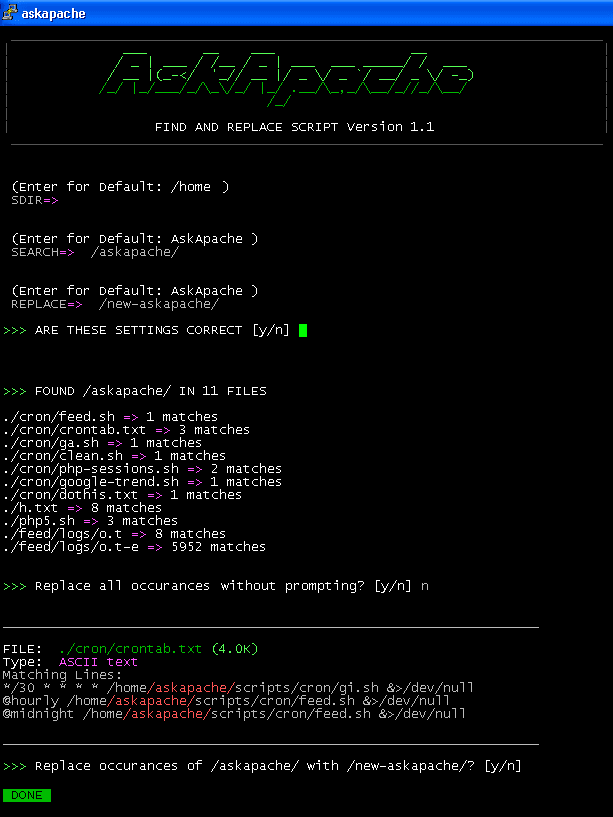
Control htaccess Basic Authentication with PHP and mod_rewriteSearch And Replace shell script helpful for Upgrades
Search all files in a directory, replacing all occurances of string with a replacement string.