I am almost ready to publish the final tutorial on using ssh tunnels from a truecrypt partition on a Windows machine. Of course I choose to go way overboard in my research and the tutorial is full of some pretty awesome windows tricks.. I will come back to this post soon and post all the other advanced tools I use for debugging windows, for now though you MUST know how to debug the kernel and use these basic debugging tools.
Windows Assemblers basic debugging tools Debug Debuggers Debugging Kernel
 As an example, here is the boot line that I am using at the moment on an older Dell Desktop, just to illustrate module parameters and environment vars.
title  Arch Linux X-256
linux   /vmlinuz-linux root=UUID rw rootfstype=ext4 elevator=noop selinux=0 plymouth.enable=0 raid=noautodetect ipv6.disable=1 video=DP1:d rcutree.rcu_idle_gp_delay=1 i915.panel_ignore_lid=-1 i915.modeset=1 TERM=rxvt-256color
Linux Arch Linux Boot GRUB Kernel
 One of the first things that I do upon receiving a new Windows computer is immediately create a poweruser-style customized boot menu. Then every time I boot I can choose Safe Mode, Recovery Console, Debug, whatever I want! It's quick and easy to set-up and everyone should have one, soo sweet!
Windows
Hosting HTTP HTTP Headers Wireshark
A souped-up version of the Apache printenv script for hard-core server environment debuggery.
#!/bin/sh
echo -e "Content-type: text/plainnn"
...
  __T "CURRENT PROCESS CMDLINE"
  {
   for p in `echo /proc/[0-9]*/cmdline`;
   do
    pid=${p:6:$((${#p}-13))}
    [[ $pid == $PPID || $pid == $$ ]] && continue;
    __M "[ /proc/$pid ]";
    sed 's/x00/ /g;G' $p 2>/dev/null
   done
  }
 fi
Hosting Apache HTTP Server Apache server CGI Common Gateway Interface Htaccess
 So my blog as been rather quiet for almost a year now, and very few updates if any have been released for my Password Protection PLugin, my Google 404 Plugin, and definately not for my AskApache CrazyCache plugin, which I will be releasing last... So for all of you who've helped me out by sending me suggestions and notifying me of errors and sticking with it... Just wanted to say sorry about that, and thanks for all the great ideas.. Well, I've been sticking with it as well believe it our not. I manage to get free days once in a while, and then its time to jam.
WordPress Apache HTTP Server CGI Debugging HTTP protocol Htaccess SuexecUserGroup
 pdf.js is an HTML5 technology experiment that explores building a faithful and efficient Portable Document Format (PDF) renderer without native code assistance.
Javascript PDF pdf.js Portable Document Format
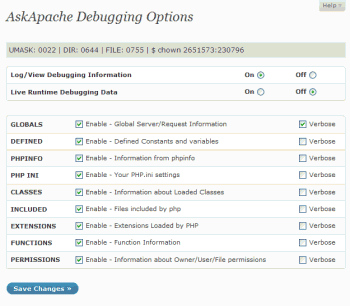 The story behind this plugin is sorta wack, but in a good way :). While doing tons of security research on permissions, authorization, access, etc.. for the Password Protection plugin (still being worked on), I needed to have unheard of debugging capabilities while working on the plugin on the various websites, webhosts, and test servers that I use to test in different environments. So I hacked together a bunch of php code that helped me debug, actually I pretty much went overkill and tried to get as much debugging info as programmatically possible, and it ended up being so much code that I took it out of my Password Protection code and made it its own plugin.
WordPress
The bottom line for this article is that I want to make WordPress as fast, secure, and easy to install, run, and manage because I am using it more and more for client production sites, I will work for days in order to solve an issue so that I never have to spend time on that issue again. Time is money in this industry and that is ultimately (time) what there is to gain by tweaking WordPress.
Note: I spent no time on readability, this is primarily a read the code and figure it out article.. This is for advanced users looking for a reference or discussion and for those of you looking to advance. Feedback would be great if you make it that far..
WordPress wordpress wp-config.php
The proponents of this scheme have given it names such as "trusted computing" and "palladium". We call it "treacherous computing", because the effect is to make your computer obey companies instead of you. This was implemented in 2007 as part of Windows Vista; we expect Apple to do something similar. In this scheme, it is the manufacturer that keeps the secret code, but the FBI would have little trouble getting it.
Hacking
Mod_Security rivals Mod_Rewrite in the amount of features it provides. I decided to go ahead and post what I learned about it today, even though its tough to give away such awesome htaccess and apache tricks.. Learn how to control spam once and for all, conditionally log/deny/allow/redirect requests based on IP, username, etc.. Mod_Security is so fine!
Htaccess Htaccess mod_security security
Google DNS Google Google Public DNS performance tools web performance
Here's an example of validation links from the AskApache footer.
RSS | XHTML 1.1 | CSS 2.1
document.getElementById("validat").innerHTML += ' | <a href="http://feedvalidator.org/check.cgi?url=https://www.askapache.com/feed/">RSS</a> | <a href="http://validator.w3.org/check/referer?ss=1;outline=1;sp=1;debug">XHTML 1.1</a> | <a href="http://jigsaw.w3.org/css-validator/check/referer?warning=0">CSS 2.1</a>'; Javascript Firebug JavaScript
 I am now about 1 week away from publishing the much-anticipated 4.7 update to the AskApache Password Protection WordPress plugin. It's an upgrade I've been working on for almost 2 years (off and on)! I have been using the new version for quite some time now, and have made a lot of improvements to it, and finally I decided enough users have suffered with the old version. I am very excited for this release, it fixes all known bugs in the older versions, and brings some heavy-duty improvements to all facets of this plugin.. not to mention way better security modules (Lots more COOKIE use) based on code I use with clients.
WordPress Plug-in wordpress
Scrolls the latest log entries for multiple log files to the current screen or to any other monitor or TTY in color using syntax highlighting, making debugging easier and saving a lot of time for multi-monitor workstations.
Linux
Sometimes there is an urgent need for creating an exact duplicate or "mirror" of a web site on a separate server. This could be needed for creating Round Robin Setups, Load-Balancing, Failovers, or for just plain vanilla backups. In the past I have used a lot of different methods to copy data from one server to another, including creating an archive of the whole directory and then using scp to send the file over, creating an archive and then encrypting it and then sending that file over using ftp, curl, etc., and my persistence at learning new ways to do things has paid off because now I use rsync to keep an exact replica of the entire directory on an external server, without having to use all the CPU and resources of other mirroring methods.
Security rsync ssh
SetEnv, SetEnvIf, and SetEnvIfNoCase directives conditionally set environment variables accessible by scripts and apache based on HTTP Headers, Variables, and Request information.
Htaccess Environment variable FilesMatch Header Htaccess SetEnvIf SetEnvIfNoCase
Secure phpinfo.php with .htaccess, Now instead of getting a 404 error you will see debug information which will help you find out what the problem is. PHP
 While playing around with the Nmap Scripting Engine (NSE) we discovered an amazing number of open embedded devices on the Internet. Many of them are based on Linux and allow login to standard BusyBox with empty or default credentials. We used these devices to build a distributed port scanner to scan all IPv4 addresses. These scans include service probes for the most common ports, ICMP ping, reverse DNS and SYN scans. We analyzed some of the data to get an estimation of the IP address usage.
Hacking
Windows boot.ini
 Advanced Web Development by AskApache is a Firefox Collection I created since I'm always trying new Addons out and using multiple computers and I wanted a quick and easy way to install my favorite's and keep a running list. Firebug, YSlow, LastPass, and Web Developer are the only ones I always use regularly.
I like the idea of the last.fm but it's not as powerful as the site, which is awesome. Lately listening to Kings of Leon Radio...
Software Addons Firefox Mozilla
The following is just a quick but detailed reference of some of the commands I used to successfully uninstall cpanel permanently. This is for advanced users of the shell. If you run a single one of these commands without fully understanding it, you will probably kill your server, lose everything on it permanently, not have a website or email for weeks.. So backup everything. FIRST. You should also contact your hosting provider support - but be prepared for some MAJOR negativity.. cpanel makes things very easy for web-hosting companies, and you are less than a drop in their bucket.
Hacking bash cpanel linux whm
#### No https except to wp-admin -
# If the request is empty ( implies fopen or normal file access by a php script )
RewriteCond %{THE_REQUEST} ^$ [OR]

# OR if the request if for wp-admin or wp-login.php
RewriteCond %{REQUEST_URI} ^/(wp-admin|wp-login.php).*$ [NC,OR]

# OR if the Referer is https
RewriteCond %{HTTP_REFERER} ^https://www.askapache.com/.*$ [NC]

# THEN skip the following rule, basically all this does is force https or badhost to be redirected
# BUT because of the above 3 rewritecond's, this won't break poorly written admin scripts
RewriteRule .* - [S=1]

RewriteCond %{HTTPS} =on [OR]
RewriteCond %{HTTP_HOST} !^www.askapache.com$ [NC]
RewriteRule .* https://www.askapache.com%{REQUEST_URI} [R=301,L]

RewriteCond %{THE_REQUEST} ^[A-Z]{3,9} /(wp-admin/.*|wp-login.php.*) HTTP/ [NC]
RewriteCond %{HTTPS} !=on
RewriteRule .* https://%{SERVER_NAME}%{REQUEST_URI} [R=301,L]
Htaccess RewriteCond RewriteEngine RewriteRule
Enter your DOMAIN_ROOT and the location of your wp-config.php or config.php, and this script finds all the mysql settings by parsing the phpbb or wordpress config file, then creates GPG encrypted backups, and saves your settings for future automation.
Shell Scripting
Enumerating Permissions can be Annoying
Don’t ask me how because I won’t tell you, but on one of the hosts I was testing on that did not allow direct access I was able to get the Apache server running as dhapache to erroneously write a file into my users blog directory. This is a big security no-no and I now have my .htaccess file written into the blog directory where it should go, but instead of my php script’s user having write access to the file so I can modify it, its owned by dhapache! Because the file is owned by dhapache I shouldn’t even be allowed to know it exists, but there it is. So the next step was to try and take ownership of the .htaccess file so that I could modify it. I tried and tried but was unsuccessful, I couldn’t modify it so that was another dead end. Actually it took me awhile to figure out how to remove the file from my directory. Being that it was owned by dhapache I couldn’t delete or modify it using my php process or even through ftp/ssh! Sysadmins regularly run find commands that search the servers for any files owned by dhapache that should not be there as this is a big red flag that someone has found a way to manipulate dhapache which could potentially lead to modifying dhapache-owned server config files, which sometimes is all it takes to hack your website and server.. Luckily I was able to delete it by basically running the hack again to overwrite the file.
WordPress
Tons of awesome tips and tricks using netcat. Port redirector, nessus wrapper, capture exploits being sent by vuln scanners, etc. This is very useful for doing stuff like redirecting traffic through your firewall out to other places like web servers and mail hubs, while posing no risk to the firewall machine itself.
Security
mod_rewrite is very useful in many situations. Yet some behaviors were not so obvious when I started to mess with it. After many testings, I understand it much better, now. Having said that, I do not pretend to know it perfectly. I also make mistakes.
Htaccess
Links to htaccess tutorials and howtos in the htaccess forum
Htaccess
Using FastCGI on DreamHost and .htaccess
Shell Scripting
2 awesome ways to implement caching on your website using Apache .htaccess or httpd.conf. Both methods are extremely simple to set up and will dramatically speed up your site! Htaccess Cache Cache-Control ETag Expires Header Headers Htaccess mod_expires mod_headers
List of mainly obscure security software geared more for the master pentester. These are mostly for unix, bsd, and mac and many are difficult to install and setup (require custom servers, inside access points, obscure libraries). Only programs that output data are included, so no actual exploits or anything. Most of these output extremely useful albeit extremely technical information. Security
Hosting
Apache Security tips and tricks for securing Apache Web Servers using htaccess, httpd.conf, and other built-in techniques to thwart attackers. This really should be required reading for any Apache admin or user because these little tricks are so easy to do.
Htaccess
One way I speed up AskApache.com is by downloading external third-party javascript files to host on my own server instead of externally. In addition to the obvious speed boost, this lets you configure the caching and compression settings for the files.
Javascript
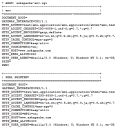 My improved version of the common printenv / test-cgi scripts for debugging Apache environment variables set in .htaccess files
Shell Scripting
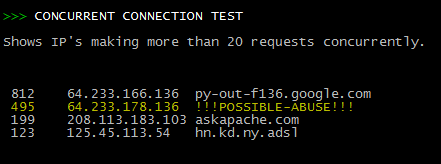 Scan Apache logs for IP address that are probably evil, then generates an .htaccess file to DENY them all.
Security



