.htaccess is a very ancient configuration file for web servers, and is one of the most powerful configuration files most webmasters will ever come across. This htaccess guide shows off the very best of the best htaccess tricks and code snippets from hackers and server administrators.
You've come to the right place if you are looking to acquire mad skills for using .htaccess files!
Apache, Hosting, Htaccess, Optimization, Security, SEO, Web Development, WordPress .htpasswd 301 Redirect Apache Apache HTTP Server Cache Hosting Htaccess Htaccess Software HTTP Headers httpd.conf HyperText Transfer Protocol mod_rewrite Redirect RewriteCond RewriteRule SSL
Some good examples for how to use the Files and FilesMatch directives in .htaccess files and httpd.conf files for Apache.
<FilesMatch ".(htm|html|css|js|php)$">
AddDefaultCharset UTF-8
DefaultLanguage en-US
</FilesMatch>
Htaccess FilesMatch
How to password-protect, Allow or Deny a visitor based on a condition. If you are having trouble getting htaccess-based password protection to work see: Troubleshooting htaccess Authentication: Getting it to work
Htaccess AuthName AuthType FilesMatch Htaccess Password Password Protection Require
Apache Security tips and tricks for securing Apache Web Servers using htaccess, httpd.conf, and other built-in techniques to thwart attackers. This really should be required reading for any Apache admin or user because these little tricks are so easy to do.
Htaccess
Links to htaccess tutorials and howtos in the htaccess forum
Htaccess
 Here is even more information from the Ultimate Htaccess Part I. For now this is very rough and you will want to come back later to read it.
Htaccess Apache HTTP Server Htaccess World Wide Web
Learning about charset's and file types maybe pretty boring, but using .htaccess it can be fun! Here's a quicklist htaccess cheatsheet for adding the correct Charset to a web document.
Htaccess AddCharset AddDefaultCharset AddType FilesMatch ForceType UTF-8
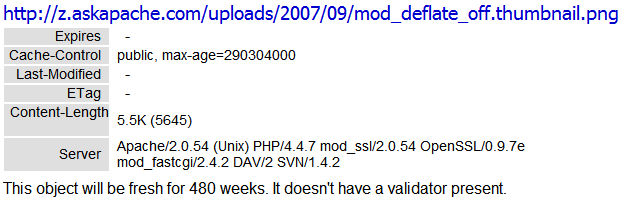
2 awesome ways to implement caching on your website using Apache .htaccess or httpd.conf. Both methods are extremely simple to set up and will dramatically speed up your site! Htaccess Cache Cache-Control ETag Expires Header Headers Htaccess mod_expires mod_headers
Apache .htaccess and httpd.conf have the power to send and manipulate HTTP Header Requests like sending P3P privacy headers, Content-Type: UTF-8, Content-Language, etc. The power is immense and you can do some really cool stuff with HTTP Headers!
Htaccess Header Htaccess
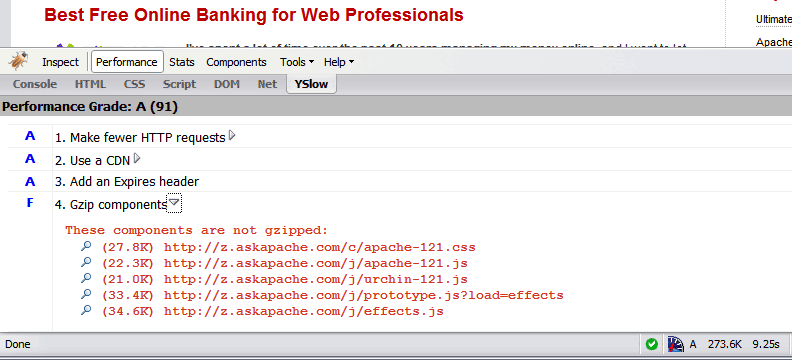
 I have written more than a few articles detailing how to improve the speed of a website, and due to popular demand, this post will detail all the latest and greatest caching tricks and techniques that I utilize and love. The AskApache Best-Practices.
Optimization
Mod_Security rivals Mod_Rewrite in the amount of features it provides. I decided to go ahead and post what I learned about it today, even though its tough to give away such awesome htaccess and apache tricks.. Learn how to control spam once and for all, conditionally log/deny/allow/redirect requests based on IP, username, etc.. Mod_Security is so fine!
Htaccess Htaccess mod_security security
Apache .htaccess Directives and Loaded Modules allowed on DreamHost Apache Server 2 Setups.
Hosting
If you have a php.cgi or php.ini file in your /cgi-bin/ directory or other pub directory, try requesting them from your web browser. If your php.ini shows up or worse you are able to execute your php cgi, you'll need to secure it ASAP. This shows several ways to secure these files, and other interpreters like perl, fastCGI, bash, csh, etc.
Htaccess Apache HTTP Server CGI Common Gateway Interface Htaccess HTTP 403 interpreter PHP php interpreter php.ini security SuEXEC
SetEnv, SetEnvIf, and SetEnvIfNoCase directives conditionally set environment variables accessible by scripts and apache based on HTTP Headers, Variables, and Request information.
Htaccess Environment variable FilesMatch Header Htaccess SetEnvIf SetEnvIfNoCase
 So my blog as been rather quiet for almost a year now, and very few updates if any have been released for my Password Protection PLugin, my Google 404 Plugin, and definately not for my AskApache CrazyCache plugin, which I will be releasing last... So for all of you who've helped me out by sending me suggestions and notifying me of errors and sticking with it... Just wanted to say sorry about that, and thanks for all the great ideas.. Well, I've been sticking with it as well believe it our not. I manage to get free days once in a while, and then its time to jam.
WordPress Apache HTTP Server CGI Debugging HTTP protocol Htaccess SuexecUserGroup
 A first-time visitor to your page will make several HTTP requests to download all your sites files, but using the Expires header you make those files cacheable. This avoids unnecessary HTTP requests on subsequent page views.
Htaccess Expires FilesMatch Header Htaccess
These are a few of the mod_rewrite uses that BlogSecurity declared pushed the boundaries of Mod_Rewrite! Some of these snippets are quite exotic and unlike anything you may have seen before, also only for those who understand them as they can kill a website pretty quick.
Htaccess Htaccess mod_rewrite RewriteCond RewriteRule wordpress
 Use the Apache module mod_deflate to compress your static
 .css and .js files, speeding your site up like crazy!
Htaccess compression Htaccess mod_deflate mod_gzip SetOutputFilter
 Using Cache-Control headers you can specify which types of proxies can cache certain content, and how long files should be cached.
Htaccess Cache-Control Htaccess
If you remove the Last-Modified and ETag header, you will totally eliminate If-Modified-Since and If-None-Match requests and their 304 Not Modified Responses.
Htaccess Cache Caching ETag Htaccess Last-Modified