THE Ultimate Htaccess
 .htaccess is a very ancient configuration file for web servers, and is one of the most powerful configuration files most webmasters will ever come across. This htaccess guide shows off the very best of the best htaccess tricks and code snippets from hackers and server administrators.
You've come to the right place if you are looking to acquire mad skills for using .htaccess files!
Actual Htaccess Files from My Server
#### No https except to wp-admin -
# If the request is empty ( implies fopen or normal file access by a php script )
RewriteCond %{THE_REQUEST} ^$ [OR]

# OR if the request if for wp-admin or wp-login.php
RewriteCond %{REQUEST_URI} ^/(wp-admin|wp-login.php).*$ [NC,OR]

# OR if the Referer is https
RewriteCond %{HTTP_REFERER} ^https://www.askapache.com/.*$ [NC]

# THEN skip the following rule, basically all this does is force https or badhost to be redirected
# BUT because of the above 3 rewritecond's, this won't break poorly written admin scripts
RewriteRule .* - [S=1]

RewriteCond %{HTTPS} =on [OR]
RewriteCond %{HTTP_HOST} !^www.askapache.com$ [NC]
RewriteRule .* https://www.askapache.com%{REQUEST_URI} [R=301,L]

RewriteCond %{THE_REQUEST} ^[A-Z]{3,9} /(wp-admin/.*|wp-login.php.*) HTTP/ [NC]
RewriteCond %{HTTPS} !=on
RewriteRule .* https://%{SERVER_NAME}%{REQUEST_URI} [R=301,L]
Best Practices for Speeding Up Your Web Site with Htaccess
 I have written more than a few articles detailing how to improve the speed of a website, and due to popular demand, this post will detail all the latest and greatest caching tricks and techniques that I utilize and love. The AskApache Best-Practices.
Caching Tutorial for Webmasters
If you examine the preferences dialog of any modern Web browser (like Internet Explorer, Safari or Mozilla), you'll probably notice a 'cache' setting. This lets you set aside a section of your computer's hard disk to store representations that you've seen, just for you. The browser cache works according to fairly simple rules. It will check to make sure that the representations are fresh, usually once a session (that is, the once in the current invocation of the browser).
Manipulating HTTP Headers with htaccess
Apache .htaccess and httpd.conf have the power to send and manipulate HTTP Header Requests like sending P3P privacy headers, Content-Type: UTF-8, Content-Language, etc. The power is immense and you can do some really cool stuff with HTTP Headers!
Make phpBB SEO friendly with htaccess
After I optimized the caching for my non-dynamic pages using apache modules mod_headers and mod_expires, I began to learn about phpbb seo..
ListOfErrors
Links to htaccess tutorials and articles
Links to htaccess tutorials and howtos in the htaccess forum
Htaccess File Sample
Comprehensive .htaccess example file with advanced examples in 1 htaccess sample skeleton .htaccess file with the very best apache htaccess examples... Updated frequently based on detailed info from the Apache htaccess tutorial.
Setting charset in htaccess
Learning about charset's and file types maybe pretty boring, but using .htaccess it can be fun! Here's a quicklist htaccess cheatsheet for adding the correct Charset to a web document.
Skeleton .htaccess file for Powweb Hosting
 If you have a Powweb Webhosting account, you will appreciate this simple skeleton .htaccess file for use on their systems.
Speed Tips: Add Future Expires Headers
 A first-time visitor to your page will make several HTTP requests to download all your sites files, but using the Expires header you make those files cacheable. This avoids unnecessary HTTP requests on subsequent page views.
FastCGI on DreamHost
Using FastCGI on DreamHost and .htaccess
Apache Directives and Modules on DreamHost
Apache .htaccess Directives and Loaded Modules allowed on DreamHost Apache Server 2 Setups.
.htaccess Plugin Blocks Spam, Hackers, and Password Protects Blog

Well what can I say, other than this is sooo DOPE! Here is a list of the modules this plugin (version 4.7 unreleased) will automatically detect. I compiled the list myself using every module included with any default Apache installation for ALL the versions listed below, 1.3 to 2.2+
Want to know something else I'm including in this plugin? For each and every module that is detected, this plugin can then detect ALL of the modules .htaccess Directives! For instance, RewriteRule, AccessFileName, AddHandler, etc.. are each a directive belonging to a module that is allowed to be used from within .htaccess files.
Talk about sick.. these tricks have the diamond disease!
htaccess Tricks for Webmasters
Some of my favorite htaccess examples from some of my favorite .htaccess tutorials. These cut-and-paste ready htaccess code snippets are very useful for website and server administrators.
An AskApache Plugin Upgrade to Rule them All
 So my blog as been rather quiet for almost a year now, and very few updates if any have been released for my Password Protection PLugin, my Google 404 Plugin, and definately not for my AskApache CrazyCache plugin, which I will be releasing last... So for all of you who've helped me out by sending me suggestions and notifying me of errors and sticking with it... Just wanted to say sorry about that, and thanks for all the great ideas.. Well, I've been sticking with it as well believe it our not. I manage to get free days once in a while, and then its time to jam.
Speed Tips: Add Cache-Control Headers
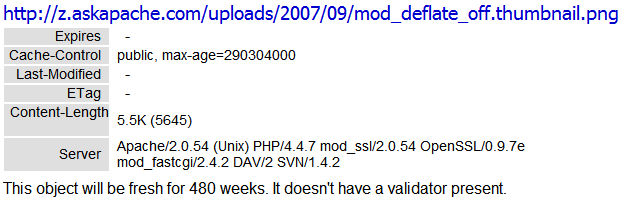 Using Cache-Control headers you can specify which types of proxies can cache certain content, and how long files should be cached.
.htaccess trick to show Alternate CSS file based on IP
This past week I updated my sites apache.css file for a site-redesign. I wanted to make changes to the .css file that only I could see, so that my regular traffic and site-visitors would still see the old version. Here's the elegant solution I came up with using .htaccess and mod_rewrite that works so well I'm sharing it with all you wonderful and incredible people reading my blog :)
htaccess directives available on Powweb
List of the directives available to Powweb users for use in htaccess filesSpeed up your site with Caching and cache-control
Caching with .htaccess and Apache will take your website and your web skills to the next level. This is some technical and advanced methods condensed to simple htaccess code examples for you.
Speed Tips: Remove Last-Modified Header
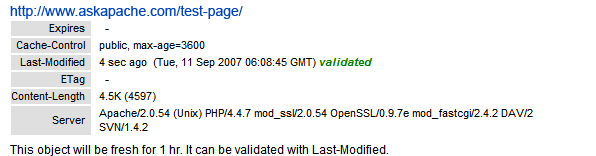
If you remove the Last-Modified and ETag header, you will totally eliminate If-Modified-Since and If-None-Match requests and their 304 Not Modified Responses.
Optimize a Website for Speed, Security, and Easy Management
Learn how to setup, configure, secure, optimize, and create a low-maintenance website the AskApache way. I'm piecing together all the hacks, tricks, methods, and ideas discussed throughout this blog and all across Netdom and glueing them all together to show you how to have the most optimized, crazy fastest, and best website setup I can think of.
Mod_Status tricks to View Apache Module Directives
 Quick and easy method to get a list of all Apache Modules currently loaded, a list of all the directives each module provides, a list of currently used directives, etc... These directives can be used in httpd.conf and/or .htaccess files so it is definately useful to know which ones are available and which ones are currently being used.
Speed Tips: Turn On Compression
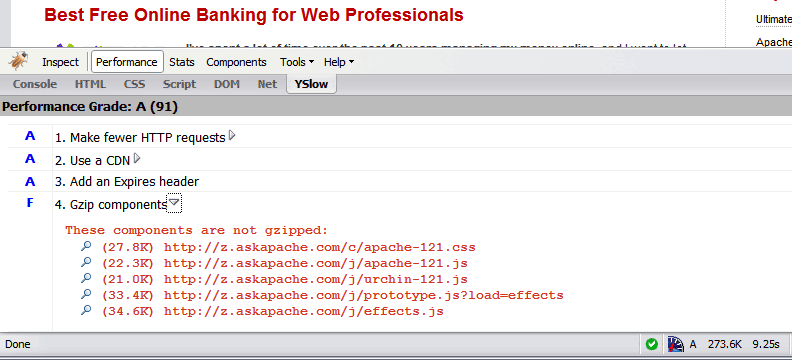 Use the Apache module mod_deflate to compress your static
 .css and .js files, speeding your site up like crazy!
Pimp out your FeedBurner Count
I've had a lot of people ask about the FeedBurner FeedCount image on AskApache. Specifically how to set it up with custom messages and different colors each page view... It is pretty sweet..
Hack WP-Cache for Maximum Speed
 If you desire SPEED from your WordPress blog, the #1 speed improvement comes from using the WP-Cache Plugin. If you still desire SPEED after installing the Plugin, you can modify the WP-Cache Plugin code to make your blog even faster!
Apache 2.4 and PHP-FPM
Preload flash .flv files into browser cache
How I was able to preload many flash flv and swf files on one of my clients sites that has a lot of online video and relatively small traffic. Their site visitors would usually watch 3-10 videos per visit and so to make the videos load almost instantly on every page I came up with a way to preload the top 10 .flv files and the swf flv player files as soon as the visitor successfully started watching the 1st video. Of course I also setup .htaccess caching on the server so that once they downloaded the files into their cache they would never request them from the server again. I was having fun with this so its pretty funky and uses some really cool combinations of javascript, swf preloader from xml, css classes to help automate it all..
Speed Tips: Turn Off ETags
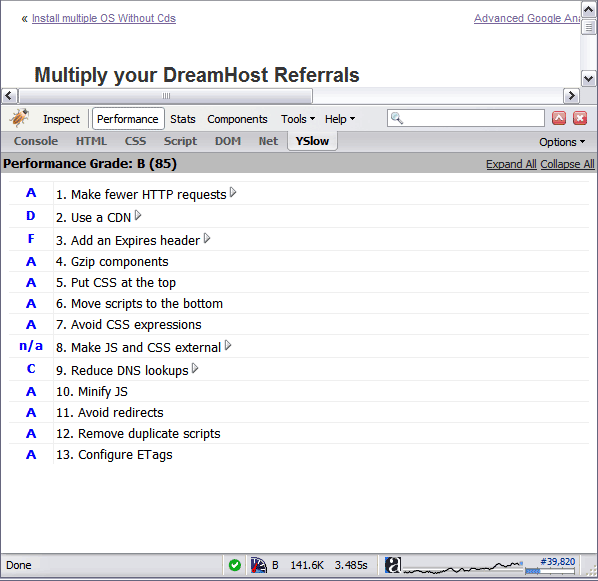 By removing the ETag header, you disable caches and browsers from being able to validate files, so they are forced to rely on your Cache-Control and Expires header.
Apache Web Server Speed Configuration Hacks
Apache server performance can be improved by adding additional hardware resources such as RAM, faster CPU, etc.Speed Tips: Use Multiple SubDomains
To make your site even faster, serve certain content from different subdomains. The reason this works is amazingly cool!
Top methods for Faster, Speedier web sites
High Performance Web Site list of the best and newest methods to make web pages super fast using caching, compression, cache-control, etc.Preloading .flv and .mp3 files with Flash
 If you want to pre-load
 .flv / .mp3 files into a visitors browser cache using flash, here's the actionscript I use to do it, and some ideas behind a good javascript implementation using swfobject or ufo.