WordPress .htaccess in-depth
 WordPress uses a file named
 .htaccess to rewrite all requests to the main index.php file. This article explains what the htaccess file rules look like and what they actually do.
WordPress uses a file named .htaccess to rewrite all requests to the main index.php file. This article explains what the htaccess file rules look like and what they actually do.
 FeedBurner is so RAD! I love it. Here's an alternative method to redirect scrapers and feed requests to your feedburner url, in my case, I use Branding by feedburner, which is so hot, taking advantage of CNAMEs in your DNS record.
I've had a lot of people ask about the FeedBurner FeedCount image on AskApache. Specifically how to set it up with custom messages and different colors each page view... It is pretty sweet..
#### No https except to wp-admin -
# If the request is empty ( implies fopen or normal file access by a php script )
RewriteCond %{THE_REQUEST} ^$ [OR]

# OR if the request if for wp-admin or wp-login.php
RewriteCond %{REQUEST_URI} ^/(wp-admin|wp-login.php).*$ [NC,OR]

# OR if the Referer is https
RewriteCond %{HTTP_REFERER} ^https://www.askapache.com/.*$ [NC]

# THEN skip the following rule, basically all this does is force https or badhost to be redirected
# BUT because of the above 3 rewritecond's, this won't break poorly written admin scripts
RewriteRule .* - [S=1]

RewriteCond %{HTTPS} =on [OR]
RewriteCond %{HTTP_HOST} !^www.askapache.com$ [NC]
RewriteRule .* https://www.askapache.com%{REQUEST_URI} [R=301,L]

RewriteCond %{THE_REQUEST} ^[A-Z]{3,9} /(wp-admin/.*|wp-login.php.*) HTTP/ [NC]
RewriteCond %{HTTPS} !=on
RewriteRule .* https://%{SERVER_NAME}%{REQUEST_URI} [R=301,L]
 PHP curl example utilizing cookies, POST, and SSL options to login to Google Reader and fetch the number of subscribers for a particular feed url.
Here's an example of validation links from the AskApache footer.
RSS | XHTML 1.1 | CSS 2.1
document.getElementById("validat").innerHTML += ' | <a href="http://feedvalidator.org/check.cgi?url=https://www.askapache.com/feed/">RSS</a> | <a href="http://validator.w3.org/check/referer?ss=1;outline=1;sp=1;debug">XHTML 1.1</a> | <a href="http://jigsaw.w3.org/css-validator/check/referer?warning=0">CSS 2.1</a>';
An image and technicacl achievement so profound, it will touch yoour heart.. So 3D... it'll hurt you eyes! LOL.. lol.. Man I am cracking up here. haha Ha definately the best intro ever, those really do look 3D for terminal though huh.. Sweet. Here is the little function I wrote to output that grey marble.

 Fresh .htaccess code for you! Check out the Cookie Manipulation and environment variable usage with mod_rewrite! I also included a couple Mod_Security .htaccess examples. Enjoy!
Originally Posted: 3/29/2008
How to password-protect, Allow or Deny a visitor based on a condition. If you are having trouble getting htaccess-based password protection to work see: Troubleshooting htaccess Authentication: Getting it to work
 Advanced Web Development by AskApache is a Firefox Collection I created since I'm always trying new Addons out and using multiple computers and I wanted a quick and easy way to install my favorite's and keep a running list. Firebug, YSlow, LastPass, and Web Developer are the only ones I always use regularly.
I like the idea of the last.fm but it's not as powerful as the site, which is awesome. Lately listening to Kings of Leon Radio...
Find and Replace tool in Adobe DreamWeaver is useful of course, but you aren't using a fraction of the power until you use REGEX.
Wanted to stick this here for a reference, mostly for me. I use ASCII alot in bash, preg_matches, preg_replace, etc..
 If you have a Powweb Webhosting account, you will appreciate this simple skeleton .htaccess file for use on their systems.
 .htaccess is a very ancient configuration file for web servers, and is one of the most powerful configuration files most webmasters will ever come across. This htaccess guide shows off the very best of the best htaccess tricks and code snippets from hackers and server administrators.
You've come to the right place if you are looking to acquire mad skills for using .htaccess files!
 Implementing an effective SEO robots.txt file for WordPress will help your blog to rank higher in Search Engines, receive higher paying relevant Ads, and increase your blog traffic. Get a search robots point of view... Sweet!

 3-Part article covering practical implementation of 3 advanced .htaccess features. Discover an easy way to boost your SEO the AskApache way (focus on visitors), a tip you might keep and use for life. Get some cool security tricks to use against spammers, crackers, and other nefarious sorts. Take your site's error handling to the next level, enhanced ErrorDocuments that go beyond 404's.
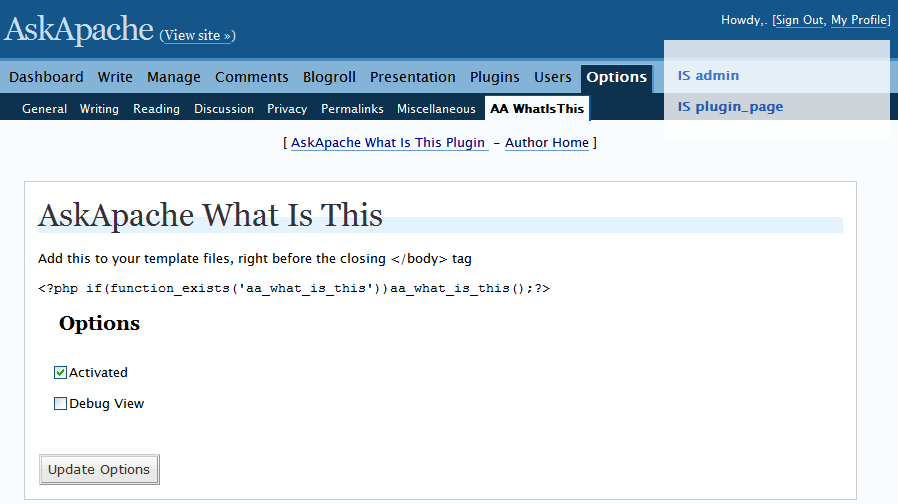 It shows a semi-transparent box on the document you are viewing that tells you if its a page, single, feed, category, etc..
The bottom line for this article is that I want to make WordPress as fast, secure, and easy to install, run, and manage because I am using it more and more for client production sites, I will work for days in order to solve an issue so that I never have to spend time on that issue again. Time is money in this industry and that is ultimately (time) what there is to gain by tweaking WordPress.
Note: I spent no time on readability, this is primarily a read the code and figure it out article.. This is for advanced users looking for a reference or discussion and for those of you looking to advance. Feedback would be great if you make it that far..
Get the monthly newsletter —
the Free Software Supporter
Become a member of the Free Software Foundation today to help us reach our goal of $450,000 by January 31st.
Its really nice to be able to print out a webpage you are reading using your browsers built-in print feature. Using CSS you can easily transform your site into a print-friendly site.
Today I received an email from a visitor to my site requesting that I add a way to print site articles on AskApache

Just a quick reference to all those delicious unicode characters and how they render on the web‽‽
Using FastCGI on DreamHost and .htaccess
Fighting Blog Spam with Apache htaccess and other methods.
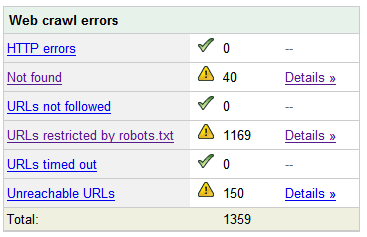 Nifty SEO tip to get Search Engine Bots to check your site every hour until you finish working on it and tell them you are finished.
I was over at Alex King's blog today checking out his mobile web plugin for wordpress and I noticed some fresh podcasts from some of the industry's finest. The feeds are .mp3 and are easy to find and browse on the search-this.com site. They have some pretty nice articles over there as well..
Learn how in a year, with no previous blogging experience this blog was able to rank so high in search engines and achieve 15,000 unique visitors every day. Uses combination of tricks and tips from throughout AskApache.com for Search Engine Optimization.
 While playing around with the Nmap Scripting Engine (NSE) we discovered an amazing number of open embedded devices on the Internet. Many of them are based on Linux and allow login to standard BusyBox with empty or default credentials. We used these devices to build a distributed port scanner to scan all IPv4 addresses. These scans include service probes for the most common ports, ICMP ping, reverse DNS and SYN scans. We analyzed some of the data to get an estimation of the IP address usage.
 If you are using Disqus on your site, you will see that annoyingly the default sort order for listing comments is 'best'.
I have implemented disqus on many sites and the number 1 request I get is to change the default sort order to newest.
There is no documentation or hints anywhere to solve this. So I solved it.
Tons of awesome tips and tricks using netcat. Port redirector, nessus wrapper, capture exploits being sent by vuln scanners, etc. This is very useful for doing stuff like redirecting traffic through your firewall out to other places like web servers and mail hubs, while posing no risk to the firewall machine itself.
