Looking for some advanced uses for the shell? Here is some of my best. The shell is where 70% of my work takes place, and I have at least one terminal open almost 100% of the time, for viewing tailing color-coded logs, and of course for the SSH Tunnels that I use to route various networking through, like my email. So I decided that to standardize and create a bash_profile containing the most time-saving and helpful functions that I could use on all the various hosting environments would really be some sweet sugar, so here is my constant Work-in-progress.
It works for all shells I encounter, including BackTrack, Debian, Knoppix, Arch Linux, etc. Also works for many hosting environments I use including DreamHost, HostGator, WiredTree, and pretty much any linux VPS.
I also rely on this heavily from within shell scripts I write to access all the functions and stuff in this .bash_profile, and to do that I just do like:
#!/bin/bash

source ~/.bash_profile &>/dev/nulll

pm "PM is a function to output nice messages with color"
yn "Are you enjoying the shell" && pm "Thats great!" || pm "Perhaps you're better suited for DOS"
yn "Show Calendar" && aa_calendar
yn "Show Fortune" && aa_fortune
Linux Arch Linux bash linux shell Unix shells
 Advanced Web Development by AskApache is a Firefox Collection I created since I'm always trying new Addons out and using multiple computers and I wanted a quick and easy way to install my favorite's and keep a running list. Firebug, YSlow, LastPass, and Web Developer are the only ones I always use regularly.
I like the idea of the last.fm but it's not as powerful as the site, which is awesome. Lately listening to Kings of Leon Radio...
Software Addons Firefox Mozilla
 The Admin Bar in WordPress is always shown when in the backend administration area no matter what.
You are given the option to show/hide the admin bar when viewing the site, but there is no option to show/hide the admin bar when using the backend... So I created a plugin to provide that option on profile pages.
Why hide the admin bar in backend?
Normally I like the admin-bar and usually have it enabled, but it's nice to be able to switch it on/off from the "Edit Profile" page. The biggest reason for not loading/showing the admin_bar in the backend is SPEED. Here are 2 instances where I hide it-
· Sites with many authors/admins
· Moderating Comments on a Mobile Phone
WordPress PHP WordPress Plugin
 Webmasters often use SSH to remotely admin web sites and servers, learn how to make your shell colorful and powerful using my sample .bash_profile and you can be up and running in 30 seconds!
Shell Scripting
 One of the first things that I do upon receiving a new Windows computer is immediately create a poweruser-style customized boot menu. Then every time I boot I can choose Safe Mode, Recovery Console, Debug, whatever I want! It's quick and easy to set-up and everyone should have one, soo sweet!
Windows
Very nice tutorial dealing with the robots.txt file. Shows examples for google and other search engines. Wordpress robots.txt and phpBB robots.txt sample files. SEO
SEO
Unix file permissions are one of the more difficult subjects to grasp.. Well, ok maybe "grasp" isn't the word.. Master is the right word.. Unix file permissions is a hard topic to fully master, mainly I think because there aren't many instances when a computer user encounters them seriously, and bitwise is oldschool. This contains a listing of all possible permission masks and bits from a linux, php, and web hosting view.... cuz you guys AskApache Regs Rock!
Security chmod File Permissions umask
 This amazing bash linux prompt does more than meets the eye. If you want to know how to become really good with technology, linux is the secret sauce behind the AskApache articles. Open Source is elixir of the web. Thanks to everyone who helped me for the past 20 years. I use linux/bsd because homey don't play, so this is geared to be as productive a prompt as I can make it.
Don't have much time.. or just don't care? Not a problem, here are the 3 lines to copy and paste - you can just paste them right in your shell to test it, or add to a startup script.
export AA_P="export PVE=\"\\033[m\\033[38;5;2m\"\$(( \`sed -n \"s/MemFree:[\\t ]\\+\\([0-9]\\+\\) kB/\\1/p\" /proc/meminfo\` / 1024 ))\"\\033[38;5;22m/\"\$((\`sed -n \"s/MemTotal:[\\t ]\\+\\([0-9]\\+\\) kB/\\1/p\" /proc/meminfo\`/ 1024 ))MB\"\\t\\033[m\\033[38;5;55m\$(< /proc/loadavg)\\033[m\";echo -en \"\""
export PROMPT_COMMAND="history -a;((\$SECONDS % 10==0 ))&&eval \"\$AA_P\";echo -en \"\$PVE\";"
export PS1="\\[\\e[m\\n\\e[1;30m\\][\$\$:\$PPID \\j:\\!\\[\\e[1;30m\\]]\\[\\e[0;36m\\] \\T \\d \\[\\e[1;30m\\][\\[\\e[1;34m\\]\\u@\\H\\[\\e[1;30m\\]:\\[\\e[0;37m\\]\${SSH_TTY} \\[\\e[0;32m\\]+\${SHLVL}\\[\\e[1;30m\\]] \\[\\e[1;37m\\]\\w\\[\\e[0;37m\\] \\n(\$SHLVL:\\!)\\\$ " && eval $AA_P
Linux bash Prompt PROMPT_COMMAND PS1 sed ssh
After I optimized the caching for my non-dynamic pages using apache modules mod_headers and mod_expires, I began to learn about phpbb seo..
Htaccess Htaccess PhpBB
 .htaccess is a very ancient configuration file for web servers, and is one of the most powerful configuration files most webmasters will ever come across. This htaccess guide shows off the very best of the best htaccess tricks and code snippets from hackers and server administrators.
You've come to the right place if you are looking to acquire mad skills for using .htaccess files!
Apache, Hosting, Htaccess, Optimization, Security, SEO, Web Development, WordPress .htpasswd 301 Redirect Apache Apache HTTP Server Cache Hosting Htaccess Htaccess Software HTTP Headers httpd.conf HyperText Transfer Protocol mod_rewrite Redirect RewriteCond RewriteRule SSL
Become a member of the Free Software Foundation today to help us reach our goal of $450,000 by January 31st.
Net Coreboot Free Software Foundation FSF GNU GNU/Linux Microsoft Windows
 If for some reason you need to use windows .bat batch file scripting to do some task, or you just want to learn the most universal batch programming language on Windows machines, you lucked out and found the AskApache example. My expertise is the shell, in this article the shell is Windows
 cmd.exe. It has some pretty advanced windows shell usage, including pipes and redirection, but it's the modular linux-like coding approach that earns this script it's "advanced" title.
:SETPROMPT
set PROMPT=$_[%USERNAME%@%USERDOMAIN%]$S[$P]$_$M$G && EXIT /B
 My favorite tool (and I've tried sooo many) for editing most Windows files and especially .bat files is the free and open-source Notepad++. Set that up and you will have a color-syntax-highlighted editor for Batch Scripting that works very very well.
Windows Batch File Batch Scripting Command Prompt Microsoft Windows
Here's an example of validation links from the AskApache footer.
RSS | XHTML 1.1 | CSS 2.1
document.getElementById("validat").innerHTML += ' | <a href="http://feedvalidator.org/check.cgi?url=https://www.askapache.com/feed/">RSS</a> | <a href="http://validator.w3.org/check/referer?ss=1;outline=1;sp=1;debug">XHTML 1.1</a> | <a href="http://jigsaw.w3.org/css-validator/check/referer?warning=0">CSS 2.1</a>'; Javascript Firebug JavaScript
Htaccess AddDescription Apache bash
Ok I just came back up to write the intro.. I'm trying to keep it short to avoid getting bogged down by the coolness of each step. Here is what goes on. When I logon to my XP machine at work, I bring my usb key and plug it in first. On logging a window pops up first and it's a password prompt to mount my encrypted drive leonardo. It also checks a keyfile that is located on my usb key, but all I do now is type in my password. That causes my encrypted folder to be accessible to me like a normal drive, and it autoruns a startup batch file.
The batch file causes Portable versions of Firefox (all my bookmarks, my settings) to load, and launches Portable Mozilla Thunderbird (IMAP makes this work well), which is my favorite program (great GPG features and open-source!). Also Some Adobe CS4 software is loaded from the hard drive, like DreamWeaver. In the background, a service we created executes a PortaPuttY plink command to create forwarded tunnels from various remote servers and accounts, all using key-based encryption. These tunnels are automatically reconnected if they are disconnected, meaning you can use a socks 5 if you want or even better!
Hacking Backup encryption Microsoft Windows Secure Shell ssh TrueCrypt USB USB flash drive windows builtin command-line tools
Google DNS Google Google Public DNS performance tools web performance
The bottom line for this article is that I want to make WordPress as fast, secure, and easy to install, run, and manage because I am using it more and more for client production sites, I will work for days in order to solve an issue so that I never have to spend time on that issue again. Time is money in this industry and that is ultimately (time) what there is to gain by tweaking WordPress.
Note: I spent no time on readability, this is primarily a read the code and figure it out article.. This is for advanced users looking for a reference or discussion and for those of you looking to advance. Feedback would be great if you make it that far..
WordPress wordpress wp-config.php

 Stop wasting your lives with Mac Terminals.. or Macs. Get a real machine and then get a real shell multiplexer! For many years we all loved GNU Screen, but tmux is by far a better option today. The only time I am in the shell and not using a multiplexer, is when I'm not on one of my machines. My Arch Linux machines all run URxvt and my .bash_profiles all start tmux automataically, whether in X or single-user mode, tmux is where it's at.
Hacking, Linux linux.bash Screen shell tmux
The proponents of this scheme have given it names such as "trusted computing" and "palladium". We call it "treacherous computing", because the effect is to make your computer obey companies instead of you. This was implemented in 2007 as part of Windows Vista; we expect Apple to do something similar. In this scheme, it is the manufacturer that keeps the secret code, but the FBI would have little trouble getting it.
Hacking
Acronym and Abbr examples from the W3C Quality Assurance Site.
Web Design
Before
 After trick
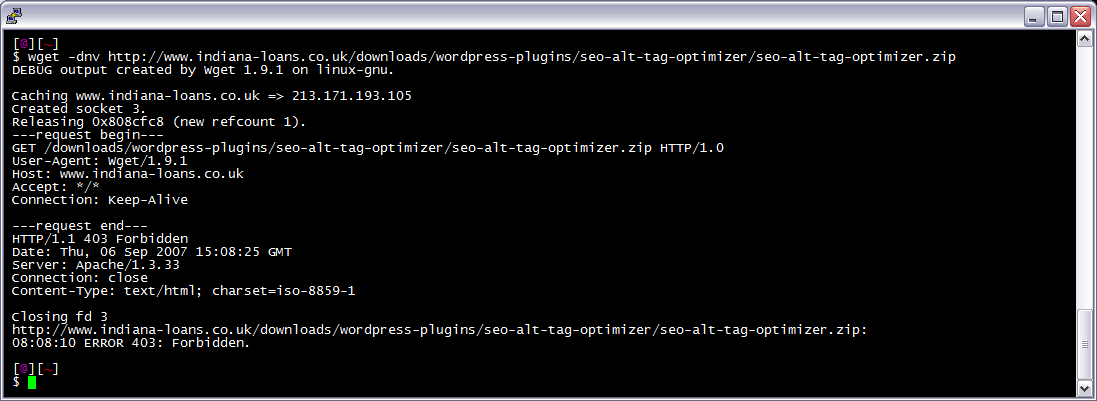
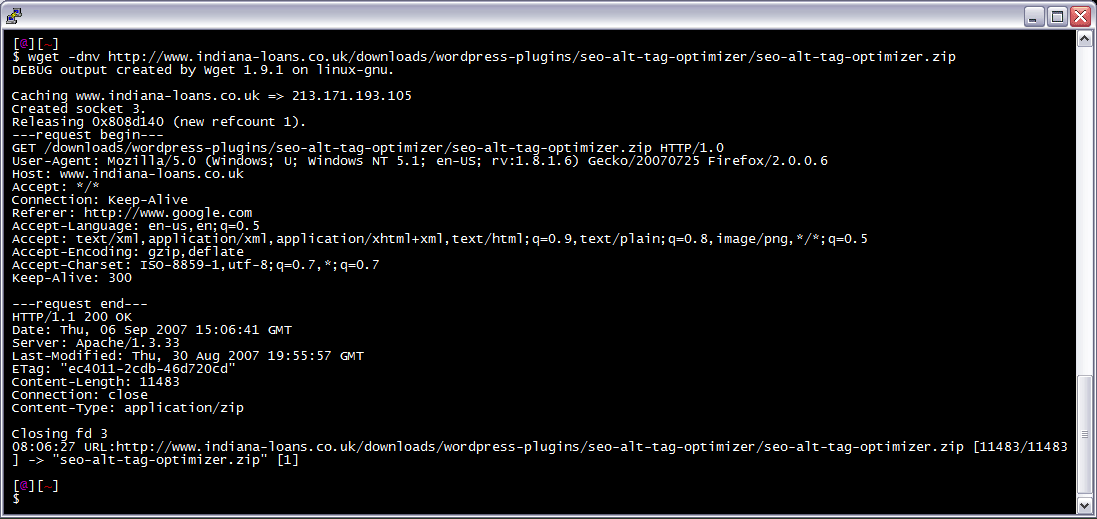
 I am often logged in to my servers via SSH, and I need to download a file like a WordPress plugin. I've noticed many sites now employ a means of blocking robots like wget from accessing their files. Most of the time they use .htaccess to do this. So a permanent workaround has wget mimick a normal browser.
Linux bash wget
Bash Functions and Aliases for Traps, Kills, and Signals. Useful for translating signal numbers/signal names and getting more info about signals.
Shell Scripting bash kill trap
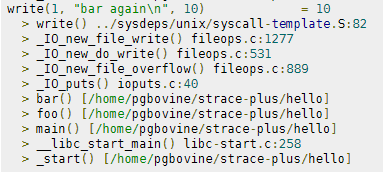 strace+ is an improved version of strace that collects stack traces associated with each system call. Since system calls require an expensive user-kernel context switch, they are often sources of performance bottlenecks. strace+ allows programmers to do more detailed system call profiling and determine, say, which call sites led to costly syscalls and thus have potential for optimization.
Linux gcc linux strace
 After many years of using any and all terminal emulators out there, from xterm to the Gnome terminal, to KDE Konsole to xfce4-terminal, lxterminal, vte, yakuake, rote, roxterm, sakura, terminator, and putty I finally I settled in for the long-haul with rxvt (rxvt-unicode).
My BOX: Slim -> Ratpoison -> URxvt -> Tmux -> Bash
Linux .Xdefaults .Xresources bash Gnome terminal GNU Screen ratpoison rxvt rxvt-unicode Terminal multiplexers tmux urxvt Xterm Yakuake
Both of these pcs were behind a hardware/software firewall, and so each had their own host names, we'll say PEPSI and COKE, and they were both on a private network on the same subnet, so each belonged to a domain called MARKETING. Hacking

Just a quick reference to all those delicious unicode characters and how they render on the web‽‽
Web Development symbols Unicode
Apache, Hosting 2.4 Apache Error
 One of the biggest speed bottlenecks of sites today are images, specifically unoptimized images or large scaled images. With Apaches Rewrite module we can convert all existing jpegs and png files (and most gifs) to webp, then transparently rewrite them so that a request for img.png from a browser that supports webp will receive img.webp.
Hosting, Htaccess, Optimization accept Header png RewriteCond RewriteRule vary webp