.htaccess is a very ancient configuration file for web servers, and is one of the most powerful configuration files most webmasters will ever come across. This htaccess guide shows off the very best of the best htaccess tricks and code snippets from hackers and server administrators.
You've come to the right place if you are looking to acquire mad skills for using .htaccess files!
Apache, Hosting, Htaccess, Optimization, Security, SEO, Web Development, WordPress .htpasswd 301 Redirect Apache Apache HTTP Server Cache Hosting Htaccess Htaccess Software HTTP Headers httpd.conf HyperText Transfer Protocol mod_rewrite Redirect RewriteCond RewriteRule SSL
Web Professionals use mod_rewrite to issue 301 and 302 Redirects for Search Engines. Sometimes you may not have mod_rewrite.c or you want an alternative redirect method. Using mod_alias RedirectMatch you can use REGEX in Redirect commands!
Htaccess 301 Redirect SEO
- When php run as Apache Module (mod_php)
- When php run as CGI
- When cgi?d php is run with wrapper (for FastCGI)
PHP CGI Htaccess PHP php.ini
2 awesome ways to implement caching on your website using Apache .htaccess or httpd.conf. Both methods are extremely simple to set up and will dramatically speed up your site! Htaccess Cache Cache-Control ETag Expires Header Headers Htaccess mod_expires mod_headers
Apache has the best SSL/HTTPS support and can be controlled by the httpd.conf file or other HTTPD server configuration file. This htaccess tutorial has htaccess example code to make it easy to secure and use HTTPS and SSL with Apache.
Htaccess
 Thought I'd give you all the tips and tricks that I've learned and use when developing WordPress plugins.. which can be quite fun!
WordPress
To make your site even faster, serve certain content from different subdomains. The reason this works is amazingly cool!
Htaccess
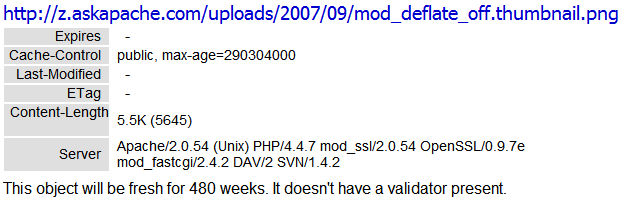
 By removing the ETag header, you disable caches and browsers from being able to validate files, so they are forced to rely on your Cache-Control and Expires header.
Htaccess Cache-Control ETags
Apache Security tips and tricks for securing Apache Web Servers using htaccess, httpd.conf, and other built-in techniques to thwart attackers. This really should be required reading for any Apache admin or user because these little tricks are so easy to do.
Htaccess
If you examine the preferences dialog of any modern Web browser (like Internet Explorer, Safari or Mozilla), you'll probably notice a 'cache' setting. This lets you set aside a section of your computer's hard disk to store representations that you've seen, just for you. The browser cache works according to fairly simple rules. It will check to make sure that the representations are fresh, usually once a session (that is, the once in the current invocation of the browser).
Optimization
 Use the Apache module mod_deflate to compress your static
 .css and .js files, speeding your site up like crazy!
Htaccess compression Htaccess mod_deflate mod_gzip SetOutputFilter
If you remove the Last-Modified and ETag header, you will totally eliminate If-Modified-Since and If-None-Match requests and their 304 Not Modified Responses.
Htaccess Cache Caching ETag Htaccess Last-Modified
Top 3 ways to speed up websites that use Google Analytics. Host Script Locally, Fix Google-Analytics Cookie Domain, and Failsafe Loading for optimum tracking statistics.
Google
 Using Cache-Control headers you can specify which types of proxies can cache certain content, and how long files should be cached.
Htaccess Cache-Control Htaccess
 WordPress uses a file named
 .htaccess to rewrite all requests to the main index.php file. This article explains what the htaccess file rules look like and what they actually do.
Htaccess Htaccess wordpress
Search Engine Optimization for WordPress WordPress
Htaccess
301 Redirects using Apache mod_rewrite or RedirectMatch in .htaccess or httpd.conf
Htaccess
 Advanced Web Development by AskApache is a Firefox Collection I created since I'm always trying new Addons out and using multiple computers and I wanted a quick and easy way to install my favorite's and keep a running list. Firebug, YSlow, LastPass, and Web Developer are the only ones I always use regularly.
I like the idea of the last.fm but it's not as powerful as the site, which is awesome. Lately listening to Kings of Leon Radio...
Software Addons Firefox Mozilla
Learn how in a year, with no previous blogging experience this blog was able to rank so high in search engines and achieve 15,000 unique visitors every day. Uses combination of tricks and tips from throughout AskApache.com for Search Engine Optimization.
SEO
Some of my favorite htaccess examples from some of my favorite .htaccess tutorials. These cut-and-paste ready htaccess code snippets are very useful for website and server administrators.
Htaccess
Comprehensive .htaccess example file with advanced examples in 1 htaccess sample skeleton .htaccess file with the very best apache htaccess examples... Updated frequently based on detailed info from the Apache htaccess tutorial.
Htaccess Allow AuthUserFile Deny Htaccess Redirect RewriteCond RewriteEngine RewriteRule
Mod_Security rivals Mod_Rewrite in the amount of features it provides. I decided to go ahead and post what I learned about it today, even though its tough to give away such awesome htaccess and apache tricks.. Learn how to control spam once and for all, conditionally log/deny/allow/redirect requests based on IP, username, etc.. Mod_Security is so fine!
Htaccess Htaccess mod_security security
Server and Environment Variables are used by The Apache HTTP Server by provides a mechanism for storing information. This information can be used to control various operations such as logging or access control.
Htaccess
Google DNS Google Google Public DNS performance tools web performance
Unix file permissions are one of the more difficult subjects to grasp.. Well, ok maybe "grasp" isn't the word.. Master is the right word.. Unix file permissions is a hard topic to fully master, mainly I think because there aren't many instances when a computer user encounters them seriously, and bitwise is oldschool. This contains a listing of all possible permission masks and bits from a linux, php, and web hosting view.... cuz you guys AskApache Regs Rock!
Security chmod File Permissions umask
Google
 Check out this free online SEO site-scoring tool. The SEO generated report is simple, neat, and helpful. The main thing I like about it is how it is a stand-alone website, a residual money making machine.
Software
Fighting Blog Spam with Apache htaccess and other methods.
Htaccess
 PHP's fsockopen function lets you open an Internet or Unix domain socket connection for connecting to a resource, and is one of the most powerful functions available in the php language.
PHP fsockopen PHP socket strace udp Unix
The bottom line for this article is that I want to make WordPress as fast, secure, and easy to install, run, and manage because I am using it more and more for client production sites, I will work for days in order to solve an issue so that I never have to spend time on that issue again. Time is money in this industry and that is ultimately (time) what there is to gain by tweaking WordPress.
Note: I spent no time on readability, this is primarily a read the code and figure it out article.. This is for advanced users looking for a reference or discussion and for those of you looking to advance. Feedback would be great if you make it that far..
WordPress wordpress wp-config.php
Find and Replace tool in Adobe DreamWeaver is useful of course, but you aren't using a fraction of the power until you use REGEX.
Software
 CSS is one of the most useful tools I have in my toolbox as a Web Developer. Having a CSS Toolbox containing good CSS Classes that you repeatedly use is quite helpful for us XHTML / web-standards / best-practices developers. Check out 10 of my favorite CSS classes.
CSS
 Host Google Analytics ga.js file locally for increased speed! Makes web pages load faster.
Google
While researching a unix/linux tool awk I came upon one of the most thorough and helpful tutorials I've ever seen devoted to a particular topic. It's old-school just the way I like it. I contacted the author, Bruce Barnett because I just HAD to have this article for my readers, who are predominantly running solaris/unix/bsd/linux and he kindly gave permission.
Linux
A lot of the past and upcoming articles on AskApache are focused on speeding up a server or website, or just making things more efficient. I'm starting several speed tip articles that require the following 3 programs if you want to follow along, that is... if you can keep up! ;)
Software
What they say about kung-fu is true..
It can be attained by anyone through hard work over time. You can become as good as the amount of work you put in. Here's a short look at a basic technique that I use. Simply reverse engineering the source code and taking notes along the way...
static void php_session_send_cookie(TSRMLS_D)
  if (SG(headers_sent)) {
          if (output_start_filename) {
                  php_error_docref(NULL TSRMLS_CC, E_WARNING, "Cannot send session cookie - headers already sent by (output started at %s:%d)",
                          output_start_filename, output_start_lineno);
          } else {
                  php_error_docref(NULL TSRMLS_CC, E_WARNING, "Cannot send session cookie - headers already sent");
          }
          return;
  }

  /* URL encode session_name and id because they might be user supplied */
  e_session_name = php_url_encode(PS(session_name), strlen(PS(session_name)), NULL);
PHP PHP Session Session ID