Trace Email Back to the Sender
Locate the sender of an email and their geographical location, including messages sent through anonymous email services like Gmail, Yahoo, and Hotmail.
Blocking Bad Bots and Scrapers with .htaccess
 Want to block a bad robot or web scraper using .htaccess files? Here are 2 methods that illustrate blocking 436 various user-agents.
Fight Blog Spam with Apache
Fighting Blog Spam with Apache htaccess and other methods.
THE Ultimate Htaccess
 .htaccess is a very ancient configuration file for web servers, and is one of the most powerful configuration files most webmasters will ever come across. This htaccess guide shows off the very best of the best htaccess tricks and code snippets from hackers and server administrators.
You've come to the right place if you are looking to acquire mad skills for using .htaccess files!
Advanced Google Analytics 404 Error Page
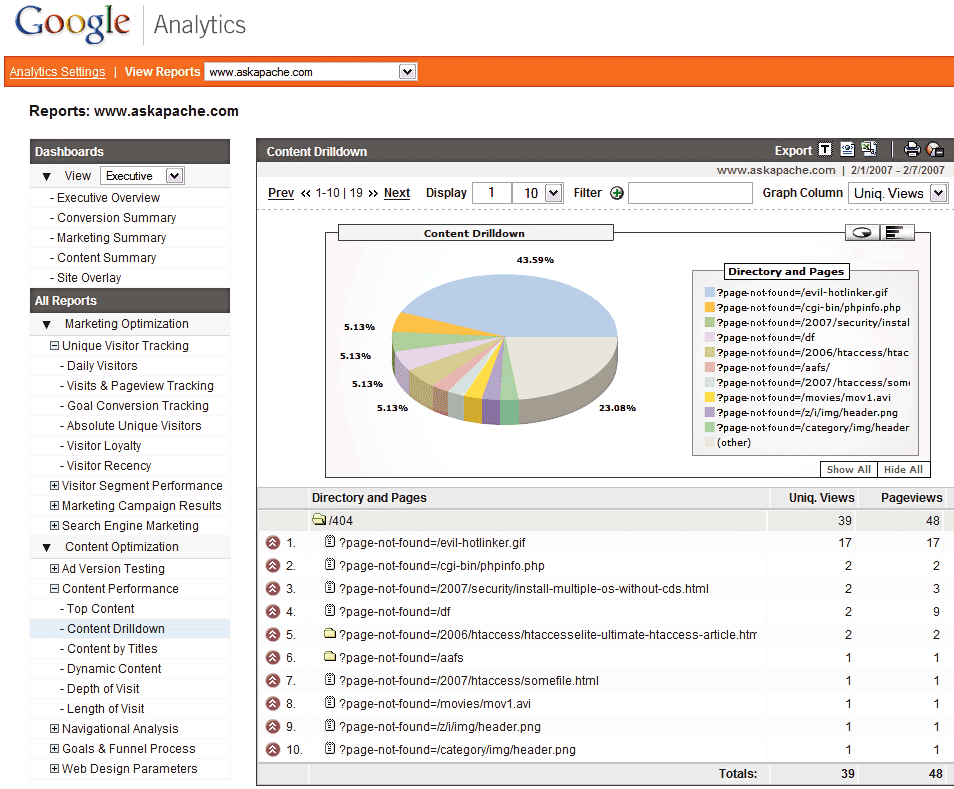 Advanced 404 Not Found Error page usage with Google Analytics. This makes it very easy to diagnose and keep track of 404 Error messages from within google analytics. Enjoy!
IP Blocked by stateful Firewall, now what?
About AskApache
Firefox Add-ons for Web Developers
 Advanced Web Development by AskApache is a Firefox Collection I created since I'm always trying new Addons out and using multiple computers and I wanted a quick and easy way to install my favorite's and keep a running list. Firebug, YSlow, LastPass, and Web Developer are the only ones I always use regularly.
I like the idea of the last.fm but it's not as powerful as the site, which is awesome. Lately listening to Kings of Leon Radio...
Privacy Policy and Terms of Use
.htaccess Plugin Blocks Spam, Hackers, and Password Protects Blog

Well what can I say, other than this is sooo DOPE! Here is a list of the modules this plugin (version 4.7 unreleased) will automatically detect. I compiled the list myself using every module included with any default Apache installation for ALL the versions listed below, 1.3 to 2.2+
Want to know something else I'm including in this plugin? For each and every module that is detected, this plugin can then detect ALL of the modules .htaccess Directives! For instance, RewriteRule, AccessFileName, AddHandler, etc.. are each a directive belonging to a module that is allowed to be used from within .htaccess files.
Talk about sick.. these tricks have the diamond disease!
SEO in WordPress
Search Engine Optimization for WordPressMod_Status tricks to View Apache Module Directives
 Quick and easy method to get a list of all Apache Modules currently loaded, a list of all the directives each module provides, a list of currently used directives, etc... These directives can be used in httpd.conf and/or .htaccess files so it is definately useful to know which ones are available and which ones are currently being used.
SSI in Htaccess for ErrorDocuments, DirectoryIndexing, SEO

 3-Part article covering practical implementation of 3 advanced .htaccess features. Discover an easy way to boost your SEO the AskApache way (focus on visitors), a tip you might keep and use for life. Get some cool security tricks to use against spammers, crackers, and other nefarious sorts. Take your site's error handling to the next level, enhanced ErrorDocuments that go beyond 404's.
Apache Directives and Modules on DreamHost
Apache .htaccess Directives and Loaded Modules allowed on DreamHost Apache Server 2 Setups.
Internet Census 2012 – Port scanning using insecure embedded devices – Carna Botnet
 While playing around with the Nmap Scripting Engine (NSE) we discovered an amazing number of open embedded devices on the Internet. Many of them are based on Linux and allow login to standard BusyBox with empty or default credentials. We used these devices to build a distributed port scanner to scan all IPv4 addresses. These scans include service probes for the most common ports, ICMP ping, reverse DNS and SYN scans. We analyzed some of the data to get an estimation of the IP address usage.
Multiply your DreamHost Referrals
 Learn how to make YOUR DreamHost promo codes work much better for YOU! This is not about promo-codes, this is about a simple method you should implement.
An AskApache Plugin Upgrade to Rule them All
 So my blog as been rather quiet for almost a year now, and very few updates if any have been released for my Password Protection PLugin, my Google 404 Plugin, and definately not for my AskApache CrazyCache plugin, which I will be releasing last... So for all of you who've helped me out by sending me suggestions and notifying me of errors and sticking with it... Just wanted to say sorry about that, and thanks for all the great ideas.. Well, I've been sticking with it as well believe it our not. I manage to get free days once in a while, and then its time to jam.
Compete Search Analytics officially opened to the public! It rocks!
 I just received an email (I'm a VIP) from the Compete Search Analytics Team announcing that they are officially open to the public! Normally this would have 0 effect on me, I'm not into SEO tools, but this online resource is incredible!
Convert Image Base64 Encoder
Custom bash_profile for Advanced Shell Users
Looking for some advanced uses for the shell? Here is some of my best. The shell is where 70% of my work takes place, and I have at least one terminal open almost 100% of the time, for viewing tailing color-coded logs, and of course for the SSH Tunnels that I use to route various networking through, like my email. So I decided that to standardize and create a bash_profile containing the most time-saving and helpful functions that I could use on all the various hosting environments would really be some sweet sugar, so here is my constant Work-in-progress.
It works for all shells I encounter, including BackTrack, Debian, Knoppix, Arch Linux, etc. Also works for many hosting environments I use including DreamHost, HostGator, WiredTree, and pretty much any linux VPS.
I also rely on this heavily from within shell scripts I write to access all the functions and stuff in this .bash_profile, and to do that I just do like:
#!/bin/bash

source ~/.bash_profile &>/dev/nulll

pm "PM is a function to output nice messages with color"
yn "Are you enjoying the shell" && pm "Thats great!" || pm "Perhaps you're better suited for DOS"
yn "Show Calendar" && aa_calendar
yn "Show Fortune" && aa_fortune
Vulnerability Scanners Review
Adding Akismet Anti-Spam Protection Anywhere
Wouldn't you love to have Akismet Anti-spam protection for non-wordpress forms and pages?

Mod_Security .htaccess tricks
Mod_Security rivals Mod_Rewrite in the amount of features it provides. I decided to go ahead and post what I learned about it today, even though its tough to give away such awesome htaccess and apache tricks.. Learn how to control spam once and for all, conditionally log/deny/allow/redirect requests based on IP, username, etc.. Mod_Security is so fine!
Awk Tutorial and Introduction
While researching a unix/linux tool awk I came upon one of the most thorough and helpful tutorials I've ever seen devoted to a particular topic. It's old-school just the way I like it. I contacted the author, Bruce Barnett because I just HAD to have this article for my readers, who are predominantly running solaris/unix/bsd/linux and he kindly gave permission.