Website SEO Score Tool
 Check out this free online SEO site-scoring tool. The SEO generated report is simple, neat, and helpful. The main thing I like about it is how it is a stand-alone website, a residual money making machine.
Check out this free online SEO site-scoring tool. The SEO generated report is simple, neat, and helpful. The main thing I like about it is how it is a stand-alone website, a residual money making machine.
Learn how to setup, configure, secure, optimize, and create a low-maintenance website the AskApache way. I'm piecing together all the hacks, tricks, methods, and ideas discussed throughout this blog and all across Netdom and glueing them all together to show you how to have the most optimized, crazy fastest, and best website setup I can think of.
 Let me show you an example that works so well I am using it right now on my site. Every page in fact. If you are a young or up and coming web developer with skills to pay the bills, lets make the future Net fast, learn about optimization and refactoring while you still have the chance.
This is the advanced example. It uses the jw flv player to create a flash proxy. This basically lets me control the youtube video as if it were a local .f4v file. With this method I can specify any options, autostart, volume, playlists, etc.. But it's rather complex so lets start with 3 other methods to embed YouTube video.
 Advanced Web Development by AskApache is a Firefox Collection I created since I'm always trying new Addons out and using multiple computers and I wanted a quick and easy way to install my favorite's and keep a running list. Firebug, YSlow, LastPass, and Web Developer are the only ones I always use regularly.
I like the idea of the last.fm but it's not as powerful as the site, which is awesome. Lately listening to Kings of Leon Radio...
Fighting Blog Spam with Apache htaccess and other methods.
 Implementing an effective SEO robots.txt file for WordPress will help your blog to rank higher in Search Engines, receive higher paying relevant Ads, and increase your blog traffic. Get a search robots point of view... Sweet!
 I have written more than a few articles detailing how to improve the speed of a website, and due to popular demand, this post will detail all the latest and greatest caching tricks and techniques that I utilize and love. The AskApache Best-Practices.
This is part II of the Advanced SEO used on AskApache.com Series and describes how to control which urls are indexed by Search Engines and how to move them higher up in Search Results.
Top 3 ways to speed up websites that use Google Analytics. Host Script Locally, Fix Google-Analytics Cookie Domain, and Failsafe Loading for optimum tracking statistics.
 I just received an email (I'm a VIP) from the Compete Search Analytics Team announcing that they are officially open to the public! Normally this would have 0 effect on me, I'm not into SEO tools, but this online resource is incredible!
 Want to block a bad robot or web scraper using .htaccess files? Here are 2 methods that illustrate blocking 436 various user-agents.
 Google AdSense calles their AdSense Ads, "Sponsored Links", while Text-Link-Ads.com recommends "Sponsored By". Of course it is against the Google Adsense TOS to rename your ads, but in general, for non-adsense, what do you like to call your sponsored links?
 .htaccess is a very ancient configuration file for web servers, and is one of the most powerful configuration files most webmasters will ever come across. This htaccess guide shows off the very best of the best htaccess tricks and code snippets from hackers and server administrators.
You've come to the right place if you are looking to acquire mad skills for using .htaccess files!
The following is just a quick but detailed reference of some of the commands I used to successfully uninstall cpanel permanently. This is for advanced users of the shell. If you run a single one of these commands without fully understanding it, you will probably kill your server, lose everything on it permanently, not have a website or email for weeks.. So backup everything. FIRST. You should also contact your hosting provider support - but be prepared for some MAJOR negativity.. cpanel makes things very easy for web-hosting companies, and you are less than a drop in their bucket.
 The collusion add-on for Firefox is super-legit. Just navigate to any website normally, then just click the little collusion icon in the status bar and a full detailed report pops up in a new tab describing all the sites that the current site shared your data with (shared as in connected).
View the full introduction to Collusion on mozilla.org, or view my Firefox Add-on Collection: AskApache Web Development (Advanced)
Enumerating Permissions can be Annoying
Don’t ask me how because I won’t tell you, but on one of the hosts I was testing on that did not allow direct access I was able to get the Apache server running as dhapache to erroneously write a file into my users blog directory. This is a big security no-no and I now have my .htaccess file written into the blog directory where it should go, but instead of my php script’s user having write access to the file so I can modify it, its owned by dhapache! Because the file is owned by dhapache I shouldn’t even be allowed to know it exists, but there it is. So the next step was to try and take ownership of the .htaccess file so that I could modify it. I tried and tried but was unsuccessful, I couldn’t modify it so that was another dead end. Actually it took me awhile to figure out how to remove the file from my directory. Being that it was owned by dhapache I couldn’t delete or modify it using my php process or even through ftp/ssh! Sysadmins regularly run find commands that search the servers for any files owned by dhapache that should not be there as this is a big red flag that someone has found a way to manipulate dhapache which could potentially lead to modifying dhapache-owned server config files, which sometimes is all it takes to hack your website and server.. Luckily I was able to delete it by basically running the hack again to overwrite the file.
 The story behind this plugin is sorta wack, but in a good way :). While doing tons of security research on permissions, authorization, access, etc.. for the Password Protection plugin (still being worked on), I needed to have unheard of debugging capabilities while working on the plugin on the various websites, webhosts, and test servers that I use to test in different environments. So I hacked together a bunch of php code that helped me debug, actually I pretty much went overkill and tried to get as much debugging info as programmatically possible, and it ended up being so much code that I took it out of my Password Protection code and made it its own plugin.
To prepare for several upcoming articles on AskApache that are focused on optimizing Servers and Sites from a server admin level, here is an article to introduce the main tools that we will be using. These tools are used to optimize CPU time for each process using nice and renice, and other tools like ionice are used to optimize the Disk IO, or Disk speed / Disk traffic for each process. Then you can make sure your mysqld and httpd processes are always fast and prioritized.
As a security nut myself, and also a Linux admin, one of my biggest pet peeves is when I've taken the time and care to segment all the users on a server into separate home directories, and then some developer comes along, logs in as root, and changes the ownership of files. Other things can cause this, like Apache, PHP, Mutt, etc.. So I've always used a cron job that executes daily (and on demand) which automatically fixes all the permissions back to what they should be.
NOT a typo.. 30x is measurable, well-documented, and easily tested. This is what open-source is about. I haven’t had time to post much the past year, I'm always working! So I wanted to make up for that by publishing an article on a topic that would blow your mind and be something that you could actually start using and really get some benefit out of it. This is one of those articles that the majority of web hosting companies would love to see in paperback, so they could burn it.
 pdf.js is an HTML5 technology experiment that explores building a faithful and efficient Portable Document Format (PDF) renderer without native code assistance.
htaccess vs. httpd.conf
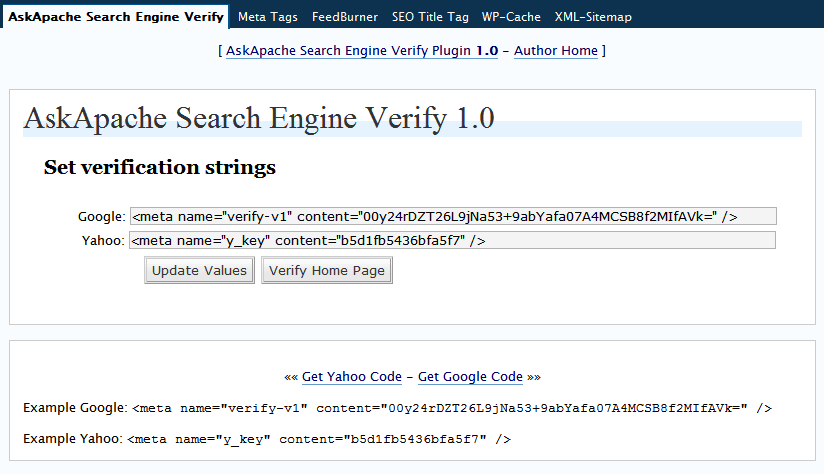 You may not think much about verifying your website with these search engines, but I am of the opinion it is extremely good for Search Engine Optimization (SEO). In fact, I read the other day on Google that if you buy a domain with a checkered past that has been punished by the search engines and you want it to be reincluded in the index this is what they recommended. Verify your sites.
These are a few of the mod_rewrite uses that BlogSecurity declared pushed the boundaries of Mod_Rewrite! Some of these snippets are quite exotic and unlike anything you may have seen before, also only for those who understand them as they can kill a website pretty quick.
 So, here's what I hacked together last night, that is being used today. It's essentially 2 files.
 One of the biggest speed bottlenecks of sites today are images, specifically unoptimized images or large scaled images. With Apaches Rewrite module we can convert all existing jpegs and png files (and most gifs) to webp, then transparently rewrite them so that a request for img.png from a browser that supports webp will receive img.webp.