Post by AskApache | Mar 06, 2024
 .htaccess is a very ancient configuration file for web servers, and is one of the most powerful configuration files most webmasters will ever come across. This htaccess guide shows off the very best of the best htaccess tricks and code snippets from hackers and server administrators.
You've come to the right place if you are looking to acquire mad skills for using .htaccess files!
.htpasswd 301 Redirect Apache Apache HTTP Server Cache Hosting Htaccess Htaccess Software HTTP Headers httpd.conf HyperText Transfer Protocol mod_rewrite Redirect RewriteCond RewriteRule SSL
Apr 30, 2021
.htaccess Topic vs htaccess Keyword
Apache Google Google Trends Htaccess SEO
Jul 22, 2016
Aug 20, 2014
 Turns every 404 Not Found error into a SEO traffic generating event! Help your site visitors find what they were looking for automatically by leveraging both Google and WordPress. It's one of about 6 plugins I use on every WP site I run. Highly recommend you try it for a few months.
«Take My 404 for a Test-Drive
404 Google 404 SEO wordpress WordPress Plugin
Jan 24, 2013
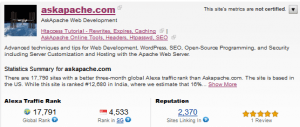 The Alexa Toolbar is a free search and navigation companion that accompanies you as you surf, providing useful information about the sites you visit without interrupting your Web browsing.
Alexa rank SEO traffic
Oct 17, 2008
This is part II of the Advanced SEO used on AskApache.com Series and describes how to control which urls are indexed by Search Engines and how to move them higher up in Search Results.
May 28, 2008
Learn how in a year, with no previous blogging experience this blog was able to rank so high in search engines and achieve 15,000 unique visitors every day. Uses combination of tricks and tips from throughout AskApache.com for Search Engine Optimization.
Mar 26, 2008
 Learn about the 7 different HTTP response codes specifically reserved for redirection. 301, 302, 303, 304, 305, and 307.
Mar 15, 2008
 Implementing an effective SEO robots.txt file for WordPress will help your blog to rank higher in Search Engines, receive higher paying relevant Ads, and increase your blog traffic. Get a search robots point of view... Sweet!
Google meta robots robots.txt SEO
Feb 28, 2008
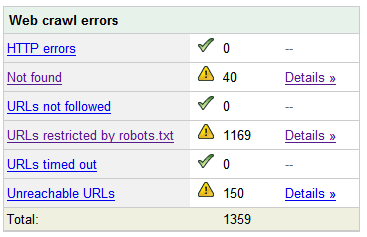 Nifty SEO tip to get Search Engine Bots to check your site every hour until you finish working on it and tell them you are finished.
Dec 14, 2007
 The secrets in this post were really more of enlightening bits of seo wisdom. The secret is how to combine robots.txt with meta robots tags to control pagerank, juice, whatever.
Nov 13, 2007
 Google AdSense calles their AdSense Ads, "Sponsored Links", while Text-Link-Ads.com recommends "Sponsored By". Of course it is against the Google Adsense TOS to rename your ads, but in general, for non-adsense, what do you like to call your sponsored links?
Oct 20, 2007
Very nice tutorial dealing with the robots.txt file. Shows examples for google and other search engines. Wordpress robots.txt and phpBB robots.txt sample files.
Oct 10, 2007
 I just received an email (I'm a VIP) from the Compete Search Analytics Team announcing that they are officially open to the public! Normally this would have 0 effect on me, I'm not into SEO tools, but this online resource is incredible!
Jul 02, 2007
AskApache.com won the contest for May! Thanks to all of you who voted for my site! Even though AskApache won the contest according to the rules, somehow they said I cheated by giving DreamHost too much free publicity and advertising. I love DreamHost!
May 31, 2007
 Every month a contest called DHSOTM is held for the highest rated website on DreamHost. By winning the contest your site gets SEO and traffic benefits, which I hope to measure soon.
May 10, 2007
WordPress robots.txt file can make a huge impact on your WordPress blogs traffic and search engine rank. This is an SEO optimized robots.txt file. robots.txt
Feb 06, 2007
Use these standards best-practices to achieve more powerful links in terms of SEO, EM, STRONG, DFN, CODE, SAMP, KBD, VAR, CITE, ABBR, and ACRONYM
Nov 20, 2006
One of the most cost-effective ways to drive traffic to your Web site is to optimize it for search engines. Many of them use automated programs called "crawlers" or "spiders" to create an index of the Web, which they use to determine what sites are most relevant to users' queries. These programs essentially visit Web sites, read the pages' content, and follow any links to other pages, repeating the process

