Password Protection Plugin Status
I wanted to address why the update to the AskApache Password Protection plugin didn't happen pre-2009 as I had hoped.. Mostly due to my job but I thought I could at least fill you in. Oh and this is going to get very boring very fast, unless you're ready to rumble in the zone.
File Permissions!
The main issue with the password protection plugin working for some people and not others is due to file permission configurations. WordPress is simply a group of .php files saved on your server. The actual program that is in fact running WordPress is the PHP interpreter, which is in turn controlled by the Apache Server. Almost all computers are running at least 2 servers, the Web Server which serves and displays your files, and a FTP server.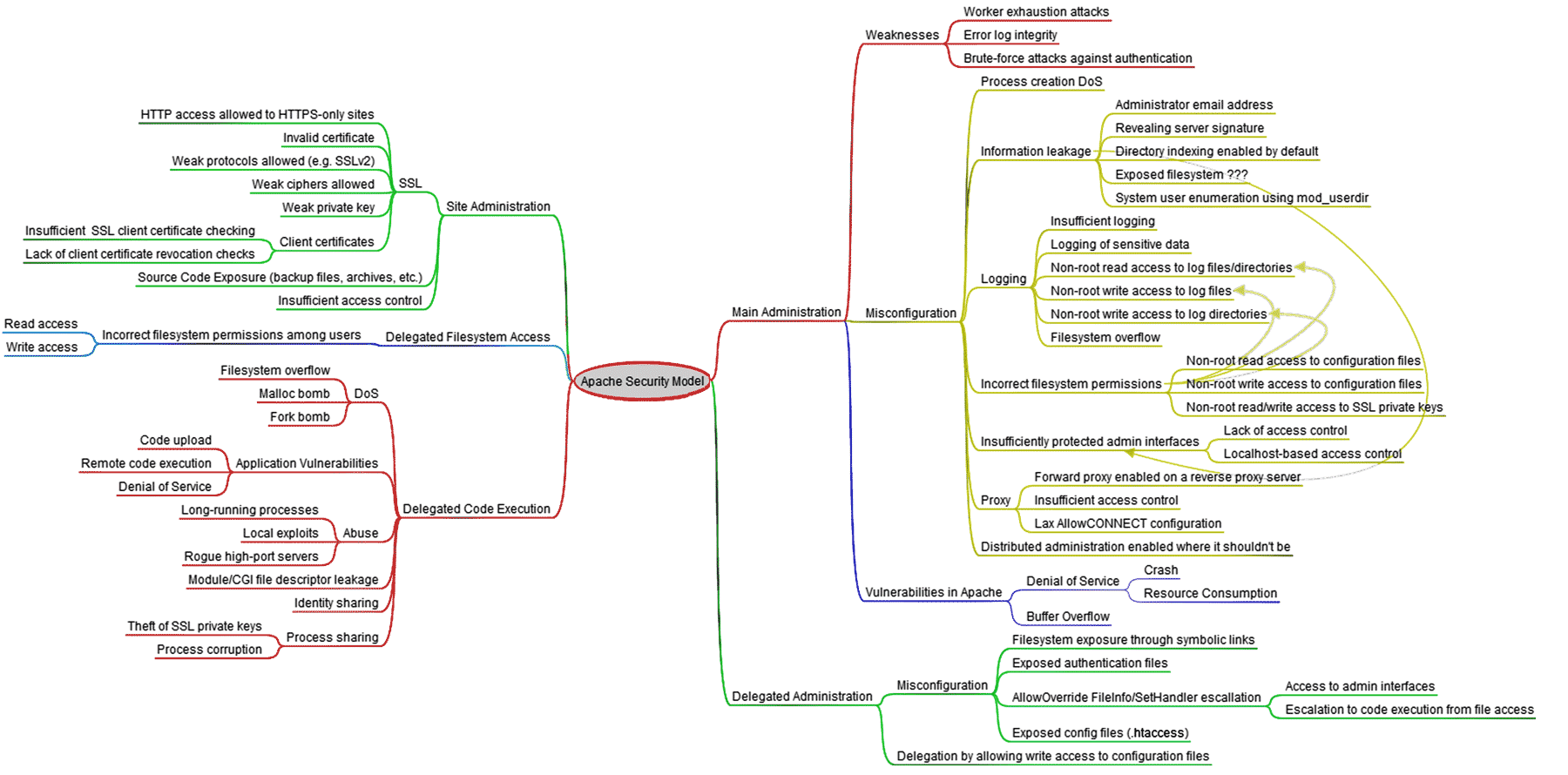 Here's a detailed look at the Apache Security Model, from ApacheSecurity.net, a blog maintained by Ivan Ristic, the author of ModSecurity.
The problem is happening because when you login to your FTP server with your username and password, the files that you upload are then owned by that username and password, which is almost always an actual user account on the server system. But the Apache Server is an executable file itself, and it is not owned by your FTP username, for security reasons. Apache controls the PHP Interpreter, which parses and executes the WordPress and plugin files as a separate user. ( SuEXEC, Apache Security Tips )
So what happens is theaskapache-password-protect.php file saved on your server and is owned by the user that created it (if you downloaded it to your computer then used ftp to transfer, your ftp user owns it.. if you used a php downloader script, then the php process owner owns it) So when you click on the Run Tests button from the WordPress administration website what you are doing is sending a request via HTTP to your Apache Server process, which sees the requested file is .php so it then runs the php interpreter to execute the askapache-password-protect.php file, then that file uses programming to attempt and write/modify a file in your blog's root directory.
Process Owner vs. File Owner
So who owns your blog's root directory? Your ftp user account/ you do.. but who owns the process that is trying to write/modify a file that is owned by your ftp user? The PHP Process that is actually executing the file access/write requests. This is the core way that 99% of all web sites get cracked into.. All these malicious robots and exploit bots do is attempt to write a file onto your server so that it can then be used to take over your site. If they can save a file on your blog's directory (uploads, insecure plugin code, not filtering user input, etc..) it inherits the permissions of the process that actually wrote the data bits onto the hard-drive. So some server-admins/web hosts configure the php interpreter to not have write access anywhere except for a couple neccessary locations like /tmp. They have auto-installation's available through their online web panels, meaning instead of executing .php scripts in your user directory as the php process they force you to use, they can bypass all that because the installation scripts they use are all on their systems, not on your "locked-down" cluster. This is the fundamental security battle that network server security is all based on.. Apache is owned by a powerful user because it owns the server process, so apache is often run as the user dhapache or nobody.. If a cracker is able to find a way to get a file saved on your server with the dhapache user as the owner then they've basically just gotten control of the whole thing. When you upload a file to your server using the add attachment form in wordpress, the file first goes through the dhapache user which passes the file to the php process owner which has much less permissions. Apache has been in open-source development for many many years now, its the safest most secure server in the world, windows servers are hackable, apache servers are hacked usually only when the sysadmin configures it wrong or accidentally. Believe it or not, as confusing as my feeble explanation was, this is only like .1% of whats going on.. I've basically spent the last several months developing the new version specifically to be able to work no matter what configuration you have. What I ended up doing was finding ways to bypass this security on a couple hosting providers that are setup in this way, but even though I got it to work in most instances it basically was hacking their systems, and if I published that code to automatically bypass web-hosts security setups I think I'd be in big trouble and they would just close those specific holes and the plugin would not work again. So I decided instead of exploiting host-specifics hacks to get the plugin to work that I would focus on the method that WordPress sorta uses. The code they have now (2.8 bleeding-edge) still isn't where it needs to be, but this is some difficult stuff and they have a brilliant start, it'll work.. just a question of when.wp-admin/includes/file.php
Ok so this function get_filesystem_method is a brilliant bit of code that would've been beyond my current PHP skills to come up with. It determines which if any of the following methods can be used to modify files on your server from within WordPress, which is exactly what the new version of the passpro plugin needs to use. The first test simply creates a file from within php using wp_tempnam, a function that attempts to locate and write to a temporary location on your server that has the best chance of having write access. If it is successfully created (this code assumes that it will be, something they need to fix) then the fileowner (uses stat internally) of the temp file just created is compared to the owner of the php script... Normally this works and then the plugin woks too, but on some hosts the script is running as a separate user than that of the file which means you can't directly access the local file system. That is what is occurring for most of you who experience permission problems while testing the plugin. There are thousands of caveats for each little part depending on your php version, php setup, server setup, server version, which Server API you are using, the type of SAPI being used, and on and on..
function get_filesystem_method($args = array()) {
	$method = false;
	if( function_exists('getmyuid') && function_exists('fileowner') ){
		$temp_file = wp_tempnam();
		if ( getmyuid() == fileowner($temp_file) ) $method = 'direct';
		unlink($temp_file);
	}
	if ( ! $method && isset($args['connection_type']) && 'ssh' == $args['connection_type'] && extension_loaded('ssh2') )
          $method = 'ssh2';
	if ( ! $method && extension_loaded('ftp') )
          $method = 'ftpext';
	if ( ! $method && ( extension_loaded('sockets') || function_exists('fsockopen') ) )
          $method = 'ftpsockets'; //Sockets: Socket extension; PHP Mode: FSockopen / fwrite / fread
	return apply_filters('filesystem_method', $method);
}
Enumerating Permissions can be Annoying
This was part of some tests I did to see what kind of access I had with the very helpful posix functions which are very accurate as well since they were designed for a system with file permissions, ie. not Win. Don't ask me how because I won't tell you, but on one of the hosts I was testing on that did not allow direct access I was able to get the Apache server running as dhapache to erroneously write a file into my users blog directory. This is a big security no-no and I now have my .htaccess file written into the blog directory where it should go, but instead of my php script's user having write access to the file so I can modify it, its owned by dhapache! Because the file is owned by dhapache I shouldn't even be allowed to know it exists, but there it is. So the next step was to try and take ownership of the .htaccess file so that I could modify it. I tried and tried but was unsuccessful, I couldn't modify it so that was another dead end. Actually it took me awhile to figure out how to remove the file from my directory. Being that it was owned by dhapache I couldn't delete or modify it using my php process or even through ftp/ssh! Sysadmins regularly run find commands that search the servers for any files owned by dhapache that should not be there as this is a big red flag that someone has found a way to manipulate dhapache which could potentially lead to modifying dhapche-owned server config files.. Luckily I was able to delete it by basically running the hack again to overwrite the file.
  if ((posix_setgid(getmygid())) !== false) $this->to_log('', 1,
      "Success Changing SETGID of {$file}	to " . getmygid(), 3);
  elseif ((posix_setgid(filegroup(__file__))) !== false) $this->to_log('', 1,
      "Success Changing SETUID of {$file} to " . filegroup(__file__), 3);
  if ((posix_setegid(getmygid())) !== false) $this->to_log('', 1,
      "Success Changing SETEGID of {$file} to " . getmygid(), 3);
  elseif ((posix_setegid(filegroup(__file__))) !== false) $this->to_log('', 1,
      "Success Changing SETEGID of {$file} to " . filegroup(__file__), 3);
  if ((posix_setuid(getmyuid())) !== false) $this->to_log('', 1,
      "Success Changing SETUID of {$file}	to " . getmyuid(), 3);
  elseif ((posix_setuid(get_current_user())) !== false) $this->to_log('', 1,
      "Success Changing SETUID of {$file} to " . get_current_user(), 3);
  if ((posix_seteuid(getmyuid())) !== false) $this->to_log('', 1,
      "Success Changing SETEUID of {$file} to " . getmyuid(), 3);
  elseif ((posix_seteuid(get_current_user())) !== false) $this->to_log('', 1,
      "Success Changing SETEUID of {$file} to " . get_current_user(), 3);
  if ((chmod($file, FS_CHMOD_DIR) || chmod($file, 0776) || chmod($file, 0766) || chmod($file,
    FS_CHMOD_FILE)) !== false) $this->to_log('', 1, "Success Changing Mode of {$file}", 3);
  if ((chown($file, getmyuid())) !== false) $this->to_log('', 1,
      "Success Changing Ownership of {$file} to " . getmyuid(), 3);
  elseif ((chown($file, get_current_user())) !== false) $this->to_log('', 1,
      "Success Changing Ownership of {$file} to " . get_current_user(), 3);
  if ((chgrp($file, getmygid())) !== false) $this->to_log('', 1,
      "Success Changing Group of {$file} to " . getmygid(), 3);
  elseif ((chgrp($file, filegroup(__file__))) !== false) $this->to_log('', 1,
      "Success Changing Group of {$file} to " . filegroup(__file__), 3);
  if ((chmod($file, FS_CHMOD_DIR) || chmod($file, 0776) || chmod($file, 0766) || chmod($file,
    FS_CHMOD_FILE)) !== false) $this->to_log('', 1, "Success Changing Mode of {$file}", 3);
  if ((chown($file, getmyuid())) !== false) $this->to_log('', 1,
      "Success Changing Ownership of {$file} to " . getmyuid(), 3);
  elseif ((chown($file, get_current_user())) !== false) $this->to_log('', 1,
      "Success Changing Ownership of {$file} to " . get_current_user(), 3);
  if ((chgrp($file, getmygid())) !== false) $this->to_log('', 1,
      "Success Changing Group of {$file} to " . getmygid(), 3);
  elseif ((chgrp($file, filegroup(__file__))) !== false) $this->to_log('', 1,
      "Success Changing Group of {$file} to " . filegroup(__file__), 3);
  return (!$this->_fclose($fh)) ? $this->to_log(__function__ . ':' . __line__ .
    " Error closing {$mode} handle for {$file}", 0) : $total;
If php process isn't allowed to write to your web directory but you have an ftp account that is, then we request your ftp username/password in wordpress and if the php process running the askapache-password-protect.php plugin script is allowed access to raw networking sockets using fsockopen then we can basically access and write to your blog's .htaccess file by using php to mimick an ftp client session. There are also other protocols and options available using php if ftp/fsockopen isn't allowed, but you run out of alternatives quick. Using the curl extension is one option.
So I wrote my own ftp library for a fsockopen class I had already developed for specific test requirements in unreleased versions, so the release of the new askapache password protect plugin will work for 75% or so of the people who have trouble now.. not to mention the insane logging and debugging I've added while looking for the reasons some web-hosts still don't work. Some use custom php security modules, wrappers, and custom virtual servers that are akin to a vmware server. So for maybe 10% of those running apache who have had problems they would still have them. I'm still playing with some ssh capability from within the plugin similar to the ftp technique.. I really hope WordPress just adds this functionality by updating their current filesystem classes..
Fsockopen Payload Class
Here's what I had several versions ago.. Just sticking it up here in case anyone is curious, one cool thing this version starts to incorporate is being able to send direct data payloads across the socket so it can be used like the metasploit framework to send payloads of exploits, but of course we're using it to mimick other protocols like ftp, which can be setup by feeding hex into the socket direct from a real ftp client, and piping the output. Keep in mind that this is my first time using php classes, so the learning curve has been incredible...
 '1.0', 'method' => 'GET', 'referer' =>
   'https://www.askapache.com/', 'port' => '80', 'ua' =>
   'Mozilla/5.0 (compatible; AskApache_Net/1.6; https://www.askapache.com/)', 'scheme' =>
   'http', 'transport' => '', 'host' => '', 'user' => '', 'pass' => '', 'path' => '/',
   'query' => '', 'fragment' => '');
  var $authtype = 'Basic';
  var $timeout = 15;
  var $_dh = '';
  var $_digest = array('realm' => '', 'nonce' => '', 'uri' => '', 'algorithm' => 'MD5',
   'qop' => 'auth', 'opaque' => '', 'domain' => '', 'nc' => '00000001', 'cnonce' =>
   '82d057852a9dc497', 'A1' => '', 'A2' => '', 'response' => '');
  var $_ACLF = "rn";
  var $_request_body = '';
  var $_request_headers = array();
  var $_response_headers = array();
  var $my_headers;
  var $_response_header = '';
  var $_response_protocol = '';
  var $_response_version = '';
  var $_response_code = '';
  var $_response_message = '';
  var $_response_body = '';
  var $_errs = array(3 => 'Socket creation failed', 4 => 'DNS lookup failure', 5 =>
   'Connection refused or timed out', 111 => 'Connection refused', 113 =>
   'No route to host', 110 => 'Connection timed out', 104 => 'Connection reset by client');

  /**
   * AskApache_Net::AskApache_Net()
   */
  function AskApache_Net()
  {
   return $this->__construct();
  }

  /**
   * AskApache_Net::__destruct()
   */
  function __destruct()
  {
   $this->_timer('class');
   return true;
  }

  /**
   * AskApache_Net::__construct()
   */
  function __construct()
  {
   $this->_timer('class');
   $this->_ACLF = chr(13) . chr(10);
   @set_time_limit(60);
   return true;
  }

  /**
   * AskApache_Net::hsockit()
   */
  function hsockit($URI)
  {
   $this->msg(__function__ . ':' . __line__, 3);
   $this->_socket['method'] = 'HEAD';
   return $this->sockit($URI);
  }

  /**
   * AskApache_Net::sockit()
   */
  function sockit($URI = '')
  {
   $this->msg(__function__ . ':' . __line__, 3);
   if (!$this->_build_sock($URI)) return $this->msg(__function__ . ':' . __line__,
     "Failed!", 0);
   if (!$this->_connect()) return $this->msg(__function__ . ':' . __line__, "Failed!", 0);
   $this->_build_request();
   if (!$this->_build_request()) return $this->msg(__function__ . ':' . __line__,
     "Failed!", 0);
   if (!$this->_tx()) return $this->msg(__function__ . ':' . __line__, "tx Failed!", 0);
   if (!$this->_rx()) return $this->msg(__function__ . ':' . __line__, "rx Failed!", 0);
   if (!$this->_disconnect()) return $this->msg(__function__ . ':' . __line__,
     "disconnect Failed!", 0);
   if ((bool)$this->net_debug === true) {
    foreach (array('out_payload', '_request_body', '_response_header', '_response_body') as
     $nam) {
     if (is_array($this->$nam)) {
      if (sizeof($this->$nam) > 1) {
       echo "nn{$nam}n";
       print_r($this->$nam);
      }
     } else {

      if (!empty($this->$nam)) {
       echo "nn{$nam}n";
       echo $this->$nam;
      }
     }
    }
    $this->tcp_trace(1);
   }
   return (int)$this->_response_code;
  }

  /**
   * AskApache_Net::_build_sock()
   */
  function _build_sock($url)
  {
   $this->msg(__function__ . ':' . __line__, 3);
   $socket_info = &$this->_socket;
   if (!$u_bits = parse_url($url)) return false;
   if (empty($u_bits['method'])) $u_bits['method'] = 'GET';
   if (empty($u_bits['protocol'])) $u_bits['protocol'] = '1.0';
   if (empty($u_bits['host'])) $u_bits['host'] = $_SERVER['HTTP_HOST'];
   if (empty($u_bits['scheme'])) $u_bits['scheme'] = 'http';
   if (empty($u_bits['port'])) $u_bits['port'] = $_SERVER['SERVER_PORT'];
   $u_bits['path'] = (empty($u_bits['path']) ? '/' : $u_bits['path']) . (!empty($u_bits['query']) ?
    '?' . $u_bits['query'] : '');
   if (empty($u_bits['ua'])) $u_bits['ua'] =
     'Mozilla/5.0 (compatible; AskApache_Net/1.0; https://www.askapache.com)';
   if (empty($u_bits['referer'])) $u_bits['referer'] = 'https://www.askapache.com';
   if (empty($u_bits['fragment'])) unset($u_bits['fragment']);
   if (empty($u_bits['user'])) unset($u_bits['user']);
   if (empty($u_bits['pass'])) unset($u_bits['pass']);
   if ($u_bits['scheme'] == 'https' || $this->_socket['scheme'] == 'https') $u_bits['transport'] =
     'ssl://';
   if ($u_bits['scheme'] == 'https' || $this->_socket['scheme'] == 'https') $u_bits['port'] =
     '443';
   $socket_info = $this->_parse_args($u_bits, $socket_info);
   extract($socket_info, EXTR_SKIP);
   return true;
  }

  /**
   * AskApache_Net::_build_auth_header()
   */
  function _build_auth_header()
  {
   $this->msg(__function__ . ':' . __line__, 3);
   if ($this->authtype == 'Basic') $this->_request_headers[] = 'Authorization: Basic ' .
     base64_encode($this->_socket['user'] . ":" . $this->_socket['pass']);
   elseif ($this->authtype == 'Digest') {
    $this->msg(__function__ . ':' . __line__, 3);
    $this->_socket['protocol'] = '1.1';
    $hdr = $mtx = array();
    preg_match_all('/(w+)=(?:"([^"]+)"|([^s,]+))/', $this->_dh, $mtx, PREG_SET_ORDER);
    foreach ($mtx as $m) $hdr[$m[1]] = $m[2] ? $m[2] : $m[3];
    foreach ($hdr as $key => $val)
     if (array_key_exists($key, $this->_digest) && !empty($val)) $this->_digest[$key] = $val;
    $this->_digest['uri'] = $this->_socket['path'];
    $this->_digest['A1'] = md5($this->_socket['user'] . ':' . $this->_digest['realm'] .
     ':' . $this->_socket['pass']);
    $this->_digest['A2'] = md5($this->_socket['method'] . ':' . $this->_socket['path']);
    $this->_digest['response'] = md5($this->_digest['A1'] . ':' . $this->_digest['nonce'] .
     ':' . $this->_digest['nc'] . ':' . $this->_digest['cnonce'] . ':' . $this->_digest['qop'] .
     ':' . $this->_digest['A2']);
    $this->_request_headers[] = sprintf('Authorization: Digest username="%1$s", realm="%2$s", nonce="%3$s",'.
		 'uri="%4$s", algorithm=%5$s, response="%6$s", qop="%7$s", nc="%8$s"%9$s%10$s',
     $this->_socket['user'], $this->_digest['realm'], $this->_digest['nonce'], $this->
     _digest['uri'], $this->_digest['algorithm'], $this->_digest['response'], $this->
     _digest['qop'], $this->_digest['nc'], !empty($this->_digest['cnonce']) ? ', cnonce="' .
     $this->_digest['cnonce'] . '"' : '', !empty($this->_digest['opaque']) ? ', opaque="' .
     $this->_digest['opaque'] . '"' : '');
   }
   return true;
  }

  /**
   * AskApache_Net::_build_request()
   */
  function _build_request()
  {
   $this->msg(__function__ . ':' . __line__, 3);
   $this->_request_headers[] = $this->_socket['method'] . " " . $this->_socket['path'] .
    " HTTP/" . $this->_socket['protocol'];
   if (is_array($this->my_headers) && sizeof($this->my_headers) > 0) $this->
     _request_headers = array_merge($this->_request_headers, $this->my_headers);
   else {
    $this->_request_headers[] = "Host: " . $this->_socket['host'];
    $this->_request_headers[] = "User-Agent: " . $this->_socket['ua'];
    $this->_request_headers[] = 'Accept: application/xhtml+xml,text/html;q=0.9,*/*;q=0.5';
    $this->_request_headers[] = 'Accept-Language: en-us,en;q=0.5';
    $this->_request_headers[] = 'Accept-Encoding: none';
    $this->_request_headers[] = 'Accept-Charset: ISO-8859-1,utf-8;q=0.7,*;q=0.7';
    $this->_request_headers[] = 'Referer: ' . $this->_socket['referer'];
   }
   if (!empty($this->_socket['user']) && !empty($this->_socket['pass'])) $this->
     _build_auth_header();
   if ($this->out_payload !== false) $this->_request_body = $this->out_payload;
   else  $this->_request_body = join($this->_ACLF, $this->_request_headers) . $this->
     _ACLF . $this->_ACLF;
   return true;
  }


  /**
   * AskApache_Net::_tx()
   */
  function _tx()
  {
   $this->msg(__function__ . ':' . __line__, 3);
   return (bool)(is_resource($this->_fp) && $this->_netwrite($this->_fp, $this->
    _request_body));
  }

  /**
   * AskApache_Net::_rx()
   */
  function _rx()
  {
   $this->msg(__function__ . ':' . __line__, 3);
   if (!is_resource($this->_fp)) return false;
   $this->_response = $this->_netread($this->_fp, 500000);
   $parts = explode($this->_ACLF . $this->_ACLF, ltrim($this->_response), 2);
   $this->_response_header = trim($parts[0]);
   $this->_response_body = trim($parts[1]);
   if (preg_match('#([^/]*)/([d.]+) ([d]*?) (.*)#', $this->_response_header, $htx)) {
    $this->_response_protocol = trim($htx[1]);
    $this->_response_version = trim($htx[2]);
    $this->_response_code = trim($htx[3]);
    $this->_response_message = trim($htx[4]);
   }
   if (preg_match_all('#([^:]+):?(.*)#', str_replace($htx, '', $this->_response_header),
    $mtx, PREG_SET_ORDER)) {
    foreach ($mtx as $m) {
     $this->_headers[strtolower(trim($m[1]))] = trim($m[2]);
     if (preg_match('/(WWW|Proxy)-Authenticate:.*Digest/i', trim($m[1]))) $this->_dh =
       trim($m[1]);
    }
   }
   return true;
  }

  /**
   * AskApache_Net::tcp_trace()
   */
  function tcp_trace($p = false)
  {
   $this->_timer(__function__ );
   $ret = join("n", array_merge((array )$this->_request_headers, array(''), (array )$this->
    _response_headers));
   if ($p !== false) {
    echo $ret;
    $ret = true;
   }
   $this->_timer(__function__ );
   return $ret;
  }

  /**
   * AskApache_Net::_get_ip()
   */
  function _get_ip($host)
  {
   $this->msg(__function__ . ':' . __line__, 3);

   if (!preg_match('/^[t ]*[0-9]+.[0-9]+.[0-9]+.[0-9]+[t ]*$/', $host)) $hostip =
     gethostbyname($host);
   $ip = ($hostip == $host) ? $host : long2ip(ip2long($hostip));
   return $ip;
  }

  /**
   * AskApache_Net::_connect()
   */
  function _connect()
  {
   $this->msg(__function__ . ':' . __line__, 3);
   if (false === ($this->_fp = fsockopen($this->_get_ip($this->_socket['host']), $this->
    _socket['port'], $errno, $errstr, $this->timeout)) || !is_resource($this->_fp)) {
    $err = (array_key_exists($errno, $this->_errs)) ? $this->_errs[$errno] :
     'Connection failed';
    return $this->msg(__function__ . ':' . __line__ . " Fsockopen failed! [{$errno}] {$err} ({$errstr})",
     0);
   }
   if (function_exists("socket_set_timeout")) socket_set_timeout($this->_fp, $this->
     timeout);
   elseif (function_exists("stream_set_timeout")) stream_set_timeout($this->_fp, $this->
     timeout);
   usleep(10000);
   return true;
  }

  /**
   * AskApache_Net::_disconnect()
   */
  function _disconnect()
  {
   $this->msg(__function__ . ':' . __line__, 3);
   if (is_resource($this->_fp)) return $this->_fclose($this->_fp);
   else  $this->_fp = null;
   return true;
  }

  /**
   * AskApache_Net::get_response_headers()
   */
  function get_response_headers($header = false)
  {
   $this->msg(__function__ . ':' . __line__, 3);
   if ($header !== false && array_key_exists($header, $this->_response_headers)) return $this->
     _response_headers[$header];
   return $this->_response_headers;
  }

  /**
   * AskApache_Net::get_response_body()
   */
  function get_response_body()
  {
   $this->msg(__function__ . ':' . __line__, 3);
   return $this->_response_body;
  }

  /**
   * AskApache_Net::_netread()
   */
  function _netread(&$fh, $ts = 50000000, $bs = 124)
  {
   $this->_timer(__function__ );
   for ($d = $b = '', $rt = $at = $r = 0; ($fh !== false && !feof($fh) && $b !== false &&
    $at < 50000000 && $rt < $ts); $r = $ts - $rt, $bs = (($bs > $r) ? $r : $bs), $this->
    _timer("R: {$rt}"), $b = fread($fh, $bs), $br = strlen($b), $d .= $b, $this->_timer("R: {$rt}"),
    $rt += $br, $at++, $this->msg("[RT: {$rt}]t[BR: {$br}" . (($ts != 50000000) ? "]tt [{$r} / {$ts}]" :
    " : {$bs}]t[{$at}]"))) ;
   $this->_timer(__function__ );
   return ((strlen($d) != 0)) ? $d : false;
  }

  /**
   * AskApache_Net::_netwrite()
   */
  function _netwrite(&$fh, $d = '', $bs = 512)
  {
   $this->_timer(__function__ );

   for ($bw = $wt = $at = 0, $dat = '', $ts = strlen($d); ($fh !== false && $bw !== false &&
    $at < 50000000 && $wt < $ts); $r = $ts - $wt, $bs = (($bs > $r) ? $r : $bs), $dat =
    substr($d, $wt, $bs), $bw = fwrite($fh, $dat), $wt += $bw, $this->msg("[WT: {$wt}]t[BW: {$bw}]tt[I: {$r} / {$ts}:{$bs}] - {$at}"),
    $at++) ;
   $this->msg("[WT: {$wt}]t[BW: {$bw}]tt[I: {$r} / {$ts}:{$bs}] - {$at}");
   $this->_timer(__function__ );
   return ($wt == $ts) ? true : false;
  }
 }
endif;
?>
So I decided to finally give in to what I've been avoiding all along and added a php-software-based method that will work on everycomputer, windows, blackberrys, etc.. That took me about 15minutes as its just a few lines of code.. The problem I have with it is that php is what is actually controlling the sending, receiving, and verifying of the authentication headers instead of using the builtin super-secure apache method.
Here's how you would block someone using the apache/askapache way:
[Exploit Request] => ([BLOCKED]-AskApache)This prevents the exploit from even reaching PHP, saving your computer a lot of CPU/memory and bandwdith, and obviously can't exploit wordpress if php isn't even loading. Here's how the php-software-based method blocks the same request:
[Exploit Request] => (AskApache) => (PHP) => (WordPress) => ([BLOCKED]-askapache-password-protect.php)So the last bit of programming and research I'm doing at the moment is how to cause the askapache-password-protect plugin to execute as soon as possible, ideally it would execute before WordPress starts.. And I am still crazy swamped at work, this was the longest non-posting period of the blog to date!
« Faster DNS LookupsSSI in Htaccess for ErrorDocuments, DirectoryIndexing, SEO »
Comments