FREE THOUGHT · FREE SOFTWARE · FREE WORLD

Home » WordPress »  Update: AskApache Password Protect Plugin

Update: AskApache Password Protect Plugin

by Charles Torvalds 13 comments

[hide]

Note: A lot of updates to this plugin are in the works, so this plugin should be considered BETA... than them.

Adding .htaccess based HTTP Basic Authentication to your WordPress blog is such a smart thing to do and I'm trying to help make it easier for you. Mainly because it stops alot of automated hacking attempts and exploits from ever being attempted, thus cutting down on the number of requests, connections, and mysql queries for all WordPress blogs on the Internet.
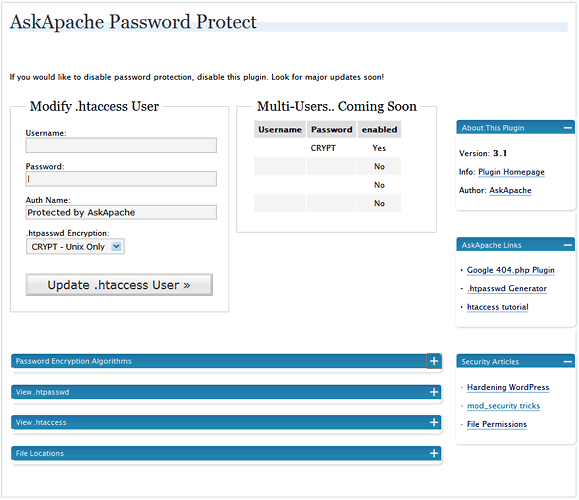
The Plugin Control Page

Upgrading Instructions
Just download and extract the new plugin file to wp-content/plugins/askapache-password-protect/ and activate it. It automatically deactivates and deletes previous versions.

New Features

Well, this is BETA for now, meaning it works but there are a lot of cool features I just didn't have time to include in this release. A lot of people were experiencing problems with the older version.

  • TONS of error checking and compatibility checks. This plugin WONT break your server.
  • Tests your servers ability to use .htaccess/.htpasswd files by setting them up in a temporary spot first and checking them. (ssl/https enabled)
  • Determines which .htpasswd Encryption Algorithms that your server supports by testing each one.
  • Provides all 4 htpasswd encryption formats that Apache explains
  • Uses php to generate the encrypted hashes for all 4 encryption formats using portable code. Even has the apache-specific MD5!
  • Allows you to specify and change the AuthName / Realm
  • I made this upgrade fool-proof, just the way I like it.
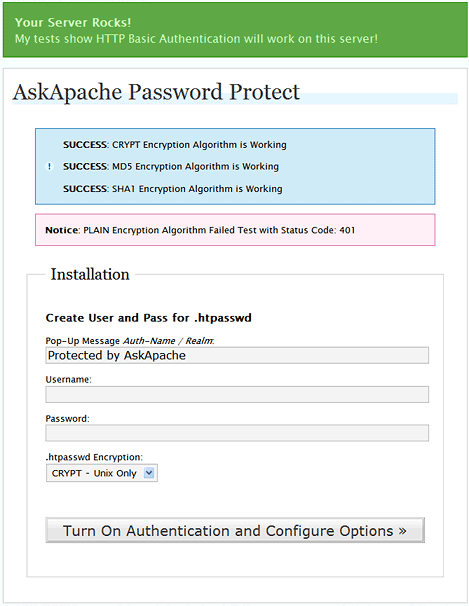
Easy Upgrade and Installation

Download New AskApache PassPro

Now hosted by WordPress.org

Current AskApache Password Protection: download | description

Whats Looks Like
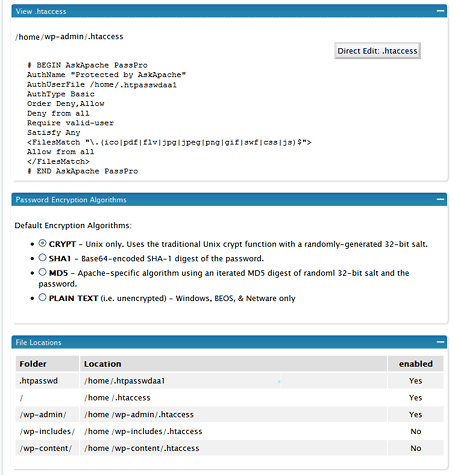
The Plugin Control Page

WordPress Security Plugin: Various Option Panels on Plugin Setup Page

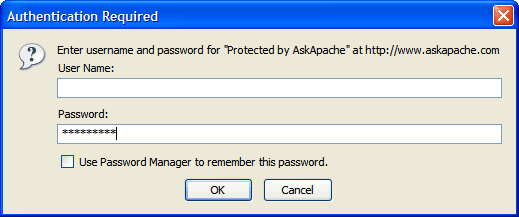
The HTTP Basic Authentication Password Prompt

Easy Upgrade and Installation

Install Problems
Known solutions to all the issues are in the works so prepare for the next release. In the meantime, the problem occurs because this version tries to save the encrypted htpasswd file ABOVE your document_root, obviously this isn't working very well for most wordpress users.


February 7th, 2008

Comments Welcome

  • http://www.couchmouse.net Mike

    wordpress 2.3.3 on apache server.
    I have been using version 2.0 of this plug in. I followed your upgrade instructions for 3.1 and have the following errors...

    1. Upon activating the new version it did NOT deactivate and delete the previous version. I cleared cache and reloaded plugins page several times and checked via ftp.
    2. At control panel of new version I get FATAL ERROR Please disable this plugin but dont delete, updates are on the horizon and a suggestion I use Apache on server (I am)
    3. The error logs show the following problems...

    PHP Warning: file_exists() [<a href='function.file-exists' rel="nofollow">function.file-exists</a>]: open_basedir restriction in effect. File(/.htpasswdaa1) is not within the allowed path(s):
    Will this be fixed in the near future? Or what can I do at my end to fix it?
    Thanks
  • BlueMushrooms

    Ooookay, I installed this, and now I get a 404 page when I try to access any page in the admin panel. I deleted the plugin AND the test folder it made, and still the problem persists.

  • http://bluemushrooms.com BlueMushrooms

    Never mind - I found the htaccess it wrote in the admin folder, deleted that, and now I'm fine.

  • http://www.directory411.us/ Mike

    Very nice plugin setup and configuration. It creates the files in the directories. I am using the latest version and WP 2.3.3 on a Linux/Apache hosted server.

    However, I am having a similar problem as others on the old version's comments... 404 Not Found errors when trying to access the wp-admin directory. The comments I read under the old version post didn't have any answers - that I could find. So, what is the fix for this?

    Thank you for your hard work and effort on this plugin.

  • newuser

    I have uploaded the latest version with my updated wordpress install; my server is running php5, and tells me that it is apache, although when I do this:

    /phpinfo.php

    I get server api: CGI.

    Anyway, This will not install, telling me my server's not good enough... not much I can do about this, since I'm buying host time at hostgator...

    I like the idea of this plugin and hope it can be made to work.

    Oh, the error it gives me when I try to active is error 500.

    Thx

  • ccpetersen

    I am using Wordpress 2.3.3, hosted on my site, which is hosted by hostgator. I am using PHP5. My server details are:

    Apache/1.3.37 Server at site Port 80

    Yet, when I go to activate this and set the config, it tells me that my server can't handle the program. I get an error 500.

    Can you advise?

  • Ivan

    Is it possible to use Windows Live Writer with your plugin?

  • Will

    Same error here Mike and:

    Warning: Wrong parameter count for sha1() in /wp-content/plugins/askapache-password-protect/askapache-password-protect.php on line 532

    Warning: touch() [function.touch]: Unable to create file /.htpasswdaa1 because Permission denied in /wp-content/plugins/askapache-password-protect/askapache-password-protect.php on line 413

  • norvo

    hi, great idea for a plugin. however, like a lot of the others i read in the comments, i also get a 404 page and can not access the wp-admin directory. nor does it prompt me for a username or password. any fix for this?

    it would also be great if you could add something like this to the .htaccess file in the root of the blog directory (seperate from the other wordpress variables:

    Options All -Indexes
     
    RewriteEngine On
    RewriteBase /
    RewriteCond %{THE_REQUEST} /(wp-includes|wp-content)/.* HTTP/
    RewriteCond %{HTTP_REFERER} !^http://(www.)yourdomain.com/.*$ [NC]
    RewriteRule .* - [F]
     

    this would exclude people for browsing or direct calling the plugins or template stuff except for the blog software itself. just a thought :)

  • Andi

    I get the error

    Warning: Wrong parameter count for sha1() in /public_html/sitename/wp-content/plugins/askapache-password-protect.php on line 532
  • highhopesgardens

    I added the askapache password plugin to my 2.5.2 wordpress blog hosted on Yahoo (never found any warnings in install documentation on Wordpress against this) and now I cannot access my dashboard to remove the plugin (or do anything else on my blog). There are not any .htaccess files or password files that I can see in Yahoo file manager or filezilla. After I installed it and gave user name and password, the first login, it refuses my username and password and I'm locked out of my own blog. How can I fix this, short of blowing everything away and reinstalling Wordpress and my backups?

  • http://profile.bradbeckett.com Brad Beckett

    I figured it out... you have to FTP in and make sure all your .htaccess files in your mail /public_html/wp-admin/ is CHMOD 755 and /public_html/.htpasswda1 file is also CHMOD 755

    Works for me!

  • Robert

    @ Ivan. After having installed the plugin, I couldn't use the Windows Live Writer any longer. All I got was a "403 forbidden" error. Then I played around with activating and deactivating the security modules in the plugin configuration. Now I know at least one thing for sure: The module "1022 BAD Content Type Denies any POST request with a content type other than application/x-www-form-urlencoded|multipart/form-data" blocks WLW. I deactivated it - now WLW has access to my blog again.

My Online Tools

Related Articles
Twitter

  • askapache: Today in 1965 DEC announces PDP-8
  • hubail: RT @askapache: Make sure you unplug your Ethernet when leaving the room, or disable wifi
  • askapache: Make sure you unplug your Ethernet when leaving the room, or disable wifi
  • askapache: My servers, and me, are getting annoyed. Fail2ban works fairly well against all the Chinese brute forcing going on
  • askapache: Can't the Chinese stop ordering their hackers to hack us? Ugh
  • askapache: All I want for my bday is a bottle of American whiskey :)
  • askapache: The first Dino fossil wasn't found until 1822, we sure are young
  • askapache: Htaccess - Ultimate HowTo:  t.co/XMmRKFIWuG 
  • askapache: Show Events that Occurred on this day in the Past:  t.co/5u33s4OolA 
  • askapache: Linux / UNIX: Create Large 1GB Binary Image File With dd Command  t.co/2xs3pvudOz  via @nixcraft

My Picks
Newest Posts

WordPress Development
Hacking and Hackers

The use of "hacker" to mean "security breaker" is a confusion on the part of the mass media. We hackers refuse to recognize that meaning, and continue using the word to mean someone who loves to program, someone who enjoys playful cleverness, or the combination of the two. See my article, On Hacking.
-- Richard M. Stallman


It's very simple - you read the protocol and write the code. -Bill Joy

Except where otherwise noted, content on this site is licensed under a Creative Commons Attribution 3.0 License, just credit with a link.
This site is not supported or endorsed by The Apache Software Foundation (ASF). All software and documentation produced by The ASF is licensed. "Apache" is a trademark of The ASF. NCSA HTTPd.
UNIX ® is a registered Trademark of The Open Group. POSIX ® is a registered Trademark of The IEEE.

Site Map | Contact Webmaster | License and Disclaimer | Terms of Service

↑ TOPMain