#### No https except to wp-admin -
# If the request is empty ( implies fopen or normal file access by a php script )
RewriteCond %{THE_REQUEST} ^$ [OR]

# OR if the request if for wp-admin or wp-login.php
RewriteCond %{REQUEST_URI} ^/(wp-admin|wp-login.php).*$ [NC,OR]

# OR if the Referer is https
RewriteCond %{HTTP_REFERER} ^https://www.askapache.com/.*$ [NC]

# THEN skip the following rule, basically all this does is force https or badhost to be redirected
# BUT because of the above 3 rewritecond's, this won't break poorly written admin scripts
RewriteRule .* - [S=1]

RewriteCond %{HTTPS} =on [OR]
RewriteCond %{HTTP_HOST} !^www.askapache.com$ [NC]
RewriteRule .* https://www.askapache.com%{REQUEST_URI} [R=301,L]

RewriteCond %{THE_REQUEST} ^[A-Z]{3,9} /(wp-admin/.*|wp-login.php.*) HTTP/ [NC]
RewriteCond %{HTTPS} !=on
RewriteRule .* https://%{SERVER_NAME}%{REQUEST_URI} [R=301,L]
Htaccess RewriteCond RewriteEngine RewriteRule
Fighting Blog Spam with Apache htaccess and other methods.
Htaccess

Just a quick reference to all those delicious unicode characters and how they render on the web‽‽
Web Development symbols Unicode
Web Professionals use mod_rewrite to issue 301 and 302 Redirects for Search Engines. Sometimes you may not have mod_rewrite.c or you want an alternative redirect method. Using mod_alias RedirectMatch you can use REGEX in Redirect commands!
Htaccess 301 Redirect SEO
Hosting
There are a total of 57 HTTP Status Codes recognized by the Apache Web Server. Wouldn't you like to see what all those headers and their output, ErrorDocuments look like?
Htaccess 403 404 500 503 Htaccess mod_rewrite PHP RewriteCond RewriteRule
Sometimes there is an urgent need for creating an exact duplicate or "mirror" of a web site on a separate server. This could be needed for creating Round Robin Setups, Load-Balancing, Failovers, or for just plain vanilla backups. In the past I have used a lot of different methods to copy data from one server to another, including creating an archive of the whole directory and then using scp to send the file over, creating an archive and then encrypting it and then sending that file over using ftp, curl, etc., and my persistence at learning new ways to do things has paid off because now I use rsync to keep an exact replica of the entire directory on an external server, without having to use all the CPU and resources of other mirroring methods.
Security rsync ssh
Today I successfully learned how to compile and run multiple custom php installations for a DreamHost account, and to get it working I came upon a simple shell script that I made a couple changes to.
Shell Scripting
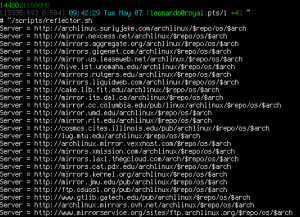 A pure bash alternative to the python reflector, using curl, xargs, and sort for ranking Arch Linux mirrors.
Nice and simple. Short and sweet.
Shell Scripting ArchLinux awk bash cURL Python reflector sed shell-script
Hosting compile inittab ssh
301 Redirects using Apache mod_rewrite or RedirectMatch in .htaccess or httpd.conf
Htaccess
Enumerating Permissions can be Annoying
Don’t ask me how because I won’t tell you, but on one of the hosts I was testing on that did not allow direct access I was able to get the Apache server running as dhapache to erroneously write a file into my users blog directory. This is a big security no-no and I now have my .htaccess file written into the blog directory where it should go, but instead of my php script’s user having write access to the file so I can modify it, its owned by dhapache! Because the file is owned by dhapache I shouldn’t even be allowed to know it exists, but there it is. So the next step was to try and take ownership of the .htaccess file so that I could modify it. I tried and tried but was unsuccessful, I couldn’t modify it so that was another dead end. Actually it took me awhile to figure out how to remove the file from my directory. Being that it was owned by dhapache I couldn’t delete or modify it using my php process or even through ftp/ssh! Sysadmins regularly run find commands that search the servers for any files owned by dhapache that should not be there as this is a big red flag that someone has found a way to manipulate dhapache which could potentially lead to modifying dhapache-owned server config files, which sometimes is all it takes to hack your website and server.. Luckily I was able to delete it by basically running the hack again to overwrite the file.
WordPress
Google
 Just a very brief look at speeding up form submission by delegating the processing and bandwidth to your server, not your client.
PHP bottleneck cURL form fsockopen PHP snoopy
I've had a lot of people ask about the FeedBurner FeedCount image on AskApache. Specifically how to set it up with custom messages and different colors each page view... It is pretty sweet..
Hacking Feed Count FeedBurner Htaccess
 This is a big update from the last time I looked into this, when I enumerated 57 Status Codes that Apache 2.x was capable of handling. This list contains 83 Status Codes recognized by Apache. I compiled the latest 2.4.4 Apache in order to view the actual codes sent by a live server.. very cool. You can read about the newest HTTP Status Codes in RFC 6585.
Net Apache cURL ErrorDocument Htaccess HTTP HTTP Headers Redirect Status Code
To prepare for several upcoming articles on AskApache that are focused on optimizing Servers and Sites from a server admin level, here is an article to introduce the main tools that we will be using. These tools are used to optimize CPU time for each process using nice and renice, and other tools like ionice are used to optimize the Disk IO, or Disk speed / Disk traffic for each process. Then you can make sure your mysqld and httpd processes are always fast and prioritized.
Optimization CFQ Idle linux Linux scheduler Load Nice RAM Scheduling algorithms
Since I was disqualified and accused of cheating, which is absolutely false, I decided to go ahead and do the crime I have been punished for. That's right, I'm going to show YOU how I could have rigged the DHSOTM contest to hopefully make the statement that I absolutely did not cheat and I absolutely want to be re-instated as the winner. Hosting
 This is not your everyday vimrc. This is my personalized vimrc.. works especially great on remote servers, in tmux, screen, etc.
This doesn't require a git checkout, a vim update, a bash update, an OS update, a plugin. No. 1 vimrc, 1 colorscheme, just use curl to download and it's on. I use this on Arch Linux, NetBSD, FreeBSD, OpenBSD, Debian, Ubuntu, Cent OS, Red Hat, and that's mostly it so far.
If you aren't already using vim as your primary editor in a powerful way, you are gonna owe me for this.
Linux .vimrc 256 Color Vim
One way I speed up AskApache.com is by downloading external third-party javascript files to host on my own server instead of externally. In addition to the obvious speed boost, this lets you configure the caching and compression settings for the files.
Javascript
SetEnv, SetEnvIf, and SetEnvIfNoCase directives conditionally set environment variables accessible by scripts and apache based on HTTP Headers, Variables, and Request information.
Htaccess Environment variable FilesMatch Header Htaccess SetEnvIf SetEnvIfNoCase
 Host Google Analytics ga.js file locally for increased speed! Makes web pages load faster.
Google
 Part II: Example illustrating how to speed up GET/POST form submissions. Uses fsockopen to initiate a server-side background request to process the submitted data, so that the result page of the form is displayed to the client lightningly quick.
PHP
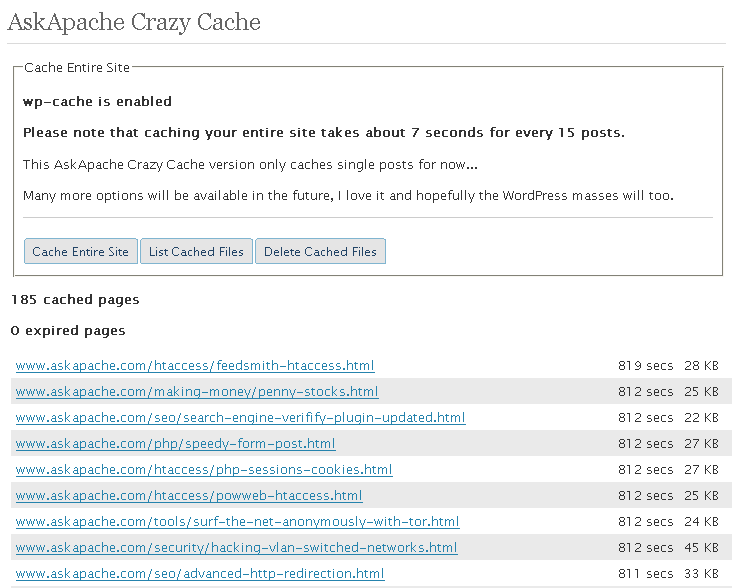
 A WordPress plugin that caches your entire blog for WP-Cache, I love this plugin and finally released it to the public!
WordPress