Speed Tips: Turn Off ETags
FREE THOUGHT · FREE SOFTWARE · FREE WORLD

Speed Tips: Turn Off ETags

ETags OffBy removing the ETag header, you disable caches and browsers from being able to validate files, so they are forced to rely on your Cache-Control and Expires header. Basically you can remove If-Modified-Since and If-None-Match requests and their 304 Not Modified Responses.

Entity tags (ETags) are a mechanism to check for a newer version of a cached file.

Easy Apache Speed Tips Articles

Please don’t turn off ETags and Last-Modified headers for your .html files, leave one of them ON. (I use Last-Modified for .html).

Turn ETags Off

This goes in your root .htaccess file but if you have access to httpd.conf that is better.

This code uses the FileETag and the Header directive to remove all ETags from being sent.

Header unset ETag
FileETag None

Example ETag Request and Response

Notice that the ETag performs the same service that Last-Modified header performs.

Response for /i/yahoo.gif

HTTP/1.1 200 OK
Last-Modified: Tue, 12 Dec 2006 03:03:59 GMT
ETag: "10c24bc-4ab-457e1c1f"
Content-Length: 12195

Later, if the browser has to validate a component, it uses the If-None-Match header to pass the ETag back to the origin server. If the ETags match, a 304 status code is returned reducing the response by 12195 bytes for this example.

GET /i/yahoo.gif HTTP/1.1
Host: us.yimg.com
If-Modified-Since: Tue, 12 Dec 2006 03:03:59 GMT
If-None-Match: "10c24bc-4ab-457e1c1f"
HTTP/1.1 304 Not Modified

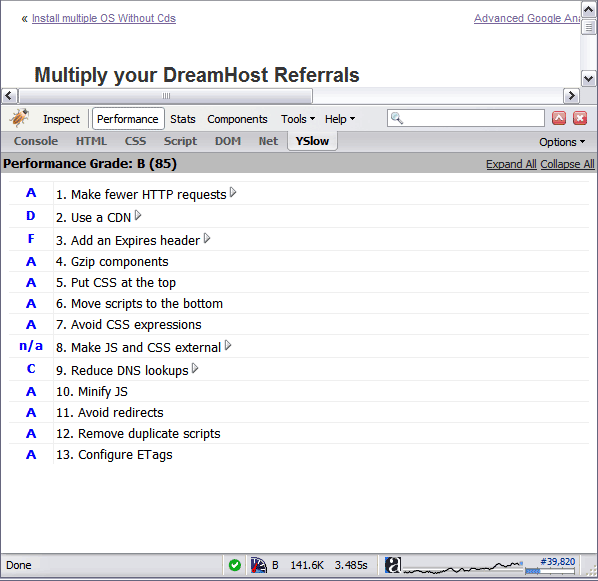
With ETags
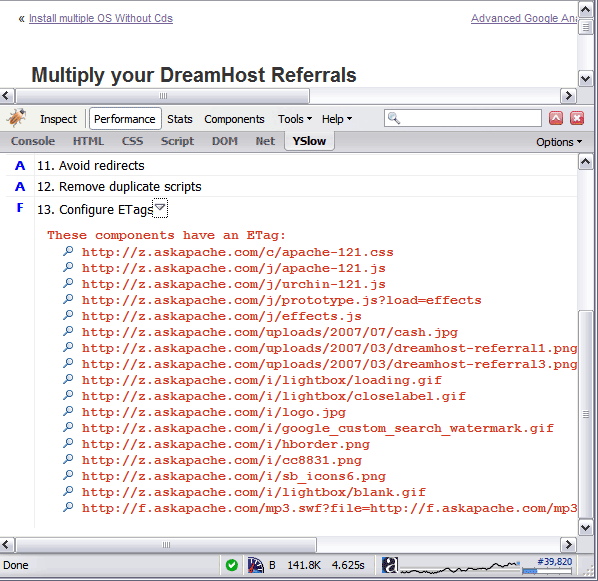
ETags OnThe problem with ETags is that they typically are constructed using attributes that make them unique to a specific server hosting a site. ETags won’t match when a browser gets the original component from one server and later tries to validate that component on a different server, a situation that is all too common on Web sites that use a cluster of servers to handle requests. By default, both Apache and IIS embed data in the ETag that dramatically reduces the odds of the validity test succeeding on web sites with multiple servers.

Without ETags

ETags Off


«
»

Leave your own comment

Reader Comments

  1. Kent Richards ~

    I tried many combinations from the various articles on askapache and on Google’s help pages, but the browser wasn’t caching.

    Finally, I removed FileETag None, and it cached as expected.

    If you’re having problems and have the distributed content concern mentioned in this article, try FileETag Size, or FileETag MTime with attention to preserving modification times on files when mirroring.

    Docs: http://httpd.apache.org/docs/2.2/mod/core.html#fileetag

  2. Eren Emre Kanal | UI Designer + Coder. San Francisco, CA » Blog Archive » How to increase your YSlow! score? ~

    [...] my ETags score was F. So I added these codes to my .htaccess file. It’s now a B. Why not A? Because, there is a JavaScript file for my web [...]

  3. Dr. Kenneth Noisewater ~

    Including the inode in a load-balanced group of webservers will likely guarantee too much uniqueness in generated ETags, but how about just filesize and timestamp?

    FileETag MTime Size

    should do the trick I’d think? Or possibly leave off the Size attribute?

    Too bad ETag isn’t a proper hash value on the file contents (at least as an option)..

  4. Yvar ~

    Ok, I read all articles regarding this subject, but the cache-ing confuses me. As I understand it, there are several ways to configure the cache? (header set cache-control and expirebytype??)

    If I do the following, would that be all right, and what happens when I change a css or js file with this configuration?

    Header unset ETag
    FileETag None
    Header unset Last-Modified
    Header set Cache-Control "public, no-transform"
    Header set Cache-Control "public, must-revalidate"
    ExpiresActive On
    ExpiresDefault "access plus 1 days"
    ExpiresByType text/html "access plus 5 minutes"
    ExpiresByType image/gif "access plus 1 years"
    ExpiresByType image/jpeg "access plus 1 years"
    ExpiresByType image/png "access plus 1 years"
    ExpiresByType text/css "access plus 1 years"
    ExpiresByType text/javascript "access plus 1 years"
    ExpiresByType application/x-javascript "access plus 1 years"
    

    Thank you.

  5. Rex ~

    Can anyone clairfy this from above
    Please don’t turn off ETags and Last-Modified headers for your .html files, leave one of them ON. (I use Last-Modified for .html).

    askapache says to turn etags off, how do you leave then on for .html files?

    Thanks

  6. bdigit ~

    Actually if you are using multiple apache servers you should just modify how the ETag is generated rather than turn them off. The defaullt is inode-lastmodified-size IIRC. Just remove the inode part and then your etags will match across the servers.

  7. Matt ~

    How do you turn off etags just for static files like images?

  8. AskApache ~

    @ Steven

    The Yahoo Developer Best-Practices Exceptional Performance Group are the creators of the yslow extension for firebug that recommends removing them.

    But you can’t just remove them or keep them because some blogger or new book says too. You have to do your own research and understand for yourself what the best-practice is.

    Etags exists only as an alternative to checking the Last-Modified header as a method of validating the freshness of a file to determine whether it should be re-requested and emptied from the cache, or whether it should stay in the cache.

    Even though all proxies are supposed to be following a defined set of standards for handling these types of data, not all do. But one thing is true, if you make sure that you provide at least one valid way for the proxy/client to determine how long the file should be cached, everything else is redundant and was created as an alternative not as a way to clog up the net with unneccessary HTTP headers

    .

  9. Steven Jomiel ~

    Note that this page provides the opposite advice that Yahoo developers are giving in the new book http://www.oreilly.com/catalog/9780596529307/ by Steve Souder, modulo the problem with etags including inode information when using multiple web servers.

Go for it!


It's very simple - you read the protocol and write the code. -Bill Joy

HTML | DCMI | GRDDL | XOXO | XDMP | XFN | DOM | XML | XHTML 1.1 Strict | CSS 2.1 | W3C

Except where otherwise noted, content on this site is licensed under a Creative Commons Attribution 3.0 License, just credit with a link.
This site is not supported or endorsed by The Apache Software Foundation (ASF). All software and documentation produced by The ASF is licensed. "Apache" is a trademark of The ASF. NCSA HTTPd.
UNIX ® is a registered Trademark of The Open Group. POSIX ® is a registered Trademark of The IEEE.

Site Map | Contact Webmaster | Glossary | License and Disclaimer | Terms of Service

↑ TOP
Main