« Chmod, Umask, Stat, Fileperms, and File PermissionsApache HTTPD and Module API Versions »
.htaccess Plugin Blocks Spam, Hackers, and Password Protects Blog

Well what can I say, other than this is sooo DOPE! Here is a list of the modules this plugin (version 4.7 unreleased) will automatically detect. I compiled the list myself using every module included with any default Apache installation for ALL the versions listed below, 1.3 to 2.2+
Want to know something else I’m including in this plugin? For each and every module that is detected, this plugin can then detect ALL of the modules .htaccess Directives! For instance, RewriteRule, AccessFileName, AddHandler, etc.. are each a directive belonging to a module that is allowed to be used from within .htaccess files.
Talk about sick.. these tricks have the diamond disease!
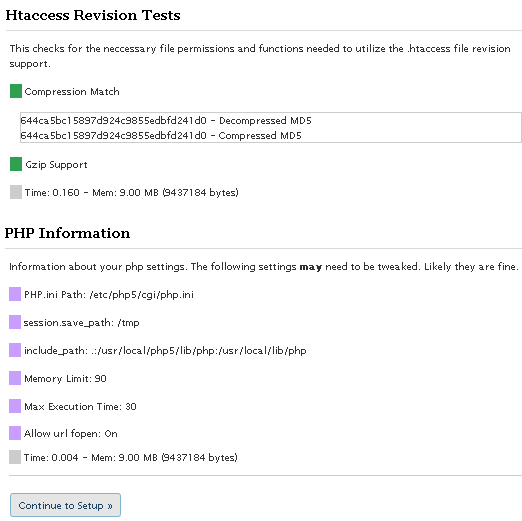
I’ve been making a lot of progress as these screenshots illustrate, including the ability to detect 100% accurately the modules that are enabled on your server. Big deal! you might say… “How does knowing the modules help?”
Well it just so happens that in addition to detecting which modules are loaded on your server, this plugin will also detect which Directives are enabled for each module that are allowed to be used from within your .htaccess file! Future release will provide the ability to explore the different .htaccess directives allowed by your server, so you can do all sorts of cool Apache .htaccess tricks to secure your blog and make it run better.
Future releases of this plugin will also let you search for non-default modules, wild, beta, and others.
The original plugin page and description can be found here.
To make a long story short, I downloaded each major release of the apache httpd source code from version 1.3.0 to version 2.2.10, then I configured and compiled each for a custom HTTPD installation built from source. This allowed me to find every directive allowed in .htaccess files for each particular version. YES!
http://wordpress.org/support/rss/topic/214390
I’ve been working on a completely improved version on/off for about a month with the specific goal of finally ending all the little errors that can crop up when dealing with .htaccess.To that effect I am succeeding marvelously, first I’ve converted the plugin to a class (4+5 compat), I’ve replaced my error_handling with WordPress’s WP_Error class, and the coolest change is the new tests I’ve added.
To make a long story short, I downloaded each major release of the apache httpd source code starting at version 1.3.0 and finishing with version 2.2.10, I then compiled each version and built a HTTPD from source for all the apache versions.
1.3.0,1.3.1,1.3.11,1.3.12,1.3.14,1.3.17,1.3.19,1.3.2,1.3.20,1.3.22,1.3.23,1.3.24,1.3.27,1.3.28,1.3.29,1.3.3,1.3.31,1.3.32,1.3.33,1.3.34,1.3.35,1.3.36,1.3.37,1.3.39,1.3.4,1.3.41,1.3.6,1.3.9,2.0.35,2.0.36,2.0.39,2.0.40,2.0.42,2.0.43,2.0.44,2.0.45,2.0.46,2.0.47,2.0.48,2.0.49,2.0.50,2.0.51,2.0.52,2.0.53,2.0.54,2.0.55,2.0.58,2.0.59,2.0.61,2.0.63,2.1.3-beta,2.1.6-alpha,2.1.7-beta,2.1.8-beta,2.1.9-beta,2.2.0,2.2.10,2.2.2,2.2.3,2.2.4,2.2.6,2.2.8,2.2.9Then I went through each version and determined the compatible modules for that version, and I’m pretty confident that I was also able to find each and every directive allowed by the compatible modules for that version (including core directives). See .htaccess directive list.
Basically I can now test a server using a variety of methods and determine almost 100% accurately what version of Apache (down to the API) is running, what modules (and versions) are enabled, and each and every directive that is allowed or disallowed for that version.
So this is so awesome because now we can enable all sorts of additional security features.
Other big changes are:
- Completely hands-off updates, so that updating the plugin keeps all your settings.
- making each SID module have its own configuration and options (like protecting individual files, individual request, and custom exploit strings).
- Advanced ErrorDocument usage and handling (like tracking repeat offenders and suggesting they be blocked, emailing admin with custom info, etc..)
- Multi User/Group password Control
And this time I am developing the plugin using a plethora of wordpress installations and configurations, to make sure that it will work regardless of a custom siteurl, blogid, etc..
Release will come before 2009.. I have some vacations to take and business to finish first.
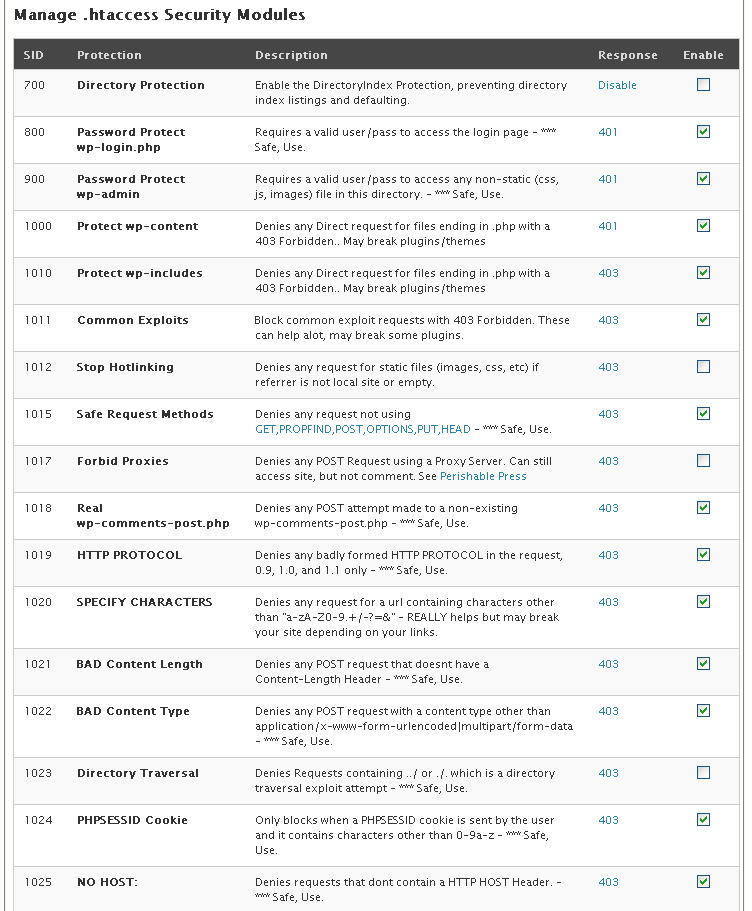
Enable the DirectoryIndex Protection, preventing directory index listings and defaulting. [Disable]
Options -Indexes DirectoryIndex index.html index.php /index.php
Requires a valid user/pass to access the login page - *** Safe, Use [401]
<Files wp-login.php> Order Deny,Allow Deny from All Satisfy Any AuthName "Protected By AskApache" AuthUserFile /home/askapache.com/.htpasswda1 AuthType Basic Require valid-user </Files>
Requires a valid user/pass to access any non-static (css, js, images) file in this directory. - *** Safe, Use [401]
Options -ExecCGI -Indexes +FollowSymLinks -Includes DirectoryIndex index.php /index.php Order Deny,Allow Deny from All Satisfy Any AuthName "Protected By AskApache" AuthUserFile /home/askapache.com/.htpasswda1 AuthType Basic Require valid-user <FilesMatch "\.(ico|pdf|flv|jpg|jpeg|mp3|mpg|mp4|mov|wav|wmv|png|gif|swf|css|js)$"> Allow from All </FilesMatch> <FilesMatch "(async-upload)\.php$"> <IfModule mod_security.c> SecFilterEngine Off </IfModule> Allow from All </FilesMatch>
Denies any Direct request for files ending in .php with a 403 Forbidden.. May break plugins/themes [401]
RewriteCond %{THE_REQUEST} ^[A-Z]{3,9}\ /wp-content/.*$ [NC]
RewriteCond %{REQUEST_FILENAME} !^.+flexible-upload-wp25js.php$
RewriteCond %{REQUEST_FILENAME} ^.+\.(php|html|htm|txt)$
RewriteRule .* - [F,NS,L]
Denies any Direct request for files ending in .php with a 403 Forbidden.. May break plugins/themes [403]
RewriteCond %{THE_REQUEST} ^[A-Z]{3,9}\ /wp-includes/.*$ [NC]
RewriteCond %{THE_REQUEST} !^[A-Z]{3,9}\ /wp-includes/js/.+/.+\ HTTP/ [NC]
RewriteCond %{REQUEST_FILENAME} ^.+\.php$
RewriteRule .* - [F,NS,L]
Block common exploit requests with 403 Forbidden. These can help alot, may break some plugins. [403]
RewriteCond %{REQUEST_URI} !^/(wp-login.php|wp-admin/|wp-content/plugins/|wp-includes/).* [NC]
RewriteCond %{THE_REQUEST} ^[A-Z]{3,9}\ ///.*\ HTTP/ [NC,OR]
RewriteCond %{THE_REQUEST} ^[A-Z]{3,9}\ /.*\?\=?(http|ftp|ssl|https):/.*\ HTTP/ [NC,OR]
RewriteCond %{THE_REQUEST} ^[A-Z]{3,9}\ /.*\?\?.*\ HTTP/ [NC,OR]
RewriteCond %{THE_REQUEST} ^[A-Z]{3,9}\ /.*\.(asp|ini|dll).*\ HTTP/ [NC,OR]
RewriteCond %{THE_REQUEST} ^[A-Z]{3,9}\ /.*\.(htpasswd|htaccess|aahtpasswd).*\ HTTP/ [NC]
RewriteRule .* - [F,NS,L]
Denies any request for static files (images, css, etc) if referrer is not local site or empty. [403]
RewriteCond %{HTTP_REFERER} !^$
RewriteCond %{REQUEST_URI} !^/(wp-login.php|wp-admin/|wp-content/plugins/|wp-includes/).* [NC]
RewriteCond %{HTTP_REFERER} !^http://www.askapache.com.*$ [NC]
RewriteRule \.(ico|pdf|flv|jpg|jpeg|mp3|mpg|mp4|mov|wav|wmv|png|gif|swf|css|js)$ - [F,NS,L]
Denies any request not using GET,PROPFIND,POST,OPTIONS,PUT,HEAD - *** Safe, Use [403]
RewriteCond %{REQUEST_METHOD} !^(GET|HEAD|POST|PROPFIND|OPTIONS|PUT)$ [NC]
RewriteRule .* - [F,NS,L]
Denies any POST Request using a Proxy Server. Can still access site, but not comment. See Perishable Press [403]
RewriteCond %{REQUEST_METHOD} =POST
RewriteCond %{HTTP:VIA}%{HTTP:FORWARDED}%{HTTP:USERAGENT_VIA}%{HTTP:X_FORWARDED_FOR}%{HTTP:PROXY_CONNECTION} !^$ [OR]
RewriteCond %{HTTP:XPROXY_CONNECTION}%{HTTP:HTTP_PC_REMOTE_ADDR}%{HTTP:HTTP_CLIENT_IP} !^$
RewriteCond %{REQUEST_URI} !^/(wp-login.php|wp-admin/|wp-content/plugins/|wp-includes/).* [NC]
RewriteRule .* - [F,NS,L]
Denies any POST attempt made to a non-existing wp-comments-post.php - *** Safe, Use [403]
RewriteCond %{THE_REQUEST} ^[A-Z]{3,9}\ /.*/wp-comments-post\.php.*\ HTTP/ [NC]
RewriteRule .* - [F,NS,L]
Denies any badly formed HTTP PROTOCOL in the request, 0.9, 1.0, and 1.1 only - *** Safe, Use [403]
RewriteCond %{THE_REQUEST} !^[A-Z]{3,9}\ .+\ HTTP/(0\.9|1\.0|1\.1) [NC]
RewriteRule .* - [F,NS,L]
Denies any request for a url containing characters other than “a-zA-Z0-9.+/-?=&” – REALLY helps but may break your site depending on your links. [403]
RewriteCond %{REQUEST_URI} !^/(wp-login.php|wp-admin/|wp-content/plugins/|wp-includes/).* [NC]
RewriteCond %{THE_REQUEST} !^[A-Z]{3,9}\ [a-zA-Z0-9\.\+_/\-\?\=\&]+\ HTTP/ [NC]
RewriteRule .* - [F,NS,L]
Denies any POST request that doesnt have a Content-Length Header - *** Safe, Use [403]
RewriteCond %{REQUEST_METHOD} =POST
RewriteCond %{HTTP:Content-Length} ^$
RewriteCond %{REQUEST_URI} !^/(wp-admin/|wp-content/plugins/|wp-includes/).* [NC]
RewriteRule .* - [F,NS,L]
Denies any POST request with a content type other than application/x-www-form-urlencoded|multipart/form-data - *** Safe, Use [403]
RewriteCond %{REQUEST_METHOD} =POST
RewriteCond %{HTTP:Content-Type} !^(application/x-www-form-urlencoded|multipart/form-data.*(boundary.*)?)$ [NC]
RewriteCond %{REQUEST_URI} !^/(wp-login.php|wp-admin/|wp-content/plugins/|wp-includes/).* [NC]
RewriteRule .* - [F,NS,L]
Denies Requests containing ../ or ./. which is a directory traversal exploit attempt - *** Safe, Use [403]
Only blocks when a PHPSESSID cookie is sent by the user and it contains characters other than 0-9a-z - *** Safe, Use [403]
Denies requests that dont contain a HTTP HOST Header. - *** Safe, Use [403]
RewriteCond %{REQUEST_URI} !^/(wp-login.php|wp-admin/|wp-content/plugins/|wp-includes/).* [NC]
RewriteCond %{HTTP_HOST} ^$
RewriteRule .* - [F,NS,L]
Denies obvious exploit using bogus graphics - *** Safe, Use [403]
RewriteCond %{HTTP:Content-Disposition} \.php [NC]
RewriteCond %{HTTP:Content-Type} image/.+ [NC]
RewriteRule .* - [F,NS,L]
Denies POST requests by blank user-agents. May prevent a small number of visitors from POSTING. [403]
RewriteCond %{REQUEST_METHOD} =POST
RewriteCond %{HTTP_USER_AGENT} ^-?$
RewriteCond %{REQUEST_URI} !^/(wp-login.php|wp-admin/|wp-content/plugins/|wp-includes/).* [NC]
RewriteRule .* - [F,NS,L]
Denies any comment attempt with a blank HTTP_REFERER field, highly indicative of spam. May prevent some visitors from POSTING. [403]
RewriteCond %{THE_REQUEST} ^[A-Z]{3,9}\ /.*/wp-comments-post\.php.*\ HTTP/ [NC]
RewriteCond %{HTTP_REFERER} ^-?$
RewriteRule .* - [F,NS,L]
Denies obvious trackback spam. See Holy Shmoly! [403]
RewriteCond %{REQUEST_METHOD} =POST
RewriteCond %{HTTP_USER_AGENT} ^.*(opera|mozilla|firefox|msie|safari).*$ [NC]
RewriteCond %{THE_REQUEST} ^[A-Z]{3,9}\ /.+/trackback/?\ HTTP/ [NC]
RewriteRule .* - [F,NS,L]
Redirects all non-SSL (https) requests to your https-enabled url [301]
Denies Obvious Spam and uses advanced mod_security protection [Read More]
« Chmod, Umask, Stat, Fileperms, and File Permissions
Apache HTTPD and Module API Versions »
The love of liberty is the love of others; the love of power is the love of ourselves.
-- William Hazlitt
The power of the Web is in its universality. Access by everyone regardless of disability is an essential aspect. Tim Berners-Lee
These errors appear at the top of the page for “Password Configuration” and “SID Module Management” when I click on any “Activate” (and a box of .htaccess code appears at the top). What is causing this?
Warning: array_merge() [function.array-merge]: Argument #1 is not an array in /home/prostro/public_html/wp-content/plugins/askapache-password-protect/askapache-password-protect.php on line 1316 Warning: join() [function.join]: Invalid arguments passed in /home/prostro/public_html/wp-content/plugins/askapache-password-protect/askapache-password-protect.php on line 1319 Warning: array_merge() [function.array-merge]: Argument #1 is not an array in /home/prostro/public_html/wp-content/plugins/askapache-password-protect/askapache-password-protect.php on line 1316 Warning: join() [function.join]: Invalid arguments passed in /home/prostro/public_html/wp-content/plugins/askapache-password-protect/askapache-password-protect.php on line 1319 Warning: array_merge() [function.array-merge]: Argument #1 is not an array in /home/prostro/public_html/wp-content/plugins/askapache-password-protect/askapache-password-protect.php on line 1316 Warning: join() [function.join]: Invalid arguments passed in /home/prostro/public_html/wp-content/plugins/askapache-password-protect/askapache-password-protect.php on line 1319
I’ve moved my .htaccess file from the wordpress directory to the directory below it (so that I can access my wp install through www.domain.com instead of www.domain.com/wordpress). Ask Apache doesn’t work for me in this case, it’s getting a lot of the directory setting wrong in the test (as seen from the verbose output). Any tips?
Eddie
It would be nice if you allowed the dates to show in these comments so we don’t waste our time looking at out of date problems and to be able to know what order they are in.
I’m not sure if this comment is even going to get posted because I wrote an answer to gon and it hasn’t appeared. Then I wrote a separate comment about problems I’m having and what steps I took. It was long and detailed. As soon as I clicked on the “Add Your Opinion” button, I got a page saying Firefox couldn’t find this page or the comment. The Back button didn’t get me back to the comments–everything is gone.
Without dates below, I have no way of knowing whether these are from 2005 or more recent. Is the developer still looking at the comments and working on solutions?
The plugin is a great idea and I’d like to get it to work. Even though I solved the mystery of the .htpasswda3 file, I am having problems with the plugin. Is it possible to run this plugin when WordPress is in a subdirectory of a regular HTML site that doesn’t require a logon to use?
In the tests, I put the absolute URL for where the blog is. The wording for this field is confusing. It says one or two URIs in the same space that require the same authname, username, and password. My site is not set up that way. A separate username and password is used for the blog. It is not the same as the FTP logon for the main site because I only want authors and contributors to the blog to have access to the blog and not the whole site.
Although I set the field pointing to the blog in the subdirectory, the .htpasswda3 file was created outside the blog directory. Assuming that most people will be working with a standalone WordPress installation, the .htpasswda3 file would normally be created in the root of the WordPress files. So I moved the file that was made outside the WordPress directory and put it into the WP root. Then I ran the test again and specified that link for the .htpasswda3 file in the WordPress directory.
I activated Password Protect wp-login.php and wp-admin. Then I tried to go to my blog and I keep getting an Authentication Required window that says: A username and password are being requested by http://www.domain.name. The site says: “Protected By AskApache” I’ve tried entering the FTP logon info but that isn’t accepted and I even tried the blog logon info even though the blog is not at that level. But nothing is accepted.
In addition, all the CSS styling for both the main site and the WordPress site is not being used. How would this plugin affect that?
I am hoping that this plugin will allow me to protect the WordPress directory, wp-login, and wp-admin from unwanted users and allow multiple registered authors, editors, and contributors to log on with a password. I’m going to remove the plugin until someone can tell me how to make it work with WordPress in a subdirectory. I am using WordPress 2.8.5.
I got the same error about the .htpasswda3. I looked at my files and it had been created but it had zero contents. I went back to the section below that error message and decided to click on the first module for Password Protect wp-login.php
That made the error message go away. In its place was a yellow box with the code that had been written to the .htaccess file.
hi! this pluging seems to be great but
im having a ERROR: Failed to create /home/user/.htpasswda3
my .htaccess is writable but i have a red box in
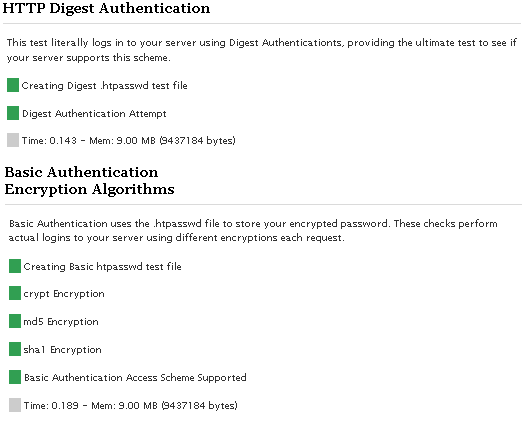
Digest Authentication Attempt and
2nd Digest Authentication Attempt
it may be the reason of my first error.
can i ask how to solve this?
Installed plug-in, ran tests, activated first two items on your plug-ins set up page, now I can’t access Wp-admin. Tried going to my cpanel and deleting everything in your plug-in. No help. I still can’t access my wp-admin. How to solve?
Hi, thanks for a great looking plugin.
I’m having problems however and I’m receiving this in the testing phase:
‘Bummer… you don’t have digest capabilities.’
and this is stopping the plugin from working.
What would cause this, and is it something I can do, or do I have to get onto my web host?
Thanks for any help with this.
hi there,
this plugin seems really good :)
However, when i installed it and tested it i got
the message that my server doesnt support authentication digest.
is there anything i can do to change this?
best , sarah
Norway
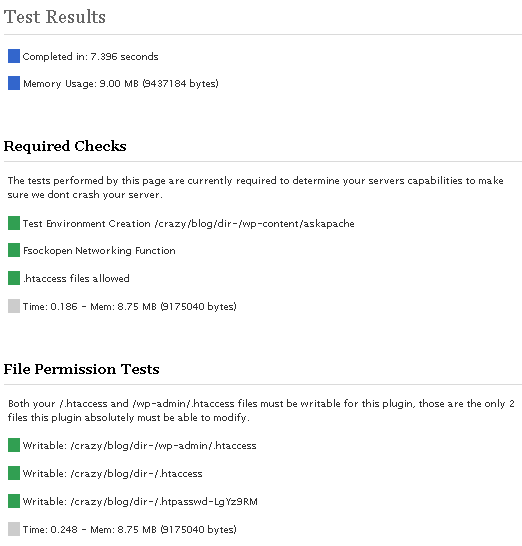
Hi, I am not able to use your plugin. The initial test fails. The result for “/wp-admin/.htaccess file writable” is shown twice. One time with a red status and one time with a green status. How could this be?
Best regards from Berlin – Germany, Phil
PS:
File Permission Tests If any of these checks fail this plugin will not work. Both your /.htaccess and /wp-admin/.htaccess files must be writable for this plugin, those are the only 2 files this plugin absolutely must be able to modify. If any of the other checks fail you will need to manually create a folder named askapache in your /wp-content/ folder and make it writable. [ ] /wp-admin/.htaccess file writable [ ] /wp-admin/.htaccess file writable [ ] /kunden/sassen.org/.htpasswda3 file writable [ ] Creating test folder [ ] Test folder writable [ ] Basic Auth htpasswd file writable [ ] Digest Auth htpasswd file writable [ ] .htaccess test file writable
So, how’s this coming along? I haven’t seen any new posts from you in a while… hope everything’s ok :)
My website is being broadcast in a frame using some kind of script. The jerk doing this accessed it somehow through an archive I reposted.
I found out the IP address (it’s in England). I blocked the IP from my host, but that didn’t work. I at least changed the contents of the post the site is broadcasting and I contacted Google ads to let them know the site is plagiarizing.
I am only savvy enough to add graphics. Will this plug-in help remedy this particular problem? This is the second time my site has been cloned or redirected. The first time the host took the site down ASAP. This time, I have had no response.
If you have any suggestions, I would greatly appreciate them.
The site that is stealing from me is:
http://tv. const anata .com/open.php?url=http://www.kneedeepinthehooah.com/2009/03/03/talkin-bout-my-generation/&title=Talkin019%20019bout%20my%20generation%20-%20Knee%20Deep%20in%20the%20Hooah!
my web host tells me the following WP 2.71 core files and variables are a security risk, for exploits:
index.php $_SERVER[DOCUMENT_ROOT],page errors.php $error
what can be done?
Hey, i uploaded the plugin to my blog, filled in the name and password and suddenly i cannot access my blog!!!!!
An error message appears:
Internal Server Error 500
Please help me, I’m desperate!
@Falcon
Thanks for your tip. We too had lost access to our site. Resetting the .htaccess brought the site back.
I need help. I think I have many SQL injections with strange url’s like:
mysite. com/"http:/www.mysite.com/category/uncategorized/ mysite. com/page/2/?url=spammers.we.bs%252Ftest.txt%253F%253F%253F mysite. com/2008/04/world-wide-food-crisis/\\
I’ve tried to use: Denies any request for a url containing characters other than "a-zA-Z0-9.+/-?=&
RewriteCond %{REQUEST_URI} !^/(wp-login.php|wp-admin/|wp-content/plugins/|wp-includes/).* [NC]
RewriteCond %{THE_REQUEST} !^[A-Z]{3,9}\ [A-Z0-9\.\+_/\-\?\=\&\%\#]+\ HTTP/ [NC]
RewriteRule .* - [F,NS,L]
It seems to help forbidding strange url’s, but I’m not sure about “may break your site depending on your links”
What does that mean? I used that code in my .htaccess file for about a week but took it off because I felt that my links and my site in Google SERP were slowly decreasing.
My question: Is that the effect or that code doesn’t affect incoming links?
Also, I still can’t fix an injection like:
mysite. com/?ref=www.spammers-www.spammers.com-www.spammers.com
I read some article advising the blocking of bad query strings like this:
RewriteCond %{QUERY_STRING} ftp\: [NC,OR]
RewriteCond %{QUERY_STRING} http\: [NC,OR]
RewriteCond %{QUERY_STRING} https\: [NC]
RewriteRule .* - [F,L]
But the next morning, I found a lot more strange url’s similar to those above. What can I do about this? I’m newbie with .htaccess. I don’t really know which one is the right one for my site.
Thanks.
Hi,
Are you still working on this plugin? (AAPP v4.7)
Thanks
I have very little understanding of PHP, and many of the terms you use are like a foreign language to me. I do understand though that you are making great leaps forward and things are going well for you! Keep up the great work, and good luck with future releases!
It was a db backup plugin who blocked me… it wasnt the .htaccess
I can’t believe you compiled 50+ (rough count) versions of Apache! Thanks for your hard work on this great (and soon to be better) plugin. The WP community owes you a debt of gratitude for your excellent work.
This is a very good plugin!!
I’ll test this on my test site first.
Oh btw if you are reading this.
Make a plugin or so to protect the upload folder.(Which is set by default by wordpress as wp-content/uploads)
Hacker are attempting hack my website with .htaccess files.
AddHandler cgi-script .php .pp
I chmod folder to 755 so i can remove all those hacker stuff.
Chmodding the upload folder to 777 was a bad idea.The hack thingy won’t go away lol.
You could email me if you want to see the .htaccess, .pp and the php file.
Hey, Thanks for this RAD plug-in. I am, however, having a little trouble getting it running. It may be that I am using WP v 2.6.3, but I keep getting an errors that my htpass and htacc are not readable or writeable. I’ve given them the proper permissions, and the self-diag even gives me greens, but I still get the errors when I’m doing pass protect or trying to add modules. Any help or thoughts would be greatly appreciated. Thanks.
These seem like some very important modifications although I am worried about having some plugins defaulting as a result.
Hi,
I have been searching for something like this since a client’s site got hacked. Works like a charm – not bot attacks anymore. But now my problem is getting in. The login / password as I remember entering it, won’t let me in. I tried to find the htaccess file through ftp, but can’t find it anywhere…What can I do to login or recover the password?
Thanks
Hey there,
I ran the tests and my server config failed so I couldn’t use it, but it looks like the site is delivering the following URL’s:
/category/breaking-news/?nomo=true
Which are not rewriting anything causing HTTP errors. Any advice on correcting this? Hope that’s a decent amount of information, I’m not the Apache whiz you are!
loving it…
Word of caution to those who host at GoDaddy.
I found that they process new htaccess files and edits only once per hour
which requires a serious wait time.
Needless to say, I will be seeking a new host.
awesome bunch of htaccess hacks – they work like a charm.
my main problem is other blog link directly to my pics sometimes, like www.site.com/wp-content/images/mypic.jpg and such.
Since this isn’t inclusion in their posts or pages it gets by the hotlinking filter. I mean, the referrer is my own domain, cause it comes up in a window from my site…but I don’t want people to see images like this directly (not in the context of a post or a page).
How do I stop this?
any help appreciated!
Have tried most of the setings with a live site and the rewrite stuff works so far on Apache 1.3.33 and Apache 2.2.xx.
This never worked for me. I’ve tried it with all kinds of proxies, but no blocking at all.
RewriteEngine On
RewriteCond %{HTTP:VIA} !^$ [OR]
RewriteCond %{HTTP:FORWARDED} !^$ [OR]
RewriteCond %{HTTP:USERAGENT_VIA} !^$ [OR]
RewriteCond %{HTTP:X_FORWARDED_FOR} !^$ [OR]
RewriteCond %{HTTP:PROXY_CONNECTION} !^$ [OR]
RewriteCond %{HTTP:XPROXY_CONNECTION} !^$ [OR]
RewriteCond %{HTTP:HTTP_PC_REMOTE_ADDR} !^$ [OR]
RewriteCond %{HTTP:HTTP_CLIENT_IP} !^$
RewriteRule ^(.*)$ - [F]
This:
RewriteCond %{REQUEST_METHOD} =POST
RewriteCond %{HTTP:VIA}%{HTTP:FORWARDED}%{HTTP:USERAGENT_VIA}%{HTTP:X_FORWARDED_FOR}%{HTTP:PROXY_CONNECTION} !^$ [OR]
RewriteCond %{HTTP:XPROXY_CONNECTION}%{HTTP:HTTP_PC_REMOTE_ADDR}%{HTTP:HTTP_CLIENT_IP} !^$
RewriteCond %{REQUEST_URI} !^/(wp-login.php|wp-admin/|wp-content/plugins/|wp-includes/).* [NC]
RewriteRule .* - [F,NS,L]
ends up in a 404. I for myself would say this is not a good solution. Personally i use a php script to block proxies and WHAT I THINK IS VWERY IMPORTANT the tor network.
This:
#Protect wp-content
#Denies any Direct request for files ending in .php with a 403 Forbidden.. May break plugins/themes
#RewriteCond %{THE_REQUEST} ^[A-Z]{3,9}\ /wp-content/.*$ [NC]
#RewriteCond %{REQUEST_FILENAME} !^.+flexible-upload-wp25js.php$
#RewriteCond %{REQUEST_FILENAME} ^.+\.(php|html|htm|txt)$
#RewriteRule .* - [F,NS,L]
stops firestats working and i know a lot of people prefer firestats over google analytics.
Sorry for asking, but for what is this ugly peace of rewrite:
RewriteCond %{REQUEST_METHOD} =POST
RewriteCond %{HTTP_USER_AGENT} ^.*(opera|mozilla|firefox|msie|safari).*$ [NC]
RewriteCond %{THE_REQUEST} ^[A-Z]{3,9}\ /.+/trackback/?\ HTTP/ [NC]
RewriteRule .* - [F,NS,L]
I use something like this:
RewriteRule ^wp-trackback\.php.*$ - [F,L]
-Dieter
Thanks for posting the actual code that goes into the .htaccess file! Yesterday morning I implemented a few of the edits and my site was working just fine. However, upon revisiting my site in the afternoon I got an immediate 500 Internal Server error. I thought this was strange because the site was working fine after I applied the edits to my .htaccess file. My web host’s tech support had to go in and reset my .htaccess file for me to regain access. Now, I apply each of your edits one at a time before proceeding to the next so I can isolate the exact entry that causes the problem.
Keep up the good work!
Every time I update the plugin, all my previous settings are wiped out. Is there a way to keep them? It forces me to redo my htaccess user/pass setting, as well as re-tick all the check boxes in the AA configuration page.
Sounds great,
could you please post a .htaccess example file generated by the plugin its maybe usefull for other CMS systems too.
would be great.
regards
good!
i wouldn’t use it due to some limitations, like user enabled wordpress andusing subdirectories and subdomains for some other things
Your list of bad robots to block in htaccess resolves everything for me
dude, my akismet doesn’t have spam for months!
Tags: .htaccess plugin, 301 Redirect, 401, 403 Forbidden, admin, Advanced, Anti-Spam, Apache, askapache, ASP, Cache, Cookies, CSS, Dig, Email, errordocument, feed, FilesMatch, Firefox, GET, Hacking, hotlinking, Htaccess, htaccess files, htaccess rewrite, htaccess tricks, Htpasswd, HTTP Headers, httpd, HTTPS SSL, Login, mod_include, Mod_Rewrite, Mod_Security, Mod_Setenvif, password, PDF, PHP, Port, post, Redirect, Request Method, Rewrite Tricks, rewritecond, rewriterule, Security, server, servers, SetEnvIf, Source Code, SSI, stat, SymLinks, trick, WordPress,
It's very simple - you read the protocol and write the code. -Bill Joy
HTML | DCMI | GRDDL | XOXO | XDMP | XFN | DOM | XML | XHTML 1.1 Strict | CSS 2.1 | W3C
Except where otherwise noted, content on this site is licensed under a Creative Commons Attribution 3.0 License, just credit with a link.
This site is not supported or endorsed by The Apache Software Foundation (ASF). All software and documentation produced by The ASF is licensed. "Apache" is a trademark of The ASF. NCSA HTTPd.
UNIX ® is a registered Trademark of The Open Group.
POSIX ® is a registered Trademark of The IEEE.
July 12, 2010
I’m trying to set up AskApache, but the radio buttons for Authentication Scheme and Encryption Preferences are greyed out. If I save the settings anyway, the .htpasswda3 file gets created, but there is no password information in it.
How do I resolve this?