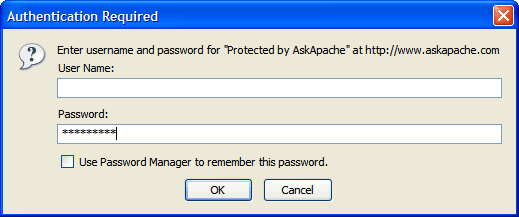
Note: A lot of updates to this plugin are in the works, so this plugin should be considered BETA… than them.
Adding .htaccess based HTTP Basic Authentication to your WordPress blog is such a smart thing to do and I’m trying to help make it easier for you. Mainly because it stops alot of automated hacking attempts and exploits from ever being attempted, thus cutting down on the number of requests, connections, and mysql queries for all WordPress blogs on the Internet.
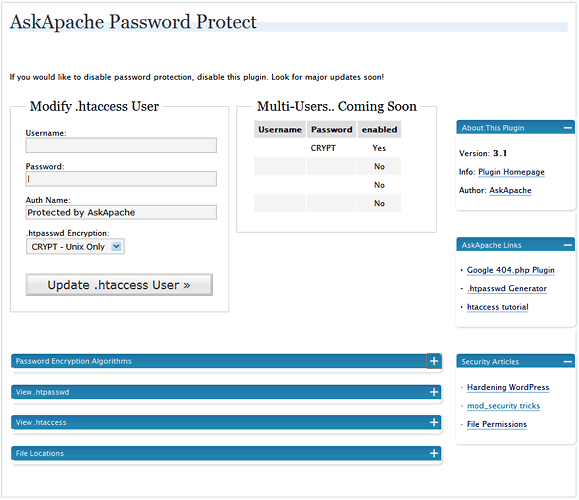
Upgrading Instructions
Just download and extract the new plugin file to wp-content/plugins/askapache-password-protect/ and activate it. It automatically deactivates and deletes previous versions.
New Features
Well, this is BETA for now, meaning it works but there are a lot of cool features I just didn’t have time to include in this release. A lot of people were experiencing problems with the older version.
- TONS of error checking and compatibility checks. This plugin WONT break your server.
- Tests your servers ability to use .htaccess/.htpasswd files by setting them up in a temporary spot first and checking them. (ssl/https enabled)
- Determines which .htpasswd Encryption Algorithms that your server supports by testing each one.
- Provides all 4 htpasswd encryption formats that Apache explains
- Uses php to generate the encrypted hashes for all 4 encryption formats using portable code. Even has the apache-specific MD5!
- Allows you to specify and change the AuthName / Realm
- I made this upgrade fool-proof, just the way I like it.
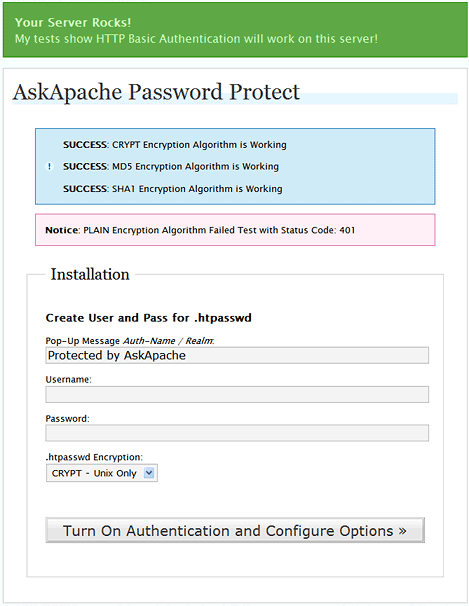
Download New AskApache PassPro
Now hosted by WordPress.org
Current AskApache Password Protection: download | description
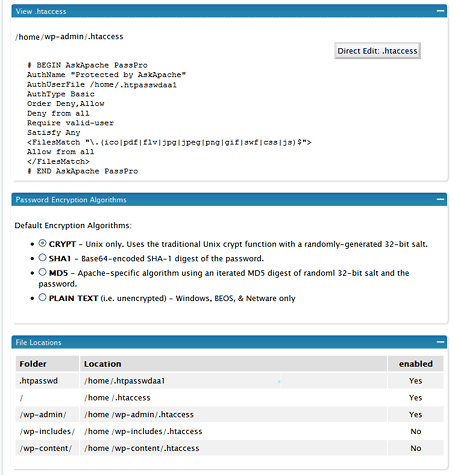
Whats Looks Like
Install Problems
Known solutions to all the issues are in the works so prepare for the next release. In the meantime, the problem occurs because this version tries to save the encrypted htpasswd file ABOVE your document_root, obviously this isn’t working very well for most wordpress users.
htpasswd -sha1 -md5 -wordpress -plugin -authentication -security
Related Articles
- WordPress Plugin for Apache .htaccess Security
- AskApache Password Protection, For WordPress
- Crazy Cache WordPress Plugin Released
- Troubleshooting Apache .htaccess Authentication
- WordPress RewriteRules Viewer
- Updated: WordPress RewriteRules Viewer Plugin
- Apache Authentication in htaccess
- htaccess Tricks for Webmasters


02.07.08 at 6:49 pm
wordpress 2.3.3 on apache server.
I have been using version 2.0 of this plug in. I followed your upgrade instructions for 3.1 and have the following errors…
1. Upon activating the new version it did NOT deactivate and delete the previous version. I cleared cache and reloaded plugins page several times and checked via http://ftp.
2. At control panel of new version I get FATAL ERROR Please disable this plugin but dont delete, updates are on the horizon and a suggestion I use Apache on server (I am)
3. The error logs show the following problems…
02.08.08 at 4:37 pm
Ooookay, I installed this, and now I get a 404 page when I try to access any page in the admin panel. I deleted the plugin AND the test folder it made, and still the problem persists.
02.08.08 at 4:40 pm
Never mind - I found the htaccess it wrote in the admin folder, deleted that, and now I’m fine.
02.08.08 at 6:53 pm
Very nice plugin setup and configuration. It creates the files in the directories. I am using the latest version and WP 2.3.3 on a Linux/Apache hosted server.
However, I am having a similar problem as others on the old version’s comments… 404 Not Found errors when trying to access the wp-admin directory. The comments I read under the old version post didn’t have any answers - that I could find. So, what is the fix for this?
Thank you for your hard work and effort on this plugin.
02.16.08 at 11:12 pm
I have uploaded the latest version with my updated wordpress install; my server is running php5, and tells me that it is apache, although when I do this:
/phpinfo.php
I get server api: CGI.
Anyway, This will not install, telling me my server’s not good enough… not much I can do about this, since I’m buying host time at hostgator…
I like the idea of this plugin and hope it can be made to work.
Oh, the error it gives me when I try to active is error 500.
Thx
02.17.08 at 1:31 pm
I am using Wordpress 2.3.3, hosted on my site, which is hosted by hostgator. I am using PHP5. My server details are:
Apache/1.3.37 Server at site Port 80
Yet, when I go to activate this and set the config, it tells me that my server can’t handle the program. I get an error 500.
Can you advise?
02.24.08 at 6:23 pm
Is it possible to use Windows Live Writer with your plugin?
03.01.08 at 8:42 am
Same error here Mike and:
Warning: Wrong parameter count for sha1() in /wp-content/plugins/askapache-password-protect/askapache-password-protect.php on line 532
Warning: touch() [function.touch]: Unable to create file /.htpasswdaa1 because Permission denied in /wp-content/plugins/askapache-password-protect/askapache-password-protect.php on line 413
03.01.08 at 7:24 pm
hi, great idea for a plugin. however, like a lot of the others i read in the comments, i also get a 404 page and can not access the wp-admin directory. nor does it prompt me for a username or password. any fix for this?
it would also be great if you could add something like this to the .htaccess file in the root of the blog directory (seperate from the other wordpress variables:
Options All -Indexes
RewriteEngine On
RewriteBase /
RewriteCond %{THE_REQUEST} /(wp-includes|wp-content)/.*\ HTTP/
RewriteCond %{HTTP_REFERER} !^http://(www\.)yourdomain\.com/.*$ [NC]
RewriteRule .* - [F]
this would exclude people for browsing or direct calling the plugins or template stuff except for the blog software itself. just a thought :)
03.09.08 at 3:05 pm
I get the error
03.25.08 at 7:01 pm
I installed your password plugin, not cannot get into admin panel. Did all you suggested, but cannot bring up admin… what did I do wrong?
thanks
lauren