Vetted – Top 3 WordPress Speed Plugins
There are so many WordPress plugins out there now that I wanted to post my favorite 3 plugins for speeding up a WP-Powered blog (including one of my plugins). These are the 3 plugins that I install for pretty much all of my WP-Powered sites, which I run about 300 now. They work together to provide a very optimized blog for speed.
Top 3 WordPress Speed Plugins
WP Caching Overview
Each request to your blog has to fire up the php interpreter and query the mysql database to create the output that you see in your browser. Using a plugin like WP Super Cache simply saves the output of that request as a static HTML file and serves that to a request instead of using php and mysql every time. DB Cache Reloaded takes this a step further by optimizing the mysql queries. Finally, AskApache Crazy Cache is used to keep a cache fully primed and ready.
Why Caching?
If you have a private server, or you want to keep your MEMORY, BANDWIDTH, and CPU usage down for your server, these plugins will be dramatic. If you have a site that is updated maybe once a month and gets a very small amount of traffic, then the AskApache Crazy Cache would be redundant. That plugin is geared for the heaviest traffic sites.
Request and Response
Most HTTP communication is initiated by a user agent (browser) and consists of a request to a resource on some origin server. In the simplest case, this may be accomplished via a single connection (v) between the user agent (UA) and the origin server (O).
             request chain ------------------------>
          UA -------------------v------------------- O
             <----------------------- response chain
If a browser requests a WP-driven page, the server generates the response (the outputted html) by loading a php interpreter or module to read the WP php files and load all the settings. WP stores the settings in a mysql database and has to query the mysql database for all the data (like the content of your post that becomes html). Finally php sends the output through the server back to the browser. This is the norm for most PHP applications. Every time an interpreter is loaded additional CPU and Memory are used. And perhaps even more troublesome for shared-hosting using a virtual or network filesystem, each load causes many hard-disk accesses, additional processes, etc.
Cache PHP
By saving the php-generated output of a page to a static html file, your server can entirely skip loading a php interpreter or other process. Originally servers were needed and created to essentially open a static file on disk and send that file back to the requesting user. So servers are specialized for this as it's their core function.
WP-Super cache does this for you by saving the output into a static html file, and by instructing the server to skip loading php. It basically only uses php for creating the cached version, in the same way that you can save this webpage as an html file, WP-Super cache saves all the WP-blog permalinks to static files.
DB-Cache Reloaded does something entirely different, it saves the mysql queries that are made to the WP-database, as well as the mysql results to static files, and then through php serves those cached-files instead of re-querying the mysql database. Most mysql databases are stored on separate servers, and although many are on the same local network there is a limit to how many queries, and how many connections can take place. But mysql is maybe the fastest thing I've seen, so your bottlenecks almost never happen there (if configured correctly).
So DB-Cache Reloaded basically makes WP-Super Cache work alot faster when generating the cache files, and DB-Cache Reloaded helps in a number of areas un-related to WP-Super Cache, like in the admin panel. And DB-Cache without WP-Super-Cache is a joke because it still uses the application-level and php for everything. Gotta use both (or just WPSC).
AskApache Crazy Cache is a plugin I wrote to do one thing very well, it runs at intervals via the WP-cron and forces WP-Super-Cache to create a static cache file for all the posts, pages, etc. on your site. Without this WPSC likes to do dumb things like try to manage it's own cache with stale files and expired files, which equals a lot more php interpreters getting loaded instead of cached static files. For sites with more than a visit/page/10minutes this plugin keeps a full primed cache built by WPSC.
Compression and WP-Super Cache
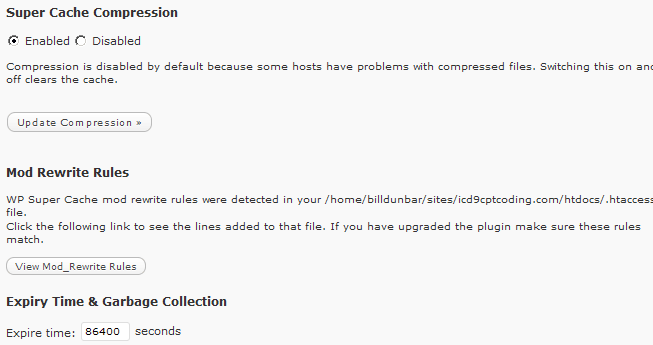
Enabling compression in WP-Super Cache is almost always a great idea. I've never had a problem other than some php compat issues with not-updated php installations. This option basically lets WP-Super Cache compress the generated output of a page and save that to the static file. Normally Apache, Lighttpd, Nginx, etc. open the static file and compress it before it is sent to the browser, then the browser automatically decompresses it to view. This happens so fast because it is run by the server.
This lets WPSC instruct your server to send the compressed version to all browsers that accept compression, and send the uncompressed static file to any other browsers. So this is helpful because it eliminates your server having to do any transparent compressing, it can instead just focus on what it does best, serving static files.
PHP is an application so it requires memory, hard-drive access, and CPU time. Check out the protocol hierarchy:
       +------+ +-----+ +-----+       +-----+
       |Telnet| | FTP | |Voice|  ...  |     |  Application Level
       +------+ +-----+ +-----+       +-----+
             |   |         |             |
            +-----+     +-----+       +-----+
            | TCP |     | RTP |  ...  |     |  Host Level
            +-----+     +-----+       +-----+
               |           |             |
            +-------------------------------+
            |    Internet Protocol & ICMP   |  Gateway Level
            +-------------------------------+
                           |
              +---------------------------+
              |   Local Network Protocol  |    Network Level
              +---------------------------+
DB Cache Reloaded
DB Cache Reloaded Plugin Page - News
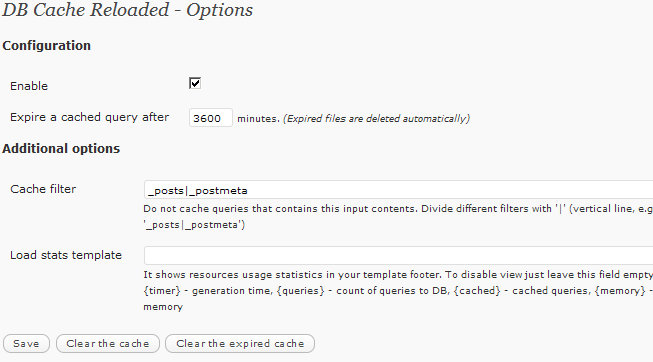 This plugin caches every database query with given lifetime. It is much faster than other html caching plugins and uses less disk space for caching.
I think you've heard of WP-Cache or WP Super Cache, they are both top plugins for WordPress, which make your site faster and responsive. Forget about them - with DB Cache Reloaded your site will work much faster and will use less disk space for cached files. Your visitors will always get actual information in sidebars and server CPU loads will be as low as possible.
Why is DB Cache Reloaded better than WP Super Cache?
This plugin is based on a fundamentally different principle of caching queries to database instead of full pages, which optimises WordPress from the very beginning and uses less disk space for cache files because it saves only useful information. It saves information separately and also caches hidden requests to database.
WP Super Cache
WP Super Cache Plugin Page - News
 This plugin generates static html files from your dynamic WordPress blog. After a html file is generated your webserver will serve that file instead of processing the comparatively heavier and more expensive WordPress PHP scripts.
The static html files will be served to the vast majority of your users, but because a user's details are displayed in the comment form after they leave a comment those requests are handled by PHP. Static files are served to:
· Users who are not logged in.
· Users who have not left a comment on your blog.
· Or users who have not viewed a password protected post.
99% of your visitors will be served static html files. Those users who don't see the static files will still benefit because they will see regular WP-Cache cached files and your server won't be as busy as before. This plugin will help your server cope with a front page appearance on digg.com or other social networking site.
Why is WP-Super-Cache better than WP-Cache?
This plugin is based on the excellent WP-Cache plugin and therefore brings all the benefits of that plugin to WordPress. On top of that it creates copies of every page that is accessed on a blog in a form that is quickly served by the web server. It's almost as quick as if the you had saved a page in your browser and uploaded it to replace your homepage.
Will the Super Cache compression slow down my server?
No, it will do the opposite in fact. Super Cache files are compressed and stored that way so the heavy compression is done only once. These files are generally much smaller and are sent to a visitor's browser much more quickly than uncompressed html. As a result, your server spends less time talking over the network which saves CPU time and bandwidth, and can also serve the next request much more quickly.
AskApache Crazy Cache
AskApache Crazy Cache Plugin Page - News
This sweet little plugin does one thing very well. It caches all the posts on your entire blog at the same time, if you are using WP-Cache, WP-Super-Cache, or Hyper-Cache.

                              +---------+ ---------      active OPEN
                              |  CLOSED |                -----------
                              +---------+<---------      create TCB
                                |     ^                   snd SYN
                   passive OPEN |     |   CLOSE
                   ------------ |     | ----------
                    create TCB  |     | delete TCB
                                V     |
                              +---------+            CLOSE    |
                              |  LISTEN |          ---------- |     |
                              +---------+          delete TCB |     |
                   rcv SYN      |     |     SEND              |     |
                  -----------   |     |    -------            |     V
 +---------+      snd SYN,ACK  /          snd SYN          +---------+
 |         |<-----------------           ------------------>|         |
 |   SYN   |                    rcv SYN                     |   SYN   |
 |   RCVD  |<-----------------------------------------------|   SENT  |
 |         |                    snd ACK                     |         |
 |         |------------------           -------------------|         |
 +---------+   rcv ACK of SYN         /  rcv SYN,ACK       +---------+
   |           --------------   |     |   -----------
   |                  x         |     |     snd ACK
   |                            V     V
   |  CLOSE                   +---------+
   | -------                  |  ESTAB  |
   | snd FIN                  +---------+
   |                   CLOSE    |     |    rcv FIN
   V                  -------   |     |    -------
 +---------+          snd FIN  /          snd ACK          +---------+
 |  FIN    |<-----------------           ------------------>|  CLOSE  |
 | WAIT-1  |------------------                              |   WAIT  |
 +---------+          rcv FIN                              +---------+
   | rcv ACK of FIN   -------   |                            CLOSE  |
   | --------------   snd ACK   |                           ------- |
   V        x                   V                           snd FIN V
 +---------+                  +---------+                   +---------+
 |FINWAIT-2|                  | CLOSING |                   | LAST-ACK|
 +---------+                  +---------+                   +---------+
   |                rcv ACK of FIN |                 rcv ACK of FIN |
   |  rcv FIN       -------------- |    Timeout=2MSL -------------- |
   |  -------              x       V    ------------        x       V
     snd ACK                 +---------+delete TCB         +---------+
     ------------------------>|TIME WAIT|------------------>| CLOSED  |
                              +---------+                   +---------+

                      TCP Connection State Diagram
« Custom bash_profile for Advanced Shell UsersDreamHost ProcWatch »
Comments