Description | Download | Installation | FAQ | Screenshots
AskApache Password Protect adds some serious password protection to your WordPress Blog. Not only does it protect your wp-admin directory, but also your wp-includes, wp-content, plugins, etc. plugins as well. Imagine a HUGE brick wall protecting your frail .php scripts from the endless attacks of automated web robots and password-guessing exploit-serving virii. Forget spam, these millions of zombie bots are too outrageous to ignore, they are attempting known (but strangely outdated) exploits looking for known vulnerabilities against blogs and other Internet software. Sooner or later some poor blogger is going to miss an upgrade and become a victim to this type of video-game-like-attack.
Of course this would never be able to stop real hacker intent on taking over your blog, if you are connected to the net on a public line, of course you coun’t stop them. The people who are attacking the blogosphere are for the most part just playing. They “hack” code that “exploits” a “vulnerabiliity” in some open-source software like phpBB or WordPress. Those people actually help the community of open source software like WordPress by finding security issues and bringing them to light.. So who is this plugin built to stop? It’s built to stop the people who are trying all the time to maliciously crack into YOUR average blog. Why would someone want to hack an AVERAGE blog like mine or yours? Well the answer is that its not an actual group, entity, or person who is going to try hacking into your blog. Its an army of robots.. and they will never stop the attack.
So how do these robots attack us? What is their ammo? Their ammo is very specific knowledge of exploiting security holes in very specific software to “crack” your blog. Vulnerabilities are discovered all the time, mostly small ones, but those vulnerabiilties that are dangerous to those of us running WordPress 2.5 are LETHAL to those of us running 2.1.. just absolutely deadly. So These robots are programmed to do one thing and one thing only, try the exact same exploit that would work against 2.3 against every computer on the internet, as fast as they can and as anonymously as they can.. terrorizing the networks with these non-stop requests and slowing down the whole internet, which hopefully will start getting faster as more people use this plugin. Robots have no choice but to leave my servers alone. They understand what a 403 Forbidden means, to them it means take me off your list, the exploit I’m carrying is not compatible. But once again, this will not stop a hacker, this will stop 99.9% of the same bots that “hacked” 99.9% of the blogs.
If you are looking for an even stronger solution, including customized logging, reports, and alerts try this PHP/MySQL configurable firewall
Description
This Plugin will make alot of the bots out there stop coming back, and I have found this exact type of security setup to be a great insurance policy against these types of brainless zombie bots. A few years ago I had implemented this password protection on a forum I was the security admin for, and it didn’t seem like a big improvement to very many people. The forum software we were running was phpbb, and during that Christmas break we weren’t even thinking about the forums. When we got back though the whole place was in an uproar. Some kid sent out a million of these zombie robots with a single payload- an exploit that he knew would successfully penetrate the forum’s defenses. It did.
It was like a tidal wave across the world, thats how many of these phpBB forums were hit. Thankfully all the kid did was copy the entire forum into a kind of book format, and sell it on ebay. Anyway so we looked at the logs for our server and forum, and we saw he had tried the exact same thing against us… and he did have our forum software defenses beat… You see he had his target all scoped out and meticulously researched, a nice fat range of forums needing an upgrade.. As long as they could get to the inner door (admin login) they could knock it down in seconds and own the whole thing.
Everything about the attack on our server was incredibly smooth and fast, hacked past the user login and then flew straight towards the admininstrator login… then, out of nowhere they got b**slapped because they ran full-speed into a wall that seemingly came out of nowhere, and thats exactly the same thing that you will have after installing this plugin. Its like being surrounded by a smal army, a sniper can still get you, but you can forget about the ground troops (zombies ech)
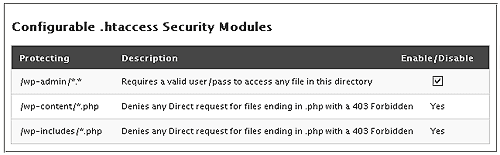
If you are worried about your WordPress blog getting hacked, this can help immensely. It adds a 2nd layer of security to your blog by requiring a username and password to access anything in the /wp-admin/ folder.
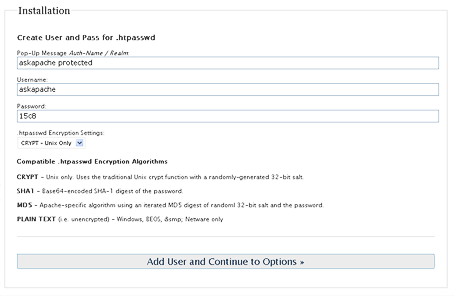
The plugin is simple, you just choose a username and password and you are done. It writes the .htaccess file, without messing it up. It also encrypts your password and creates the .htpasswd file, as well as setting the correct security-enhanced file permissions on both.
This plugin automatically picks all the right settings for where to save the .htpasswd and .htaccess files, but you can easily change those settings to anything you want. You can change it whenever you want right from your WordPress Admin Panel.
Screenshots
Downloads
Download the AskApache Password Protection Plugin
Installation
- Upload
aa-password-protect.zipto the/wp-content/plugins/directory - Unzip
- Activate
- Setup
Frequently Asked Questions
Do I have to type in my username and password every admin page?
No. You just have to type it in once and it will keep you logged in until you close your browser.
How Secure Is It
In Basic HTTP Authentication, the password is passed over the network not encrypted but not as plain text — it is “uuencoded.” Anyone watching packet traffic on the network will not see the password in the clear, but the password will be easily decoded by anyone who happens to catch the right network packet.
WordPress Codex Security Articles
- Limiting access: Making smart choices that effectively lower the possible entry points available to a malicious person.
- Containment: If a weak point in your installation is found by a malicious person, your system should be configured to minimize the amount of damage that can be done once inside your system.
- Knowledge: Keeping backups, knowing the state of your WordPress installation at regular time intervals, documenting your modifications all help you understand your WordPress installation.
wordpress plugin password security authentication htaccess apache htpasswd
Related Articles


08.14.07 at 6:12 am
Sounds alright, I’ll give it a try :)
08.14.07 at 7:06 am
Why use a plugin for this? Basic HTTP Authentication is not problem to configure in .htaccess, and if someone is managing a blog/website/whatever then they should at least know how to do basic Apache configuration.
08.16.07 at 1:21 pm
Blog Security: htaccess block convenient set up while working at home. The other involves using a brand new plugin available at Ask Apache. That plugin is almost perfect. However, it could be improved. Because I got an error when trying to [...]
08.18.07 at 8:50 am
Secure WordPress with AskApache Password Protect Plugin can either manually code the .htaccess file or get hold of the AskApache Password Protect Plugin to automate the process.[...]
08.18.07 at 7:40 pm
The First 5 Steps for Stronger Wordpress Security WP-Plugin: AskApache Password Protect Just remember the caveats that go along with each of the plugins, you are responsible for the proper functioning of your site, but hey, isn’t it that same control that drove you to managing your own blog in the first place? “With great responsibility, comes great liability….” [...]
08.18.07 at 8:45 pm
hi nice post, i enjoyed it
08.18.07 at 9:04 pm
hi i enjoyed the read
08.20.07 at 3:30 pm
great work! and thanks for you comment on http://wordpress.designpraxis.at/plugins/demo-mode/
I actually was thinking of a http-authentication plugin, but the weired setup of my host’s machine doesn’t allow for certain statements within the .htaccess file. It results in an Error 500. That’s why I did “Demo Mode”.
08.28.07 at 1:02 am
Thnx for the write-up. Take a look at http://www.groovypost.com/howto/apache/password-protect-apache-website/ for details on password protecting pages and directories for both LINUX and Windows boxes hosting apache.
MrGroove
09.01.07 at 7:17 am
Hardening Wordpress with Mod Rewrite and htaccess a side note, if you want the easiest way to password protect your wp-admin directory you can use this plugin by askapache or if you prefer to do it using the manual way … you can check blogsecurity…
09.06.07 at 1:27 pm
Hi there
I installed the plugin, activated it and turned it on by adding a username and password. When it asked for my username password and I typed in the same one I had entered earlier it wouldn’t give me access, just kept asking for my username password.
I noticed once the plugin was turned on that it said it hadn’t written the .htpasswd file.
How do I get access back and get the plugin working?
thanks, Grant
09.06.07 at 4:27 pm
Grant,
I hope you got my email!
So sorry!
Just edit your .htaccess file, using eith SSH, telnet, or good old http://FTP. Remove the part the plugin added. I updated the plugin just yesterday so you might want to deactivate the plugin, download the newest version, and then try it.
09.10.07 at 3:43 pm
9 ways to secure your WordPress blog my favorite WordPress security plugin is AskApache Password Protect. It adds a 2nd layer of security to your blog by requiring a username and password to access [...]
09.10.07 at 4:48 pm
It password protects my admin panel….not my blog. Have I done something wrong or is this what the plugin is designed to do?
09.10.07 at 6:49 pm
sara,
please read the Description
09.17.07 at 7:43 pm
Thanks for writing this plugin.
09.21.07 at 3:48 am
Useful plugin, thank you.
09.25.07 at 5:11 am
I installed it, but that “Authentication Required” window doesn’t pop up AT ALL in Firefox 2 or IE 7 (that window that asks for name and password)!
Now I can’t even access my wp-admin URL. It keeps redirecting to home page. I tried deleting the plugin, but I’m still locked out of my WordPress admin. What do I do? Help!
10.10.07 at 11:17 am
Is it possible to protect another folder then the admin folder? I want myphotos folder proteced with a password. The ‘normal’ page protection doesn’t work. Now it is possible
to send the pictures’ url to someone and you can get in. So I’m searching how to
protect it with .htaccess.
10.16.07 at 11:32 pm
Also read the great, fantastic PDF from blogsecurity, Securing WordPress Blogs
10.30.07 at 3:09 pm
Bug? The plugin itself doesn’t like it when tell AskApache that you want the password outside of the htdocs folder (example /Library/WebServer/ ranther than /Library/WebServer/htdocs/blog/ ) If you have the .aahtpsswd outside of the htdocs it can’t be accessed by a web surfer, but it CAN be access by the web SERVER. Just make sure your giving it an absolute path int the .htaccess file.
Hope thhat helps. I also had to CHMOD 777 to freakin everything. Even after following examples in your ultimate guide and from BlogSecurity. WordPress, it’s themes and plugins just didn’t like any access limitations. hmmmm, let me make sure the ownership is correct since I didn’t not "upload" the files, just copied them locally.
Maybe you should include a small segment on file ownership, eh?
Thanks,
Chaz
10.31.07 at 8:44 am
WordPress Intrusion Detection: How to Block Hacking Attempts
This is good if you want a secure WordPress installation.
11.14.07 at 3:57 am
hi,
really nice plugin. i am not sure whether you know it, but in the standard setup (e.g., .aahtpasswd in the root of your web blog), wp-scanner complains about exposed dangerous files (.aahtpasswd world readable). it’s probably the best solution to put it somewhere else, where it’s not readable by the browser, but where it’s still accessible by the server (as suggested also in #23), e.g., to the home directory
11.19.07 at 7:28 pm
How do you undo this plugin? I forgot the username and password I setup. I deleted the plugin folder and all the htaccess htpasswd files and it still askes to login before getting to wordpress’s admin screen. please help i locked myself from wp.
11.21.07 at 6:21 am
Okay, great idea - but it’s not working for me. I don’t get the “Authentication Required” window, it just throws a 404. This is occurring in FireFox 2.0.0.9, IE7 and Opera 9.23 on XP SP2.
I’ve verified that the two files exist (.aahtpasswd and wp-admin/.htaccess) and that they have the correct content (as per the options screen).
Okay, the solution to the 404 problem I mentioned in my previous comment works for me. The article had
to your .htaccess file and create a static file called myerror.html.
If you don’t want it in your public_hmtl folder, then you can put it in a folder and add the folder’s name to the two lines, ie:
This seems to fix the problem, at least for me, but I’m not sure what impact it may have on other things (ie by having 401 and 403 go to the new file rather than WordPress handling it).
11.30.07 at 10:17 am
Great plugin! Thanks for creating it. I like the idea of that second layer of protection being there.
Now I have one question, as hopefully there’s an easier way: How does the admin easily change the passphrase?
My solution was to delete the files from the server, delete (actually, rename) the plugin, play in the MySQL database for a bit, re-add the plugin (change the name back to the original name), and re-activate it, which then allowed me to change the password. Surely there’s a simpler way.
Again, thanks for creating this. It’s a great extra step.
11.30.07 at 10:25 am
Nevermind. Sometimes the simplest idea is never pursued. Yes, I just found clicking the “DISABLE PROTECTION” button brings you back to the scren to reset the passphrase and username.
Argh. Let me go drive my head in the sand. Who looks for simple? :D
12.02.07 at 12:20 pm
I love your produce but the music on your site is…… somewhat distracting….. especially since a visitor has to shut it off each time they visit a page….
This makes it a little difficult to absorb the width and depth of your obvious brilliance.
I hope this sounded “diplomatic”.
01.04.08 at 1:48 pm
Nice tool, but by default unsecure. Default
.aahtpasswdis readable by apache.Simples workarounds:
aahtpasswdto.htaapasswdin configuration and plugin source (.ht must be first)01.09.08 at 11:32 am
[...] the WordPress Plugin - htaccess password protection for wp-admin. Nothing like adding an extra layer of protection by using some Basic HTTP Authentication on the [...]
01.24.08 at 1:28 am
Thanks for the great plugin. It seems to be working fine now. I finally got it installed after trying a bunch of stuff. The key to getting it to write the .aahtpasswd and .htaccess files was changing permissions on root, wordpress and wp-admin folders to 777 for the install and then back to 755 afterwards.
02.05.08 at 6:15 am
In case anyone else has the following issues.
First: I’m using developerside.net’s implementation of Apache/MySQL/PHP for Windows, Wordpress 2.3.3, and AAPP 2.0.
By default the plugin does not work with my implementation. When I activate the plugin and set it up I am unable to log in…instead I’m given a 500 page. When I’m finally able to get the authentication window it fails to authenticate me even if my username and password are correct.
To fix the first problem I remove the AuthGroupFile line all together
To fix the second problem I simply recreate my users password by opening a command prompt or shell in the same directory as the .aahtpasswd file (which should be out of the web root btw) and then running ‘htpasswd .aahtpasswd use_your_username_here’.
I haven’t debugged the reason why the password is wrong, however resetting it manually works just dandy. Thanx for the great plugin!
02.05.08 at 4:44 pm
Hello i installed this plugin and i was totally locked out of my admin.
It didnt even prompt me for the password i had entered.
So i had to delete the two htaccess files and now im getting the error:
Internal Server Error
The server encountered an internal error or misconfiguration and was unable to complete your request.
Please contact the server administrator, webmaster@deshoda.islandspoogy.com and inform them of the time the error occurred, and anything you might have done that may have caused the error.
More information about this error may be available in the server error log.
Additionally, a 404 Not Found error was encountered while trying to use an ErrorDocument to handle the reques
any ideas as to how to undo the work of this plugin
02.07.08 at 3:11 pm
I am getting this error on going to the options page after installing the wordpres plugin.
Wordpress is just freshly upgraded.
Call to undefined function: wp_localize_script()
02.07.08 at 4:39 pm
@Assem ~
I can’t explain that one.. wp_localize_script has been defined since version 2.2! I checked!
I did make a fix for it though, so redownload the new version.
Also- Keep reporting any and all bugs!
02.12.08 at 5:57 am
well, the 2.x version worked fine, now with the 3.x version I get
Error Creating
FATAL ERROR! response code: 404
My thorough testing shows your server isnt good enough to to handle .htaccess / .htpasswd files. Switch to Apache
- tried the chmodding to 777 and forth and back, manually creating the files and deleting again. I really liked the additional security this plugin offers, not sure why this is freaking out now.
maybe apache can help?
02.12.08 at 6:13 am
problem sorted out, the httpdocs (root) had also to be 777, as well as the wp-admin, seems like I missed one folder either way when fiddling around.
nice plugin, I appreciate it, keep up the good work sir!
02.22.08 at 4:47 pm
I get (rather arrogantly) told…
But that simply is not true, I am on an apache server, (a very good one) but all the normal port settings have been changed to make the server more secure. Could this be the problem?
02.22.08 at 4:50 pm
Am I understanding this correctly?
People think they are securing their site by making folders 777 permission? I hope everyone who has done that knows that 777 permissions will make your installation very insecure.
02.27.08 at 8:23 am
I had to fix the code to prevent the file_put_contents() error.
Now the options page is displayed correctly, but I get the following message: “Error Creating test pages for HTTP Authentication Enabled Test!”
Does it have to do with my .htaccess file permissions? Please drop me a line if you know the answer!
Great job anyway, hope I’ll get it to work soon!
Greetings from Italy!
03.04.08 at 9:59 pm
Zack,
That was my comment you referenced - and no there’s been no solution yet. AskApache feel free to correct me if I’m wrong!
However, I’m pretty sure it’s something to do with my web host. I get the same problem if I turn on Password Protect Directories through CPanel. That’s doing the same thing as the plugin, but the plugin is not involved - indicating that it’s something to do with the server.
I reported it to my host, but they want me to activate the protection and leave it in their hands to investigate further. That involves locking myself out of the Admin area until their finished and I haven’t found a good time to do this!
03.07.08 at 9:33 am
I too am having the 404 problem after activating the plugin and setting up a user. I’m sure it’s a host issue and this occurs when I password protect the wp-admin directory using their control panel as well. However, any suggestions on why adding .htaccess password protection to the wp-admin folder would throw a 404 error? Other instructions contained within the .htaccess file in wp-admin do not cause the 404, seemingly only the password protection does.
03.07.08 at 11:50 am
Thanks Boss
Installed fine but one problem:
When a user registers and clicks on the URL that is included in the email he is prompted with the Wordpress login; when they login they are automatically redirected to the url
wp-admin/profile.phpwhich is of course protected.Can I change this behaviour?
Ed
03.19.08 at 11:02 am
For those with the 404 problems, I found an article which seems to discuss it in depth at:
WordPress admin password protection 404.
The article’s not related directly to this plugin, but it’s the same problem. I haven’t tried any of the suggestions yet myself, but will do so sometime in the next week or two. I thought I’d post the link in case anyone is wants to try it quicker!
AskApache - you may want to have a look at this too, out of interest… Not sure if there’s anything your plugin can do to get around this, but you never know.
04.07.08 at 11:03 pm
This is a solid piece of work, but I’m actually looking for something a little *less* stringent. Is there anyway to manipulate this plugin so that it will password protect a specific public post? Wordpress 2.3+ had post-level passwords but they stunk. And 2.5 appears to have done away with the option completely!
04.16.08 at 2:05 pm
I just noticed that a direct request for
/wp-login.php?loggedout=true
doesn’t get blocked. The same goes for
/wp-login.php?redirect_to=%2Fwp-admin%2F
Those paths are the same for all WP installations. Of course a hacker wouldn’t be able to work if (s)he found out how to login, but I still wonder if it is smart to leave these pages open for someone to just try. Can’t the wp-login.php not just be behind the password too?
04.18.08 at 7:37 pm
Last time I tried AskApache PassPro I was not able to make it work with another scheme that I already had set up called, “Hiding WordPress Installation Files”
My question is this, Do you think the AskApache protection is more important that the protection provided by hiding the WordPress installatin files? Thanks.
04.18.08 at 11:20 pm
obscurity does not beat strong authentication from a security point of view. this is not to suggest that obscurity does not provide a value, simply that I’d rather put my stock behind a strong password and an effective password protection system, than attempting to hide my files. The Word-Press site itself makes mention of this : Hardening WordPress
jason
04.18.08 at 11:43 pm
@ Marcus~
Thanks! fixed.
@ Matt~
Whoa.. this is actually not a good thing to do. I am assuming that your blog is at site.com/wordpress/ not site.com/
Another issue with this is that your code can be improved to:
<IfModule mod_rewrite.c> RewriteEngine On RewriteBase / RewriteCond %{HTTP_REFERER} !^http(s?)://([^\.]*)(\.?)example\.com.* [NC] RewriteRule ^/?wordpress/?(.*) http%1://%2%3example.com/ [NC,L,R=302] RewriteCond %{REQUEST_FILENAME} !-f RewriteCond %{REQUEST_FILENAME} !-d RewriteRule . /wordpress/index.php [NC,L] </IfModule>One other issue I wondered about is what “installation files” you are talking about. The installation files are located in the wp-admin directory, so if you are going to use this method you should only be protecting the wp-admin directory.
The AskApache Password Protect plugin approaches security through .htaccess in a very different way.
Here’s the .htaccess used by the AskApache Password Protection plugin:
<IfModule mod_rewrite.c> RewriteEngine On RewriteBase / RewriteCond %{THE_REQUEST} ^[A-Z]{3,9}\ /wp-(includes|content)/.*$ [NC] RewriteCond %{REQUEST_FILENAME} ^.+\.php$ RewriteRule .* - [F] </IfModule>I think I might just not be understanding this technique.. it seems to be completely worthless other than an acedemic discussion.
04.19.08 at 12:48 am
Thank you for the extensive and helpful answer. I’ll be switching over to the AskApache Password Protect. I hadn’t realized that it also provided protection for the wp-includes and wp-content folders as well as the wp-admin folder. I also hadn’t realized how easy it is to spoof headers and that the scrapers and bots are doing that automatically. Thanks again, I appreciate it.
04.20.08 at 9:47 pm
@Havard~
REeally enjoyed your tutorial, reposted to your site.
Yes that is the most common argument against it, though its really a non-issue for 99% of sites. For an attacker to bypass the HTTP authentication on a non-encrypted connection, they would literally have to have a physical connection to a network path between an authenticated user and the server. The only issue is that the password and username are passed in cleartext, but you would have to be able to sniff the data off the wire to bypass it. As you can imagine, most of the automated exploit tools and bots performing mass exploits against WordPress blogs and other online software do not have this capability, so they are stopped dead. For sites that I admin that require a bit more security, I completely agree with you that SSL is mandatory, which encryts the connection and thereby prevents an attacker with physical access who can sniff your connection from seeing the password pass in plaintext. That can be a very secure setup.
Your logic and solutions to this problem are completely accurate and insightful, as you say here:
The problem is accomplishing that by using the HTTP_REFERER header is simply impossible and ineffective. And of course the biggest problem for most blog admins would be the overwhelmingly negative effects on SEO.
Apache’s mod_rewrite module only has 1 variable that can achieve your solution effectively, which is what the AskApache Password Protect plugin utilizes. Basically, the special variable THE_REQUEST contains the FULL HTTP request sent by the client, in fact, the internall operation of the server rely almost exclusively on this variable to determine the values of other variables, like the QUERY_STRING, PROTOCOL, REQUEST_METHOD, etc.. THE_REQUEST looks like this.
"GET /wordpress/wp-content/plugins/ HTTP/1.1"The reason this plugin is so special is because this is the only time the request is unfiltered. Basically ONLY external requests like clicking on a link or typing a link in a browser will cause this value. Other than using the REDIRECT_STATUS variable for those using cgi, this is the only way to determine whether a request is direct or indirect.
To take it further, I’ve removed directory index generation and using the DirectoryIndex command to point to a static file we can make sure that directories can’t be browsed. I’ve also used the NS or nosubrequest flag to make sure internal uri requests by apache and other modules are able to pass through. I would encourage you to try accessing files at askapache.com if you would like a demonstration.
Options -Indexes DirectoryIndex /wordpress/index.php ErrorDocument 403 /forbidden.html RewriteEngine On RewriteBase / RewriteCond %{THE_REQUEST} ^[A-Z]{3,9}\ /wordpress/wp-(includes|admin|content)/?.* [NC] RewriteCond %{REQUEST_FILENAME} ^.+\.php$ [NC] RewriteRule .* - [F, NS]I just noticed you wrote this a couple years ago, which is before I heard of this technique. This is just to add to your excellent article, as its a great idea and one of the better and easier ways to really increase your security. Subscribed!
04.23.08 at 10:54 pm
BTW- I’m running WP.org 2.3.2. on a hosted server.
To clarify just a bit, when I attempt to log in to WP, I’m taken to my blog, but instead of getting the admin page, the sidebars display, but the following message pops up on top-
“Sorry. The page you are looking for is not here.”
I’m actually logged into my blog ( I believe, as the META options displays a “Logout” button), but the admin, or edit functions won’t display, only the “sorry your page is not here”.
I deleted the plugin altogether in My Computer, but still exactly the same issue.
I’m a total loser with no life or contact with the outside world except the contact I have thru my crappy blog.
Please help. I’m desperate. I may not survive much longer.
Thank you-
04.24.08 at 1:37 pm
Somebody asked this question already but I think it was not answered:
the root file wp-login.php can be reached without any restrictions. Wouldn´t it be helpful to protect it too?
04.26.08 at 3:29 am
I noticed that I could not post via Windows LiveWriter anymore AND that my “inline tag thing” plugin wouldnt let me change tags via ajax. So I switched it off again, or is there some kind of workaround?
04.26.08 at 1:57 pm
thanks for the comment .. nice plugin .. hope other will enjoy using it too!!
04.26.08 at 6:52 pm
Many thanks for this. Have installed it, and will sleep better as a result!! Especially when on holiday!
Cheers,
Alex
04.29.08 at 9:05 am
Is the version 3.6.6 compatible with Wordpress 2.5.1? When I have actived the plugin, in options panel control this appears:
“htaccess support not found”
04.29.08 at 10:44 am
After getting hacked I thought this plugin was the answer to my prayers, but after installing it I was unable to login with the username/password I set up. After reading the comments here I tried what you suggested in commment #12, removing the bit added by the plugin to my htaccess file. Now I get 404 errors when I try to log in to wp-admin! Looks like other folks have had this problem but I’ve tried everything suggested here and nothing has worked! I’m unable to login. Does anyone have any suggestions? Is there any way to completely deactivate the plugin and undo all the changes it’s made without logging in? Any help is appreciated.
04.29.08 at 2:28 pm
I installed the plugin, Im getting the message “htaccess support not found”, my server support htaccess, what is happening?
please help and thanks for your work.
Gus
05.03.08 at 2:34 am
I have used this plugin for almost a year. I noticed that it doesn’t work sincd I downloaded the latest version (or since I installed Bad Behavior?) and now I also get the “htaccess support not found” error…
05.03.08 at 4:03 am
@Roy and anyone else having problems~
Sounds like my fault :(
I apologize for the trouble you are having, I’m still working on.. and making a lot of progress that will pay off in terms of security.
It sounds like you need to disable the plugin, then manually (using ftp, control panel, ssh) delete the /wp-admin/.htaccess file and you could also remove any .htpasswd or .aahtpasswd files.
Then clear your browsers cache, make sure you are the latest version, and if it still doesn’t work then try to email me the error messages produced by php and your apache server, and if its ever worked in the past it will definately work with the next upgrade. In the meantime you can always go download an older release that has worked for you in the past, and use that for now. You just can’t beat this plugins protection, and that is a fact jack.
Sorry again for these issues,
-AskApache
05.03.08 at 4:45 am
Just a short update in case other people are struggling as well.
There is no htaccess in the wp-admin folder and sometimes (I haven’t figured out when yet) there is no longer an Ask Apache part in the htaccess in the root AND I can’t delete the password file in the root. What I managed to do it the following:
If I clear the password file (delete the content) and delete the Ask Apache part from the htaccess in the root AFTER I deactivated and deleted the plugin, I can upload version 3.5.1, activate it and get it to work. That’s the only version that I get running as of now, but at least, it’s better than nothing! All other versions leave me with a password that is not accepted or doing nothing at all (not even a login screen).
05.03.08 at 5:57 pm
Hi,
I am experimenting with your plugin today too. When I activate, the main .htaccess file is edited, but nothing is installed in wp-admin folder.
Also, when I go to the options screen, nothing appears under the AA PassPro tab.
Looks like it would be effective at holding off those xmlrpc hacks.
Thanks!