Speed Tips: Turn On Compression
FREE THOUGHT · FREE SOFTWARE · FREE WORLD

Speed Tips: Turn On Compression

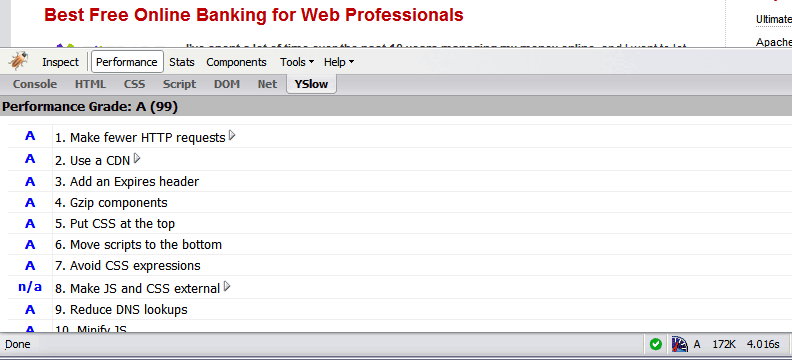
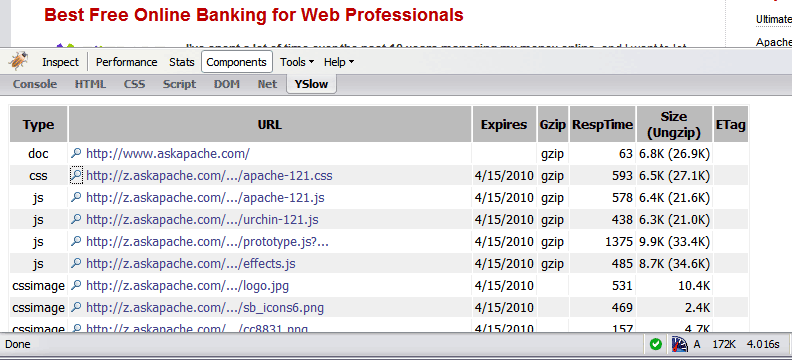
mod_deflate disabledApache 2 uses mod_deflate to quickly and easily compress your static .css and .js files before you send them to a client. This speeds up your site like crazy!

FWIW, this is how I configure Apache to set the Expires header:

#####################################################
# CONFIGURE media caching
#
Header unset ETag
FileETag None
<FilesMatch "(?i)^.*\.(ico|flv|jpg|jpeg|png|gif|js|css)$">
Header unset Last-Modified
Header set Expires "Fri, 21 Dec 2012 00:00:00 GMT"
Header set Cache-Control "public, no-transform"
</FilesMatch>
#
#####################################################

The reason I remove and disable the ETag is because supposedly some browsers will ignore your Expires header when it’s present:

The reason I remove the Last-Modified header is for the same reason:

The reason I set the Cache-Control header to ‘public’ is so the browser will cache media over HTTPS (see tip #3):

The reason I set the Cache-Control header to ‘no-transform’ is to prevent proxies from modifying my content.

Bil

Easy Apache Speed Tips Articles

Turn Gzip Compression On

This goes in your root .htaccess file but if you have access to httpd.conf that is better.

This code uses the FilesMatch directive and the SetOutputFilter DEFLATE directive to only target files ending in .js or .css

<IfModule mod_deflate.c>
<FilesMatch "\.(js|css)$">
SetOutputFilter DEFLATE
</FilesMatch>
</IfModule>

Without mod_deflate

mod_deflate disabled


With mod_deflate

mod_deflate enabled


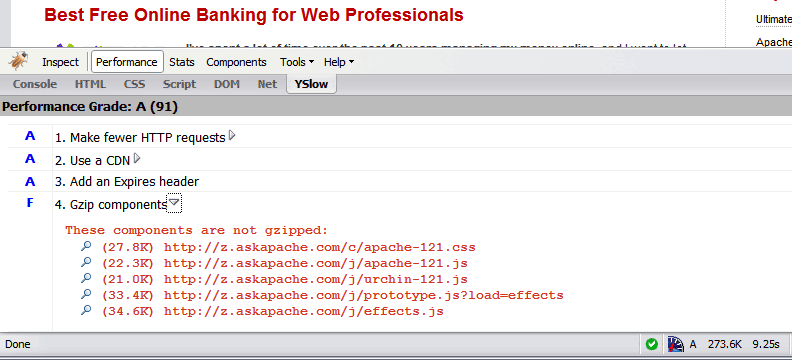
Bandwidth Savings

mod_deflate bandwidth savings


«
»

Skip to Comments

Add Your Opinion

Reader Comments

  1. Royads ~

    Hey

    Thanks for sharing the information. I am using the same technique on one of my website to get benefits of compression.

    Header set Expires "Mon, 20 Apr 2012 23:30:00 GMT"
    Header append Cache-Control "public"
     

    I am writing this in .htaccess file in my website root. But when I am testing my website with google page speed it gives me this message.

    Compressing the following resources with gzip could reduce their transfer size by about two thirds (~53.1kB).

    List of all my css and JS files, but not the images file.

    So I have doubt whether it work for CSS and js or not. Because its working for my images contents.

    Can any one explain.

    Thanks a lot in advance.
    Roy

  2. Fasst ~

    very helpful speed tips bud… thanks

  3. alicious ~

    I normally add php|html to my match for zlib compression, any reason why you haven’t? Is deflate better than zlib for some reason. Also with javascript if you’ve got minified files I imagine it’s not going to help much (if at all).

  4. AskApache ~

    Yes. You can test my site out using the http headers tool. Just put “none” in the accept-encoding field.

    Though actually, I am using gzip for compression and I am actually serving both XTHML 1.1 with the application/xhtml+xml content-type, and plain text/html for microsoft browsers that can’t handle it.

    I do have mod_deflate turned on for my javascript and css files though.

  5. lu-blog ~

    Will the server in this case send uncompressed content to client if the client didn’t send deflate in HTTP_ACCEPT_ENCODING?

  6. AskApache ~

    @ Jason

    You aren’t using a FilesMatch but other than that I couldn’t tell you, it depends on your server, configuration, and modules.

    @ Prasannah

    This really won’t make that much of a difference to begin with but you can use the http header viewer tool by requesting directly your .css or .js file with this .htaccess compression code on and then with this code off and you should see a difference unless something on your end isn’t working correctly.

  7. Prasannah ~

    I don’t see any changes in the page load speed AT ALL! I used this tool (Pingdom) to test my speeds. Any thoughts?

  8. Jason ~

    Thanks for your attention:

    My .htaccess file:

    # BEGIN WordPress
    RewriteEngine On
    RewriteBase /
    RewriteCond %{REQUEST_FILENAME} !-f
    RewriteCond %{REQUEST_FILENAME} !-d
    RewriteRule . /index.php [L]
    # END WordPress
     
    #12 Months
     
    Header set Cache-Control "max-age=29030400, public"
     
    Header unset ETag
    FileETag None
     
    # 2 HOURS
     
    Header set Cache-Control "max-age=7200, must-revalidate"
     
    SetOutputFilter DEFLATE

    I am not getting an error. It is just not working with the css and js according to yslow. I was able to set a php.ini file to gzip the php. Although, I am not sure how to do the same thing for the css/js.

  9. AskApache ~

    @ jason

    Sounds like you don’t have mod_deflate. I need more info like error messages, how you know its not working, and current .htaccess if I were going to answer.

  10. Jason ~

    I am trying to add gzip compression for a friends site which is WP. I already set up compression for php files using php.ini. However, I can’t get the js|CSS to work. Any suggestions. The site is hosted with Godaddy, apache of course.

  11. AskApache ~

    @ Everybody

    Sorry for the delay people, I just updated the code to prevent the 500 error, which is telling you that you don’t have the deflate module. At least now you know which module you are missing!

    <IfModule mod_deflate.c>
    <FilesMatch "\.(js|css)$">
    SetOutputFilter DEFLATE
    </FilesMatch>
    </IfModule>
  12. Jason ~

    When I added the above code, I was given an internal server error. I am not sure why? Any suggestions?

    Header set Cache-Control "max-age=29030400, public"
     
    Header unset ETag
    FileETag None
     
    SetOutputFilter MOD_DEFLATE
  13. Isaiah ~

    If you get an 500 internal server error, means that your server don’t have mod_expire.so and mod_headers.so loaded. Edit your httpd.conf and add these lines :

    LoadModule expires_module /usr/lib/apache2/modules/mod_expires.so
    LoadModule headers_module /usr/lib/apache2/modules/mod_headers.so

    Cheers

  14. Paul ~

    My site ALSO throws an Error 500.
    I can’t see a problem with the code, so something has to be set at the server to accept this, right?

  15. Ajay ~

    My site throws up a 500 error when I do this. Any suggestions?


It's very simple - you read the protocol and write the code. -Bill Joy

HTML | DCMI | GRDDL | XOXO | XDMP | XFN | DOM | XML | XHTML 1.1 Strict | CSS 2.1 | W3C | TLDP | WAI | DISA | ICSI | GIAC | SANS RR | GHOST | DEFCON | NIST | DHS CYBER | NIST

↑ TOPExcept where otherwise noted, content on this site is licensed under a Creative Commons Attribution 3.0 License, just credit with a link.
This site is not supported or endorsed by The Apache Software Foundation (ASF). All software and documentation produced by The ASF is licensed. "Apache" is a trademark of The ASF. HTTPD based on NCSA HTTPd

Site Map | Contact Webmaster | Email AskApache | Glossary | License and Disclaimer | Terms of Service