FREE THOUGHT · FREE SOFTWARE · FREE WORLD

Home » Htaccess » Speed Tips: Add Future Expires Headers
Speed Tips: Add Future Expires Headers

Speed Tips: Add Future Expires Headers Learn How to Add a Far Future Expires Header to your files to make your site lightning fast!

Speed Tips: Add Future Expires Headers

September 10th, 2007

With Expires HeaderA first-time visitor to your page will make several HTTP requests to download all your sites files, but using the Expires header you make those files cacheable. This avoids unnecessary HTTP requests on subsequent page views. Expires headers should be used on all components including scripts, stylesheets, and Flash components.

Easy Apache Speed Tips Articles

Keep in mind, if you use a far future Expires header you have to change the component's filename whenever the file changes.

Add Future Expires Headers

This goes in your root .htaccess file but if you have access to httpd.conf that is better.

This code uses the FilesMatch directive and the Header directive to add Future Expires Headers to certain files.

<filesMatch "\.(ico|pdf|flv|jpg|jpeg|png|gif|js|css|swf)$">
Header set Expires "Thu, 15 Apr 2010 20:00:00 GMT"
</filesMatch>

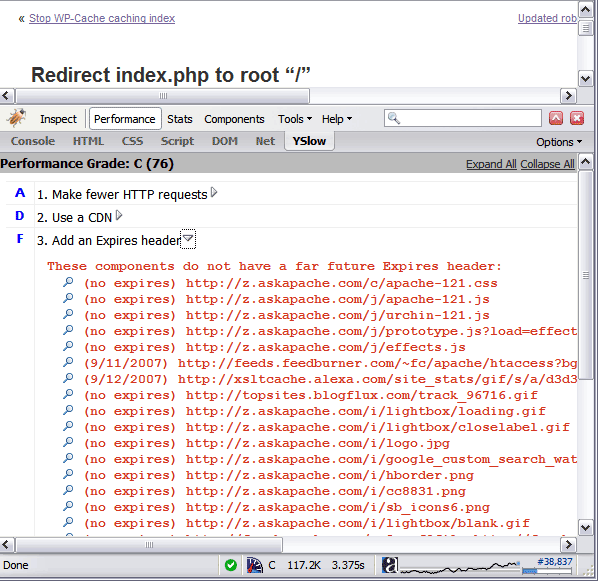
Without Expires Headers

No Expires Headers

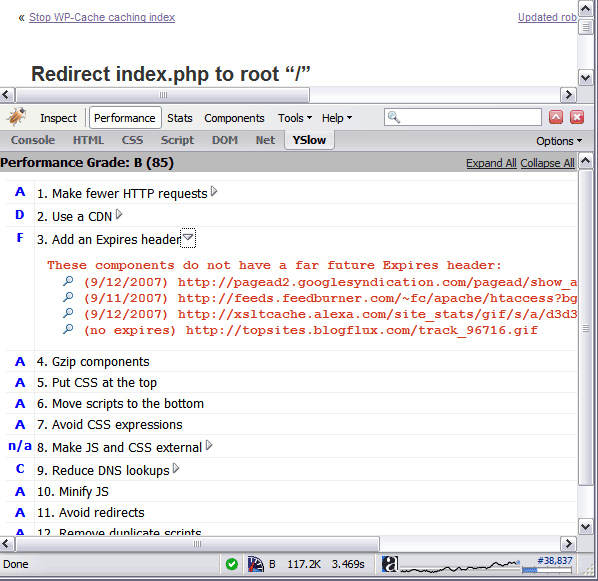
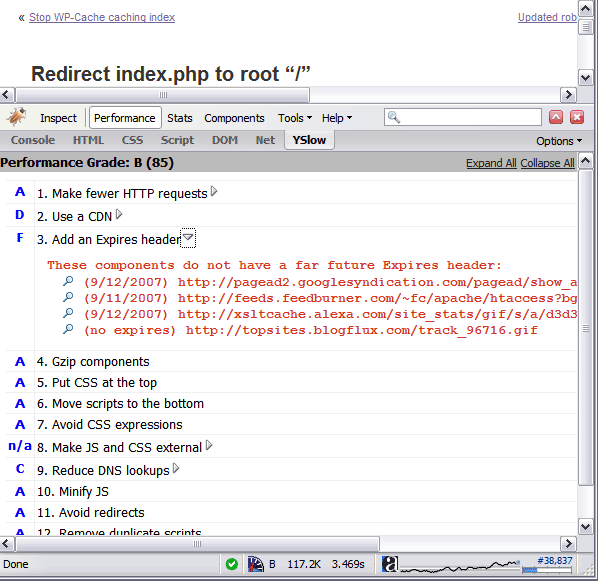
With Expires Headers

With Expires Header


http://www.askapache.com/htaccess/apache-speed-expires.html#comments

Reader Comments

  1. zulu ~November 13, 2011 @ 5:54 am
    Nice. In this way, We don't need mod_expires.c.
  2. web design houston ~May 22, 2011 @ 3:42 pm
    This could also be done with:
    ExpiresActive On
    ExpiresByType image/gif A2592000 # + 1 month after being accesed
  3. Pingback:10 Tips for Optimizing Your Website’s Speed

  4. pc-manden ~December 2, 2010 @ 5:32 am
    If your server doesn't support the module mod_expires.c, you'll get a 500 Server Side Error when trying to invoke it with Expires statements.
  5. David H. ~November 15, 2010 @ 12:32 pm
    I can't use it, apparently, on a site created with MS FrontPage (2000). I am using it between the tags, before the body tags. My site is on an Apache server.
  6. miranda ~November 5, 2010 @ 7:22 pm
    i have lot of images on my wp blog http://models-hq.com with 85 score. on firebug i need to know where to add the code in htaccess badly...
  7. JeeShen Lee ~October 6, 2010 @ 5:06 am
    Hello All, For ASP user like me, Expire Header can be turn on using web.config file. Refer my blog post below for more information. "How to Add Expires Headers in ASP.NET. I have tested in on GoDaddy Window Shared hosting and it works. Thanks. Regards, Jeeshen Lee.
  8. Pattanaik ~September 27, 2010 @ 9:36 am
    I get this working for all files withing my site. This time I went for some cloud CDN to serve static content. Now the htaccess is not supposed to be working for the cloud files so what to do? How do you tell the browser not to fetch content before a particular period ..from the clouds too????
  9. Duke ~September 25, 2010 @ 8:18 am
    Where exactly do i add the code in the htaccess file.
  10. Aguitta ~September 24, 2010 @ 2:30 pm
    Hello, Thanks, great content!. I want what is best for SEO, in terms of expiration date. I think it might be the "Present day". So in terms of SEO what is best? and how does that translate to code in the .htaccess? Thank you very mucho!
  11. Slavi ~September 10, 2010 @ 3:29 pm
    hm, Why adding Expires header to point to the past ? This will remove the warning from yslow but will make browsers not to cache files.
    Header set Expires "Thu, 15 Apr 2010 20:00:00 GMT"
  12. referat ~August 24, 2010 @ 1:36 pm
    Yeee haaa! I get a 95 points score because of your tip :X thanks alot man! keep up the good posts :X
  13. John ~August 24, 2010 @ 12:21 pm
    Hi - having loading problems with my WP sites even though there's very little on them - bearing in mind I'm not a techie, I went to yslow to see if i could understand what was going on - my homepage response time is 13477ms - the details are below:
    Date  Tue, 24 Aug 2010 15:44:50 GMT
    Server  Apache
    P3P  CP="PSA"
    X-Pingback  http://mysite.com/xmlrpc.php
    Expires  Wed, 11 Jan 1984 05:00:00 GMT
    Cache-Control  no-cache, must-revalidate, max-age=0
    Pragma  no-cache
    X-Powered-By  W3 Total Cache/0.9.1.1
    Vary  Accept-Encoding
    Last-Modified  Tue, 24 Aug 2010 15:44:52 GMT
    Connection  close
    Transfer-Encoding  chunked
    Content-Type  text/html; charset=UTF-8
    One thing i notice is that there's an Expires date way in the past of 1984 - I have no idea what an Expires date is or what it means, but that doesn't look right at all - anyway, it might be irrelevant, i just don't know - would appreciate if you could explain what you think is going on here. Thanks
  14. Jack Fisher ~May 27, 2010 @ 4:06 am
    When I add
    Header set Expires "Thu, 15 Apr 2011 20:00:00 GMT"
    I get the 500 message error
  15. Miki ~May 2, 2010 @ 5:35 pm
    Hi so if i'm right the .htaccess should look like this:
    # turn on the module for this directory
    ExpiresActive on
    # set default
    ExpiresDefault "access plus 24 hours"
    ExpiresByType image/jpg "access plus 1 months"
    ExpiresByType image/gif "access plus 1 months"
    ExpiresByType image/jpeg "access plus 1 months"
    ExpiresByType image/png "access plus 1 months"
    ExpiresByType text/css "access plus 1 months"
    ExpiresByType text/javascript "access plus 1 months"
    ExpiresByType application/javascript "access plus 1 months"
    ExpiresByType application/x-shockwave-flash "access plus 1 months"
  16. Billy ~April 25, 2010 @ 9:24 am

    I'm using Yslow, and having a hard time getting any different results using either the:

    Header set Expires "Thu, 15 Apr 2010 20:00:00 GMT"

    command, or the ones that phpGangsta posted above. I'm still getting the same results in Yslow. I'm pasting them into my htacess file. I did successfully remove etags earlier, so I know its working, but is there something else I need to know about adding these expiring headers?

  17. Daniel Norton ~April 22, 2010 @ 5:47 pm
    I presume that this article specifies an expires date in the past because when the article was written, it was in the future. Stop pussyfooting, and set the date 15 years in the future, to 2025. For those of you getting “Error 500” I’m surmising that you’re using the .htaccess method, as the apache.conf method would have failed when you restarted the server and it would tell you that it didn’t recognize the “header” directive. If you have access to the error log, you’ll see that message in the log for the .htaccess usage. The solution? Install the mod_headers module on your Apache server.
  18. Pingback:Visit my site and it tries to download a GZ file - Page 2 - WordPress Tavern Forum

  19. PHPGangsta ~March 28, 2010 @ 12:58 pm
    I prefer relative dates, like this:
        # turn on the module for this directory
        ExpiresActive on
        # set default
        ExpiresDefault "access plus 24 hours"
    cache common graphics
        ExpiresByType image/jpg "access plus 1 months"
        ExpiresByType image/gif "access plus 1 months"
        ExpiresByType image/jpeg "access plus 1 months"
        ExpiresByType image/png "access plus 1 months"
    cache CSS
        ExpiresByType text/css "access plus 1 months"
    cache other filetypes
        ExpiresByType text/javascript "access plus 1 months"
        ExpiresByType application/javascript "access plus 1 months"
        ExpiresByType application/x-shockwave-flash "access plus 1 months"
  20. Pingback:Speed Tips: Turn Off ETags

  21. Ela ~October 8, 2009 @ 10:26 am
    Please can you explain me how to setup this expire header to the httpd.conf file. I have access to httpd.conf through ssh.
  22. Aaron Braun-Duin ~February 26, 2009 @ 11:50 am
    I have implemented this code in the htaccess of my WordPress blog, however, I am still getting an F from YSlow for not having expires headers on the adsense code on my site. Is there any way to remedy that, or is that not really having any significant effect on my loading speed despite the poor score? Thanks.
  23. Michael ~October 13, 2008 @ 5:46 pm
    Thanks for the great content. I came across your site as I was trying to fix a caching problem on one of my websites. I'm a bit of a novice when it comes to caching and did a lot of damage to my site this past week experimenting with far future expires header. In your post, you say
    Keep in mind, if you use a far future Expires header you have to change the component’s filename whenever the file changes.
    I would be very grateful if you could point me in the right direction as to what code I should include in my .htaccess file to fix this problem. After I made this initial change, I lost my enter header section of my website and it also screwed up the rest of my page template. Thanks in advance for your help!
  24. julien ~June 23, 2008 @ 9:50 pm
    Hi, i just would like to know one thing. if you combine using multiple subdomain to serve images and script, where would put your .htaccess file that hold the cache control header, future expire header and all this for images. do you put it in your main domain root or in the subdomains root where you have images and script? thanks julien
  25. Jeff ~March 2, 2008 @ 2:00 pm
    Hello, when l add this to my .htaccess it crashes my site (returns 404) ... any idea why?
    Header set Expires "Thu, 15 Apr 2010 20:00:00 GMT"
  26. Pete ~December 28, 2007 @ 8:49 am
    That middle part actually gives me 500 error. is there another way?
  27. Christophe ~October 24, 2007 @ 1:40 am
    It might be helpful for readers to also mention that you are using Yahoo's Yslow addon for the Firebug extension to get the analysis presented in the screen shots (without/with). YSlow for Firebug http://developer.yahoo.com/yslow/

Add Comment!

Leave a Reply

Your email address will not be published.


Google +

It's very simple - you read the protocol and write the code. -Bill Joy

Except where otherwise noted, content on this site is licensed under a Creative Commons Attribution 3.0 License, just credit with a link.
This site is not supported or endorsed by The Apache Software Foundation (ASF). All software and documentation produced by The ASF is licensed. "Apache" is a trademark of The ASF. NCSA HTTPd.
UNIX ® is a registered Trademark of The Open Group. POSIX ® is a registered Trademark of The IEEE.

Site Map | Contact Webmaster | Glossary | License and Disclaimer | Terms of Service |

↑ TOPMain