THE Ultimate Htaccess
Htaccess is a very ancient configuration file that controls the Web Server running your website, and is one of the most powerful configuration files you will ever come across. htaccess has the ability to control access/settings for the HyperText Transfer Protocol (HTTP) using Password Protection, 301 Redirects, rewrites, and much much more. This is because this configuration file was coded in the earliest days of the web (HTTP), for one of the first Web Servers ever! Eventually these Web Servers (configured with htaccess) became known as the World Wide Web, and eventually grew into the Internet we use today.
 This is not an introduction to htaccess.
This is a guide for using htaccess to the fullest.
Originally (2003) this guide was known in certain hacker circles and hidden corners of the net as an ultimate htaccess due to the powerful htaccess tricks and tips to bypass security on a webhost, and also because many of the htaccess examples were pretty impressive back then in that group.
Htaccess - Evolved
The Hyper Text Transfer Protocol (HTTP) was initiated at the CERN in Geneve (Switzerland), where it emerged (together with the HTML presentation language) from the need to exchange scientific information on a computer network in a simple manner. The first public HTTP implementation only allowed for plain text information, and almost instantaneously became a replacement of the GOPHER service. One of the first text-based browsers was LYNX which still exists today; a graphical HTTP client appeared very quickly with the name NCSA Mosaic. Mosaic was a popular browser back in 1994. Soon the need for a more rich multimedia experience was born, and the markup language provided support for a growing multitude of media types.
AskApache Htaccess Journey
Skip this - still under edit
I discovered these tips and tricks mostly while working as a network security penetration specialist hired to find security holes in web hosting environments. Shared hosting is the most common and cheapest form of web-hosting where multiple customers are placed on a single machine and "share" the resources (CPU/RAM/SPACE). The machines are configured to basically ONLY do HTTP and FTP. No shells or any interactive logins, no ssh, just FTP access. That is when I started examining htaccess files in great detail and learned about the incredible untapped power of htaccess. For 99% of the worlds best Apache admins, they don't use .htaccess much, if AT ALL. It's much easier, safer, and faster to configure Apache using the httpd.conf file instead. However, this file is almost never readable on shared-hosts, and I've never seen it writable. So the only avenue left for those on shared-hosting was and is the .htaccess file, and holy freaking fiber-optics.. it's almost as powerful as httpd.conf itself!
Most all .htaccess code works in the httpd.conf file, but not all httpd.conf code works in .htaccess files, around 50%. So all the best Apache admins and programmers never used .htaccess files. There was no incentive for those with access to httpd.conf to use htaccess, and the gap grew. It's common to see "computer gurus" on forums and mailing lists rail against all uses and users of .htaccess files, smugly announcing the well known problems with .htaccess files compared with httpd.conf - I wonder if these "gurus" know the history of the htaccess file, like it's use in the earliest versions of the HTTP Server- NCSA's HTTPd, which BTW, became known as Apache HTTP. So you could easily say that htaccess files predates Apache itself.
Once I discovered what .htaccess files could do towards helping me enumerate and exploit security vulnerabilities even on big shared-hosts I focused all my research into .htaccess files, meaning I was reading the venerable Apache HTTP Source code 24/7! I compiled every released version of the Apache Web Server, ever, even NCSA's, and focused on enumerating the most powerful htaccess directives. Good times! Because my focus was on protocol/file/network vulnerabilites instead of web dev I built up a nice toolbox of htaccess tricks to do unusual things. When I switched over to webdev in 2005 I started using htaccess for websites, not research. I documented most of my favorites and rewrote the htaccess guide for webdevelopers. After some great encouragement on various forums and nets I decided to start a blog to share my work with everyone, AskApache.com was registered, I published my guide, and it was quickly plagiarized and scraped all over the net. Information is freedom, and freedom is information, so this blog has the least restrictive copyright for you. Feel free to modify, copy, republish, sell, or use anything on this site ;)
What Is .htaccess
Specifically, .htaccess is the default file name of a special configuration file that provides a number of directives (commands) for controlling and configuring the Apache Web Server, and also to control and configure modules that can be built into the Apache installation, or included at run-time like mod_rewrite (for htaccess rewrite), mod_alias (for htaccess redirects), and mod_ssl (for controlling SSL connections).
Htaccess allows for decentralized management of Web Server configurations which makes life very easy for web hosting companies and especially their savvy consumers. They set up and run "server farms" where many hundreds and thousands of web hosting customers are all put on the same Apache Server. This type of hosting is called "virtual hosting" and without .htaccess files would mean that every customer must use the same exact settings as everyone else on their segment. So that is why any half-decent web host allows/enables (DreamHost, Powweb, MediaTemple, GoDaddy) .htaccess files, though few people are aware of it. Let's just say that if I was a customer on your server-farm, and .htaccess files were enabled, my websites would be a LOT faster than yours, as these configuration files allow you to fully take advantage of and utilize the resources allotted to you by your host. If even 1/10 of the sites on a server-farm took advantage of what they are paying for, the providers would go out of business.
SKIP: History of Htaccess in 1st Apache. One of the design goals for this server was to maintain external compatibility with the NCSA 1.3 server --- that is, to read the same configuration files, to process all the directives therein correctly, and in general to be a drop-in replacement for NCSA. On the other hand, another design goal was to move as much of the server's functionality into modules which have as little as possible to do with the monolithic server core. The only way to reconcile these goals is to move the handling of most commands from the central server into the modules. However, just giving the modules command tables is not enough to divorce them completely from the server core. The server has to remember the commands in order to act on them later. That involves maintaining data which is private to the modules, and which can be either per-server, or per-directory. Most things are per-directory, including in particular access control and authorization information, but also information on how to determine file types from suffixes, which can be modified by AddType and DefaultType directives, and so forth. In general, the governing philosophy is that anything which can be made configurable by directory should be; per-server information is generally used in the standard set of modules for information like Aliases and Redirects which come into play before the request is tied to a particular place in the underlying file system. Another requirement for emulating the NCSA server is being able to handle the per-directory configuration files, generally called .htaccess files, though even in the NCSA server they can contain directives which have nothing at all to do with access control. Accordingly, after URI -> filename translation, but before performing any other phase, the server walks down the directory hierarchy of the underlying filesystem, following the translated pathname, to read any .htaccess files which might be present. The information which is read in then has to be merged with the applicable information from the server's own config files (either from the<directory></directory>sections in access.conf, or from defaults in srm.conf, which actually behaves for most purposes almost exactly like<directory></directory>). Finally, after having served a request which involved reading .htaccess files, we need to discard the storage allocated for handling them. That is solved the same way it is solved wherever else similar problems come up, by tying those structures to the per-transaction resource pool.
Creating Htaccess Files
Htaccess files use the default filename ".htaccess" but any unix-style file name can be specified from the main server config using the AccessFileName directive. The file isn't .htaccess.txt, its literally just named .htaccess.
Htaccess Scope
Unlike the main server configuration files like httpd.conf, Htaccess files are read on every request therefore changes in these files take immediate effect. Apache searches all directories and subdirectories that are htaccess-enabled for an .htaccess file which results in performance loss due to file accesses. I've never noticed a performance loss but OTOH, I know how to use them. If you do have access to your main server configuration file, you should of course use that instead, and lucky for you ALL the .htaccess tricks and examples can be used there as well (just not vice versa).
Htaccess File Syntax
Htaccess files follow the same syntax as the main Apache configuration files, for powerusers here's an apache.vim for VI. The one main difference is the context of the directive, which means whether or not that directive is ALLOWED to be used inside of an .htaccess file. Htaccess files are incredibly powerful, and can also be very dangerous as some directives allowed in the main configuration files would allow users/customers to completely bypass security/bandwidth-limits/resource-limits/file-permissions, etc.. About 1/4 of all Apache directives cannot be used inside an .htaccess file (also known as a per-directory context config). The Apache Developers are well-regarded throughout the world as being among some of the best programmers, ever. To enable a disallowed directive inside a .htaccess file would require modifying the source code and re-compiling the server (which they allow and encourage if you are the owner/admin).
Htaccess Directives
Don't ask why, but I personally downloaded each major/beta release of the Apache HTTPD source code from version 1.3.0 to version 2.2.10 (all 63 Apache versions!), then I configured and compiled each version for a custom HTTPD installation built from source. This allowed me to find every directive allowed in .htaccess files and every variable in .htaccess files for each particular version, which has never been done before, or since. YES! I think that is so cool..
An .htaccess directive is basically a command that is specific to a module or builtin to the core that performs a specific task or sets a specific setting for how Apache serves your WebSite. Directives placed in Htaccess files apply to the directory they are in, and all sub-directories. Here's the 3 top links (official Apache Docs) you will repeatedly use, bookmark/print/save them.
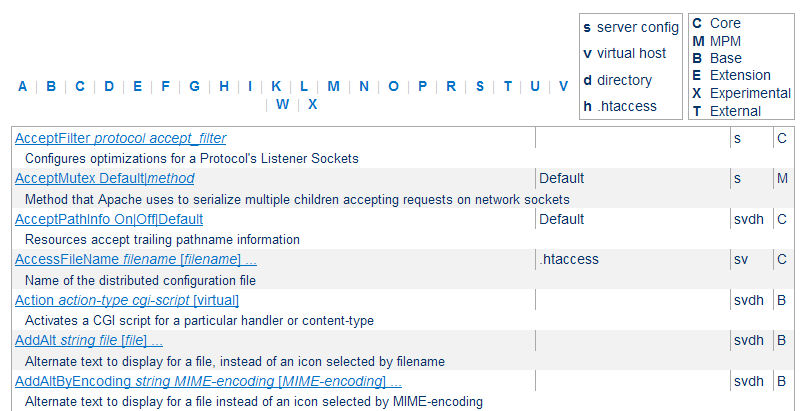
- Terms Used to Describe Directives
- Official List of Apache Directives
- Directive Quick-Reference -- with Context
Main Server Config Examples
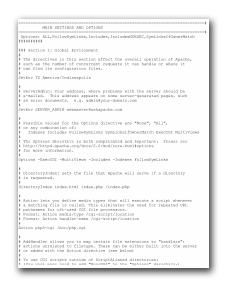
Now lets take a look at some htaccess examples to get a feel for the syntax and some general ideas at the capabilities. Some of the best examples for .htaccess files are included with Apache for main server config files, so lets take a quick look at a couple of them on our way down to the actual .htaccess examples further down the page (this site has thousands, take your time). The basic syntax is a line starting with # is a comment, everything else are directives followed by the directive argument.
httpd-multilang-errordoc.conf: The configuration below implements multi-language error documents through content-negotiation.
Here are the rest of them if you wanna take a look. (httpd-mpm.conf, httpd-default.conf, httpd-ssl.conf, httpd-info.conf, httpd-vhosts.conf, httpd-dav.conf).
Example .htaccess Code Snippets
Here are some specific examples, this is the most popular section of this page. Updated frequently.
Redirect Everyone Except IP address to alternate page
ErrorDocument 403 https://www.yahoo.com/
Order deny,allow
Deny from all
Allow from 208.113.134.190
When developing sites
This lets google crawl the page, lets me access without a password, and lets my client access the page WITH a password. It also allows for XHTML and CSS validation! (w3.org)
AuthName "Under Development"
AuthUserFile /web/sitename.com/.htpasswd
AuthType basic
Require valid-user
Order deny,allow
Deny from all
Allow from 208.113.134.190 w3.org htmlhelp.com googlebot.com
Satisfy Any
Fix double-login prompt
Redirect non-https requests to https server and ensure that .htpasswd authorization can only be entered across HTTPS
SSLOptions +StrictRequire
SSLRequireSSL
SSLRequire %{HTTP_HOST} eq "askapache.com"
ErrorDocument 403 https://askapache.com
Set Timezone of the Server (GMT)
SetEnv TZ America/Las_Vegas
Administrator Email for ErrorDocument
SetEnv SERVER_ADMIN webmaster@google.com
ServerSignature for ErrorDocument
ServerSignature off | on | email
Charset and Language headers
Article: Setting Charset in htaccess, and article by Richard Ishida
AddDefaultCharset UTF-8
DefaultLanguage en-US
Disallow Script Execution
Options -ExecCGI
AddHandler cgi-script .php .pl .py .jsp .asp .htm .shtml .sh .cgi
Deny Request Methods
RewriteCond %{REQUEST_METHOD} !^(GET|HEAD|OPTIONS|POST|PUT)
RewriteRule .? - [F]
Force "File Save As" Prompt
AddType application/octet-stream .avi .mpg .mov .pdf .xls .mp4
Show CGI Source Code
RemoveHandler cgi-script .pl .py .cgi
AddType text/plain .pl .py .cgi
Serve all .pdf files on your site using .htaccess and mod_rewrite with the php script.
RewriteCond %{REQUEST_FILENAME} -f
RewriteRule ^(.+)\.pdf$  /cgi-bin/pdf.php?file=$1 [L,NC,QSA]
Rewrite to www
RewriteCond %{REQUEST_URI} !^/(robots\.txt|favicon\.ico|sitemap\.xml)$
RewriteCond %{HTTP_HOST} !^www\.askapache\.com$ [NC]
RewriteRule ^(.*)$ https://www.askapache.com/$1 [R=301,L]
Rewrite to www dynamically
RewriteCond %{REQUEST_URI} !^/robots\.txt$ [NC]
RewriteCond %{HTTP_HOST} !^www\.[a-z-]+\.[a-z]{2,6} [NC]
RewriteCond %{HTTP_HOST} ([a-z-]+\.[a-z]{2,6})$   [NC]
RewriteRule ^/(.*)$ https://%1/$1 [R=301,L]
301 Redirect Old File
Redirect 301 /old/file.html https://www.askapache.com/new/file/
301 Redirect Entire Directory
RedirectMatch 301 /blog(.*) https://www.askapache.com/$1
Protecting your php.cgi
<FilesMatch "^php5?\.(ini|cgi)$">
Order Deny,Allow
Deny from All
Allow from env=REDIRECT_STATUS
</FilesMatch>
Set Cookie based on Request
This code sends the Set-Cookie header to create a cookie on the client with the value of a matching item in 2nd parantheses.
RewriteRule ^(.*)(de|es|fr|it|ja|ru|en)/$ - [co=lang:$2:.askapache.com:7200:/]
Set Cookie with env variable
Header set Set-Cookie "language=%{lang}e; path=/;" env=lang
Custom ErrorDocuments
ErrorDocument 100 /100_CONTINUE
ErrorDocument 101 /101_SWITCHING_PROTOCOLS
ErrorDocument 102 /102_PROCESSING
ErrorDocument 200 /200_OK
ErrorDocument 201 /201_CREATED
ErrorDocument 202 /202_ACCEPTED
ErrorDocument 203 /203_NON_AUTHORITATIVE
ErrorDocument 204 /204_NO_CONTENT
ErrorDocument 205 /205_RESET_CONTENT
ErrorDocument 206 /206_PARTIAL_CONTENT
ErrorDocument 207 /207_MULTI_STATUS
ErrorDocument 300 /300_MULTIPLE_CHOICES
ErrorDocument 301 /301_MOVED_PERMANENTLY
ErrorDocument 302 /302_MOVED_TEMPORARILY
ErrorDocument 303 /303_SEE_OTHER
ErrorDocument 304 /304_NOT_MODIFIED
ErrorDocument 305 /305_USE_PROXY
ErrorDocument 307 /307_TEMPORARY_REDIRECT
ErrorDocument 400 /400_BAD_REQUEST
ErrorDocument 401 /401_UNAUTHORIZED
ErrorDocument 402 /402_PAYMENT_REQUIRED
ErrorDocument 403 /403_FORBIDDEN
ErrorDocument 404 /404_NOT_FOUND

ErrorDocument 405 /405_METHOD_NOT_ALLOWED
ErrorDocument 406 /406_NOT_ACCEPTABLE
ErrorDocument 407 /407_PROXY_AUTHENTICATION_REQUIRED
ErrorDocument 408 /408_REQUEST_TIME_OUT
ErrorDocument 409 /409_CONFLICT
ErrorDocument 410 /410_GONE
ErrorDocument 411 /411_LENGTH_REQUIRED
ErrorDocument 412 /412_PRECONDITION_FAILED
ErrorDocument 413 /413_REQUEST_ENTITY_TOO_LARGE
ErrorDocument 414 /414_REQUEST_URI_TOO_LARGE
ErrorDocument 415 /415_UNSUPPORTED_MEDIA_TYPE
ErrorDocument 416 /416_RANGE_NOT_SATISFIABLE
ErrorDocument 417 /417_EXPECTATION_FAILED
ErrorDocument 422 /422_UNPROCESSABLE_ENTITY
ErrorDocument 423 /423_LOCKED
ErrorDocument 424 /424_FAILED_DEPENDENCY
ErrorDocument 426 /426_UPGRADE_REQUIRED
ErrorDocument 500 /500_INTERNAL_SERVER_ERROR
ErrorDocument 501 /501_NOT_IMPLEMENTED
ErrorDocument 502 /502_BAD_GATEWAY
ErrorDocument 503 /503_SERVICE_UNAVAILABLE
ErrorDocument 504 /504_GATEWAY_TIME_OUT
ErrorDocument 505 /505_VERSION_NOT_SUPPORTED
ErrorDocument 506 /506_VARIANT_ALSO_VARIES
ErrorDocument 507 /507_INSUFFICIENT_STORAGE
ErrorDocument 510 /510_NOT_EXTENDED
Implementing a Caching Scheme with .htaccess
# year
<FilesMatch "\.(ico|pdf|flv|jpg|jpeg|png|gif|swf|mp3|mp4)$">
Header set Cache-Control "public"
Header set Expires "Thu, 15 Apr 2010 20:00:00 GMT"
Header unset Last-Modified
</FilesMatch>
#2 hours
<FilesMatch "\.(html|htm|xml|txt|xsl)$">
Header set Cache-Control "max-age=7200, must-revalidate"
</FilesMatch>
<FilesMatch "\.(js|css)$">
SetOutputFilter DEFLATE
Header set Expires "Thu, 15 Apr 2010 20:00:00 GMT"
</FilesMatch>
Password Protect single file
<Files login.php>
AuthName "Prompt"
AuthType Basic
AuthUserFile /web/askapache.com/.htpasswd
Require valid-user
</Files>
Password Protect multiple files
<FilesMatch "^(private|phpinfo).*$">
AuthName "Development"
AuthUserFile /.htpasswd
AuthType basic
Require valid-user
</FilesMatch>
Send Custom Headers
Header set P3P "policyref="https://www.askapache.com/w3c/p3p.xml""
Header set X-Pingback "https://www.askapache.com/xmlrpc.php"
Header set Content-Language "en-US"
Header set Vary "Accept-Encoding"
Blocking based on User-Agent Header
SetEnvIfNoCase ^User-Agent$ .*(craftbot|download|extract|stripper|sucker|ninja|clshttp|webspider|leacher|collector|grabber|webpictures) HTTP_SAFE_BADBOT
SetEnvIfNoCase ^User-Agent$ .*(libwww-perl|aesop_com_spiderman) HTTP_SAFE_BADBOT
Deny from env=HTTP_SAFE_BADBOT
Blocking with RewriteCond
RewriteCond %{HTTP_USER_AGENT} ^.*(craftbot|download|extract|stripper|sucker|ninja|clshttp|webspider|leacher|collector|grabber|webpictures).*$ [NC]
RewriteRule . - [F,L]
.htaccess for mod_php
SetEnv PHPRC /location/todir/containing/phpinifile
.htaccess for php as cgi
AddHandler php-cgi .php .htm
Action php-cgi /cgi-bin/php5.cgi
Shell wrapper for custom php.ini
#!/bin/sh
export PHP_FCGI_CHILDREN=3
exec php5.cgi -c /abs/php5/php.ini
Add values from HTTP Headers
SetEnvIfNoCase ^If-Modified-Since$ "(.+)" HTTP_IF_MODIFIED_SINCE=$1
SetEnvIfNoCase ^If-None-Match$ "(.+)" HTTP_IF_NONE_MATCH=$1
SetEnvIfNoCase ^Cache-Control$ "(.+)" HTTP_CACHE_CONTROL=$1
SetEnvIfNoCase ^Connection$ "(.+)" HTTP_CONNECTION=$1
SetEnvIfNoCase ^Keep-Alive$ "(.+)" HTTP_KEEP_ALIVE=$1
SetEnvIfNoCase ^Authorization$ "(.+)" HTTP_AUTHORIZATION=$1
SetEnvIfNoCase ^Cookie$ "(.+)" HTTP_MY_COOKIE=$1
Stop hotlinking
RewriteCond %{HTTP_REFERER} !^$
RewriteCond %{HTTP_REFERER} !^https://(www\.)?askapache\.com/.*$ [NC]
RewriteRule \.(gif|jpg|swf|flv|png)$ https://www.askapache.com/feed.gif [R=302,L]
Example .htaccess Files
Here are some samples and examples taken from different .htaccess files I've used over the years. Specific solutions are farther down on this page and throughout the site.
# Set the Time Zone of your Server
SetEnv TZ America/Las_Vegas

# ServerAdmin:  This address appears on some server-generated pages, such as error documents.
SetEnv SERVER_ADMIN webmaster@askapache.com

# Possible values for the Options directive are "None", "All", or any combination of:
#  Indexes Includes FollowSymLinks SymLinksifOwnerMatch ExecCGI MultiViews
Options -ExecCGI -MultiViews -Includes -Indexes FollowSymLinks

# DirectoryIndex: sets the file that Apache will serve if a directory is requested.
DirectoryIndex index.html index.php /index.php

# Action lets you define media types that will execute a script whenever
# a matching file is called. This eliminates the need for repeated URL
# pathnames for oft-used CGI file processors.
# Format: Action media/type /cgi-script/location
# Format: Action handler-name /cgi-script/location
#
Action php5-cgi /bin/php.cgi

# AddHandler allows you to map certain file extensions to "handlers":
# actions unrelated to filetype. These can be either built into the server
# or added with the Action directive (see below)
#
# To use CGI scripts outside of ScriptAliased directories:
# (You will also need to add "ExecCGI" to the "Options" directive.)
#
AddHandler php-cgi .php .inc

# Commonly used filename extensions to character sets.
AddDefaultCharset UTF-8

# AddType allows you to add to or override the MIME configuration
AddType 'application/rdf+xml; charset=UTF-8' .rdf
AddType 'application/xhtml+xml; charset=UTF-8' .xhtml
AddType 'application/xhtml+xml; charset=UTF-8' .xhtml.gz
AddType 'text/html; charset=UTF-8' .html
AddType 'text/html; charset=UTF-8' .html.gz
AddType application/octet-stream .rar .chm .bz2 .tgz .msi .pdf .exe
AddType application/vnd.ms-excel .csv
AddType application/x-httpd-php-source .phps
AddType application/x-pilot .prc .pdb
AddType application/x-shockwave-flash .swf
AddType application/xrds+xml .xrdf
AddType text/plain .ini .sh .bsh .bash .awk .nawk .gawk .csh .var .c .in .h .asc .md5 .sha .sha1
AddType video/x-flv .flv

# AddEncoding allows you to have certain browsers uncompress information on the fly. Note: Not all browsers support this.
AddEncoding x-compress .Z
AddEncoding x-gzip .gz .tgz

# DefaultType: the default MIME type the server will use for a document.
DefaultType text/html

# Optionally add a line containing the server version and virtual host
# name to server-generated pages (internal error documents, FTP directory
# listings, mod_status and mod_info output etc., but not CGI generated
# documents or custom error documents).
# Set to "EMail" to also include a mailto: link to the ServerAdmin.
# Set to one of:  On | Off | EMail
ServerSignature Off
## MAIN DEFAULTS
Options +ExecCGI -Indexes
DirectoryIndex index.html index.htm index.php
DefaultLanguage en-US
AddDefaultCharset UTF-8
ServerSignature Off

## ENVIRONMENT VARIABLES
SetEnv PHPRC /webroot/includes
SetEnv TZ America/Las_Vegas

SetEnv SERVER_ADMIN webmaster@askapache.com

## MIME TYPES
AddType video/x-flv .flv
AddType application/x-shockwave-flash .swf
AddType image/x-icon .ico

## FORCE FILE TO DOWNLOAD INSTEAD OF APPEAR IN BROWSER
# https://www.htaccesselite.com/addtype-addhandler-action-vf6.html
AddType application/octet-stream .mov .mp3 .zip

## ERRORDOCUMENTS
# https://www.askapache.com/htaccess/apache-status-code-headers-errordocument.html
ErrorDocument 400 /e400/
ErrorDocument 401 /e401/
ErrorDocument 402 /e402/
ErrorDocument 403 /e403/
ErrorDocument 404 /e404/

# Handlers be builtin, included in a module, or added with Action directive
# default-handler: default, handles static content (core)
#   send-as-is: Send file with HTTP headers (mod_asis)
#   cgi-script: treat file as CGI script (mod_cgi)
#    imap-file: Parse as an imagemap rule file (mod_imap)
#   server-info: Get server config info (mod_info)
#  server-status: Get server status report (mod_status)
#    type-map: type map file for content negotiation (mod_negotiation)
#  fastcgi-script: treat file as fastcgi script (mod_fastcgi)
#
# https://www.askapache.com/php/custom-phpini-tips-and-tricks/

## PARSE AS CGI
AddHandler cgi-script .cgi .pl .spl

## RUN PHP AS APACHE MODULE
AddHandler application/x-httpd-php .php .htm

## RUN PHP AS CGI
AddHandler php-cgi .php .htm

## CGI PHP WRAPPER FOR CUSTOM PHP.INI
AddHandler phpini-cgi .php .htm
Action phpini-cgi /cgi-bin/php5-custom-ini.cgi

## FAST-CGI SETUP WITH PHP-CGI WRAPPER FOR CUSTOM PHP.INI
AddHandler fastcgi-script .fcgi
AddHandler php-cgi .php .htm
Action php-cgi /cgi-bin/php5-wrapper.fcgi

## CUSTOM PHP CGI BINARY SETUP
AddHandler php-cgi .php .htm
Action php-cgi /cgi-bin/php.cgi

## PROCESS SPECIFIC FILETYPES WITH CGI-SCRIPT
Action image/gif /cgi-bin/img-create.cgi

## CREATE CUSTOM HANDLER FOR SPECIFIC FILE EXTENSIONS
AddHandler custom-processor .ssp
Action custom-processor /cgi-bin/myprocessor.cgi

### HEADER CACHING
# https://www.askapache.com/htaccess/speed-up-sites-with-htaccess-caching/
<FilesMatch "\.(flv|gif|jpg|jpeg|png|ico)$">
Header set Cache-Control "max-age=2592000"
</FilesMatch>
<FilesMatch "\.(js|css|pdf|swf)$">
Header set Cache-Control "max-age=604800"
</FilesMatch>
<FilesMatch "\.(html|htm|txt)$">
Header set Cache-Control "max-age=600"
</FilesMatch>
<FilesMatch "\.(pl|php|cgi|spl|scgi|fcgi)$">
Header unset Cache-Control
</FilesMatch>

## ALTERNATE EXPIRES CACHING
# htaccesselite.com/d/use-htaccess-to-speed-up-your-site-discussion-vt67.html
ExpiresActive On
ExpiresDefault A604800
ExpiresByType image/x-icon A2592000
ExpiresByType application/x-javascript A2592000
ExpiresByType text/css A2592000
ExpiresByType text/html A300

<FilesMatch "\.(pl|php|cgi|spl|scgi|fcgi)$">
ExpiresActive Off
</FilesMatch>

## META HTTP-EQUIV REPLACEMENTS
<FilesMatch "\.(html|htm|php)$">
Header set imagetoolbar "no"
</FilesMatch>
Here are some default MOD_REWRITE code examples.
## REWRITE DEFAULTS
RewriteEngine On
RewriteBase /

## REQUIRE SUBDOMAIN
RewriteCond %{HTTP_HOST} !^$
RewriteCond %{HTTP_HOST} !^www\.askapache\.com$ [NC]
RewriteRule ^/(.*)$ https://www.askapache.com/$1 [L,R=301]

## SEO REWRITES
RewriteRule ^(.*)/ve/(.*)$ $1/voluntary-employee/$2 [L,R=301]
RewriteRule ^(.*)/hsa/(.*)$ $1/health-saving-account/$2 [L,R=301]

## WORDPRESS
RewriteCond %{REQUEST_FILENAME} !-f  # Existing File
RewriteCond %{REQUEST_FILENAME} !-d  # Existing Directory
RewriteRule . /index.php [L]

## ALTERNATIVE ANTI-HOTLINKING
RewriteCond %{HTTP_REFERER} !^$
RewriteCond %{HTTP_REFERER} !^https://(www\.)?askapache\.com/.*$ [NC]
RewriteRule ^.*\.(bmp|tif|gif|jpg|jpeg|jpe|png)$ - [F]

## REDIRECT HOTLINKERS
RewriteCond %{HTTP_REFERER} !^$
RewriteCond %{HTTP_REFERER} !^https://(www\.)?askapache\.com/.*$ [NC]
RewriteRule ^.*\.(bmp|tif|gif|jpg|jpeg|jpe|png)$ https://google.com [R]

## DENY REQUEST BASED ON REQUEST METHOD
RewriteCond %{REQUEST_METHOD} ^(TRACE|TRACK|OPTIONS|HEAD)$ [NC]
RewriteRule ^.*$ - [F]

## REDIRECT UPLOADS
RewriteCond %{REQUEST_METHOD} ^(PUT|POST)$ [NC]
RewriteRule ^(.*)$ /cgi-bin/form-upload-processor.cgi?p=$1 [L,QSA]

## REQUIRE SSL EVEN WHEN MOD_SSL IS NOT LOADED
RewriteCond %{HTTPS} !=on [NC]
RewriteRule ^.*$ https://%{SERVER_NAME}%{REQUEST_URI} [R,L]

### ALTERNATATIVE TO USING ERRORDOCUMENT
# https://www.htaccesselite.com/d/htaccess-errordocument-examples-vt11.html
RewriteCond %{REQUEST_FILENAME} !-f
RewriteCond %{REQUEST_FILENAME} !-d
RewriteRule ^.*$ /error.php [L]

## SEO REDIRECTS
Redirect 301 /2006/oldfile.html https://www.askapache.com/newfile.html
RedirectMatch 301 /o/(.*)$ https://www.askapache.com/s/dl/$1
Examples of protecting your files and securing with password protection.
#
# Require (user|group|valid-user) (username|groupname)
#
## BASIC PASSWORD PROTECTION
AuthType basic
AuthName "prompt"
AuthUserFile /.htpasswd
AuthGroupFile /dev/null
Require valid-user

## ALLOW FROM IP OR VALID PASSWORD
Require valid-user
Allow from 192.168.1.23
Satisfy Any

## PROTECT FILES
<FilesMatch "\.(htaccess|htpasswd|ini|phps|fla|psd|log|sh)$">
Order Allow,Deny
Deny from all
</FilesMatch>

## PREVENT HOTLINKING
SetEnvIfNoCase Referer "^https://www.askapache.com/" good
SetEnvIfNoCase Referer "^$" good
<FilesMatch "\.(png|jpg|jpeg|gif|bmp|swf|flv)$">
Order Deny,Allow
Deny from all
Allow from env=good
ErrorDocument 403 https://www.google.com/intl/en_ALL/images/logo.gif
ErrorDocument 403 /images/you_bad_hotlinker.gif
</FilesMatch>

## LIMIT UPLOAD FILE SIZE TO PROTECT AGAINST DOS ATTACK
#bytes, 0-2147483647(2GB)
LimitRequestBody 10240000

## MOST SECURE WAY TO REQUIRE SSL
# https://www.askapache.com/htaccess/apache-ssl-in-htaccess-examples/
SSLOptions +StrictRequire
SSLRequireSSL
SSLRequire %{HTTP_HOST} eq "askapache.com"
ErrorDocument 403 https://askapache.com

## COMBINED DEVELOPER HTACCESS CODE-USE THIS
<FilesMatch "\.(flv|gif|jpg|jpeg|png|ico|js|css|pdf|swf|html|htm|txt)$">
Header set Cache-Control "max-age=5"
</FilesMatch>
AuthType basic
AuthName "Ooops! Temporarily Under Construction..."
AuthUserFile /.htpasswd
AuthGroupFile /dev/null
Require valid-user      # password prompt for everyone else
Order Deny,Allow
Deny from all
Allow from 192.168.64.5   # Your, the developers IP address
Allow from w3.org      # css/xhtml check jigsaw.w3.org/css-validator/
Allow from googlebot.com   # Allows google to crawl your pages
Satisfy Any        # no password required if host/ip is Allowed

## DONT HAVE TO EMPTY CACHE OR RELOAD TO SEE CHANGES
ExpiresDefault A5 #If using mod_expires
<FilesMatch "\.(flv|gif|jpg|jpeg|png|ico|js|css|pdf|swf|html|htm|txt)$">
Header set Cache-Control "max-age=5"
</FilesMatch>

## ALLOW ACCESS WITH PASSWORD OR NO PASSWORD FOR SPECIFIC IP/HOSTS
AuthType basic
AuthName "Ooops! Temporarily Under Construction..."
AuthUserFile /.htpasswd
AuthGroupFile /dev/null
Require valid-user      # password prompt for everyone else
Order Deny,Allow
Deny from all
Allow from 192.168.64.5   # Your, the developers IP address
Allow from w3.org      # css/xhtml check jigsaw.w3.org/css-validator/
Allow from googlebot.com   # Allows google to crawl your pages
Satisfy Any        # no password required if host/ip is Allowed
Advanced Mod_Rewrites
Here are some specific htaccess examples taken mostly from my WordPress Password Protection plugin, which does alot more than password protection as you will see from the following mod_rewrite examples. These are a few of the mod_rewrite uses that BlogSecurity declared pushed the boundaries of Mod_Rewrite! Some of these snippets are quite exotic and unlike anything you may have seen before, also only for those who understand them as they can kill a website pretty quick.
Directory Protection
Enable the DirectoryIndex Protection, preventing directory index listings and defaulting. [Disable]
Options -Indexes
DirectoryIndex index.html index.php /index.php
Password Protect wp-login.php
Requires a valid user/pass to access the login page[401]
<Files wp-login.php>
Order Deny,Allow
Deny from All
Satisfy Any
AuthName "Protected By AskApache"
AuthUserFile /web/askapache.com/.htpasswda1
AuthType Basic
Require valid-user
</Files>
Password Protect wp-admin
Requires a valid user/pass to access any non-static (css, js, images) file in this directory.[401]
Options -ExecCGI -Indexes +FollowSymLinks -Includes
DirectoryIndex index.php /index.php
Order Deny,Allow
Deny from All
Satisfy Any
AuthName "Protected By AskApache"
AuthUserFile /web/askapache.com/.htpasswda1
AuthType Basic
Require valid-user
<FilesMatch "\.(ico|pdf|flv|jpg|jpeg|mp3|mpg|mp4|mov|wav|wmv|png|gif|swf|css|js)$">
Allow from All
</FilesMatch>
<FilesMatch "(async-upload)\.php$">
<IfModule mod_security.c>
SecFilterEngine Off
</IfModule>
Allow from All
</FilesMatch>
Protect wp-content
Denies any Direct request for files ending in .php with a 403 Forbidden.. May break plugins/themes [401]
RewriteCond %{THE_REQUEST} ^[A-Z]{3,9}\ /wp-content/.*$ [NC]
RewriteCond %{REQUEST_FILENAME} !^.+flexible-upload-wp25js.php$
RewriteCond %{REQUEST_FILENAME} ^.+\.(php|html|htm|txt)$
RewriteRule .? - [F,NS,L]
Protect wp-includes
Denies any Direct request for files ending in .php with a 403 Forbidden.. May break plugins/themes [403]
RewriteCond %{THE_REQUEST} ^[A-Z]{3,9}\ /wp-includes/.*$ [NC]
RewriteCond %{THE_REQUEST} !^[A-Z]{3,9}\ /wp-includes/js/.+/.+\ HTTP/ [NC]
RewriteCond %{REQUEST_FILENAME} ^.+\.php$
RewriteRule .? - [F,NS,L]
Common Exploits
Block common exploit requests with 403 Forbidden. These can help alot, may break some plugins. [403]
RewriteCond %{REQUEST_URI} !^/(wp-login.php|wp-admin/|wp-content/plugins/|wp-includes/).* [NC]
RewriteCond %{THE_REQUEST} ^[A-Z]{3,9}\ ///.*\ HTTP/ [NC,OR]
RewriteCond %{THE_REQUEST} ^[A-Z]{3,9}\ /.*\?\=?(http|ftp|ssl|https):/.*\ HTTP/ [NC,OR]
RewriteCond %{THE_REQUEST} ^[A-Z]{3,9}\ /.*\?\?.*\ HTTP/ [NC,OR]
RewriteCond %{THE_REQUEST} ^[A-Z]{3,9}\ /.*\.(asp|ini|dll).*\ HTTP/ [NC,OR]
RewriteCond %{THE_REQUEST} ^[A-Z]{3,9}\ /.*\.(htpasswd|htaccess|aahtpasswd).*\ HTTP/ [NC]
RewriteRule .? - [F,NS,L]
Stop Hotlinking
Denies any request for static files (images, css, etc) if referrer is not local site or empty. [403]
RewriteCond %{HTTP_REFERER} !^$
RewriteCond %{REQUEST_URI} !^/(wp-login.php|wp-admin/|wp-content/plugins/|wp-includes/).* [NC]
RewriteCond %{HTTP_REFERER} !^https://www.askapache.com.*$ [NC]
RewriteRule \.(ico|pdf|flv|jpg|jpeg|mp3|mpg|mp4|mov|wav|wmv|png|gif|swf|css|js)$ - [F,NS,L]
Safe Request Methods
Denies any request not using GET,PROPFIND,POST,OPTIONS,PUT,HEAD[403]
RewriteCond %{REQUEST_METHOD} !^(GET|HEAD|POST|PROPFIND|OPTIONS|PUT)$ [NC]
RewriteRule .? - [F,NS,L]
Forbid Proxies
Denies any POST Request using a Proxy Server. Can still access site, but not comment. See Perishable Press [403]
RewriteCond %{REQUEST_METHOD} =POST
RewriteCond %{HTTP:VIA}%{HTTP:FORWARDED}%{HTTP:USERAGENT_VIA}%{HTTP:X_FORWARDED_FOR}%{HTTP:PROXY_CONNECTION} !^$ [OR]
RewriteCond %{HTTP:XPROXY_CONNECTION}%{HTTP:HTTP_PC_REMOTE_ADDR}%{HTTP:HTTP_CLIENT_IP} !^$
RewriteCond %{REQUEST_URI} !^/(wp-login.php|wp-admin/|wp-content/plugins/|wp-includes/).* [NC]
RewriteRule .? - [F,NS,L]
Real wp-comments-post.php
Denies any POST attempt made to a non-existing wp-comments-post.php[403]
RewriteCond %{THE_REQUEST} ^[A-Z]{3,9}\ /.*/wp-comments-post\.php.*\ HTTP/ [NC]
RewriteRule .? - [F,NS,L]
HTTP PROTOCOL
Denies any badly formed HTTP PROTOCOL in the request, 0.9, 1.0, and 1.1 only[403]
RewriteCond %{THE_REQUEST} !^[A-Z]{3,9}\ .+\ HTTP/(0\.9|1\.0|1\.1) [NC]
RewriteRule .? - [F,NS,L]
SPECIFY CHARACTERS
Denies any request for a url containing characters other than "a-zA-Z0-9.+/-?=&" - REALLY helps but may break your site depending on your links. [403]
RewriteCond %{REQUEST_URI} !^/(wp-login.php|wp-admin/|wp-content/plugins/|wp-includes/).* [NC]
RewriteCond %{THE_REQUEST} !^[A-Z]{3,9}\ [a-zA-Z0-9\.\+_/\-\?\=\&]+\ HTTP/ [NC]
RewriteRule .? - [F,NS,L]
BAD Content Length
Denies any POST request that doesnt have a Content-Length Header[403]
RewriteCond %{REQUEST_METHOD} =POST
RewriteCond %{HTTP:Content-Length} ^$
RewriteCond %{REQUEST_URI} !^/(wp-admin/|wp-content/plugins/|wp-includes/).* [NC]
RewriteRule .? - [F,NS,L]
BAD Content Type
Denies any POST request with a content type other than application/x-www-form-urlencoded|multipart/form-data[403]
RewriteCond %{REQUEST_METHOD} =POST
RewriteCond %{HTTP:Content-Type} !^(application/x-www-form-urlencoded|multipart/form-data.*(boundary.*)?)$ [NC]
RewriteCond %{REQUEST_URI} !^/(wp-login.php|wp-admin/|wp-content/plugins/|wp-includes/).* [NC]
RewriteRule .? - [F,NS,L]
Missing HTTP_HOST
Denies requests that dont contain a HTTP HOST Header.[403]
RewriteCond %{REQUEST_URI} !^/(wp-login.php|wp-admin/|wp-content/plugins/|wp-includes/).* [NC]
RewriteCond %{HTTP_HOST} ^$
RewriteRule .? - [F,NS,L]
Bogus Graphics Exploit
Denies obvious exploit using bogus graphics[403]
RewriteCond %{HTTP:Content-Disposition} \.php [NC]
RewriteCond %{HTTP:Content-Type} image/.+ [NC]
RewriteRule .? - [F,NS,L]
No UserAgent, Not POST
Denies POST requests by blank user-agents. May prevent a small number of visitors from POSTING. [403]
RewriteCond %{REQUEST_METHOD} =POST
RewriteCond %{HTTP_USER_AGENT} ^-?$
RewriteCond %{REQUEST_URI} !^/(wp-login.php|wp-admin/|wp-content/plugins/|wp-includes/).* [NC]
RewriteRule .? - [F,NS,L]
No Referer, No Comment
Denies any comment attempt with a blank HTTP_REFERER field, highly indicative of spam. May prevent some visitors from POSTING. [403]
RewriteCond %{THE_REQUEST} ^[A-Z]{3,9}\ /.*/wp-comments-post\.php.*\ HTTP/ [NC]
RewriteCond %{HTTP_REFERER} ^-?$
RewriteRule .? - [F,NS,L]
Trackback Spam
Denies obvious trackback spam. See Holy Shmoly! [403]
RewriteCond %{REQUEST_METHOD} =POST
RewriteCond %{HTTP_USER_AGENT} ^.*(opera|mozilla|firefox|msie|safari).*$ [NC]
RewriteCond %{THE_REQUEST} ^[A-Z]{3,9}\ /.+/trackback/?\ HTTP/ [NC]
RewriteRule .? - [F,NS,L]
Map all URIs except those corresponding to existing files to a handler
RewriteCond %{DOCUMENT_ROOT}%{REQUEST_URI} !-d
RewriteCond %{DOCUMENT_ROOT}%{REQUEST_URI} !-f
RewriteRule . /script.php
Map any request to a handler
In the case where all URIs should be sent to the same place (including potentially requests for static content) the method to use depends on the type of the handler. For php scripts, use: For other handlers such as php scripts, use:
RewriteCond %{REQUEST_URI} !=/script.php
RewriteRule .* /script.php
And for CGI scripts:
ScriptAliasMatch .* /var/www/script.cgi
Map URIs corresponding to existing files to a handler instead
RewriteCond %{DOCUMENT_ROOT}%{REQUEST_URI} -d [OR]
RewriteCond %{DOCUMENT_ROOT}%{REQUEST_URI} -f
RewriteCond %{REQUEST_URI} !=/script.php
RewriteRule .* /script.php
If the existing files you wish to have handled by your script have a common set of file extensions distinct from that of the hander, you can bypass mod_rewrite and use instead mod_actions. Let's say you want all .html and .tpl files to be dealt with by your script:
Action foo-action /script.php
AddHandler foo-action html tpl
Deny access if var=val contains the string foo.
RewriteCond %{QUERY_STRING} foo
RewriteRule ^/url - [F]
Removing the Query String
RewriteRule ^/url /url?
Adding to the Query String
Keep the existing query string using the Query String Append flag, but add var=val to the end.
RewriteRule ^/url /url?var=val [QSA]
Rewriting For Certain Query Strings
Rewrite URLs like https://www.askapache.com/url1?var=val to https://www.askapache.com/url2?var=val but don't rewrite if val isn't present.
RewriteCond %{QUERY_STRING} val
RewriteRule ^/url1 /url2
Modifying the Query String
Change any single instance of val in the query string to other_val when accessing /path. Note that %1 and %2 are back-references to the matched part of the regular expression in the previous RewriteCond.
RewriteCond %{QUERY_STRING} ^(.*)val(.*)$
RewriteRule /path /path?%1other_val%2
Best .htaccess Articles
.htaccess for Webmasters
- Process certain requests for files using a cgi script
- Process Requests with certain Request Methods
- Make any file be a certain filetype
- Use IfModule directive for robust code
Mod_Rewrite URL Rewriting
Undocumented techniques and methods will allow you to utilize mod_rewrite at an "expert level" by showing you how to unlock its secrets.
- Check for a key in QUERY_STRING
- Block access to files during certain hours of the day
- Rewrite underscores to hyphens for SEO URL
- Redirecting Wordpress Feeds to Feedburner
301 Redirects without mod_rewrite
Secure PHP with .htaccess
 If you have a php.cgi or php.ini file in your /cgi-bin/ directory or other pub directory, try requesting them from your web browser. If your php.ini shows up or worse you are able to execute your php cgi, you'll need to secure it ASAP. This shows several ways to secure these files, and other interpreters like perl, fastCGI, bash, csh, etc.
.htaccess Cookie Manipulation
 Fresh .htaccess code for you! Check out the Cookie Manipulation and environment variable usage with mod_rewrite! I also included a couple Mod_Security .htaccess examples. Enjoy!
- Mod_Rewrite .htaccess Examples
- Cookie Manipulation and Tests with mod_rewrite
- Setting Environment Variables
- Using the Environment Variable
- Mod_Security .htaccess Examples
.htaccess Caching
Password Protection and Authentication
Control HTTP Headers
- Prevent Caching 100%
- Remove IE imagetoolbar without meta tag
- Add Privacy (P3P) Header to your site
- Add language and charset headers without meta tags
Blocking Spam and bad Bots
 Want to block a bad robot or web scraper using .htaccess files? Here are 2 methods that illustrate blocking 436 various user-agents. You can block them using either SetEnvIf methods, or by using Rewrite Blocks.
PHP htaccess tips
By using some cool .htaccess tricks we can control PHP to be run as a cgi or a module. If php is run as a cgi then we need to compile it ourselves or use .htaccess to force php to use a local php.ini file. If it is running as a module then we can use various directives supplied by that modules in .htaccess
- When php run as CGI
- Use a custom php.ini with mod_php or php as a cgi
- When php run as Apache Module (mod_php)
- When cgi php is run with wrapper (FastCGI)
HTTP to HTTPS Redirects with mod_rewrite
 This is freaking sweet if you use SSL I promise you! Basically instead of having to check for HTTPS using a
 RewriteCond %{HTTPS} =on for every redirect that can be either HTTP or HTTPS, I set an environment variable once with the value "http" or "https" if HTTP or HTTPS is being used for that request, and use that env variable in the RewriteRule.
SSL in .htaccess
- Redirect non-https requests to https server
- Rewrite non-https to HTTPS without mod_ssl!
- Redirect everything served on port 80 to HTTPS URI
SetEnvIf and SetEnvIfNoCase in .htaccess
- Unique mod_setenvif Variables
- Populates HTTP_MY_ Variables with mod_setenvif variable values
- Allows only if HOST Header is present in request
- Add values from HTTP Headers
Site Security with .htaccess
chmod .htpasswd files 640, chmod .htaccess 644, php files 600, and chmod files that you really dont want people to see as 400. (NEVER chmod 777, try 766)
- CHMOD your files
- Prevent access to .htaccess and .htpasswd files
- Show Source Code instead of executing
- Securing directories: Remove ability to execute scripts
- .htaccess ErrorDocuments
Merging Notes
The order of merging is:
<Directory>(except regular expressions) and .htaccess done simultaneously (with .htaccess, if allowed, overriding<Directory>)<DirectoryMatch>(and<Directory ~>)<Files>and<FilesMatch>done simultaneously<Location>and<LocationMatch>done simultaneously
My Favorite .htaccess Links
These are just some of my favorite .htaccess resources. I'm really into doing your own hacking to get knowledge and these links are all great resources in that respect. I'm really interested in new or unusual htaccess solutions or htaccess hacks using .htaccess files, so let me know if you find one.
NCSA HTTPd Tutorials
Robert Hansen
Here's a great Hardening HTAccess part 1, part 2, part 3 article that goes into detail about some of the rarer security applications for .htaccess files.
SAMAXES
Some very detailed and helpful .htaccess articles, such as the ".htaccess - gzip and cache your site for faster loading and bandwidth saving."
PerishablePress
Stupid .htaccess tricks is probably the best explanation online for many of the best .htaccess solutions, including many from this page. Unlike me they are fantastic writers, even for technical stuff they are very readable, so its a good blog to kick back on and read. They also have a fantastic article detailing how to block/deny specific requests using mod_rewrite.
BlogSecurity
Mostly a site for... blog security (which is really any web-app security) this blog has a few really impressive articles full of solid information for Hardening WordPress with .htaccess among more advanced topics that can be challenging but effective. This is a good site to subscribe to their feed, they publish plugin exploits and wordpress core vulnerabilities quite a bit.
Check-These
Oldschool security/unix dude with some incredibly detailed mod_rewrite tutorials, helped me the most when I first got into this, and a great guy too. See: Basic Mod_Rewrite Guide, and Advanced Mod_Rewrite Tutorial
Reaper-X
Alot of .htaccess tutorials and code. See: Hardening Wordpress with Mod Rewrite and htaccess
jdMorgan
jdMorgan is the Moderator of the Apache Forum at WebmasterWorld, a great place for answers. In my experience he can answer any tough question pertaining to advanced .htaccess usage, haven't seen him stumped yet.
The W3C
Setting Charset in .htaccess is very informative.
Holy Shmoly!
A great blogger with analysis of attacks and spam. See: More ways to stop spammers and unwanted traffic.
Apache Week
A partnership with Red Hat back in the 90's that produced some excellent documentation.
Corz
Here's a resource that I consider to have some of the most creative and ingenious ideas for .htaccess files, although the author is somewhat of a character ;) Its a trip trying to navigate around the site, a fun trip. Its like nothing I've ever seen. There are only a few articles on the site, but the htaccess articles are very original and well-worth a look. See: htaccess tricks and tips.
Htaccess Directives
This is an AskApache.com exclusive you won't find this anywhere else.
AcceptFilter, AcceptMutex, AcceptPathInfo, AccessFileName, Action, AddAlt, AddAltByEncoding, AddAltByType, AddCharset, AddDefaultCharset, AddDescription, AddEncoding, AddHandler, AddIcon, AddIconByType, AddIconByEncoding, AddIconByEncoding, AddIconByType, AddInputFilter, AddLanguage, AddModuleInfo, AddOutputFilterByType, AddOutputFilter, AddOutputFilterByType, AddType, Alias, ScriptAlias, ServerAlias, AliasMatch, Allow, AllowOverride, AllowEncodedSlashes, _ROUTING__allow_GET, _ROUTING__allow_HEAD, _ROUTING__allow_POST, Allow, AllowOverride, AllowEncodedSlashes, AllowCONNECT, AllowEncodedSlashes, AllowMethods, AllowOverride, AllowOverrideList, Anonymous, Anonymous_LogEmail, Anonymous_NoUserID, Anonymous_Authoritative, Anonymous_LogEmail, Anonymous_MustGiveEmail, Anonymous_NoUserId, Anonymous_VerifyEmail, AssignUserID, AsyncRequestWorkerFactor, AuthAuthoritative, AuthBasicAuthoritative, AuthBasicFake, AuthBasicProvider, AuthBasicUseDigestAlgorithm, AuthDBDUserPWQuery, AuthDBDUserRealmQuery, AuthDBMAuthoritative, AuthDBMGroupFile, AuthDBMType, AuthDBMUserFile, AuthDefaultAuthoritative, AuthDigestAlgorithm, AuthDigestDomain, AuthDigestFile, AuthDigestGroupFile, AuthDigestNcCheck, AuthDigestNonceFormat, AuthDigestNonceLifetime, AuthDigestProvider, AuthDigestQop, AuthDigestShmemSize, AuthFormAuthoritative, AuthFormBody, AuthFormDisableNoStore, AuthFormFakeBasicAuth, AuthFormLocation, AuthFormLoginRequiredLocation, AuthFormLoginSuccessLocation, AuthFormLogoutLocation, AuthFormMethod, AuthFormMimetype, AuthFormPassword, AuthFormProvider, AuthFormSitePassphrase, AuthFormSize, AuthFormUsername, AuthGroupFile, AuthLDAPAuthoritative, AuthLDAPAuthorizePrefix, AuthLDAPAuthzEnabled, AuthLDAPBindAuthoritative, AuthLDAPBindDN, AuthLDAPBindPassword, AuthLDAPCharsetConfig, AuthLDAPCompareAsUser, AuthLDAPCompareDNOnServer, AuthLDAPDereferenceAliases, AuthLDAPEnabled, AuthLDAPFrontPageHack, AuthLDAPGroupAttribute, AuthLDAPGroupAttributeIsDN, AuthLDAPGroupAttributeIsDN, AuthLDAPInitialBindAsUser, AuthLDAPInitialBindPattern, AuthLDAPMaxSubGroupDepth, AuthLDAPRemoteUserAttribute, AuthLDAPRemoteUserIsDN, AuthLDAPSearchAsUser, AuthLDAPSubGroupAttribute, AuthLDAPSubGroupClass, AuthLDAPURL, AuthMerging, AuthName, AuthnCacheContext, AuthnCacheEnable, AuthnCacheProvideFor, AuthnCacheProvider, AuthnCacheSOCache, AuthnCacheTimeout, AuthnzFcgiCheckAuthnProvider, AuthnzFcgiDefineProvider, AuthType, AuthUserFile, AuthzDBDLoginToReferer, AuthzDBDQuery, AuthzDBDRedirectQuery, AuthzDBMAuthoritative, AuthzDBMType, AuthzDefaultAuthoritative, AuthzGroupFileAuthoritative, AuthzLDAPAuthoritative, AuthzOwnerAuthoritative, AuthzSendForbiddenOnFailure, AuthzUserAuthoritative, BalancerGrowth, BalancerInherit, BalancerMember, BalancerNonce, BalancerPersist, BrowserMatch, BrowserMatchNoCase, BrowserMatchNoCase, BS2000Account, BufferedLogs, DeflateBufferSize, BufferSize, CacheDefaultExpire, CacheDetailHeader, CacheDirLength, CacheDirLevels, CacheDisable, CacheEnable, CacheExpiryCheck, cachefile, CacheForceCompletion, CacheGcClean, CacheGcDaily, CacheGcInterval, CacheGcMemUsage, CacheGcUnused, CacheHeader, CacheIgnoreCacheControl, CacheIgnoreHeaders, CacheIgnoreNoLastMod, CacheIgnoreQueryString, CacheIgnoreURLSessionIdentifiers, CacheKeyBaseURL, CacheLastModifiedFactor, CacheLock, CacheLockMaxAge, CacheLockPath, CacheMaxExpire, CacheMaxFileSize, CacheMinExpire, CacheMinFileSize, CacheNegotiatedDocs, CacheQuickHandler, CacheReadSize, CacheReadTime, CacheRoot, MCacheSize, CacheSocache, CacheSocacheMaxSize, CacheSocacheMaxTime, CacheSocacheMinTime, CacheSocacheReadSize, CacheSocacheReadTime, CacheStaleOnError, CacheStoreExpired, CacheStoreNoStore, CacheStorePrivate, CacheTimeMargin, CaseFilter, CaseFilterIn, CGIDScriptTimeout, CGIMapExtension, CGIPassAuth, CGIVar, CharsetDefault, CharsetOptions, CharsetSourceEnc, CheckCaseOnly, CheckSpelling, ChildperUserID, ChrootDir, ClientRecheckTime, ContentDigest, CookieDomain, CookieExpires, CookieLog, CookieName, CookieStyle, CookieTracking, CoreDumpDirectory, CustomLog, DAV, DAVDepthInfinity, DAVGenericLockDB, DAVLockDB, DAVMinTimeout, DBDExptime, DBDInitSQL, DBDKeep, DBDMax, DBDMin, DBDParams, DBDPersist, DBDPrepareSQL, DBDriver, DefaultIcon, DefaultLanguage, DefaultRuntimeDir, DefaultType, Define, DeflateBufferSize, DeflateCompressionLevel, DeflateFilterNote, DeflateInflateLimitRequestBody, DeflateInflateRatioBurst, DeflateInflateRatioLimit, DeflateMemLevel, DeflateWindowSize, Deny, Deny, DirectoryIndex, DirectorySlash, DirectoryCheckHandler, DirectoryIndex, DirectoryIndexRedirect, DirectoryMatch, DirectorySlash, VirtualDocumentRoot, DocumentRoot, DTracePrivileges, DumpIOInput, DumpIOLogLevel, DumpIOOutput, EnableExceptionHook, EnableMMAP, EnableSendfile, ErrorDocument, ErrorLog, ErrorLogFormat, ExpiresActive, ExpiresByType, ExpiresDefault, ExtendedStatus, ExtFilterDefine, ExtFilterOptions, FallbackResource, FancyIndexing, FileETag, Files, FilesMatch, FilterChain, FilterDeclare, FilterProtocol, FilterProvider, FilterTrace, ForceLanguagePriority, ForceType, ForensicLog, GlobalLog, GprofDir, AuthGroupFile, Group, AuthDBMGroupFile, AuthLDAPGroupAttribute, AuthLDAPGroupAttributeIsDN, AuthzGroupFileAuthoritative, H2AltSvc, H2AltSvcMaxAge, H2Direct, H2MaxSessionStreams, H2MaxWorkerIdleSeconds, H2MaxWorkers, H2MinWorkers, H2ModernTLSOnly, H2Push, H2PushDiarySize, H2PushPriority, H2SerializeHeaders, H2SessionExtraFiles, H2StreamMaxMemSize, H2TLSCoolDownSecs, H2TLSWarmUpSize, H2Upgrade, H2WindowSize, Header, RequestHeader, HeaderName, HeaderName, HeartbeatAddress, HeartbeatListen, HeartbeatMaxServers, HeartbeatStorage, HostnameLookups, IdentityCheck, IdentityCheckTimeout, IfDefine, IfModule, IfVersion, ImapBase, ImapDefault, ImapMenu, Include, IncludeOptional, IndexHeadInsert, IndexIgnore, IndexIgnoreReset, IndexOptions, IndexOrderDefault, IndexStyleSheet, InputSed, ISAPIAppendLogToErrors, ISAPIAppendLogToQuery, ISAPICacheFile, ISAPIFakeAsync, ISAPILogNotSupported, ISAPIReadAheadBuffer, KeepAlive, KeepAliveTimeout, MaxKeepAliveRequests, KeepAliveTimeout, KeptBodySize, LanguagePriority, ForceLanguagePriority, LDAPCacheEntries, LDAPCacheTTL, LDAPConnectionPoolTTL, LDAPConnectionTimeout, LDAPLibraryDebug, LDAPOpCacheEntries, LDAPOpCacheTTL, LDAPReferralHopLimit, LDAPReferrals, LDAPRetries, LDAPRetryDelay, LDAPSharedCacheFile, LDAPSharedCacheSize, LDAPTimeout, LDAPTrustedCA, LDAPTrustedCAType, LDAPTrustedClientCert, LDAPTrustedGlobalCert, LDAPTrustedMode, LDAPVerifyServerCert, LimitRequestBody, RLimitMEM, LimitRequestFields, LimitRequestFieldSize, LimitRequestLine, LimitExcept, LimitInternalRecursion, LimitRequestBody, LimitRequestFields, LimitRequestFieldsize, LimitRequestLine, LimitXMLRequestBody, LoadFile, LoadModule, Location, LocationMatch, LockFile, LogFormat, LogIOTrackTTFB, RewriteLogLevel, LogLevel, LogMessage, LuaAuthzProvider, Lua_____ByteCodeHack, LuaCodeCache, LuaHookAccessChecker, LuaHookAuthChecker, LuaHookCheckUserID, LuaHookFixups, LuaHookInsertFilter, LuaHookLog, LuaHookMapToStorage, LuaHookTranslateName, LuaHookTypeChecker, LuaInherit, LuaInputFilter, LuaMapHandler, LuaOutputFilter, LuaPackageCPath, LuaPackagePath, LuaQuickHandler, LuaRoot, LuaScope, MaxClientConnections, MaxClients, MaxConnectionsPerChild, MaxKeepAliveRequests, MaxMemFree, MaxRangeOverlaps, MaxRangeReversals, MaxRanges, MaxRequestsPerChild, MaxRequestsPerThread, MaxRequestWorkers, MaxSpareServers, MaxSpareThreads, MaxThreads, MaxThreadsPerChild, MCacheMaxObjectCount, MCacheMaxObjectSize, MCacheMaxStreamingBuffer, MCacheMinObjectSize, MCacheRemovalAlgorithm, MCacheSize, MemcacheConnTTL, MergeTrailers, MetaDir, MetaFiles, MetaSuffix, MimeMagicFile, MinSpareServers, MinSpareThreads, mmapfile, ModemStandard, ModMimeUsePathInfo, MultiviewsMatch, Mutex, NameVirtualHost, NoProxy, NumServers, NWSSLTrustedCerts, NWSSLUpgradeable, Options, RewriteOptions, IndexOptions, Order, IndexOrderDefault, Order, IndexOrderDefault, OutputSed, PassEnv, php_admin_flag, php_admin_value, php_flag, php_value, PidFile, Port, PrivilegesMode, FilterProtocol, Protocol, ProtocolEcho, Protocols, ProtocolsHonorOrder, ProxyPass, ProxyPassMatch, ProxyPassReverse, ProxyRequests, ProxyAddHeaders, ProxyBadHeader, ProxyBlock, ProxyDomain, ProxyErrorOverride, ProxyExpressDBMFile, ProxyExpressDBMType, ProxyExpressEnable, ProxyFtpDirCharset, ProxyFtpEscapeWildcards, ProxyFtpListOnWildcard, ProxyHCExpr, ProxyHCTemplate, ProxyHCTPsize, ProxyHTMLBufSize, ProxyHTMLCharsetOut, ProxyHTMLDoctype, ProxyHTMLEnable, ProxyHTMLEvents, ProxyHTMLExtended, ProxyHTMLFixups, ProxyHTMLInterp, ProxyHTMLLinks, ProxyHTMLMeta, ProxyHTMLStripComments, ProxyHTMLURLMap, ProxyIOBufferSize, ProxyMatch, ProxyMaxForwards, ProxyPass, ProxyPassMatch, ProxyPassReverse, ProxyPassInherit, ProxyPassInterpolateEnv, ProxyPassMatch, ProxyPassReverse, ProxyPassReverseCookieDomain, ProxyPassReverseCookiePath, ProxyPreserveHost, ProxyReceiveBufferSize, ProxyRemote, ProxyRemoteMatch, ProxyRequests, ProxySCGIInternalRedirect, ProxySCGISendfile, ProxySet, ProxySourceAddress, ProxyStatus, ProxyTimeout, ProxyVia, QualifyRedirectURL, ReadmeName, Redirect, RedirectMatch, RedirectTemp, RedirectPermanent, RedirectMatch, RedirectPermanent, RedirectTemp, ReflectorHeader, RemoteIPHeader, RemoteIPInternalProxy, RemoteIPInternalProxyList, RemoteIPProxiesHeader, RemoteIPTrustedProxy, RemoteIPTrustedProxyList, RemoveCharset, RemoveEncoding, RemoveHandler, RemoveInputFilter, RemoveLanguage, RemoveOutputFilter, RemoveType, RequestHeader, RequestReadTimeout, RequestTimeout, Require, RewriteBase, RewriteCond, RewriteEngine, RewriteLock, RewriteLog, RewriteLogLevel, RewriteLogLevel, RewriteMap, RewriteOptions, RewriteRule, RLimitCPU, RLimitMEM, RLimitNPROC, Satisfy, ScoreboardFile, ScoreBoardFile, Script, ScriptAlias, ScriptAlias, ScriptAliasMatch, ScriptInterpreterSource, ScriptLog, ScriptLogBuffer, ScriptLogLength, Scriptsock, ScriptSock, SecureListen, SeeRequestTail, SerfCluster, SerfPass, ServerAdmin, ServerAlias, ServerLimit, ServerName, ServerPath, ServerRoot, ServerSignature, ServerTokens, Session, SessionCookieName, SessionCookieName2, SessionCookieRemove, SessionCryptoCipher, SessionCryptoDriver, SessionCryptoPassphrase, SessionCryptoPassphraseFile, SessionDBDCookieName, SessionDBDCookieName2, SessionDBDCookieRemove, SessionDBDDeleteLabel, SessionDBDInsertLabel, SessionDBDPerUser, SessionDBDSelectLabel, SessionDBDUpdateLabel, SessionEnv, SessionExclude, SessionHeader, SessionInclude, SessionMaxAge, SetEnvIfNoCase, SetEnv, SetEnvIf, SetEnvIfNoCase, SetEnvIf, SetEnvIfExpr, SetEnvIfNoCase, SetHandler, SetInputFilter, SetOutputFilter, SimpleProcCount, SimpleThreadCount, SSIAccessEnable, SSIEndTag, SSIErrorMsg, SSIEtag, SSILastModified, SSILegacyExprParser, SSIStartTag, SSITimeFormat, SSIUndefinedEcho, SSLLog, SSLLogLevel, StartServers, StartThreads, Substitute, SubstituteInheritBefore, SubstituteMaxLineLength, Suexec, SuexecUserGroup, ThreadLimit, ThreadsPerChild, ThreadStackSize, KeepAliveTimeout, AuthnCacheTimeout, TraceEnable, TransferLog, TrustedProxy, TypesConfig, UnDefine, UnsetEnv, UseCanonicalName, UseCanonicalPhysicalPort, User, AuthUserFile, UserDir, AuthDBMUserFile, Anonymous_NoUserID, UserDir, VHostCGIMode, VHostCGIPrivs, VHostGroup, VHostPrivs, VHostSecure, VHostUser, VirtualDocumentRoot, VirtualDocumentRootIP, VirtualHost, VirtualScriptAlias, VirtualScriptAliasIP, Win32DisableAcceptEx, XBitHack, xml2EncAlias, xml2EncDefault, xml2StartParse
Htaccess Variables
alias-forced-type, API_VERSION, ap-mime-exceptions-list, AP_PARENT_PID, AUTHN_PROVIDER_GROUP, AUTH_TYPE, BALANCER, BALANCER_NAME, BALANCER_ROUTE_CHANGED, BALANCER_SESSION_ROUTE, BALANCER_SESSION_STICKY, BALANCER_WORKER_NAME, BALANCER_WORKER_ROUTE, CACHE, CACHE_CONDITIONAL, CACHE_INVALIDATE, CACHE_OUT, CACHE_OUT_SUBREQ, CACHE_REMOVE_URL, CACHE_SAVE, CACHE_SAVE_SUBREQ, CERT, CERT_BASE64, CERT_DER, CERT_KEY3_DB, CERT_NICKNAME, CERT_PFX, CGI_APACHE_ROLE, CGI_ROLE, CLIENT_CERT_RFC4523_CEA, CLIENT_VERIFY, COMPRESS_METHOD, CONNECTION, CONN_LOG_ID, CONN_REMOTE_ADDR, CONTENT_LENGTH, CONTENT_SET, CONTENT_TYPE, CONTEXT_DOCUMENT_ROOT, CONTEXT_PREFIX, DATE_GMT, DATE_LOCAL, DEFLATE, DOCUMENT_ARGS, DOCUMENT_NAME, DOCUMENT_PATH_INFO, DOCUMENT_ROOT, DOCUMENT_URI, downgrade-1.0, ENV, ENVVAR_SCRIPT_URI, ENVVAR_SCRIPT_URL, ERRFN_USERDATA_KEY, error-notes, ERROR_NOTES, FCGI_APACHE_ROLE, FCGI_ROLE, filter-errordocs, force-gzip, force-no-vary, force-proxy-request-1.0, force-response-1.0, forensic-id, GATEWAY_INTERFACE, GET, HANDLER, HTTP_ACCEPT, HTTP_ACCEPT_CHARSET, HTTP_ACCEPT_ENCODING, HTTP_ACCEPT_LANGUAGE, HTTP_CACHE_CONTROL, HTTP_CONNECTION, HTTP_COOKIE, HTTP_FORWARDED, HTTP_HOST, HTTP_KEEP_ALIVE, HTTP_PC_REMOTE_ADDR, HTTP_PROXY_CONNECTION, HTTP_REFERER, HTTP_REQUEST, HTTPS, HTTPS_HOST, HTTP_TE, HTTP_TRAILER, HTTP_TRANSFER_ENCODING, HTTP_UPGRADE, HTTP_USER_AGENT, HTTP_USER_AGENT, HTTP_WP_VERSION_FOLDER_NAME, If-Modified-Since, If-None-Match, INCLUDES, INFLATE, installpath, IPV6, IS_SUBREQ, KEY_BASE64, KEY_DER, KEY_PFX, LAST_MODIFIED, LDAP_BINDASUSER, mod_rewrite_rewritten, mod_userdir_user, no-cache, no-etag, no-gzip, nokeepalive, nwconv-ssl, ORIGIN, origin_is, ORIGIN_SUB_DOMAIN, ORIG_PATH_INFO, ORIG_PATH_TRANSLATED, ORIG_SCRIPT_FILENAME, ORIG_SCRIPT_NAME, PATH_INFO, PATH_TRANSLATED, PHP_SELF, PLATFORM, POST, Pragma, Profile, PROTO, Protocol, PROTOCOL, protossl, PROXY_CONNECTION, proxy-error-override, proxy-fcgi-pathinfo, proxy-flushall, PROXY_HTML_FORCE, proxy-initial-not-pooled, proxy-interim-response, proxy-nocanon, proxy-nokeepalive, proxy-noquery, proxy-scgi-pathinfo, proxy-sendchunked, proxy-sendchunks, proxy-sendcl, proxy-sendextracrlf, proxy-sendunchangedcl, proxy-source-port, proxy-status, proxy_timedout, P_SUFFIX, push-policy, PUT, QUERY_STRING, QUERY_STRING, QUERY_STRING_UNESCAPED, rate-limit, REDIRECT_BREAKPOINT, redirect-carefull, redirect-carefully, REDIRECT_ENVVAR_SCRIPT_URL, REDIRECT_QUERY_STRING, REDIRECT_REDIRECT_STATUS, REDIRECT_REMOTE_USER, REDIRECT_STATUS, REDIRECT_UNIQUE_ID, REDIRECT_URL, REDIRECT_X_REWRITE, REMOTE_ADDR, REMOTE_HOST, REMOTE_IDENT, remoteip-proxy-ip-list, REMOTE_PASSWD, REMOTE_PORT, REMOTE_USER, REQUEST_ACCESS, REQUEST_FILENAME, REQUEST_FILENAME, REQUEST_FILENAME, REQUEST_FILNAME, REQUEST_LOG_ID, REQUEST_METHOD, REQUEST_SCHEME, REQUEST_STATUS, REQUEST_TIME, REQUEST_URI, REQUEST_URI, REQUEST_URI, REQUEST_URL, RewriteBase, REWRITEBASE, rewrite-proxy, _ROUTING__allow_GET, _ROUTING__allow_HEAD, _ROUTING__allow_POST, SCRIPT_FILENAME, SCRIPT_GROUP, SCRIPT_NAME, SCRIPT_URI, SCRIPT_URL, SCRIPT_USER, SEARCH, SECURE_RENEG, SERVER_ADDR, SERVER_ADMIN, SERVER_NAME, SERVER_PORT, SERVER_PORT_SECURE, SERVER_PROTOCOL, SERVER_SIGNATURE, SERVER_SOFTWARE, SESSION_ID, session-route, session-sticky, short-lingering-close, site_dir, SRP_USER, SRP_USERINFO, ssl-access-forbidden, SSL_CIPHER, SSL_CIPHER_ALGKEYSIZE, SSL_CIPHER_EXPORT, SSL_CIPHER_USEKEYSIZE, SSL_CLIENT_A_KEY, SSL_CLIENT_A_SIG, SSL_CLIENT_CERT, SSL_CLIENT_CERT_RFC4523_CEA, SSL_CLIENT_I_DN, SSL_CLIENT_I_DN_C, SSL_CLIENT_I_DN_CN, SSL_CLIENT_I_DN_D, SSL_CLIENT_I_DN_G, SSL_CLIENT_I_DN_I, SSL_CLIENT_I_DN_L, SSL_CLIENT_I_DN_O, SSL_CLIENT_I_DN_OU, SSL_CLIENT_I_DN_S, SSL_CLIENT_I_DN_ST, SSL_CLIENT_I_DN_T, SSL_CLIENT_I_DN_UID, SSL_CLIENT_M_SERIAL, SSL_CLIENT_M_VERSION, SSL_CLIENT_SAN_DNS, SSL_CLIENT_S_DN, SSL_CLIENT_S_DN_C, SSL_CLIENT_S_DN_CN, SSL_CLIENT_S_DN_D, SSL_CLIENT_S_DN_G, SSL_CLIENT_S_DN_I, SSL_CLIENT_S_DN_L, SSL_CLIENT_S_DN_O, SSL_CLIENT_S_DN_OU, SSL_CLIENT_S_DN_S, SSL_CLIENT_S_DN_ST, SSL_CLIENT_S_DN_T, SSL_CLIENT_S_DN_UID, SSL_CLIENT_V_END, SSL_CLIENT_VERIFY, SSL_CLIENT_V_REMAIN, SSL_CLIENT_V_START, SSL_COMPRESS_METHOD, SSL_PROTOCOL, ssl-renegotiate-forbidden, ssl-secure-reneg, SSL_SECURE_RENEG, SSL_SERVER_A_KEY, SSL_SERVER_A_SIG, SSL_SERVER_CERT, SSL_SERVER_I_DN, SSL_SERVER_I_DN_C, SSL_SERVER_I_DN_CN, SSL_SERVER_I_DN_D, SSL_SERVER_I_DN_G, SSL_SERVER_I_DN_I, SSL_SERVER_I_DN_L, SSL_SERVER_I_DN_O, SSL_SERVER_I_DN_OU, SSL_SERVER_I_DN_S, SSL_SERVER_I_DN_ST, SSL_SERVER_I_DN_T, SSL_SERVER_I_DN_UID, SSL_SERVER_M_SERIAL, SSL_SERVER_M_VERSION, SSL_SERVER_SAN_DNS, SSL_SERVER_S_DN, SSL_SERVER_S_DN_C, SSL_SERVER_S_DN_CN, SSL_SERVER_S_DN_D, SSL_SERVER_S_DN_G, SSL_SERVER_S_DN_I, SSL_SERVER_S_DN_L, SSL_SERVER_S_DN_O, SSL_SERVER_S_DN_OU, SSL_SERVER_S_DN_S, SSL_SERVER_S_DN_ST, SSL_SERVER_S_DN_T, SSL_SERVER_S_DN_UID, SSL_SERVER_V_END, SSL_SERVER_V_START, SSL_SESSION_ID, SSL_SESSION_RESUMED, SSL_SRP_USER, SSL_SRP_USERINFO, SSL_TLS_SNI, SSL_VERSION_INTERFACE, SSL_VERSION_LIBRARY, SSL_VERSION_LIBRARY_INTERFACE, SSL_VERSION_PRODUCT, static, SUB_PATH, THE_REQUEST, TIME, TIME_DAY, TIME_HOUR, TIME_MIN, TIME_MON, TIME_SEC, TIME_WDAY, TIME_YEAR, TLS_SNI, TZ, uds_path, UNIQUE_ID, UNMAPPED_REMOTE_USER, USERAGENT_VIA, USER_NAME, usingSSL, variant-list, VARIANTS, verbose-error-to, W3TC_DOMAIN, W3TC_ENC, W3TC_PREVIEW, W3TC_REF, W3TC_SSL, W3TC_UA, WRDFNC_ENC, WRDFNC_HTTPS, XAUTHORIZATION, X_FORWARDED_FOR, X-Forwarded-Proto, X-Forwarded-Server, X-Forwarded-SSL, XPROXY_CONNECTION, X-Requested-With, X-Wap-Profile, ZIP_EXT
Htaccess Modules
Here are most of the modules that come with Apache. Each one can have new commands that can be used in .htaccess file scopes.
mod_actions, mod_alias, mod_asis, mod_auth_basic, mod_auth_digest, mod_authn_anon, mod_authn_dbd, mod_authn_dbm, mod_authn_default, mod_authn_file, mod_authz_dbm, mod_authz_default, mod_authz_groupfile, mod_authz_host, mod_authz_owner, mod_authz_user, mod_autoindex, mod_cache, mod_cern_meta, mod_cgi, mod_dav, mod_dav_fs, mod_dbd, mod_deflate, mod_dir, mod_disk_cache, mod_dumpio, mod_env, mod_expires, mod_ext_filter, mod_file_cache, mod_filter, mod_headers, mod_ident, mod_imagemap, mod_include, mod_info, mod_log_config, mod_log_forensic, mod_logio, mod_mem_cache, mod_mime, mod_mime_magic, mod_negotiation, mod_proxy, mod_proxy_ajp, mod_proxy_balancer, mod_proxy_connect, mod_proxy_ftp, mod_proxy_http, mod_rewrite, mod_setenvif, mod_speling, mod_ssl, mod_status, mod_substitute, mod_unique_id, mod_userdir, mod_usertrack, mod_version, mod_vhost_alias
Htaccess Software
Apache HTTP Server comes with the following programs.
httpd- Apache hypertext transfer protocol server
apachectl- Apache HTTP server control interface
ab- Apache HTTP server benchmarking tool
apxs- APache eXtenSion tool
dbmmanage- Create and update user authentication files in DBM format for basic authentication
fcgistarter- Start a FastCGI program
htcacheclean- Clean up the disk cache
htdigest- Create and update user authentication files for digest authentication
htdbm- Manipulate DBM password databases.
htpasswd- Create and update user authentication files for basic authentication
httxt2dbm- Create dbm files for use with RewriteMap
logresolve- Resolve hostnames for IP-addresses in Apache logfiles
- log_server_status
- Periodically log the server's status
rotatelogs- Rotate Apache logs without having to kill the server
- split-logfile
- Split a multi-vhost logfile into per-host logfiles
suexec- Switch User For Exec
Technical Look at .htaccess
Per-directory configuration structures
Let's look out how all of this plays out in mod_mime.c, which defines the file typing handler which emulates the NCSA server's behavior of determining file types from suffixes. What we'll be looking at, here, is the code which implements the AddType and AddEncoding commands. These commands can appear in .htaccess files, so they must be handled in the module's private per-directory data, which in fact, consists of two separate tables for MIME types and encoding information, and is declared as follows:
table *forced_types;      /* Additional AddTyped stuff */
table *encoding_types;    /* Added with AddEncoding... */
mime_dir_config;
When the server is reading a configuration file, or <Directory> section, which includes one of the MIME module's commands, it needs to create a mime_dir_config structure, so those commands have something to act on. It does this by invoking the function it finds in the module's `create per-dir config slot', with two arguments: the name of the directory to which this configuration information applies (or NULL for srm.conf), and a pointer to a resource pool in which the allocation should happen.
(If we are reading a .htaccess file, that resource pool is the per-request resource pool for the request; otherwise it is a resource pool which is used for configuration data, and cleared on restarts. Either way, it is important for the structure being created to vanish when the pool is cleared, by registering a cleanup on the pool if necessary).
For the MIME module, the per-dir config creation function just ap_pallocs the structure above, and a creates a couple of tables to fill it. That looks like this:
void *create_mime_dir_config (pool *p, char *dummy)
mime_dir_config *new = (mime_dir_config *) ap_palloc (p, sizeof(mime_dir_config));

new->forced_types = ap_make_table (p, 4);
new->encoding_types = ap_make_table (p, 4);
Now, suppose we've just read in a .htaccess file. We already have the per-directory configuration structure for the next directory up in the hierarchy. If the .htaccess file we just read in didn't have any AddType or AddEncoding commands, its per-directory config structure for the MIME module is still valid, and we can just use it. Otherwise, we need to merge the two structures somehow.
To do that, the server invokes the module's per-directory config merge function, if one is present. That function takes three arguments: the two structures being merged, and a resource pool in which to allocate the result. For the MIME module, all that needs to be done is overlay the tables from the new per-directory config structure with those from the parent:
void *merge_mime_dir_configs (pool *p, void *parent_dirv, void *subdirv)
mime_dir_config *parent_dir = (mime_dir_config *)parent_dirv;
mime_dir_config *subdir = (mime_dir_config *)subdirv;
mime_dir_config *new =  (mime_dir_config *)ap_palloc (p, sizeof(mime_dir_config));
new->forced_types = ap_overlay_tables (p, subdir->forced_types, parent_dir->forced_types);
new->encoding_types = ap_overlay_tables (p, subdir->encoding_types, parent_dir->encoding_types);
As a note --- if there is no per-directory merge function present, the server will just use the subdirectory's configuration info, and ignore the parent's. For some modules, that works just fine (e.g., for the includes module, whose per-directory configuration information consists solely of the state of the XBITHACK), and for those modules, you can just not declare one, and leave the corresponding structure slot in the module itself NULL.
Command handling
Now that we have these structures, we need to be able to figure out how to fill them. That involves processing the actual AddType and AddEncoding commands. To find commands, the server looks in the module's command table. That table contains information on how many arguments the commands take, and in what formats, where it is permitted, and so forth. That information is sufficient to allow the server to invoke most command-handling functions with pre-parsed arguments. Without further ado, let's look at the AddType command handler, which looks like this (the AddEncoding command looks basically the same, and won't be shown here):
char *add_type(cmd_parms *cmd, mime_dir_config *m, char *ct, char *ext)
if (*ext == '.') ++ext;
ap_table_set (m->forced_types, ext, ct);
This command handler is unusually simple. As you can see, it takes four arguments, two of which are pre-parsed arguments, the third being the per-directory configuration structure for the module in question, and the fourth being a pointer to a cmd_parms structure. That structure contains a bunch of arguments which are frequently of use to some, but not all, commands, including a resource pool (from which memory can be allocated, and to which cleanups should be tied), and the (virtual) server being configured, from which the module's per-server configuration data can be obtained if required.
Another way in which this particular command handler is unusually simple is that there are no error conditions which it can encounter. If there were, it could return an error message instead of NULL; this causes an error to be printed out on the server's stderr, followed by a quick exit, if it is in the main config files; for a .htaccess file, the syntax error is logged in the server error log (along with an indication of where it came from), and the request is bounced with a server error response (HTTP error status, code 500).
The MIME module's command table has entries for these commands, which look like this:
command_rec mime_cmds[] =
{ "AddType", add_type, NULL, OR_FILEINFO, TAKE2, "a mime type followed by a file extension" },
{ "AddEncoding", add_encoding, NULL, OR_FILEINFO, TAKE2, "an encoding (e.g., gzip), followed by a file extension" },
Here's a taste of that famous Apache source code that builds the directives allowed in .htaccess file context, the key that tells whether its enabled in .htaccess context is the DIR_CMD_PERMS and then the OR_FILEINFO, which means a directive is enabled dependent on the AllowOverride directive that is only allowed in the main config. First Apache 1.3.0, then Apache 2.2.10
mod_autoindex
AddIcon, add_icon, BY_PATH, DIR_CMD_PERMS, an icon URL followed by one or more filenames
AddIconByType, add_icon, BY_TYPE, DIR_CMD_PERMS, an icon URL followed by one or more MIME types
AddIconByEncoding, add_icon, BY_ENCODING, DIR_CMD_PERMS, an icon URL followed by one or more content encodings
AddAlt, add_alt, BY_PATH, DIR_CMD_PERMS, alternate descriptive text followed by one or more filenames
AddAltByType, add_alt, BY_TYPE, DIR_CMD_PERMS, alternate descriptive text followed by one or more MIME types
AddAltByEncoding, add_alt, BY_ENCODING, DIR_CMD_PERMS, alternate descriptive text followed by one or more content encodings
IndexOptions, add_opts, DIR_CMD_PERMS, RAW_ARGS, one or more index options
IndexIgnore, add_ignore, DIR_CMD_PERMS, ITERATE, one or more file extensions
AddDescription, add_desc, BY_PATH, DIR_CMD_PERMS, Descriptive text followed by one or more filenames
HeaderName, add_header, DIR_CMD_PERMS, TAKE1, a filename
ReadmeName, add_readme, DIR_CMD_PERMS, TAKE1, a filename
FancyIndexing, fancy_indexing, DIR_CMD_PERMS, FLAG, Limited to 'on' or 'off' (superseded by IndexOptions FancyIndexing)
DefaultIcon, ap_set_string_slot, (void *) XtOffsetOf(autoindex_config_rec, default_icon), DIR_CMD_PERMS, TAKE1, an icon URL
mod_rewrite
RewriteEngine, cmd_rewriteengine, OR_FILEINFO, On or Off to enable or disable (default)
RewriteOptions, cmd_rewriteoptions, OR_FILEINFO, List of option strings to set
RewriteBase, cmd_rewritebase, OR_FILEINFO, the base URL of the per-directory context
RewriteCond, cmd_rewritecond, OR_FILEINFO, an input string and a to be applied regexp-pattern
RewriteRule, cmd_rewriterule, OR_FILEINFO, an URL-applied regexp-pattern and a substitution URL
RewriteMap, cmd_rewritemap, RSRC_CONF, a mapname and a filename
RewriteLock, cmd_rewritelock, RSRC_CONF, the filename of a lockfile used for inter-process synchronization
RewriteLog, cmd_rewritelog, RSRC_CONF, the filename of the rewriting logfile
RewriteLogLevel, cmd_rewriteloglevel, RSRC_CONF, the level of the rewriting logfile verbosity (0=none, 1=std, .., 9=max)
RewriteLog, fake_rewritelog, RSRC_CONF, [DISABLED] the filename of the rewriting logfile
RewriteLogLevel, fake_rewritelog, RSRC_CONF, [DISABLED] the level of the rewriting logfile verbosity
The entries in these tables are:
- The name of the command
- The function which handles it a (void *) pointer, which is passed in the cmd_parms structure to the command handler --- this is useful in case many similar commands are handled by the same function.
- A bit mask indicating where the command may appear. There are mask bits corresponding to each AllowOverride option, and an additional mask bit, RSRC_CONF, indicating that the command may appear in the server's own config files, but not in any .htaccess file.
- A flag indicating how many arguments the command handler wants pre-parsed, and how they should be passed in. TAKE2 indicates two pre-parsed arguments. Other options are TAKE1, which indicates one pre-parsed argument, FLAG, which indicates that the argument should be On or Off, and is passed in as a boolean flag, RAW_ARGS, which causes the server to give the command the raw, unparsed arguments (everything but the command name itself). There is also ITERATE, which means that the handler looks the same as TAKE1, but that if multiple arguments are present, it should be called multiple times, and finally ITERATE2, which indicates that the command handler looks like a TAKE2, but if more arguments are present, then it should be called multiple times, holding the first argument constant.
- Finally, we have a string which describes the arguments that should be present. If the arguments in the actual config file are not as required, this string will be used to help give a more specific error message. (You can safely leave this NULL).
Finally, having set this all up, we have to use it. This is ultimately done in the module's handlers, specifically for its file-typing handler, which looks more or less like this; note that the per-directory configuration structure is extracted from the request_rec's per-directory configuration vector by using the ap_get_module_config function.
Side notes --- per-server configuration, virtual servers, etc.
The basic ideas behind per-server module configuration are basically the same as those for per-directory configuration; there is a creation function and a merge function, the latter being invoked where a virtual server has partially overridden the base server configuration, and a combined structure must be computed. (As with per-directory configuration, the default if no merge function is specified, and a module is configured in some virtual server, is that the base configuration is simply ignored).
The only substantial difference is that when a command needs to configure the per-server private module data, it needs to go to the cmd_parms data to get at it. Here's an example, from the alias module, which also indicates how a syntax error can be returned (note that the per-directory configuration argument to the command handler is declared as a dummy, since the module doesn't actually have per-directory config data):
Litespeed Htaccess support
Unlike other lightweight web servers, Apache compatible per-directory configuration overridden is fully supported by LiteSpeed Web Server. With .htacess you can change configurations for any directory under document root on-the-fly, which in most cases is a mandatory feature in shared hosting environment. It is worth noting that enabling .htaccess support in LiteSpeed Web Server will not degrade server's performance, comparing to Apache's 40% drop in performance.
« Arp Packet HackingAllowing Access From 1 static IP and Deny the rest »
Comments