Crazy Cache WordPress Plugin Released

FREE THOUGHT · FREE SOFTWARE · FREE WORLD

Crazy Cache WordPress Plugin Released

Isn’t WP-Cache an incredibly useful plugin? If I was only allowed to have one plugin for my WordPress blogs, hands-down I’d choose WP-Cache.

AskApache Crazy Cache lets you cache all the posts on your blog at once.

I’ve used some advanced features of libcurl and fsockopen to make sure that this caching action doesn’t overwhelm your server or result in redundant requests. That could slow down your blog, which I would never, ever, allow, I am very interested in this stuff.. speedy sites that is.
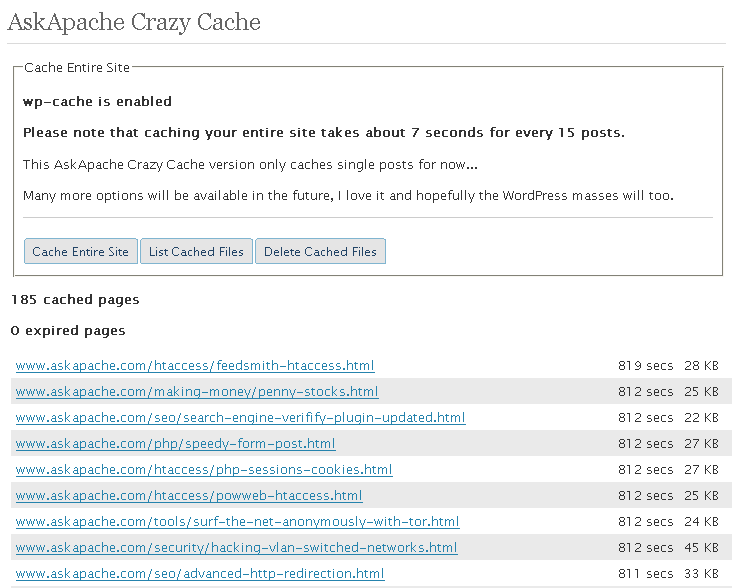
AskApache Crazy Cache WordPress PluginI always wanted the ability to cache all my posts on my blog whenever I wanted, and WP-Cache doesn’t let you do that. So a few months ago I hacked together this kick-butt plugin to do exactly that.

ScreenShot

AskApache Crazy Cache WordPress Plugin

Installation

This plugin is one of those idiot-proof installations, nuff said.

Download

Want More Speed?

I love you guys and girls who want a faster Internet, we rock. So check these out.


«
»

Leave your own comment

Reader Comments

  1. Mark de Scande ~

    Ok it is working on MU just put it in the wright place

    /home/pbc26/public_html/wp-content/plugins/askapache-crazy-cache
    Do not put it in your MU plugins directory it will not work
    Now at the moment 952 supercache cached files and counting

    Server Details:

    Processor Information
    
    Processor #1 Vendor: GenuineIntel
    Processor #1 Name: Intel(R) Xeon(R) CPU            3040  @ 1.86GHz
    Processor #1 speed: 1866.830 MHz
    Processor #1 cache size: 2048 KB
    
    Processor #2 Vendor: GenuineIntel
    Processor #2 Name: Intel(R) Xeon(R) CPU            3040  @ 1.86GHz
    Processor #2 speed: 1866.830 MHz
    Processor #2 cache size: 2048 KB
    

    Ps Alsow running WP Super Cache Manager “Expired files are files older than 172800 seconds.”

    Please remember we get about 1350 hits per day. But with every thing a lot of worked went in to server setup first.

    Your plugin works out of the box with WordPress MU 2.9.2 just put it in the right place :)

    Thx
    Mark

  2. John S. Britsios ~

    I installed the plugin. Is it still required to follow the WP-Cache instructions you mention here http://www.askapache.com/web-cache/hacking-wp-super-cache-for-speed.html ? Or does the plugin do the job?

  3. Karrie ~

    Hi there…
    I started having error messages like this one.
    —-
    Internal Server Error
    The server encountered an internal error or misconfiguration and was unable to complete your request.
    Please contact the server administrator, support@supportwebsite.com and inform them of the time the error occurred, and anything you might have done that may have caused the error.
    More information about this error may be available in the server error log.
    Apache/1.3.33 Server at adcdeg.com Port 80
    —–

    and I was told I needed a cache so I got the Super Cache and your plugin and I’m still getting the error message just as much… have you heard about this… can you shed any light… I’ve looked all over the internet and found nothing that helps and this isn’t the only error message…. I’m very frustrated not being able to fix this… have spent many hours trouble shooting… installing reinstalling on off plugins and the works…

  4. Ed ~

    Is there any chance of getting this to work with W3 Total Cache? Also I assume this won’t work if you host has blocked curl or fsockopen from reaching localhost addresses?

  5. Jason Frovich ~

    Hey does this work with wordpress 2.8+
    It looks like a fantastic plugin

  6. Shanx ~

    1BlogCacher is better than both WP-SuperCache and the much older WP-Cache. The setup and maintenance is MUCH simpler than with WP-SC and it does the same thing. Also, the coding is cleaner so any updates or other plugins won’t break it.

  7. thomas ~

    hi there,

    askapache calls askapache-crazy-cache.php – why?
    my blog is under site .com/blog/entryXY – acc calls site .com/entryXY and tries to find askapache-crazy-cache.php under site .com/askapache-crazy-cache.php not site .com/blog/askapache-crazy-cache.php or something else like the plugin folder.

    maybe acc has a problem with urls like “/login/” “/print/” or so ????

    how can i solve it?

    or is acc a worm application??

    regards,
    thomas

  8. Graeme ~

    I’ve been attempting to use this with the upgraded 2.7 WordPress and WP-Super-Cache 0.87. It appears to be incompatible in this instance (as per-previous poster, as soon as you hit any of the “delete cache” options, WP-Super-Cache stops working – there’s no comments in the source that should be inserted by WP-Super-Cache, though, curiously, no errors either…).

  9. Rich ~

    I have my site on my local pc (Easyphp) and installing the Crazy Cache plugin and Hypercache has been hell for me. I get the following error infos when i install. Does anyone have some idea for me please.

    (1) Error when i click the: “delete entire cache” button

    Warning: rename(C:\Documents and Settings\admin\MY SITE\www/wp-content/cache/,C:\Documents and Settings\admin\Escritorio\MY SITE\www/wp-content/cache.old/) [function.rename]: No such file or directory in C:\Documents and Settings\admin\MY SITE\www\wp-content\plugins\askapache-crazy-cache\askapache-crazy-cache.php on line 299
    

    (2) Error when i click the: “list entire cache” button

    Array
    (
    ) 
    

    (3) Error when i visit my site locally (localhost)

    Content Encoding Error
    The page you are trying to view cannot be shown because it uses an invalid or unsupported form of compression.
    * Please contact the website owners to inform them of this problem.
    
  10. Viphole ~

    It seems doesn’t work with WordPress 2.7 :(
    Please update it.
    Thank you!

  11. Rishi ~

    Hi there! Does Crazy Cache abide by the “exception” rules set in WP-Super Cache? For example, I don’t want my photos page to be cached, or else the navigation gets all messed up. I set this in WP-Super Cache, and it works fine. Will Crazy Cache see this “rule” and abide by it? Furthermore, as a side note, I wish there was a way to cache only certain pages/posts ahead of time rather than the ENTIRE site. Maybe this will be available in the future? =).

  12. Donncha O Caoimh ~

    The way WP-Cache stores it’s files in one directory will actually slow down your site if it’s very big if you try and pre-generate all the pages on a blog. It takes longer to seek through a directory of many files, and WP Cache must open every meta file when a comment is left, or a post made, to find out what files to delete.

    Super Cache stores the files in two directories so the problem isn’t as bad but it’s something to bear in mind, if your site generates a large number of cached files.

  13. AskApache ~

    @ Andy, Stuart

    Ok I’ll make it work with WP-Super Cache and Release the update on Sunday. :)

  14. Stuart ~

    Would be awesome… IF it worked with WP Super Cache…

    I just tried it and it doesn’t. I know. I know… I read your “WP Super Cache will also be supported when the code improves.” section in the comments. But I thought I would try it anyway, just in case 2.51 was magically different to 2.50 ;)

    What do you need to see improved on WP Super Cache before you support it with this plugin?

    WP Super Cache works great on every blog I have it on.

    And the stats on wordpress.org show lots of other folk thing the same.

    WP Super Cache – Last week downloaded 2,528 times
    WP Cache – Last week downloaded 551 times

    How about updating this to support WP Super Cache before they improve the code? Because about 5 times more people are now downloading the new version then the old.

    And your plugin is kind of the missing link ;)

    It annoys the hell out of me that I can’t cache every page on my blog lol

  15. AskApache ~

    @ eric

    I said installations, not usage ;) jk, It could be one of a thousand things.. I’ll be updating it soon but in the meantime if you have any error logs or access logs or php logs you can send me any relevant ones.

  16. eric ~

    the plug-in doesn’t work with my installation. when hitting “Cache Entire Site” 0 (zero) pages get cached.

    any idea? i thought this is one of those idiot-proof installations? ;-)

  17. Andy ~

    Would love to see this one work with WP-Super-Cache..!

  18. Thaya Kareeson ~

    @JTPratt

    Thanks for spreading the word. Since the mod I made to those plugins were not specific to WP-Super-Cache, I’m pretty sure both of those plugins you mentioned would work on AskApache’s crazy cache or WP-Cache as well. Would somebody like to give it a try? :)

  19. michaelb ~

    This would be a great plugin, if it were faster.

    yo. i dont know what apache does with the cache (ttl) but for many hits on a busy site, this is what you hope for. the thing to do is schedule the caching for off hours. or if you have a networked second server…..

  20. JTPratt’s Blogging Mistakes ~

    Caching is great, but it screws up statistical plugins like WP-PostViews and Popularity Contest. Over at Omninoggin, I found to both these plugins (converted to javascript countings) here http://omninoggin.com/2008/03/30/make-popularity-contest-work-with-wp-super-cache/

    and here

    http://omninoggin.com/2008/04/19/make-wp-postviews-work-with-wp-super-cache/

    Oh – and both those plugins work with ‘WP-Super-Cache’ which is better than WP-Cache.

    which work great!

  21. Jairus ~

    This would be a great plugin, if it were faster. I use WP as a CMS with many, many pages, and at 7 seconds for 15 posts I’m looking at a little over an hour to cache my site.

    If you get a chance to optimize the performance, it would be a killer plugin.

Go for it!


It's very simple - you read the protocol and write the code. -Bill Joy

HTML | DCMI | GRDDL | XOXO | XDMP | XFN | DOM | XML | XHTML 1.1 Strict | CSS 2.1 | W3C

Except where otherwise noted, content on this site is licensed under a Creative Commons Attribution 3.0 License, just credit with a link.
This site is not supported or endorsed by The Apache Software Foundation (ASF). All software and documentation produced by The ASF is licensed. "Apache" is a trademark of The ASF. NCSA HTTPd.
UNIX ® is a registered Trademark of The Open Group. POSIX ® is a registered Trademark of The IEEE.

Site Map | Contact Webmaster | Glossary | License and Disclaimer | Terms of Service

↑ TOP
Main