Hack WP-Cache for Maximum Speed
If you desire SPEED from your WordPress blog, the #1 speed improvement comes from using the WP-Cache Plugin. However, if you still desire even more speed after installing the Plugin, you can modify the WP-Cache Plugin code run even faster!
WP-Cache Speed Hack Results
WP-Cache Off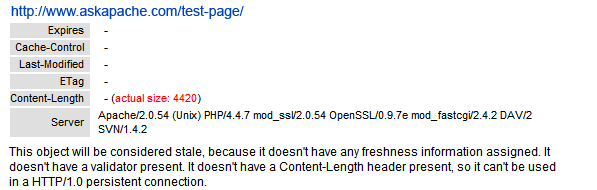
WP-Cache Default Settings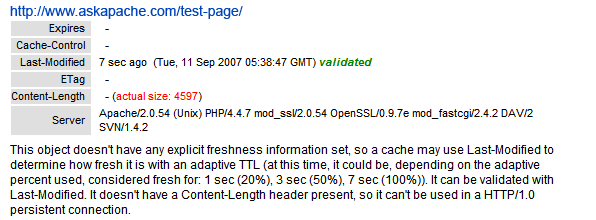
WP-Cache With wp-cache-phase1.php Hack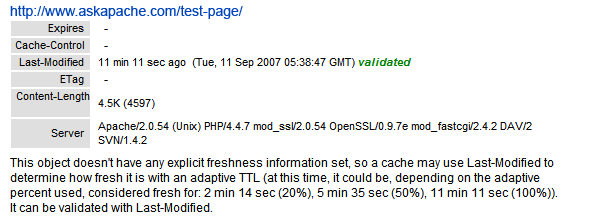
WP-Cache With Full Hack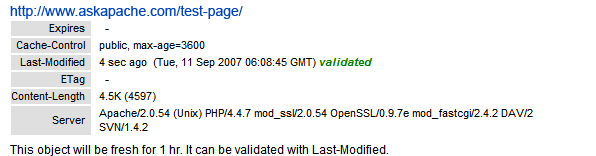
These results came from the Cacheability Checker. Yslow for firefox is what you need today.
Manual Instructions for hacking wp-cache
First you should download and activate the WP-Cache Plugin, then enable it in your Options Configuration Panel for WP-Cache.
Open wp-cache-phase1.php
Find
			/* No used to avoid problems with some PHP installations
			$content_size += strlen($log);
			header("Content-Length: $content_size");
			*/
Replace with
			// BEGIN AskApache WP-Cache hack
			$content_size += strlen($log);
			header("Content-Length: $content_size");
			// END AskApache WP-Cache hack
Open wp-cache-phase2.php
Find
	/* Not used because it gives problems with some
	 * PHP installations
	if (!$response{'Content-Length'}) {
	// WP does not set content size
		$content_size = ob_get_length();
		@header("Content-Length: $content_size");
		array_push($wp_cache_meta_object->headers, "Content-Length: $content_size");
	}
	*/
Replace with
	// BEGIN AskApache WP-Cache Hack
	if (!$response{'Content-Length'}) {
		$content_size = ob_get_length();
		@header("Content-Length: $content_size");
		array_push($wp_cache_meta_object->headers, "Content-Length: $content_size");
	}
	// END AskApache WP-Cache Hack
Find
	if (!$response{'Content-Type'}) {
		$value =  "text/html; charset=\"" . get_settings('blog_charset')  . "\"";
		@header("Content-Type: $value");
		array_push($wp_cache_meta_object->headers, "Content-Type: $value");
	}
After Add
	// BEGIN AskApache WP-Cache Hack
	if (!$response{'Cache-Control'}) {
    	$value = "max-age=$cache_max_time, public";
    	@header("Cache-Control: $value");
    	array_push($wp_cache_meta_object->headers, "Cache-Control: $value");
	}
	// END AskApache WP-Cache Hack
Download the Modified WP-Cache Plugin
Just download and install as if it were the actual WP-Cache Plugin.wp-cache.zip | wp-cache.rar
Want More Speed?
Then check out the other speed articles on AskApache.
Or just add this to your blogs .htaccess file.
# HEADERS and CACHING # 1 YEARHeader set Cache-Control "public" Header set Expires "Thu, 15 Apr 2010 20:00:00 GMT" Header unset Pragma Header unset Last-Modified Header unset ETag FileETag None # 2 DAYSHeader set Cache-Control "max-age=172800, public, must-revalidate" Header unset Pragma Header unset Last-Modified Header unset ETag FileETag None # 2 HOURSHeader set Cache-Control "max-age=7200, must-revalidate" Header unset Pragma Header unset ETag FileETag None # COMPRESSIONSetOutputFilter DEFLATE
« Speed Tips: Add Cache-Control HeadersUpdated robots.txt for WordPress »
Comments