THE Ultimate Htaccess: 2026 Edition
Htaccess is the one configuration file on the web that belongs to YOU. Not to the host. Not to the sysadmin. Not to whoever holds root. Drop a plain text file named .htaccess into a directory and the server running your website obeys it on the very next request. No restart. No support ticket. No permission slip.
That idea is older than Apache itself. Per-directory config files shipped with NCSA HTTPd, the server Apache was patched together from, in the earliest days of the web. It was a radical design then and it is a radical design now: the people who own the content govern how it is served.
This is not an introduction to htaccess.
This is a guide for using htaccess to the fullest, rebuilt from the ground up for the server you are actually running in 2026.
Updated November 2026 for Apache 2.4.70.
Most wanted, because I know why half of you are here:
- Redirect HTTP to HTTPS and non-www to www
- 301 redirect a page, a directory or a whole domain
- Password protect a directory
- Block an IP address
- Custom 404 page
- Disable directory listing
- Block AI crawlers
- Htaccess not working, 500 errors, redirect loops
- See your site the way an attacker does
- Just give me the complete file
Contents
- Twenty Years Later
- What Changed in .htaccess Since Apache 2.2 (And What Died)
- Htaccess Ground Rules: AllowOverride, IfModule and What Works
- Htaccess Access Control in Apache 2.4: Require, Deny From All, Password Protect
- Htaccess Redirects: 301, HTTP to HTTPS, WWW and Error Pages
- Htaccess Security Headers: Giving Orders To Browsers
- Htaccess Caching and Compression: Cache-Control, Expires, Brotli, Gzip
- The Apache Expression Engine: Htaccess Tricks You Won't Find Anywhere Else
- Advanced Mod_Rewrite: RewriteRule and RewriteCond Examples
- Block Bots, AI Crawlers and Exploit Scanners with .htaccess
- The Attacker's Eye: How A Hacker Reads Your .htaccess
- PHP and .htaccess in the PHP-FPM Era: php_value, .user.ini, Handlers
- WordPress .htaccess Hardening
- From The AskApache Vault: The Classics, Rebuilt For 2.4
- The Complete 2026 .htaccess File
- Htaccess Not Working? 500 Errors, Redirect Loops and Fixes
- Apache 2.2 To 2.4 .htaccess Cheat Sheet
- Htaccess FAQ
- Now Go Use It
Twenty Years Later
I learned this file the hard way. I was a network security penetration specialist, hired to find holes in shared hosting. Those boxes gave you FTP and nothing else. No shell, no ssh, and an httpd.conf you could not even read. The only lever left was .htaccess, and holy freaking fiber-optics, it turned out to be almost as powerful as the main config itself.
That is how a hacker reads a config file, BTW. Not "what is this for". "What will this LET me do". Every directive in this guide got here because somebody asked the second question.
So I went all the way in. I compiled every released version of the Apache Web Server, ever. Even NCSA's. Sixty-three builds from 1.3.0 to 2.2.10, each one configured from source, to find every directive and every variable a .htaccess file was allowed to use. Don't ask why. It had never been done before, and it has not been done since. The original guide started circulating in 2003, landed on AskApache a few years later, and was promptly scraped and copied all over the net. Good. Information is freedom.
It is now 2026. Apache 2.2 has been dead since 2017. The 2.4 branch just shipped 2.4.70. The "computer gurus" are STILL on the forums telling you not to use .htaccess. And that little file is STILL sitting in the document root of millions of sites, quietly running the web.
Good times!
The old Ultimate Htaccess stays up as a museum piece. But much of it is wrong for a modern server. Not wrong then. Wrong NOW. Paste a 2006 snippet into a 2026 server and it either does nothing, throws a 500, or works in a way you never intended.
Every example below is written for Apache 2.4. The rules have not changed:
- Every snippet is meant to be copied. Modify it, republish it, sell it, use it. It's yours.
- When a rule may break your site, I say so. Believe me.
- Replace
example.comeverywhere. Obvious, and yet. - You do not need anyone's permission to make your site faster, safer and more correct than the one next door on the same server. You need this file.
SKIP to the complete file if you just want something to paste.
What Changed in .htaccess Since Apache 2.2 (And What Died)
The short version: Apache grew a real expression language, the web went HTTPS-only, PHP moved out of the Apache process, and a whole class of 2006 tricks became either pointless or harmful.
Access control was rebuilt. Order, Allow, Deny and Satisfy are the single biggest source of broken copy-paste on the internet. They still limp along through mod_access_compat on some hosts, which is the worst possible outcome, because it lets you MIX old and new syntax in the same file and get results nobody can predict. The 2.4 way is Require. Use only that.
Apache got <If>. Real conditionals, with a real expression parser, right in .htaccess. A big chunk of what we used to do with ugly RewriteCond and SetEnvIf chains is now three readable lines.
Everything is HTTPS. Free certificates killed the last excuse. That changes redirects, cookies, headers and auth. Basic auth over plain HTTP was always a bad idea. Now it is an embarrassing one.
PHP left the building. In 2006 PHP ran inside Apache as mod_php, so php_value and php_flag worked in .htaccess. Most hosts now run PHP-FPM behind mod_proxy_fcgi. Those two directives do not exist there, and one stray php_value line takes the whole site down with a 500.
Compression and formats moved on. Brotli alongside gzip. AVIF, WebP, WOFF2 and WASM need MIME types the old guide never heard of. HTTP/2 made half the old "reduce requests" advice irrelevant.
The bots changed. In 2006 I was blocking email harvesters and comment spammers. Today the heaviest crawlers on most sites are collecting training data for AI models. Different beast, same toolbox.
And the obituaries. Stop doing all of these:
Header set X-XSS-Protection "1; mode=block". Browsers removed the feature it controls. It now does nothing at best.Expiresheaders with a hard-coded date. My own old examples said 2010. Holy freaking fiber-optics.- Hotlink rules that redirect thieves to somebody ELSE'S image. Funny in 2006. Not your server to abuse.
AddType application/x-httpd-php5 .phpand friends. Those PHP versions are fossils.chmod 766on anything, ever. I'm sorry. It was a different time.- Blocking IE with
BrowserMatch. IE is gone. Pour one out.
Htaccess Ground Rules: AllowOverride, IfModule and What Works
Should you even be using .htaccess?
If you hold root, put your rules in the vhost inside a <Directory> block. Apache reads that once at startup, where .htaccess is looked up and parsed on every request. Every example on this page works there unchanged.
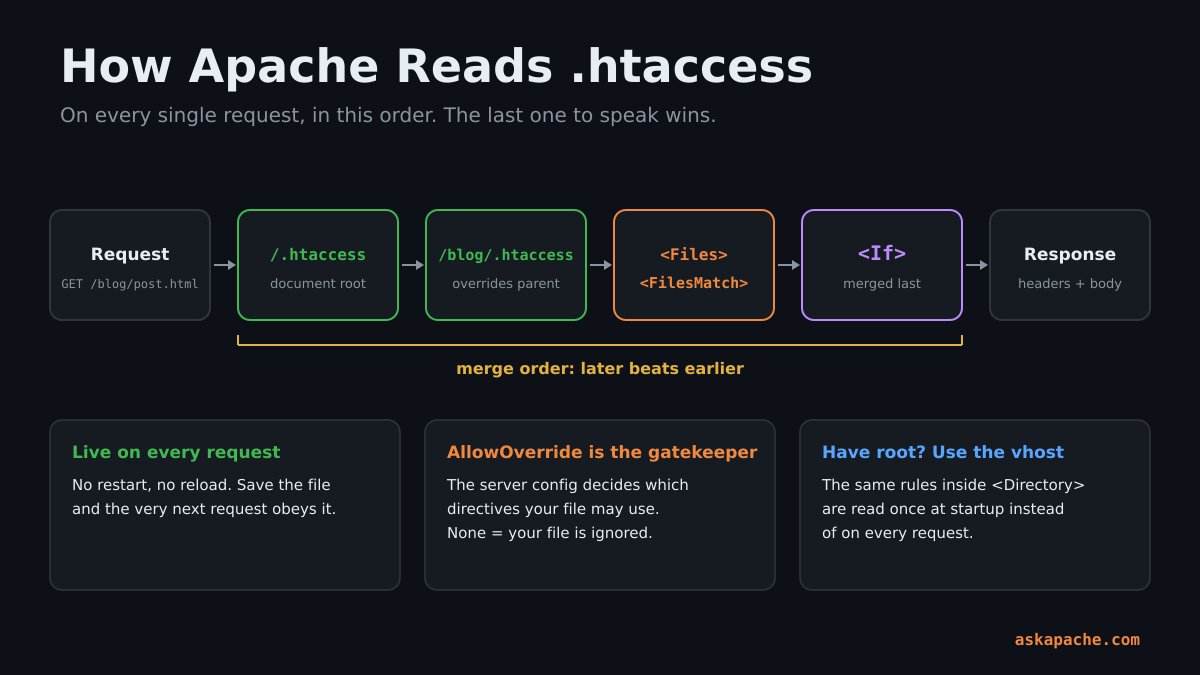
Want to SEE the cost the gurus keep warning you about? Attach strace to an Apache child and request /a/b/c/page.html. You will watch it try to open /.htaccess, then /a/.htaccess, then /a/b/.htaccess, then /a/b/c/.htaccess, on every single request. That is it. That is the whole scandal. Four open() calls, most of them failing instantly. Your database connection costs more than that before it has said hello.
Most of the web does not hold root. Shared hosting, managed WordPress, the agency box nobody will give you SSH on. There, .htaccess is not a compromise. It is the difference between a site that takes whatever defaults it was handed and a site that is tuned, locked down and fully yours. I've never noticed the performance cost. OTOH, I know how to use them. So will you.
AllowOverride decides everything
Whether a directive works in your .htaccess is up to the host's AllowOverride line. The default has been None since the 2.4 days, which means a stock Apache IGNORES your file completely until someone turns it on.
| AllowOverride class | What it unlocks |
|---|---|
| AuthConfig | AuthType, AuthName, AuthUserFile, Require |
| FileInfo | mod_rewrite, mod_headers, mod_expires, ErrorDocument, AddType, SetHandler, Redirect |
| Indexes | DirectoryIndex, autoindex options |
| Limit | Legacy Allow, Deny, Order |
| Options | Options, XBitHack |
That table is not documentation. It is source code. Every Apache module carries a command table, and one field in each row is a bit mask saying where that directive may appear. This is what the old guide pulled out of mod_rewrite:
RewriteEngine, cmd_rewriteengine, OR_FILEINFO, On or Off to enable or disable (default)
RewriteCond,   cmd_rewritecond,   OR_FILEINFO, an input string and a to be applied regexp-pattern
RewriteRule,   cmd_rewriterule,   OR_FILEINFO, an URL-applied regexp-pattern and a substitution URL
RewriteMap,    cmd_rewritemap,    RSRC_CONF,   a mapname and a filename
OR_FILEINFO means "allowed in .htaccess when AllowOverride FileInfo is on". RSRC_CONF means "server config only, forget it". That one field is the entire reason RewriteRule works in your file and RewriteMap never will. Nobody has to tell you which directives you are allowed to use. Download the source, grep -rn OR_FILEINFO modules/, and read the list yourself. That is how this guide was born.
Quick test for whether your file is being read at all: put a line of garbage at the top. If the site does not turn into a 500, Apache is not reading it.
Stop wrapping everything in IfModule
The old guide wrapped nearly every snippet in <IfModule>. I've changed my mind on that.
<IfModule> means "if this module is missing, silently skip". That is right for nice-to-haves like compression. It is WRONG for security. If your deny rules depend on a module that isn't loaded, you want a loud 500, not a site that quietly serves your backups to the world.
Rule of thumb: optional performance stuff gets wrapped. Anything protecting something goes in bare.
What will never work here
These are server-config only. No amount of wishing changes it:
<Directory>,<Location>,<VirtualHost>(use<Files>,<FilesMatch>and<If>instead)RewriteMapdefinitionsLogLevel,CustomLog,ErrorLogServerTokens,Protocols, anythingSSL*that sets up the TLS handshakephp_admin_value
Disable directory listing, and the first three lines of every file
Options -Indexes -MultiViews
ServerSignature Off
AddDefaultCharset utf-8
No directory listings. No content negotiation surprises fighting your rewrites. No version banner on error pages. UTF-8, because it's 2026.
Htaccess Access Control in Apache 2.4: Require, Deny From All, Password Protect
One directive: Require. Burn the rest.
Allow or deny everyone
Require all granted
Require all denied
Allow only certain IP addresses
IPv4, IPv6 and CIDR all on one line. Multiple Require lines are OR by default.
Require ip 203.0.113.10
Require ip 198.51.100.0/24 2001:db8::/32
Block an IP address (allow everyone else)
This is the one everybody gets wrong. A negative Require not cannot stand alone. It has to live inside <RequireAll> next to something positive.
<RequireAll>
  Require all granted
  Require not ip 192.0.2.66
  Require not ip 198.51.100.0/24
</RequireAll>
BTW: if your site sits behind a CDN or a load balancer, Apache sees the PROXY'S address, not the visitor's, unless the host has set up mod_remoteip. Every IP rule on this page is useless until that is sorted. Check before you lock yourself out.
Password protect a directory
AuthType Basic
AuthName "Staff Only"
AuthUserFile /home/you/private/.htpasswd
Require valid-user
Three things that were optional in 2006 and are not now:
- Keep the
.htpasswdfile OUTSIDE the document root. - Create it with bcrypt:
htpasswd -B -c /home/you/private/.htpasswd alice. The old MD5 and crypt hashes fall over to a modern GPU. - HTTPS only. Basic auth sends the password on every single request, base64'd, which is encoding, not encryption.
Do not take my word for it. Grab the Authorization header off any Basic auth request and run it through one command:
$ echo dXNlcjpwYXNz | base64 -d
user:pass
That is what goes over the wire, every request, to anyone sitting between the browser and the server. Without TLS, Basic auth is a password written on a postcard.
Password OR trusted IP
The old Satisfy Any trick. Office gets straight in, everyone else gets the login box.
AuthType Basic
AuthName "Staging"
AuthUserFile /home/you/private/.htpasswd
<RequireAny>
  Require ip 203.0.113.10
  Require valid-user
</RequireAny>
Deny access to one file
<Files "wp-config.php">
  Require all denied
</Files>
Block access to backups, dotfiles and .env
Backups, dumps, editor swap files, configs. Forgotten files like these are behind a depressing number of breaches.
<FilesMatch "(^\.|~$|\.(bak|old|orig|save|swp|sql|sqlite|log|ini|conf|dist|env|ya?ml|lock|sh)$)">
  Require all denied
</FilesMatch>
<FilesMatch> only looks at the FILE name, so it will not stop /.git/config, where the dot is on the directory. This will. It 404s anything with a dot-segment in the path, and leaves /.well-known/ alone so certificate renewals keep working.
RedirectMatch 404 "/\.(?!well-known/)"
This may break a site that serves real dotfiles or .yml files on purpose. Trim the list to fit.
Block by request method
<Limit> and <LimitExcept> are still around but Require method reads better.
<RequireAny>
  Require method GET HEAD POST
</RequireAny>
Htaccess Redirects: 301, HTTP to HTTPS, WWW and Error Pages
This was the most popular section of the old guide and I'd bet money it still is. A redirect is the purest htaccess move there is: one line of text and every browser, crawler and bot on earth goes where YOU say.
Redirect HTTP to HTTPS and non-www to www in one hop
The old guide did www and SSL as two separate redirects. That is two round trips. This does both in one, and it is freaking sweet.
## CANONICAL HOST + HTTPS IN ONE HOP
RewriteEngine On
RewriteCond %{HTTPS} !=on [OR]
RewriteCond %{HTTP_HOST} !=www.example.com
RewriteRule ^ https://www.example.com%{REQUEST_URI} [R=301,L]
Same thing behind a CDN or load balancer
When something in front of Apache terminates TLS, %{HTTPS} is always off and the rule above loops forever. Test the forwarded header instead. Only do this if the proxy really sets it, because a header is just a header and anyone can send one.
## HTTPS REDIRECT BEHIND A TLS-TERMINATING PROXY
RewriteEngine On
RewriteCond %{HTTP:X-Forwarded-Proto} !=https
RewriteRule ^ https://%{HTTP_HOST}%{REQUEST_URI} [R=301,L]
Tell browsers to never even try HTTP again
HSTS. Once a browser sees this it refuses to speak plain HTTP to your domain for the next year. Start with max-age=300, confirm nothing broke, THEN go big. This one is hard to take back.
## HSTS - ONLY SENT OVER HTTPS
<If "%{HTTPS} == 'on'">
  Header always set Strict-Transport-Security "max-age=31536000; includeSubDomains"
</If>
301 Redirect old file
Redirect 301 /old/file.html /new/file/
301 Redirect entire directory
RedirectMatch 301 "^/blog/(.*)$" "/articles/$1"
301 Redirect to a new domain, keeping every path
RewriteEngine On
RewriteCond %{HTTP_HOST} ^(www\.)?old-example\.com$ [NC]
RewriteRule ^ https://www.example.com%{REQUEST_URI} [R=301,L]
308, the redirect that keeps the POST
A 301 lets the client turn a POST into a GET. A 308 does not. For anything that receives form posts or API calls, this is the one you want.
Redirect 308 /api/v1 /api/v2
410 Gone
A 404 says "not found, maybe later". A 410 says "dead, stop asking". Crawlers drop a 410 much faster.
Redirect gone /2006/that-post-i-regret/
Remove index.php and index.html from URLs
## /foo/index.php -> /foo/
RewriteCond %{THE_REQUEST} \s/+(.*/)?index\.(?:php|html?)[\s?] [NC]
RewriteRule ^ /%1 [R=301,L]
Add or remove the trailing slash
Pick one and force it. Two URLs for the same page is duplicate content, and search engines have to guess which one you meant.
## ADD THE TRAILING SLASH (SKIPS REAL FILES)
RewriteCond %{REQUEST_FILENAME} !-f
RewriteRule ^(.*[^/])$ /$1/ [R=301,L]
## OR REMOVE IT (SKIPS REAL DIRECTORIES)
RewriteCond %{REQUEST_FILENAME} !-d
RewriteRule ^(.+)/$ /$1 [R=301,L]
Custom 404 page and other ErrorDocuments
The old guide listed 49 of these, one for every status code Apache knows. I still think that is so cool. These are the ones you will actually use.
## ERRORDOCUMENTS
ErrorDocument 401 /e/401.html
ErrorDocument 403 /e/403.html
ErrorDocument 404 /e/404.html
ErrorDocument 410 /e/410.html
ErrorDocument 500 /e/500.html
ErrorDocument 503 /e/503.html
Maintenance mode done right
A real 503 with a Retry-After, so crawlers come back later instead of indexing your "be right back" page. Your own IP walks straight through.
## 503 MAINTENANCE MODE - EVERYONE BUT ME
ErrorDocument 503 /maintenance.html
RewriteEngine On
RewriteCond %{REMOTE_ADDR} !=203.0.113.10
RewriteCond %{REQUEST_URI} !=/maintenance.html
RewriteRule ^ - [R=503,L]
Header always set Retry-After "3600" "expr=%{REQUEST_STATUS} == 503"
BTW: test every permanent redirect as a 302 first. Browsers cache a 301 like it's carved in stone, and you will chase a redirect you already deleted for an hour. Ask me how I know.
OTOH: do not mix Redirect and RewriteRule on the same URLs. They are two different modules, they do not run in the order you wrote them, and the result will surprise you.
Htaccess Security Headers: Giving Orders To Browsers
Here is something the gurus never tell you. A response header is a command, and the browser on the other end follows it. With mod_headers in your .htaccess you are not asking a browser to behave. You are telling it. That is a lot of power for a text file, and almost nobody on your shared server is using it.
Headers are also the most honest part of any website. The HTML is marketing. The headers are the truth. Run curl -sI against a site and in one second you know what server it runs, what it is built on, and how careful the person who set it up was. I read headers before I read anything else. So does everyone who wants in.
One thing to know first: Apache keeps TWO header tables. Plain Header set only touches successful responses. Header always set also covers redirects and error pages. For security headers you want always.
The security headers every site should send
## SECURITY HEADERS
Header always set X-Content-Type-Options "nosniff"
Header always set Referrer-Policy "strict-origin-when-cross-origin"
Header always set Permissions-Policy "camera=(), microphone=(), geolocation=(), payment=(), usb=()"
Header always set Cross-Origin-Opener-Policy "same-origin"
Header always set X-Frame-Options "SAMEORIGIN"
No MIME sniffing. No leaking full URLs to other sites. No camera, mic or location for any script on your pages, including the third-party ones you forgot you loaded. No other site framing you for clickjacking.
Content-Security-Policy, the big one
CSP is a whitelist of where scripts, styles and everything else may load from. Done right, it turns most XSS bugs into nothing. Done wrong, it turns your site into a blank page. So run it in report-only mode FIRST, read your browser console, fix what it complains about, then enforce.
## CSP - STEP 1: WATCH, DON'T BLOCK
Header always set Content-Security-Policy-Report-Only "default-src 'self'; img-src 'self' data: https:; object-src 'none'; base-uri 'self'; frame-ancestors 'self'"
## CSP - STEP 2: ENFORCE
Header always set Content-Security-Policy "default-src 'self'; img-src 'self' data: https:; object-src 'none'; base-uri 'self'; frame-ancestors 'self'; upgrade-insecure-requests"
This will break inline scripts and anything loaded from a CDN until you add those sources. That is the point.
Lock down every cookie
This one I love. Your app forgot to set Secure and HttpOnly? Rewrite its cookies on the way out the door. The lookahead keeps it from adding the flag twice.
## FORCE Secure + HttpOnly + SameSite ON EVERY COOKIE
Header always edit Set-Cookie "^((?!.*;\s*Secure).*)$" "$1; Secure"
Header always edit Set-Cookie "^((?!.*;\s*HttpOnly).*)$" "$1; HttpOnly"
Header always edit Set-Cookie "^((?!.*;\s*SameSite).*)$" "$1; SameSite=Lax"
Header edit Set-Cookie "^((?!.*;\s*Secure).*)$" "$1; Secure"
Header edit Set-Cookie "^((?!.*;\s*HttpOnly).*)$" "$1; HttpOnly"
Header edit Set-Cookie "^((?!.*;\s*SameSite).*)$" "$1; SameSite=Lax"
HttpOnly may break any JavaScript that reads its own cookies. Drop those two lines if yours does.
Stop advertising what you run
## REMOVE VERSION BANNERS
Header always unset X-Powered-By
Header unset X-Powered-By
ServerSignature Off
Keep files out of search engines without touching them
No meta tag needed, and it works on PDFs and images, which have nowhere to put one.
## NOINDEX FOR DOCUMENTS
<FilesMatch "\.(pdf|docx?|xlsx?|zip)$">
  Header set X-Robots-Tag "noindex, nofollow"
</FilesMatch>
Force "File Save As" prompt
The old guide did this by lying about the MIME type. This is the honest way.
## FORCE DOWNLOAD
<FilesMatch "\.(csv|zip|mp4|pdf)$">
  Header set Content-Disposition "attachment"
</FilesMatch>
Let other sites use your fonts
## CORS FOR WEB FONTS
<FilesMatch "\.(woff2?|ttf|otf)$">
  Header set Access-Control-Allow-Origin "*"
</FilesMatch>
Set a cookie from a URL
Straight from the old cookie manipulation article, and still one of my favorites. Visit /de/ and get a language cookie for a week, no application code involved.
## COOKIE FROM REQUEST PATH
RewriteEngine On
RewriteRule ^(de|es|fr|it|ja)/ - [CO=lang:$1:.example.com:10080:/:secure:httponly]
And the obituaries: X-XSS-Protection (send nothing, or 0), P3P, Pragma, imagetoolbar. All dead. Take them out.
Htaccess Caching and Compression: Cache-Control, Expires, Brotli, Gzip
I said it in 2006 and I'll say it again: if I am a customer on your server farm and .htaccess is enabled, my sites are going to be a LOT faster than yours. Same hardware. Same plan. Same price. The only difference is a few lines of text telling browsers to stop re-downloading things they already have.
The fastest request is the one that never gets made.
Open your browser's network tab, load a page, then load it again. Every row on that second load that is not "from cache" or a 304 is a request you paid for and did not need. That list is your to-do list.
Cache forever, the right way
The old guide set Expires to a date in 2010. Ouch. The modern rule is simple: files with a hash in the name (app.3f9a1c2b.css) can NEVER change, so cache them for a year and mark them immutable. The browser will not even ask.
## FINGERPRINTED ASSETS - 1 YEAR, NEVER REVALIDATE
<FilesMatch "\.[0-9a-f]{8,}\.(css|js|mjs|woff2|avif|webp|png|jpe?g|svg)$">
  Header set Cache-Control "public, max-age=31536000, immutable"
</FilesMatch>
HTML always checks in
no-cache does NOT mean "don't cache". It means "cache it, but ask me before using it". That is exactly what you want for pages. no-store is the one that means never keep a copy.
## HTML - ALWAYS REVALIDATE
<FilesMatch "\.html?$">
  Header set Cache-Control "no-cache"
</FilesMatch>
Sensible defaults for everything else
## EXPIRES BY TYPE
<IfModule mod_expires.c>
  ExpiresActive On
  ExpiresDefault "access plus 1 hour"
  ExpiresByType text/html "access plus 0 seconds"
  ExpiresByType text/css "access plus 1 month"
  ExpiresByType text/javascript "access plus 1 month"
  ExpiresByType image/avif "access plus 1 month"
  ExpiresByType image/webp "access plus 1 month"
  ExpiresByType image/jpeg "access plus 1 month"
  ExpiresByType image/png "access plus 1 month"
  ExpiresByType image/svg+xml "access plus 1 month"
  ExpiresByType font/woff2 "access plus 1 year"
</IfModule>
Prevent caching 100%
For the account page, the admin area, anything private.
## NEVER STORE
<FilesMatch "^(account|checkout|admin)\.php$">
  Header set Cache-Control "no-store"
</FilesMatch>
Developer mode: see changes instantly
An old favorite. Put this in the staging directory and stop holding down shift-reload.
## DEV - CACHE NOTHING
Header set Cache-Control "no-store"
MIME types the old guide never heard of
Good riddance to .swf and .flv. Apache will not guess these new ones on an older install, and a browser will refuse a module or a font served with the wrong type.
## MODERN MIME TYPES
AddType image/avif .avif
AddType image/webp .webp
AddType image/jxl .jxl
AddType font/woff2 .woff2
AddType text/javascript .js .mjs
AddType application/wasm .wasm
AddType application/manifest+json .webmanifest
AddType video/mp4 .mp4
AddType video/webm .webm
Enable Brotli and gzip compression
Text compresses beautifully. Images, video and WOFF2 are already compressed, so leave them off the list or you burn CPU for nothing.
## BROTLI
<IfModule mod_brotli.c>
  AddOutputFilterByType BROTLI_COMPRESS text/html text/plain text/css text/javascript text/xml
  AddOutputFilterByType BROTLI_COMPRESS application/javascript application/json application/xml
  AddOutputFilterByType BROTLI_COMPRESS application/manifest+json application/wasm image/svg+xml
</IfModule>

## GZIP
<IfModule mod_deflate.c>
  AddOutputFilterByType DEFLATE text/html text/plain text/css text/javascript text/xml
  AddOutputFilterByType DEFLATE application/javascript application/json application/xml
  AddOutputFilterByType DEFLATE application/manifest+json application/wasm image/svg+xml
</IfModule>
Check which one you got:
curl -sI -H 'Accept-Encoding: br, gzip' https://www.example.com/ | grep -i content-encoding
This is the one place <IfModule> belongs. If the host did not load Brotli, you lose nothing and the site stays up.
The Apache Expression Engine: Htaccess Tricks You Won't Find Anywhere Else
This is the part I have been waiting to write. Apache 2.4 quietly shipped a full expression language, ap_expr, and wired it into <If>, Require, Header, SetEnvIfExpr and RewriteCond. It reads request headers, compares strings and integers, matches regexes, checks IPs and knows what time it is. It runs in .htaccess. And almost NOBODY uses it, because every tutorial on the net is still copying snippets from 2006. (Some of them mine. Sorry.)
The Apache developers are among the best programmers in the world, and this is some of their finest work hiding in plain sight.
Yes, all of it is in the Apache docs. Anyone can read the docs. The docs tell you what a directive DOES. They do not tell you what it is GOOD for. That part you only get by pointing it at things it was never meant for and seeing what gives. Here is what gave.
Hotlink protection that does not need a Referer
Referer-based hotlink blocking is dying, because privacy settings strip the Referer. But every modern browser now sends Sec-Fetch-Site and Sec-Fetch-Dest on every request, and a page CANNOT forge them from JavaScript. So ask the browser directly: is another site embedding my image?
## HOTLINK BLOCK VIA FETCH METADATA - NO REFERER NEEDED
<If "%{req_novary:Sec-Fetch-Site} == 'cross-site' && %{req_novary:Sec-Fetch-Dest} in {'image', 'video', 'audio'}">
  Require all denied
</If>
Someone clicking a direct link to your image still gets it (that is a document navigation, not an image embed). Search engine crawlers do not send these headers, so they are untouched. Holy freaking fiber-optics that is clean.
The catch, because there is always one: this also blocks the full-size preview in image search results and images loaded by web-based email. If you want that traffic, skip this one. BTW: req_novary reads a request header WITHOUT adding it to the Vary response header. Plain req works too, but then every response grows a Vary line.
Kill cross-site form attacks at the server
Same idea, bigger payoff. A POST that a browser says came from ANOTHER site is refused before your application ever sees it. That is CSRF protection for every script on the site, including the ancient ones nobody dares touch.
## REFUSE CROSS-SITE POSTS
<If "%{REQUEST_METHOD} == 'POST' && %{req_novary:Sec-Fetch-Site} == 'cross-site'">
  Require all denied
</If>
Server-to-server callbacks (payment webhooks and the like) send no Sec-Fetch-Site at all, so they pass. This may break anything where another site sends the browser back to you with a POST: single sign-on, and some payment and 3-D Secure return pages. Exempt those URLs before you turn it on.
One file for production AND staging
Stop maintaining two .htaccess files and praying you upload the right one. Let the file figure out where it is.
## STAGING: PASSWORD + NOINDEX. PRODUCTION: NEITHER.
<If "%{HTTP_HOST} =~ /^(staging|dev)\./">
  AuthType Basic
  AuthName "Staging"
  AuthUserFile /home/you/private/.htpasswd
  Require valid-user
  Header always set X-Robots-Tag "noindex, nofollow"
</If>
A site that changes itself at midnight
%{TIME} is the server clock as YYYYMMDDHHMMSS. Compare it as a string and you have a scheduler with no cron, no deploy and nobody awake. The sale page goes live on its own. Good times!
## LAUNCH PAGE GOES LIVE NOV 27 2026 00:00 SERVER TIME
<If "%{TIME} < '20261127000000' && %{REQUEST_URI} =~ m#^/black-friday#">
  Require all denied
</If>
Office hours for the admin area
The old guide did this with a stack of RewriteCond %{TIME_HOUR} lines. Now it reads like English. Nobody logs in at 3am except the people you don't want.
## /admin CLOSED 22:00 - 06:00 SERVER TIME
<If "%{REQUEST_URI} =~ m#^/admin# && (%{TIME_HOUR} -ge 22 || %{TIME_HOUR} -lt 6)">
  Require all denied
</If>
Password protect everything EXCEPT one path
The eternal problem: the whole site is locked, but the certificate bot and the payment webhook have to get in. Require expr solves it in one line.
## LOCKED SITE WITH TWO HOLES IN THE FENCE
AuthType Basic
AuthName "Private"
AuthUserFile /home/you/private/.htpasswd
<RequireAny>
  Require valid-user
  Require expr "%{REQUEST_URI} =~ m#^/(\.well-known/|webhook/)#"
</RequireAny>
CORS for a whitelist of origins
The spec only lets you send ONE origin back, so everybody gives up and sends *. Don't. Capture the origin if it is on your list and echo that exact value.
## CORS - ECHO THE ORIGIN ONLY IF I TRUST IT
SetEnvIf Origin "^https://(www|app|admin)\.example\.com$" CORS_OK=$0
Header always set Access-Control-Allow-Origin "%{CORS_OK}e" env=CORS_OK
Header always merge Vary "Origin"
Make Apache tell you how long it took
A stopwatch on every response, visible in curl -I, no application code. %D is microseconds spent on the request and %t is when it arrived. Leave it on permanently for your own IP.
## RESPONSE TIMING HEADER - ONLY FOR ME
<If "-R '203.0.113.10'">
  Header always set X-Served "%D %t"
</If>
Expressions inside RewriteCond
Any of this works in mod_rewrite too. Compare two variables against EACH OTHER, which plain RewriteCond regexes could never do without ugly backreference hacks.
## REDIRECT ONLY IF HOST DOES NOT MATCH THE CONFIGURED SERVER NAME
RewriteEngine On
RewriteCond expr "%{HTTP_HOST} != %{SERVER_NAME}"
RewriteRule ^ https://%{SERVER_NAME}%{REQUEST_URI} [R=301,L]
Two warnings from someone who has been bitten. <If> blocks are merged LAST, after <Files>, so they win arguments you did not know you were having. And do not put RewriteRule inside an <If>. It is allowed, and it will not do what you think.
Advanced Mod_Rewrite: RewriteRule and RewriteCond Examples
mod_rewrite is the Swiss Army chainsaw of Apache. The old Apache docs opened with a quote calling it voodoo. I have read mod_rewrite.c more times than is healthy and it STILL surprises me. These are the ones that push it.
This is the module where htaccess stops being configuration and turns into programming. Conditions, variables, backreferences, loops, state carried between passes. Treat it like code: one change at a time, test every change, and never trust a rule you have not watched run.
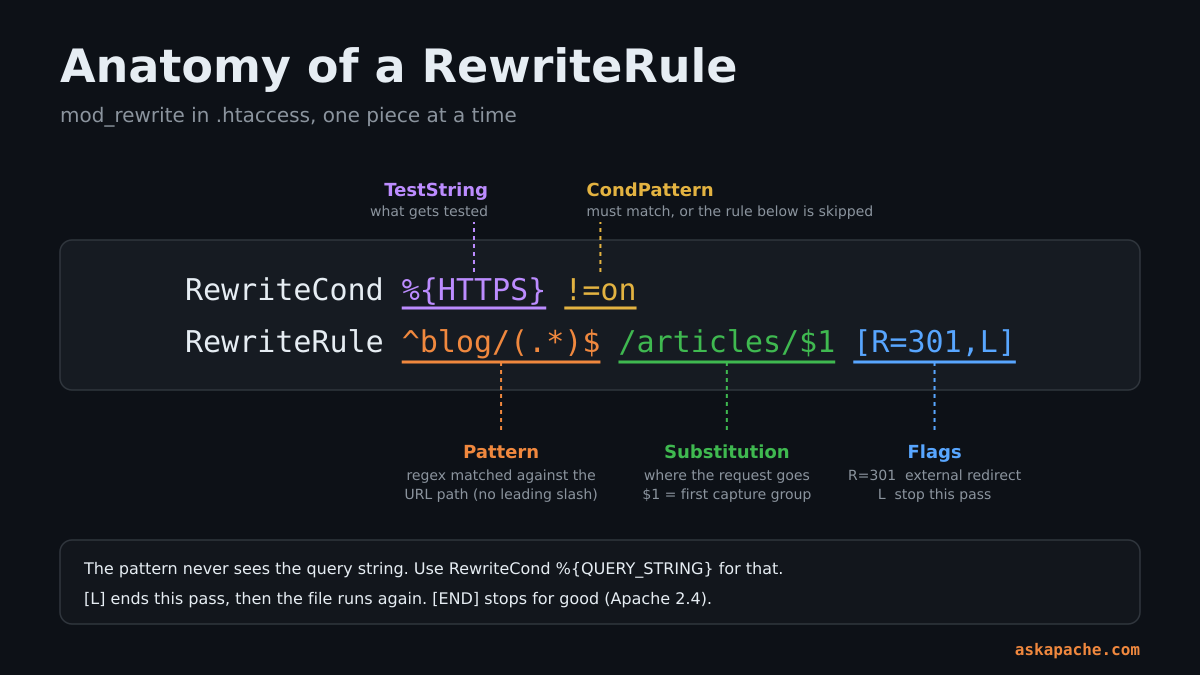
The three things that confuse everyone
- In
.htaccessthe pattern is matched against the path WITHOUT the leading slash and without the directory you are in.^/foonever matches.^foodoes. - The pattern never sees the query string. For that you need
RewriteCond %{QUERY_STRING}. [L]does not mean "stop". It means "stop this pass". Apache then runs the WHOLE file again on the rewritten URL. This is where every infinite loop comes from. 2.4 gave us[END], which really does stop.
Send everything to a front controller
## FRONT CONTROLLER
RewriteEngine On
RewriteCond %{REQUEST_FILENAME} !-f
RewriteCond %{REQUEST_FILENAME} !-d
RewriteRule ^ index.php [END]
Same thing, no mod_rewrite at all
One line. This has been in Apache since 2.2.16 and people are still pasting the four-line version.
FallbackResource /index.php
Only act on the ORIGINAL request
An AskApache classic and still the cleanest loop-killer there is. Apache sets REDIRECT_STATUS on every internal redirect, so if it is empty, this is the request the client actually sent.
## RUN ONLY ON THE FIRST PASS
RewriteCond %{ENV:REDIRECT_STATUS} ^$
RewriteRule ^old/(.*)$ new/$1 [L]
Year-long caching without a build tool
This one is sneaky. Link to style.1731300000.css in your HTML (any number: a timestamp, a version). The file on disk is still plain style.css. Change the number and every browser on earth fetches a fresh copy, and you never renamed a thing.
## style.123456.css -> style.css  (NUMBER IS IGNORED, CACHE IS BUSTED)
RewriteEngine On
RewriteCond %{REQUEST_FILENAME} !-f
RewriteRule ^(.+)\.\d+\.(css|js|png|jpe?g|svg|woff2)$ $1.$2 [L]

<FilesMatch "\.(css|js|png|jpe?g|svg|woff2)$">
  Header set Cache-Control "public, max-age=31536000, immutable"
</FilesMatch>
Only turn on the year-long header once EVERY reference in your HTML carries a number. An un-numbered style.css cached for a year is a year you cannot take back.
Serve AVIF to browsers that can take it, same URL
Your HTML says photo.jpg. If the browser accepts AVIF and photo.jpg.avif exists next to it, Apache hands over the smaller file. Old browsers get the JPEG. Zero changes to your pages. YES! I think that is so cool.
## TRANSPARENT AVIF - photo.jpg -> photo.jpg.avif WHEN SUPPORTED
RewriteEngine On
RewriteCond %{HTTP_ACCEPT} image/avif
RewriteCond %{REQUEST_FILENAME}.avif -f
RewriteRule ^(.+)\.(jpe?g|png)$ $0.avif [L]
RewriteRule \.(jpe?g|png)\.avif$ - [T=image/avif]

<FilesMatch "\.(jpe?g|png|avif)$">
  Header append Vary "Accept"
</FilesMatch>
Serve pre-compressed files with zero CPU
Compress your CSS and JS ONCE at the highest Brotli level (brotli -q 11 app.css gives you app.css.br), then let Apache hand out the finished file instead of compressing on every request.
## PRECOMPRESSED BROTLI - app.css -> app.css.br
RewriteEngine On
RewriteCond %{HTTP:Accept-Encoding} \bbr\b
RewriteCond %{REQUEST_FILENAME}.br -f
RewriteRule ^(.+)\.(css|js|svg)$ $0.br [L]

RewriteRule \.css\.br$ - [T=text/css,E=no-brotli:1,E=no-gzip:1]
RewriteRule \.js\.br$ - [T=text/javascript,E=no-brotli:1,E=no-gzip:1]
RewriteRule \.svg\.br$ - [T=image/svg+xml,E=no-brotli:1,E=no-gzip:1]

<FilesMatch "\.(css|js|svg)\.br$">
  Header set Content-Encoding "br"
  Header append Vary "Accept-Encoding"
</FilesMatch>
Remove the .php extension from URLs
## /about -> about.php (INTERNAL), /about.php -> /about (EXTERNAL)
RewriteEngine On
RewriteCond %{THE_REQUEST} \s/+(.+?)\.php[\s?] [NC]
RewriteRule ^ /%1 [R=301,L]

RewriteCond %{REQUEST_FILENAME}.php -f
RewriteRule ^(.+?)/?$ $1.php [END]
%{THE_REQUEST} is the raw first line the client sent, before any rewriting. It is the one variable that cannot be fooled by your own rules, which is why the two halves above do not fight each other.
Query string: turn ?id=42 into /product/42
[QSD] throws the old query string away. Before 2.4 we stuck a bare ? on the end. Not anymore.
## /product.php?id=42 -> /product/42
RewriteCond %{QUERY_STRING} (^|&)id=(\d+)(&|$)
RewriteRule ^product\.php$ /product/%2 [R=301,L,QSD]
Query string: block a key
## DENY ANY REQUEST CARRYING ?debug=
RewriteCond %{QUERY_STRING} (^|&)debug= [NC]
RewriteRule ^ - [F]
Strip tracking junk from URLs
## REMOVE utm_* AND fbclid WHEN THEY ARE THE WHOLE QUERY STRING
RewriteCond %{QUERY_STRING} ^((utm_[a-z]+|fbclid|gclid)=[^&]*&?)+$ [NC]
RewriteRule ^ %{REQUEST_URI} [R=301,L,QSD]
Underscores to hyphens
Still works exactly like it did in the old mod_rewrite tips article. One redirect per underscore until none are left, so use it for cleanup, not on URLs with ten of them.
## my_old_url -> my-old-url
RewriteRule ^([^_]*)_(.*)$ /$1-$2 [R=301,L]
The flags you actually need
| Flag | What it does |
|---|---|
| L | Stop this pass. The file runs again on the new URL. |
| END | Stop for real. No more passes. 2.4 only. |
| R=301 | External redirect with that status. Always pair with L. |
| F | 403 Forbidden. |
| G | 410 Gone. |
| NC | Case-insensitive match. |
| QSA | Keep the original query string and append yours. |
| QSD | Discard the original query string. 2.4 only. |
| NE | Do not escape special characters in the result. |
| E=name:value | Set an environment variable. |
| T=type | Force the Content-Type. |
| CO=... | Set a cookie. |
| S=n | Skip the next n rules. A poor man's if-block. |
BTW: since 2.4.60, a rewrite that would smuggle an encoded ? out of a backreference into the result is refused unless you add [UnsafeAllow3F]. If an old rule started throwing 403s after a server update, that is why. It was a real security hole. Fix the rule instead of adding the flag if you can.
Block Bots, AI Crawlers and Exploit Scanners with .htaccess
Years ago I published two ways to block 436 different user-agents. Email harvesters, comment spammers, site rippers. The names have changed. The game has not: something you did not invite is eating your bandwidth, and you get to decide whether it stays.
Your server. Your content. Your call.
Before you block anything, look at who is actually there. Your access log is the best intelligence feed you will ever have, and it is free. This is the top 25 user-agents hitting your site, straight out of a standard combined log:
awk -F'"' '{print $6}' access.log | sort | uniq -c | sort -rn | head -25
Run it once and you will never guess about bots again.
AI crawlers: ask nicely first
The well-behaved ones read robots.txt. That is not .htaccess, but it goes first because it costs nothing.
User-agent: GPTBot
User-agent: ClaudeBot
User-agent: CCBot
User-agent: Google-Extended
User-agent: PerplexityBot
User-agent: Bytespider
User-agent: meta-externalagent
User-agent: Amazonbot
Disallow: /
Block AI crawlers by User-Agent (GPTBot, ClaudeBot, CCBot)
For the ones that do not read the sign. robots.txt itself stays reachable so the polite bots can still see they are not wanted.
## BLOCK AI TRAINING CRAWLERS BY USER-AGENT
RewriteEngine On
RewriteCond %{REQUEST_URI} !=/robots.txt
RewriteCond %{HTTP_USER_AGENT} (GPTBot|ClaudeBot|CCBot|PerplexityBot|Bytespider|meta-externalagent|Amazonbot|Diffbot) [NC]
RewriteRule ^ - [F]
Whether you WANT to block them is your decision, not mine. Some people want to be in the answers those models give. The point is that it is a decision, and now you can make it. This list goes stale fast. Read your access log once a month.
Same block without mod_rewrite
## BLOCK BY USER-AGENT WITH SETENVIF + REQUIRE
SetEnvIfNoCase User-Agent "(GPTBot|ClaudeBot|CCBot|Bytespider)" bad_bot
<RequireAll>
  Require all granted
  Require not env bad_bot
</RequireAll>
Catch the liars
A User-Agent is just a string and every scraper on earth claims to be Chrome. But REAL Chrome, Firefox and Safari send Sec-Fetch-Mode on every HTTPS request, and most scraping libraries do not bother. So: you say you are Chrome, but you are not acting like Chrome.
## CLAIMS TO BE A MODERN BROWSER, SENDS NO FETCH METADATA = FAKE
RewriteEngine On
RewriteCond %{HTTPS} =on
RewriteCond %{HTTP_USER_AGENT} (Chrome|Firefox|Safari)/ [NC]
RewriteCond %{HTTP_USER_AGENT} !(compatible|bot|crawl|spider|preview|lighthouse) [NC]
RewriteCond %{HTTP:Sec-Fetch-Mode} ^$
RewriteRule ^ - [F]
Crawlers that announce themselves with compatible; in the User-Agent are skipped on purpose, Googlebot included. This rule may break Safari older than 16.4 and any monitoring tool that fakes a browser User-Agent. Watch your 403s for a day after you turn it on.
Block exploit scanners
Within minutes of a site going live, something is requesting /.env, /wp-config.php.bak and /vendor/phpunit/. They are not lost. Give them nothing.
## COMMON EXPLOIT PROBES
RewriteEngine On
RewriteCond %{REQUEST_URI} (\.env|\.git/|wp-config\.php\.|/vendor/phpunit|eval-stdin\.php|/cgi-bin/|\.aws/credentials) [NC,OR]
RewriteCond %{QUERY_STRING} (\.\./|%2e%2e|base64_decode|<script|%3Cscript|union[^a-z]+select|concat\() [NC,OR]
RewriteCond %{QUERY_STRING} (^|&)(cmd|exec|shell)= [NC]
RewriteRule ^ - [F]
This is not a firewall and I will not pretend it is. It is a bouncer who knows the usual faces. Keeping your software patched is still the real security.
Safe request methods
## ONLY THE METHODS A NORMAL SITE USES
RewriteCond %{REQUEST_METHOD} !^(GET|HEAD|POST|OPTIONS)$
RewriteRule ^ - [F]
Running a REST API? Add PUT|PATCH|DELETE or this will break it.
No User-Agent, no POST
Straight from the old guide and still earning its keep.
## DENY POSTS FROM BLANK USER-AGENTS
RewriteCond %{REQUEST_METHOD} =POST
RewriteCond %{HTTP_USER_AGENT} ^-?$
RewriteRule ^ - [F]
Classic Referer hotlink block
The Fetch Metadata version above is better. This is here for the browsers and apps that predate it.
## STOP HOTLINKING - REFERER METHOD
RewriteCond %{HTTP_REFERER} !^$
RewriteCond %{HTTP_REFERER} !^https://(www\.)?example\.com/ [NC]
RewriteRule \.(avif|webp|jpe?g|png|gif|mp4)$ - [F,NC]
Limit upload size
## 10MB MAX REQUEST BODY
LimitRequestBody 10485760
One thing .htaccess cannot do is count. Rate limiting and banning repeat offenders by IP needs state, and that belongs to the firewall, fail2ban or the CDN.
The Attacker's Eye: How A Hacker Reads Your .htaccess
I got into this file from the other side. Nobody hired me to configure servers. They hired me to break into them. So here is the part no other htaccess guide has: your site, the way it looks to someone who wants in. Run every one of these against YOUR OWN site. If you would not be comfortable with me running them, you have work to do.
The first sixty seconds
Nobody starts with an exploit. They start by asking politely for files you forgot were there. This asks for the ones that end careers:
## SELF-AUDIT: EVERY LINE SHOULD SAY 404
for p in .git/HEAD .env .htaccess .htpasswd .user.ini wp-config.php.bak wp-config.php~ backup.sql site.zip; do
  printf '%-22s ' "$p"; curl -s -o /dev/null -w '%{http_code}\n' "https://www.example.com/$p"
done
A 200 on any of those is game over. An exposed .git directory hands over your whole source tree with its history. A .env or a wp-config.php.bak hands over the database password, because the moment a PHP file gets a different extension Apache stops running it and starts SERVING it as plain text.
A 403 is not a pass either. A 403 means "it is here and you can't have it". That confirms the file exists, and now I know where to push. You want a 404: nothing here, never was. The dotfile rule and the backup rule in access control get you there.
What your headers give away
curl -sI https://www.example.com/ | grep -iE '^(server|x-powered-by|x-generator|via):'
Every version number in that output is a free lookup in a vulnerability database. You cannot change ServerTokens from .htaccess, but you can drop X-Powered-By and kill the signature on error pages. It will not stop anyone serious. It will take you off the list that automated scanners build, and that list is where most attacks come from.
Directories that talk too much
Request /uploads/, /images/, /backup/, /includes/. If any of them answers with "Index of", you just handed over a file browser. Options -Indexes. One line. It has been the first line of every file I have written for twenty years.
The upload folder is the front door
Almost every real compromise I have looked at comes down to the same two steps. Get a file onto the server. Get the server to run it. Your upload form does step one for free. So the only question that matters is whether the upload directory will EXECUTE what lands in it. That is why the five lines under Disallow script execution in uploads are the most valuable on this page.
Now the part people miss, and it is pure htaccess. The file is per-directory, and a deeper one overrides its parent. So if your application ever lets someone upload a file NAMED .htaccess, they did not upload a file. They uploaded a configuration, and it outranks yours in that directory. Three defenses, use all of them:
- The application must refuse dotfiles and rename everything it stores. Never trust the filename the client sent.
- If you have the vhost, set
AllowOverride Noneon the upload directory. A.htaccessthere is then just a text file. - Know what is on your disk. There should be exactly as many
.htaccessfiles as you created.
Lie about the Host header
curl -sI -H 'Host: evil.example' https://www.example.com/ | grep -i '^location:'
If evil.example comes back in that Location line, your site believes whatever name the client tells it. That is how password-reset links and cached pages end up pointing at somebody else's server. It is also the honest trade-off in the "no hardcoding" www rule further down: %{HTTP_HOST} is user input. On anything that matters, hardcode your hostname in the canonical redirect, like the one-hop rule does.
Same goes for X-Forwarded-Proto and X-Forwarded-For. They are only true when YOUR proxy wrote them. With no proxy in front, they are whatever I typed.
Methods you did not know you accept
curl -s -o /dev/null -w '%{http_code}\n' -X TRACE  https://www.example.com/
curl -s -o /dev/null -w '%{http_code}\n' -X PUT    https://www.example.com/test.txt
curl -s -o /dev/null -w '%{http_code}\n' -X DELETE https://www.example.com/index.html
Anything other than a 403 or 405 on a normal website deserves an explanation. The safe request methods rule closes the question.
The neighbors
This is the shared-hosting one, and it is where I started. On a shared box the attacker is not always out on the internet. Sometimes it is the account next to yours. Keep .htpasswd outside the document root. Keep wp-config.php and anything else with a password at 600 or 640, never world-readable. And leave symlink handling at SymLinksIfOwnerMatch if that is what the host set. It is there so nobody can point a link from their directory at your files.
How to tell if you are already owned
When a site gets popped, .htaccess is the first thing that gets touched, because one line there changes the behavior of every page without touching a single one of them. Know the signatures:
- Redirects that only fire for strangers. A rule keyed on
HTTP_REFERERmatching search engines, or on mobile user-agents. Visitors arriving from Google land on a pharmacy. You type your own URL, see your own site, and never notice. This is the classic, and it can run for months. - A handler on a file type that should never run. Any
AddHandler,SetHandlerorAddTypeline that sends images or text files to PHP is a backdoor waiting for its payload. auto_prepend_fileorauto_append_filein a.user.inior aphp_valueline you did not write. That runs somebody's code before every page on the site.- A
.htaccesswhere you never put one. Deep in an uploads, cache or images directory.
Two commands find all of it:
## EVERY PER-DIRECTORY CONFIG FILE ON THE SITE, NEWEST FIRST
find . \( -name '.htaccess' -o -name '.user.ini' \) -printf '%TY-%Tm-%Td %TH:%TM  %p\n' | sort -r

## THE LINES ATTACKERS ADD
grep -rnisE 'HTTP_REFERER|auto_(prepend|append)_file|AddHandler|SetHandler|base64' --include='.htaccess' --include='.user.ini' .
Run them today, while everything is fine, and save the output. The day something is wrong, a diff against that file will tell you in ten seconds what took someone else a week to find.
None of this is exotic. That is the point. The attacks that actually work are boring, and the defenses are a dozen lines of text in a file you already have.
PHP and .htaccess in the PHP-FPM Era: php_value, .user.ini, Handlers
The old guide had a whole zoo here: php5.cgi, shell wrappers, PHPRC, Action php-cgi. I loved that stuff. Compiling your own PHP binary and wiring it up through .htaccess on a host that swore you couldn't was the best kind of fun.
It is all gone. PHP now runs as its own service (PHP-FPM) and Apache just passes requests to it. Simpler, faster, and it changes what your .htaccess is allowed to say.
The 500 that catches everyone
php_value and php_flag belong to mod_php. Under FPM that module is not loaded, the directive does not exist, and ONE line of it takes the whole site down. If you must keep them for an old host, fence them in.
## ONLY APPLIES WHEN PHP RUNS AS AN APACHE MODULE
<IfModule mod_php.c>
  php_value upload_max_filesize 64M
  php_flag display_errors Off
</IfModule>
The replacement: .user.ini
PHP itself looks for a file called .user.ini in the directory of the script and every directory above it up to the document root. Same per-directory idea as .htaccess, read by PHP instead of Apache. It is the people's php.ini.
; .user.ini - PER-DIRECTORY PHP SETTINGS
upload_max_filesize = 64M
post_max_size = 64M
memory_limit = 256M
max_execution_time = 120
display_errors = Off
log_errors = On
session.cookie_secure = 1
session.cookie_httponly = 1
session.cookie_samesite = Lax
PHP caches this file for 5 minutes by default, so do not panic when a change does not show up instantly. And make sure nobody can download it. The dotfile rule from the access control section already covers that.
Pick your PHP version
If your host allows it, one handler line points a directory at a different PHP-FPM pool. Run the legacy app on an old version in /old/ and everything else on the current one.
## SEND .php TO A SPECIFIC PHP-FPM SOCKET
<FilesMatch "\.php$">
  SetHandler "proxy:unix:/run/php/php8.4-fpm.sock|fcgi://localhost"
</FilesMatch>
The socket path is different on every host. On cPanel and friends the control panel writes its own handler line. Leave that one alone.
Get your Authorization header back
Apache hides the Authorization header from FastCGI apps by default, and every API developer loses an afternoon to it. The old guide copied it over with SetEnvIf. 2.4 has a proper switch.
## PASS Authorization THROUGH TO PHP
CGIPassAuth On
And the oldschool way, for hosts where that directive is not allowed:
SetEnvIfNoCase ^Authorization$ "(.+)" HTTP_AUTHORIZATION=$1
Disallow script execution in uploads
The single most valuable five lines on this page. If an attacker gets a .php file into your upload folder, this is what stops it from running. Save it as /uploads/.htaccess.
## NOTHING IN THIS DIRECTORY EXECUTES
<FilesMatch "\.(php\d?|phtml|phar|pl|py|cgi|sh)$">
  Require all denied
</FilesMatch>
Options -ExecCGI
Hide your include files
Libraries and config that should only ever be included, never requested. PHP can still read them from disk. The web cannot.
## /includes/.htaccess
Require all denied
Show source instead of running it
An old trick that still makes people's jaws drop. In THIS directory only, scripts are served as plain text.
## SERVE SCRIPTS AS TEXT
<FilesMatch "\.(php|pl|py|sh)$">
  SetHandler default-handler
  ForceType text/plain
</FilesMatch>
Please do not put that anywhere near a file with a password in it ;)
WordPress .htaccess Hardening
Most of the advanced rewrites in the old guide came out of my WordPress Password Protection plugin, the ones BlogSecurity said pushed the boundaries of mod_rewrite. WordPress has grown up a lot since then. It also runs a huge share of the web now, which makes it the single biggest target on it.
Rule zero: your rules go ABOVE the # BEGIN WordPress line. WordPress rewrites everything between its markers whenever it feels like it.
The stock WordPress block, for reference
# BEGIN WordPress
RewriteEngine On
RewriteRule .* - [E=HTTP_AUTHORIZATION:%{HTTP:Authorization}]
RewriteBase /
RewriteRule ^index\.php$ - [L]
RewriteCond %{REQUEST_FILENAME} !-f
RewriteCond %{REQUEST_FILENAME} !-d
RewriteRule . /index.php [L]
# END WordPress
Protect wp-config.php
Your database password lives in this file. Nobody has any business requesting it.
<Files "wp-config.php">
  Require all denied
</Files>
Shut down xmlrpc.php
The favorite door for brute-force and pingback abuse. This will break the Jetpack plugin and the old mobile apps. Nearly everyone else can close it.
<Files "xmlrpc.php">
  Require all denied
</Files>
Lock wp-login.php to your IP
<Files "wp-login.php">
  Require ip 203.0.113.10
</Files>
Or put a second password in front of it
No fixed IP? Double-lock the door instead. Bots have to get through Basic auth before they can even SEE the login form.
<Files "wp-login.php">
  AuthType Basic
  AuthName "Protected By AskApache"
  AuthUserFile /home/you/private/.htpasswd
  Require valid-user
</Files>
Protect wp-includes
Denies direct requests for PHP files that are only ever meant to be loaded by WordPress itself.
## BLOCK DIRECT ACCESS TO CORE INCLUDES
RewriteEngine On
RewriteBase /
RewriteRule ^wp-admin/includes/ - [F,L]
RewriteRule !^wp-includes/ - [S=3]
RewriteRule ^wp-includes/[^/]+\.php$ - [F,L]
RewriteRule ^wp-includes/js/tinymce/langs/.+\.php - [F,L]
RewriteRule ^wp-includes/theme-compat/ - [F,L]
Look at that [S=3]. If the request is NOT for wp-includes, skip the next three rules. An if-block built out of a skip flag. I still love that.
No PHP in uploads
Save as /wp-content/uploads/.htaccess. WordPress never needs to execute anything in there.
<FilesMatch "\.(php\d?|phtml|phar)$">
  Require all denied
</FilesMatch>
Stop username harvesting
Request /?author=1 on a stock install and WordPress happily redirects you to a URL containing the admin's login name. Half of every brute-force attack starts here.
## BLOCK ?author=N ENUMERATION
RewriteCond %{REQUEST_URI} !^/wp-admin/
RewriteCond %{QUERY_STRING} (^|&)author=\d+ [NC]
RewriteRule ^ - [F]
Hide the debug log and the readme
## FILES THAT TELL ATTACKERS TOO MUCH
<FilesMatch "^(debug\.log|readme\.html|license\.txt|wp-config-sample\.php)$">
  Require all denied
</FilesMatch>
Real wp-comments-post.php
From the old guide, tightened up. Comment spam bots post straight to this file without ever loading a page. A real visitor always arrives from one of YOUR pages.
## COMMENT POSTS MUST COME FROM THIS SITE
RewriteCond %{REQUEST_METHOD} =POST
RewriteCond %{REQUEST_URI} ^/wp-comments-post\.php
RewriteCond %{HTTP_REFERER} !^https://(www\.)?example\.com/ [NC]
RewriteRule ^ - [F]
BTW: do NOT block /wp-json/ wholesale, whatever the listicles say. The block editor talks to the REST API, and you will lock yourself out of your own post screen.
From The AskApache Vault: The Classics, Rebuilt For 2.4
These are my favorite tricks from the old articles. The crazy advanced mod_rewrite tutorial, the cookie manipulation post, the REDIRECT_STATUS one. I went back through all of them and rebuilt the best for a 2026 server.
A script that cannot be requested, only rewritten to
The REDIRECT_STATUS trick is one of my all-time favorites. Apache sets that variable ONLY on an internal redirect. So a file guarded by it works perfectly when your rewrite rules route to it, and returns 403 to anyone who types its URL directly. In 2006 this locked down php.cgi. Today it locks down your front controller.
## handler.php RUNS ONLY WHEN A REWRITE SENDS THE REQUEST THERE
<Files "handler.php">
  Require env REDIRECT_STATUS
</Files>

RewriteEngine On
RewriteCond %{REQUEST_FILENAME} !-f
RewriteRule ^ handler.php [L]
See every variable Apache knows
mod_rewrite can read dozens of server variables your application never gets to see. Copy them into environment variables with a rule that rewrites NOTHING, and they show up in $_SERVER. The old crazy advanced mod_rewrite tutorial dumped around 90 of them this way. It is still the best debugger there is.
## EXPORT APACHE INTERNALS TO THE APPLICATION
RewriteEngine On
RewriteRule ^ - [E=INFO_THE_REQUEST:%{THE_REQUEST},E=INFO_TIME:%{TIME},E=INFO_IS_SUBREQ:%{IS_SUBREQ},E=INFO_API_VERSION:%{API_VERSION},NE]
BTW: after an internal redirect each one arrives with a REDIRECT_ prefix, so look for REDIRECT_INFO_TIME too.
Trigger any ErrorDocument on demand
The old tutorial needed a fake URL, a Redirect line and a loop guard to fire an error page from a condition. In 2.4 the R flag takes ANY status code, and your ErrorDocument fires with it.
## SEND A REAL 404 (AND THE 404 PAGE) FOR ANY CONDITION YOU LIKE
ErrorDocument 404 /e/404.html
RewriteCond %{QUERY_STRING} (^|&)preview= [NC]
RewriteRule ^drafts/ - [R=404,L]
A 403 tells an attacker something is there. A 404 tells them nothing. Use it on anything you would rather not admit exists.
Cookie gate
No cookie, no entry. A private beta without touching the application.
## /beta/ ONLY FOR VISITORS CARRYING beta=1
RewriteCond %{HTTP_COOKIE} !(^|;\s*)beta=1(;|$)
RewriteRule ^beta/ /beta-signup/ [R=302,L]
Read the browser's language without a line of code
## Accept-Language -> ENV VAR -> RESPONSE HEADER
RewriteCond %{HTTP:Accept-Language} ^(de|es|fr|it|ja) [NC]
RewriteRule ^ - [E=lang:%1]
Header set Content-Language "%{lang}e" env=lang
That last line is the part people miss. env=lang means the header is sent ONLY when the variable exists. A conditional header with no <If> at all.
Canonical www without hardcoding the domain
One file, any domain. Drop it on fifty sites and never edit it.
## FORCE www ON WHATEVER HOST THIS IS
RewriteCond %{HTTP_HOST} !^www\. [NC]
RewriteRule ^ https://www.%{HTTP_HOST}%{REQUEST_URI} [R=301,L]
## OR STRIP www ON WHATEVER HOST THIS IS
RewriteCond %{HTTP_HOST} ^www\.(.+)$ [NC]
RewriteRule ^ https://%1%{REQUEST_URI} [R=301,L]
Refuse speculative prefetches on expensive pages
The old guide blocked Firefox's X-moz: prefetch. Same problem, new header. Browsers now preload links they GUESS you might click and mark those requests Sec-Purpose: prefetch. Fine for articles. Not fine for /logout or a heavy search page.
## NO PREFETCHING OF PAGES THAT COST MONEY OR CHANGE STATE
<If "%{req_novary:Sec-Purpose} =~ /prefetch/ && %{REQUEST_URI} =~ m#^/(cart|logout|search)#">
  Require all denied
</If>
The Complete 2026 .htaccess File
Everything above, boiled down to one file you can drop into a document root today. The safe stuff is on. The stuff that can break a site is commented out with a note, so YOU decide. Replace example.com, upload, test with curl, and you are ahead of nearly every other site on your server.
## THE ULTIMATE HTACCESS - 2026 EDITION - askapache.com
## APACHE 2.4 ONLY. NEEDS mod_rewrite AND mod_headers.
## A 500 ERROR MEANS ONE IS MISSING OR NOT ALLOWED. READ THE ERROR LOG.

## MAIN DEFAULTS
Options -Indexes -MultiViews
DirectoryIndex index.html index.php
AddDefaultCharset utf-8
ServerSignature Off

## ERRORDOCUMENTS (CREATE THE PAGES FIRST)
# ErrorDocument 403 /e/403.html
# ErrorDocument 404 /e/404.html
# ErrorDocument 500 /e/500.html

## CANONICAL HTTPS + WWW IN ONE HOP
RewriteEngine On
RewriteCond %{HTTPS} !=on [OR]
RewriteCond %{HTTP_HOST} !=www.example.com
RewriteRule ^ https://www.example.com%{REQUEST_URI} [R=301,L]

## BLOCK EXPLOIT PROBES
RewriteCond %{REQUEST_URI} (\.env|\.git/|wp-config\.php\.|/vendor/phpunit|eval-stdin\.php) [NC,OR]
RewriteCond %{QUERY_STRING} (\.\./|%2e%2e|base64_decode|<script|%3Cscript) [NC]
RewriteRule ^ - [F]

## SAFE REQUEST METHODS (ADD PUT|PATCH|DELETE FOR A REST API)
RewriteCond %{REQUEST_METHOD} !^(GET|HEAD|POST|OPTIONS)$
RewriteRule ^ - [F]

## NO DOTFILES, NO BACKUPS, NO DUMPS
RedirectMatch 404 "/\.(?!well-known/)"
<FilesMatch "(~$|\.(bak|old|orig|save|swp|sql|sqlite|log|ini|conf|dist)$)">
  Require all denied
</FilesMatch>

## HSTS (RAISE max-age TO 31536000 ONCE YOU ARE SURE)
<If "%{HTTPS} == 'on'">
  Header always set Strict-Transport-Security "max-age=300"
</If>

## SECURITY HEADERS
Header always set X-Content-Type-Options "nosniff"
Header always set Referrer-Policy "strict-origin-when-cross-origin"
Header always set Permissions-Policy "camera=(), microphone=(), geolocation=()"
Header always set X-Frame-Options "SAMEORIGIN"
Header always set Content-Security-Policy-Report-Only "default-src 'self'; img-src 'self' data: https:; object-src 'none'; base-uri 'self'; frame-ancestors 'self'"
Header always unset X-Powered-By
Header unset X-Powered-By

## COOKIES: ALWAYS Secure
Header always edit Set-Cookie "^((?!.*;\s*Secure).*)$" "$1; Secure"
Header edit Set-Cookie "^((?!.*;\s*Secure).*)$" "$1; Secure"

## REFUSE CROSS-SITE POSTS (BREAKS SSO AND SOME PAYMENT RETURNS - READ FIRST)
# <If "%{REQUEST_METHOD} == 'POST' && %{req_novary:Sec-Fetch-Site} == 'cross-site'">
#   Require all denied
# </If>

## HOTLINK BLOCK (ALSO BLOCKS IMAGE SEARCH PREVIEWS - READ FIRST)
# <If "%{req_novary:Sec-Fetch-Site} == 'cross-site' && %{req_novary:Sec-Fetch-Dest} in {'image', 'video', 'audio'}">
#   Require all denied
# </If>

## AI TRAINING CRAWLERS (YOUR CALL - UNCOMMENT TO BLOCK)
# RewriteCond %{REQUEST_URI} !=/robots.txt
# RewriteCond %{HTTP_USER_AGENT} (GPTBot|ClaudeBot|CCBot|PerplexityBot|Bytespider|meta-externalagent|Amazonbot|Diffbot) [NC]
# RewriteRule ^ - [F]

## MIME TYPES
AddType image/avif .avif
AddType image/webp .webp
AddType font/woff2 .woff2
AddType text/javascript .js .mjs
AddType application/wasm .wasm
AddType application/manifest+json .webmanifest

## COMPRESSION
<IfModule mod_brotli.c>
  AddOutputFilterByType BROTLI_COMPRESS text/html text/plain text/css text/javascript application/javascript application/json application/xml image/svg+xml
</IfModule>
<IfModule mod_deflate.c>
  AddOutputFilterByType DEFLATE text/html text/plain text/css text/javascript application/javascript application/json application/xml image/svg+xml
</IfModule>

## CACHING
<IfModule mod_expires.c>
  ExpiresActive On
  ExpiresDefault "access plus 1 hour"
  ExpiresByType text/html "access plus 0 seconds"
  ExpiresByType text/css "access plus 1 month"
  ExpiresByType text/javascript "access plus 1 month"
  ExpiresByType image/avif "access plus 1 month"
  ExpiresByType image/webp "access plus 1 month"
  ExpiresByType image/jpeg "access plus 1 month"
  ExpiresByType image/png "access plus 1 month"
  ExpiresByType image/svg+xml "access plus 1 month"
  ExpiresByType font/woff2 "access plus 1 year"
</IfModule>
<FilesMatch "\.[0-9a-f]{8,}\.(css|js|mjs|woff2|avif|webp|png|jpe?g|svg)$">
  Header set Cache-Control "public, max-age=31536000, immutable"
</FilesMatch>

## YOUR APP'S FRONT CONTROLLER GOES LAST
# FallbackResource /index.php
Htaccess Not Working? 500 Errors, Redirect Loops and Fixes
Everybody hits this wall. You upload the file, reload the page, and either nothing happens or everything explodes. Both have a short list of causes, and Apache tells you which one if you know where to look.
Nothing happens at all
Put a line of garbage at the top of the file and reload. No 500 error? Apache is not reading your .htaccess. Work down this list:
- The server has
AllowOverride Nonefor your directory. Only the host (or you, in the vhost) can change that. - The file is not named exactly
.htaccess. Nothtaccess.txt, not.htaccess.txt. Windows loves to add that extension and hide it from you. - It is in the wrong directory. It controls the directory it sits in and everything below, nothing above.
- The server is not Apache. Run
curl -sI https://www.example.com/ | grep -i server. Nginx does not read.htaccess, at all, ever. LiteSpeed does read it and most of this page works there, but it is its own server with its own gaps, so test the expression tricks before trusting them.
500 Internal Server Error
Good news: a 500 means Apache read your file and choked on a specific line. The error log names it. Find the log in your hosting control panel and match the message.
| The error log says | What it means | The fix |
|---|---|---|
| Invalid command 'RewriteEngine' | mod_rewrite is not loaded | Ask the host. On Debian or Ubuntu: a2enmod rewrite |
| Invalid command 'Header' | mod_headers is not loaded | Ask the host. On Debian or Ubuntu: a2enmod headers |
| Invalid command 'php_value' | PHP is not running as an Apache module | Move the setting to .user.ini |
| Invalid command 'Order' | 2.2 syntax on a 2.4 server | Switch to Require |
| ...not allowed here | AllowOverride does not permit that directive |
The host has to widen AllowOverride |
| AH00670: Options FollowSymLinks and SymLinksIfOwnerMatch are both off | mod_rewrite refuses to run without one of them | Add Options +SymLinksIfOwnerMatch |
| AH00124: Request exceeded the limit of 10 internal redirects | A rewrite loop | Use [END], or the REDIRECT_STATUS guard |
| AH01630: client denied by server configuration | A Require rule said no |
Find which one. Look for leftover Deny lines |
Too many redirects
ERR_TOO_MANY_REDIRECTS is almost always one of three things. Your HTTPS rule tests %{HTTPS} but a proxy or CDN in front is terminating TLS, so Apache never sees HTTPS (use the X-Forwarded-Proto version). Two rules disagree about www. Or your CMS has a different site URL configured than the one .htaccess is forcing, and they bounce you back and forth forever.
The redirect I deleted is still happening
Your browser cached the 301. It is not the server. Prove it with curl, which caches nothing, then clear the browser or use a private window.
My rules stopped working in a subdirectory
mod_rewrite rules are NOT inherited the way everything else is. The moment a subdirectory has its own .htaccess with rewrite rules, the parent's rewrite rules stop applying there. Add this to the child to get them back:
RewriteEngine On
RewriteOptions Inherit
Who wins when rules collide
Apache merges your configuration in a fixed order, and the LAST one to speak wins:
<Directory>blocks and.htaccessfiles, top directory first, deepest last<DirectoryMatch><Files>and<FilesMatch><Location>and<LocationMatch><If>
So a .htaccess in /blog/ beats the one in /, a <Files> block beats both, and an <If> beats everything.
The curl toolkit
Stop testing in a browser. A browser caches, follows redirects silently and hides the headers. These six commands answer nearly every question on this page.
# RESPONSE HEADERS ONLY
curl -sI https://www.example.com/

# FOLLOW THE WHOLE REDIRECT CHAIN, ONE HOP PER BLOCK
curl -sIL http://example.com/old-page

# EMPTY USER-AGENT
curl -sI -A '' https://www.example.com/

# PRETEND TO BE A BOT
curl -sI -A 'GPTBot' https://www.example.com/

# FAKE A REFERER
curl -sI -e https://evil.example/ https://www.example.com/logo.png

# FAKE A CROSS-SITE IMAGE EMBED
curl -sI -H 'Sec-Fetch-Site: cross-site' -H 'Sec-Fetch-Dest: image' https://www.example.com/logo.png
Talk to the server yourself
The oldschool way, and still the best teacher. HTTP is just lines of text over a socket. Skip the browser, skip curl, open the connection and type the request by hand. Whatever comes back is EXACTLY what your .htaccess told Apache to say, with nothing in between to lie to you.
# PLAIN HTTP, PORT 80
printf 'GET /old-page HTTP/1.1\r\nHost: example.com\r\nConnection: close\r\n\r\n' | nc example.com 80

# HTTPS, PORT 443
printf 'GET / HTTP/1.1\r\nHost: www.example.com\r\nConnection: close\r\n\r\n' | openssl s_client -quiet -connect www.example.com:443 -servername www.example.com
Do this once and %{THE_REQUEST}, %{HTTP_HOST} and every header rule on this page stop being magic words. They are just the lines you typed.
See exactly what your request looks like to Apache
One directive reflects every request header straight back at you in the response. It echoes cookies and auth tokens too, so lock it to your own IP.
## ECHO MY REQUEST HEADERS BACK TO ME
<If "-R '203.0.113.10'">
  Header echo ^.*
</If>
Watch mod_rewrite think
If you DO have the vhost, this writes every step of every rewrite decision to the error log. RewriteLog is gone in 2.4. This replaced it. It is server config only, and it is loud, so turn it off when you are done.
LogLevel alert rewrite:trace3
Apache 2.2 To 2.4 .htaccess Cheat Sheet
Print this. Tape it to the monitor. Every row is something that is still being copy-pasted out of tutorials older than some of the people pasting it.
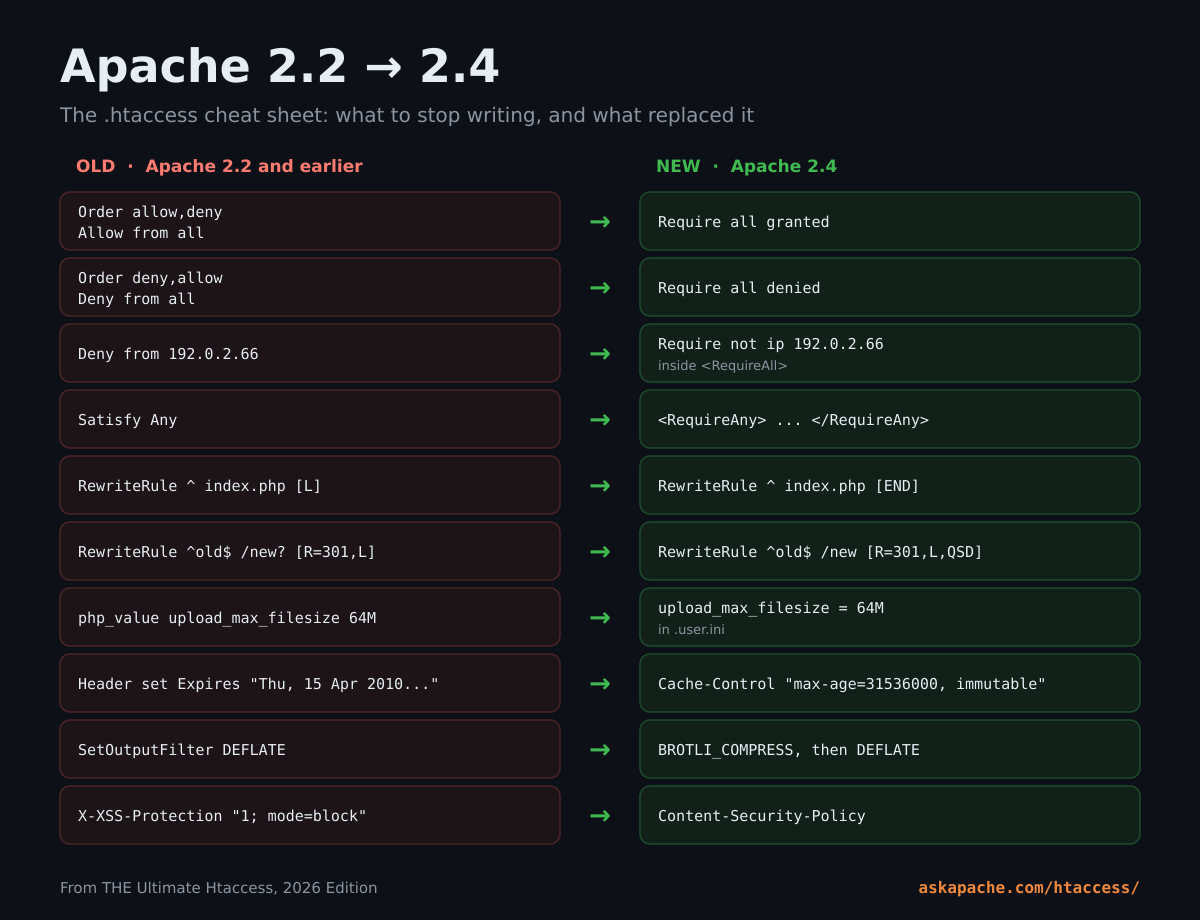
| The old way (2.2 and earlier) | The 2.4 way |
|---|---|
Order allow,deny + Allow from all |
Require all granted |
Order deny,allow + Deny from all |
Require all denied |
Deny from 192.0.2.66 |
Require not ip 192.0.2.66 inside <RequireAll> |
Allow from env=good |
Require env good |
Satisfy Any |
<RequireAny> |
SSLRequire expressions |
Require expr |
[L] to stop rewriting |
[END] |
A trailing ? to drop the query string |
[QSD] |
| The four-line front controller rewrite | FallbackResource /index.php |
Stacks of RewriteCond for simple tests |
<If> with an expression |
RewriteLog and RewriteLogLevel |
LogLevel rewrite:trace3 (server config) |
php_value and php_flag |
.user.ini |
AddHandler php5-cgi plus Action |
SetHandler pointed at the PHP-FPM socket |
The SetEnvIf Authorization copy trick |
CGIPassAuth On |
Header set Expires with a fixed date |
Cache-Control with max-age and immutable |
SetOutputFilter DEFLATE |
Brotli first, gzip as the fallback |
DefaultType text/html |
Gone. Use AddType or ForceType |
AddType application/x-javascript |
text/javascript |
X-XSS-Protection |
Content-Security-Policy |
X-Frame-Options on its own |
CSP frame-ancestors (send both) |
| Referer checks for hotlinking | Sec-Fetch-Site and Sec-Fetch-Dest |
htpasswd with MD5 or crypt |
htpasswd -B (bcrypt) |
Htaccess FAQ
What is a .htaccess file?
A plain text file of Apache directives that configures the directory it sits in and every directory below it. Apache reads it on every request, so changes take effect the moment you save. No restart, no root.
How do I create a .htaccess file?
Make a text file named exactly .htaccess, with the leading dot and no extension, and upload it to your site's document root as plain text. It is a hidden file, so turn on "show hidden files" in your FTP client or file manager or you will never see it again.
Is .htaccess still used in 2026?
Yes. Every Apache server supports it when AllowOverride is on, LiteSpeed reads it, and WordPress writes its permalink rules into it. Nginx is the one that does not.
Does .htaccess slow down a website?
A little. Apache checks each directory in the path for the file on every request. On a normal site you will not be able to measure it, and one good caching rule pays that cost back many times over.
Why is "Deny from all" not working?
Because it is Apache 2.2 syntax. On 2.4 the line is Require all denied. If old and new access rules are mixed in one file the result is unpredictable, so convert all of them.
How do I redirect HTTP to HTTPS in .htaccess?
Use the one-hop rule under Redirects and HTTPS above. If a CDN or load balancer sits in front of your server, use the X-Forwarded-Proto version instead, or you will get a redirect loop.
How do I block AI bots with .htaccess?
List them in robots.txt for the crawlers that obey it, then add a RewriteCond %{HTTP_USER_AGENT} rule ending in [F] for the ones that do not. Both are under Blocking Bots above.
Where is the .htaccess file in WordPress?
In the same folder as wp-config.php. Put your own rules above the # BEGIN WordPress line so WordPress does not overwrite them.
Can a .htaccess file be hacked?
Anyone who can write to your .htaccess owns your site, which is why malware goes for it first. Rules you did not write, redirects to domains you have never heard of, or a handler that makes .jpg files run as PHP are all signs of a break-in. Keep it at 644 and actually read it once in a while.
Now Go Use It
That is twenty years of htaccess on one page, and it is yours.
None of it is really mine. It belongs to the people who wrote Apache, some of the best programmers who ever lived, who decided back in the NCSA days that the person who owns the content should control how it is served, and have kept that promise for thirty years. I just read their source code until it gave up its secrets.
And it belongs to the people I learned next to. jdMorgan and the Apache forum at WebmasterWorld. Perishable Press and Stupid .htaccess Tricks. Corz. If you learned something here, you learned it from them too.
Same deal as always: the least restrictive copyright I can give you. Modify it, copy it, republish it, sell it, use it. Then go make your site faster and safer than the one next door.
Enjoy!
More from the AskApache vault
- Mod_Rewrite Tips and Tricks
- Crazy Advanced Mod_Rewrite Tutorial
- Htaccess Cookie Manipulation
- Secure PHP with REDIRECT_STATUS
- SetEnvIf and SetEnvIfNoCase
- Password Protection and Authentication
- Control HTTP Headers
- Blocking Bad Bots and Scrapers
- The original Ultimate Htaccess
The official Apache docs you will keep coming back to
Bookmark, print, save.
Comments