Auto-Login to Google Analytics to impress Clients

FREE THOUGHT · FREE SOFTWARE · FREE WORL

Auto-Login to Google Analytics to impress Clients

Adding Google Analytics to clients’ sites is a no-brainer, it ROCKS!

I have 100+ client web sites running Analytics and all of them have trouble-free (no password or username to remember) access to their site reports. Thanks to the method outlined in this post, my clients couldn’t be happier.. about that at least :)

Special Thanks to Bowman Technology for coming up with a fix for problems people were having. I’m glad it still is a working technique, Thanks! BT.

Google Analytics Auto-Login Demo

Sign in to AskApache.info Analytics Account


5 Minute Install
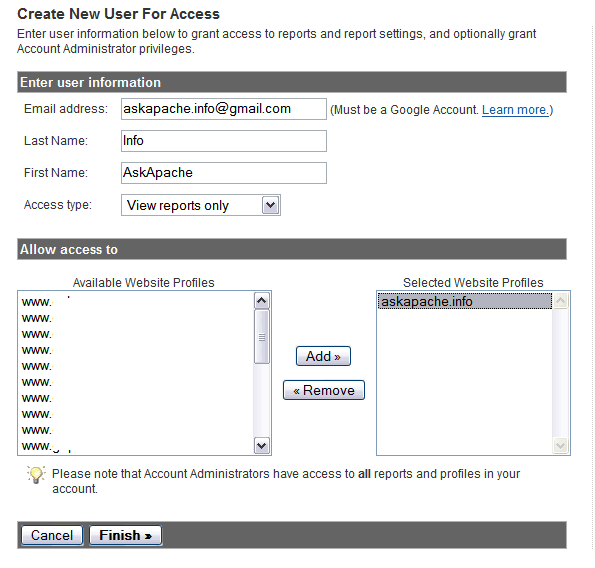
Create New User for AccessOf course you need your own Google Analytics Administrator Account, if you don’t already have one.

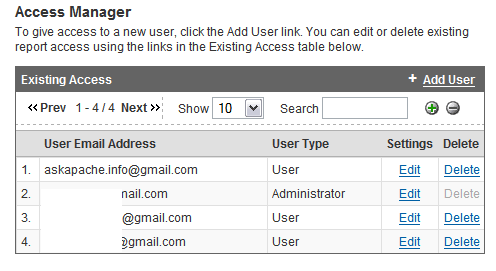
Then I add a non-admin user for each of my clients sites, making sure to only allow access to their individual accounts. I personally like using a naming system so that each new user’s email address is domain.tld@gmail.com


Log out After Adding new UserIn this example the username is askapache.info@gmail.com for the site AskApache.info, pretty easy to remember huh!

Now all you need is the code to let your clients login without a username or password, because they prefer to roll down easy street whenever possible.
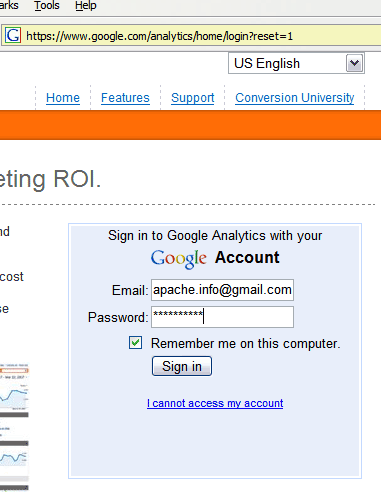

Get the form input values by logging in to google analyticsYou should be able to use the exact form code I have provided (view source), modifying only the username and password.

If you’d like you could use a Firefox add-on like Web Developer or Live HTTP Headers to view the form data. If you were really cool you would much prefer to use WireShark and view the HTTP protocol in detail. Basically you need to know the data that is sent to Google by the login form, then you can imitate that same data being sent by using a form on your own site.


The Code

The javascript is optional, you could just display the form if you want and use a form input to submit. The handy thing about keeping the form invisible and using a button with javascript is that you can have multiple hidden forms and multiple buttons. On the admin pages that I create for clients where I use this method, I have several other auto-login and other types of form submissions so its just easier.

The button

<a href="javascript:gi('googleanalyticslogin').submit();">Sign in to AskApache.info Analytics Account</a>

The invisible form

<form id="googleanalyticslogin" action="https://www.google.com/accounts/ServiceLoginBoxAuth" method="post">
<input type="text" name="Email" class="gaia le val" id="Email" size="18" value="me@gmail.com" />
<input type="password" name="Passwd" class="gaia le val" id="Passwd" size="18" value="Passw0rd" />
<input type="checkbox" name="PersistentCookie" value="yes" />
<input type="hidden" name="rmShown" value="1" />
<input type="hidden" name="continue" value="http://www.google.com/analytics/home/?et=reset&amp;hl=en-US" />
<input type="hidden" name="service" value="analytics" />
<input type="hidden" name="nui" value="1" />
<input type="hidden" name="hl" value="en-US" />
<input type="hidden" name="GA3T" value="oCGYxIWWGUE" />
<input type="hidden" name="GALX" value="3Jces-nq404" />
<input type="submit" />
</form>

NOTE: I’m still waiting to hear from google whether or not they are OK with this method, so if anyone hears anything let me know!


SEO Agency implementation of Google Analytics is a good free way to monitor organic search engine traffic.


«
»

Skip to Comments

Add Your Opinion

Reader Comments

  1. BowmanTechnology ~

    Tried the code and it wasnt working. Seams that it needs to post the data now instead of getting. This code is working (and as before make sure it is located behind a login screen or other protection):

    &lt;form id=&quot;googleanalyticslogin&quot; action=&quot;https://www.google.com/accounts/ServiceLoginBoxAuth&quot; method=&quot;post&quot;&gt;
    &lt;input type=&quot;text&quot; name=&quot;Email&quot; class=&quot;gaia le val&quot; id=&quot;Email&quot; size=&quot;18&quot; value=&quot;me@gmail.com&quot; /&gt;
    &lt;input type=&quot;password&quot; name=&quot;Passwd&quot; class=&quot;gaia le val&quot; id=&quot;Passwd&quot; size=&quot;18&quot; value=&quot;Passw0rd&quot; /&gt;
    &lt;input type=&quot;checkbox&quot; name=&quot;PersistentCookie&quot; value=&quot;yes&quot; /&gt;
    &lt;input type=&quot;hidden&quot; name=&quot;rmShown&quot; value=&quot;1&quot; /&gt;
    &lt;input type=&quot;hidden&quot; name=&quot;continue&quot; value=&quot;http://www.google.com/analytics/home/?et=reset&amp;amp;hl=en-US&quot; /&gt;
    &lt;input type=&quot;hidden&quot; name=&quot;service&quot; value=&quot;analytics&quot; /&gt;
    &lt;input type=&quot;hidden&quot; name=&quot;nui&quot; value=&quot;1&quot; /&gt;
    &lt;input type=&quot;hidden&quot; name=&quot;hl&quot; value=&quot;en-US&quot; /&gt;
    &lt;input type=&quot;hidden&quot; name=&quot;GA3T&quot; value=&quot;oCGYxIWWGUE&quot; /&gt;
    &lt;input type=&quot;hidden&quot; name=&quot;GALX&quot; value=&quot;3Jces-nq404&quot; /&gt;
    &lt;input type=&quot;submit&quot; /&gt;
    &lt;/form&gt;
  2. Aaed Kayal ~

    Where Is the Code ?

  3. SimonSez07 ~

    I have the same problem as Quantum:

    1. I need to visit Google Analytics website to get a cookie, otherwise I get: “Your browser’s cookie functionality is turned off. Please turn it on.”
    2. A value of the hidden element (name=”GALX”) needs to be submitted. Unfortunately the value is not constant and changes every time the cookie value is changed.

    Has anyone found a workaround for this problem? When I was first using this method, I don’t remember this being a problem, but now it is not allowing any of my clients access to their analytics through my CMS.

    Even if there was a way to embed the login page (google.com/accounts/ServiceLoginBox) in an iFrame and auto-fill the username and password, that would work for my purposes.

    Any help appreciated.

    Thanks,
    Simon

  4. pbernardo ~

    answer from google

    http://groups.google.com/group/google-analytics-data-export-api/browse_thread/thread/338faa2bf5bf0b42/1f6609e4be608a28?lnk=gst&q=login#1f6609e4be608a28

  5. Joost Koopmans ~

    Somebody got a fix for the new login page from google?

  6. SoWhat ~

    the same problem:

    “Your browser’s cookie functionality is turned off. Please turn it on.”

    Google probably changed code few days ago.

  7. Jeremy ~

    you need to update the form

  8. Quantum ~

    I cannot log in this way today.

    1. I need to visit Google Analytics website to get a cookie, otherwise I get
      “Your browser’s cookie functionality is turned off. Please turn it on.”

    2. A value of the hidden element (name="GALX") needs to be submitted. Unfortunately the value is not constant and changes every time the cookie value is changed (remove from browser and revisit website).
  9. paris ~

    Great piece of code!

    already used this in my company’s CMS so that clients can automatically login to their analytics account. hopefully Google wont change this!

    I have also change a bit of the code so that it will take you automatically to the specific website profile dashboard!

    just change the continue field to use your website Profile id instead of 123456789

  10. Gaston Tavella ~

    The problem with the login in a hidden form, is the password on the html page.

  11. Lance_22 ~

    For starters, you’ll never hear from Google but if this works I’d not remind them that this sort of thing is going on. If they add one of those security

    please type what this squiggly image says

    dealies the show will be over.

    BTW, I’ll be implementing a version of your code and I really appreciate your work.

  12. Web Design Glasgow ~

    Good post and great idea. I’ve only got about 4 clients genuinely interested in analytics and it’s a right hassle – cheers!

  13. Tzedekh ~

    Anyway to take this one step further and bypass the profile listing page and go directly to a prespecified report, with report type (e.g., dashboard) and date range specified? This would be useful for integrating GA into a reporting system, especially if more than 50 profiles — and therefore more than one GA account — are involved.

  14. vincent ~

    hi, this is a great tweak for google services. thank you for sharing them. i would like to ask if you could do that with the free email that google offer using my own domain name.

    i have sign up for their free email application and i thinking that it is cool if my user can login in our webpage. i have tried to copy the login form source code but google says an error. users need to sign-in at mail.google/a/antique.ph

  15. Gabrijel ~

    As far as I can tell the API is not working for analytics (yet)…
    When using the API for webapps, there is no scope parameter available for analytics; if there is one available, I have not yet found a person who knows what it is…

    example: https://www.google.com/accounts/AuthSubRequest?next=http%3A%2F%2Fwww.yourwebapp.com%2Fshowcalendar.html&
    scope=http%3A%2F%2Fwww.google.com%2Fcalendar%2Ffeeds%2F&session=1&secure=1

  16. AskApache ~

    I recommend using the Google API, if you are up to it :)

  17. Justin ~

    Very interesting. I found a php lib that was written that simulates POSTs to Google, however I noticed this is no longer working due to a google clampdown!

  18. talee ~

    I don’t care that google provides an API.

    I found this first and it’s smooth! Why use web services when this works?

    Thank you.

  19. AskApache ~

    Thanks for the update All Knight Access! Google Rocks!

  20. All Knight Access ~

    The method used here is no longer needed. Google is now offering an API to all of their services via account authentication.

    Quoted from Google:

    “Here at Google, we welcome the development of applications that rely on and communicate with Google services. However, many of these services require that users log into their Google Accounts, and authentication by outside applications has been–until now–somewhat cumbersome. To improve this experience, we are pleased to offer alternatives for Google Account authentication.

    Our goals in providing these alternatives are to enhance both performance and security, as well as to streamline the process for developers of client applications. As new options are developed, we’ll post them here.

    Authentication options currently available:

    Account Authentication for Installed Applications: The ClientLogin API lets you incorporate programmatic login into your desktop or mobile applications. This API incorporates CAPTCHA for greater security against password trollers.

    Account Authentication Proxy for Web Applications: The AuthSub API gives your web application the ability to access a user’s Google services accounts without handling the user’s login information. This API offers a secure mode, in which the web application can register with Google for greater security.”

    For more info, refer to:

    http://code.google.com/apis/accounts/Authentication.html

  21. Lewis ~

    There are a few problems with that. Firstly is, of course, you need to password protect the page that sends that information as anyone could view it or log on to Analytics. But if you’re in an AdminCP then it makes sense not to have them log in twice.

    Secondly, some browsers will warn that they’re submitting a form across domains, and that may confuse people or make them suspicious.

    Lastly, Google may block referrers from different domains.

    But it’s a handy idea, saves clients keep asking passwords and log-ins and I think I’ll use it on localhost to quickly access all my accounts.


It's very simple - you read the protocol and write the code. -Bill Joy

HTML | DCMI | GRDDL | XOXO | XDMP | XFN | DOM | XML | XHTML 1.1 Strict | CSS 2.1 | W3C | TLDP | WAI | DISA | ICSI | GIAC | SANS RR | GHOST | DEFCON | NIST | DHS CYBER | NIST | Phrack | GDB | IEEE | GIT | GNU LIBC

↑ TOPExcept where otherwise noted, content on this site is licensed under a Creative Commons Attribution 3.0 License, just credit with a link.
This site is not supported or endorsed by The Apache Software Foundation (ASF). All software and documentation produced by The ASF is licensed. "Apache" is a trademark of The ASF. HTTPD based on NCSA HTTPd

Site Map | Contact Webmaster | Email AskApache | Glossary | License and Disclaimer | Terms of Service