Google Trends for SEO / Apache Htaccess
.htaccess Topic vs htaccess Keyword
 Google Inc. is an American public corporation, specializing in Internet search and online advertising. The company is based in Mountain View, California, and has 13,748 full-time employees (as of June 30, 2007). Google's mission statement is, "to organize the world's information and make it universally accessible and useful." Google's corporate philosophy includes statements such as "Don't be evil", and "Work should be challenging and the challenge should be fun", illustrating a somewhat relaxed corporate culture.
.htaccess Topic vs htaccess Keyword
htaccess vs. httpd.conf
Top 3 ways to speed up websites that use Google Analytics. Host Script Locally, Fix Google-Analytics Cookie Domain, and Failsafe Loading for optimum tracking statistics.
 Google Analytics for your clients sites is a no-brainer, it ROCKS! I have 100+ client sites running Analytics and all of them have trouble-free (no password or username to remember) access to their site reports. Thanks to the method in this post, my clients couldn't be happier..
 Host Google Analytics ga.js file locally for increased speed! Makes web pages load faster.
 PHP curl example utilizing cookies, POST, and SSL options to login to Google Reader and fetch the number of subscribers for a particular feed url.
 Check out ReadWriteWeb's fantastic list of uniquely useful search engines, its a lot of fun!
 Google's Search Engine Hosting Servers automatically provide Internet users all over the world with a "localized" version of the incredible Google Search Engine that we know and love.
 Apache Documentation Google Custom Search Engine is a great place to go looking for mod_rewrite, .htaccess, and other Apache HTTPD related topics.
Demo php cURL code, that automatically logs into Google AdSense, using cookies and post fields with the POST method.
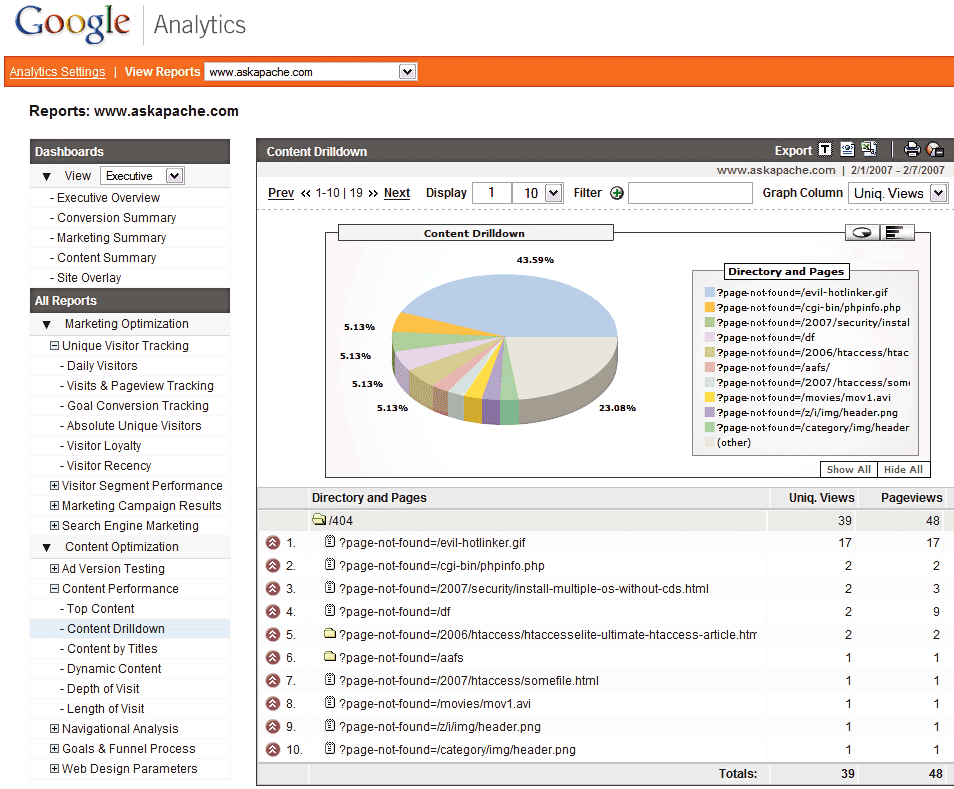 Advanced 404 Not Found Error page usage with Google Analytics. This makes it very easy to diagnose and keep track of 404 Error messages from within google analytics. Enjoy!
Google was co-founded by Larry Page and Sergey Brin while they were students at Stanford University and the company was first incorporated as a privately held company on September 7, 1998. Google's initial public offering took place on August 19, 2004, raising $1.67 billion, making it worth $23 billion. Through a series of new product developments, acquisitions and partnerships, the company has expanded its initial search and advertising business into other areas, including web-based email, online mapping, office productivity, and video sharing, among others.