An image and technicacl achievement so profound, it will touch yoour heart.. So 3D... it'll hurt you eyes! LOL.. lol.. Man I am cracking up here. haha Ha definately the best intro ever, those really do look 3D for terminal though huh.. Sweet. Here is the little function I wrote to output that grey marble.

Linux ANSI escape code ANSI.SYS Control characters Escape sequence Stty Termcap Terminfo Tput
 After many years of using any and all terminal emulators out there, from xterm to the Gnome terminal, to KDE Konsole to xfce4-terminal, lxterminal, vte, yakuake, rote, roxterm, sakura, terminator, and putty I finally I settled in for the long-haul with rxvt (rxvt-unicode).
My BOX: Slim -> Ratpoison -> URxvt -> Tmux -> Bash
Linux .Xdefaults .Xresources bash Gnome terminal GNU Screen ratpoison rxvt rxvt-unicode Terminal multiplexers tmux urxvt Xterm Yakuake
Oh ya lets get it on! short but sweet

Hacking bash Screen ssh War Dialing
 This amazing bash linux prompt does more than meets the eye. If you want to know how to become really good with technology, linux is the secret sauce behind the AskApache articles. Open Source is elixir of the web. Thanks to everyone who helped me for the past 20 years. I use linux/bsd because homey don't play, so this is geared to be as productive a prompt as I can make it.
Don't have much time.. or just don't care? Not a problem, here are the 3 lines to copy and paste - you can just paste them right in your shell to test it, or add to a startup script.
export AA_P="export PVE=\"\\033[m\\033[38;5;2m\"\$(( \`sed -n \"s/MemFree:[\\t ]\\+\\([0-9]\\+\\) kB/\\1/p\" /proc/meminfo\` / 1024 ))\"\\033[38;5;22m/\"\$((\`sed -n \"s/MemTotal:[\\t ]\\+\\([0-9]\\+\\) kB/\\1/p\" /proc/meminfo\`/ 1024 ))MB\"\\t\\033[m\\033[38;5;55m\$(< /proc/loadavg)\\033[m\";echo -en \"\""
export PROMPT_COMMAND="history -a;((\$SECONDS % 10==0 ))&&eval \"\$AA_P\";echo -en \"\$PVE\";"
export PS1="\\[\\e[m\\n\\e[1;30m\\][\$\$:\$PPID \\j:\\!\\[\\e[1;30m\\]]\\[\\e[0;36m\\] \\T \\d \\[\\e[1;30m\\][\\[\\e[1;34m\\]\\u@\\H\\[\\e[1;30m\\]:\\[\\e[0;37m\\]\${SSH_TTY} \\[\\e[0;32m\\]+\${SHLVL}\\[\\e[1;30m\\]] \\[\\e[1;37m\\]\\w\\[\\e[0;37m\\] \\n(\$SHLVL:\\!)\\\$ " && eval $AA_P
Linux bash Prompt PROMPT_COMMAND PS1 sed ssh
Wanted to stick this here for a reference, mostly for me. I use ASCII alot in bash, preg_matches, preg_replace, etc..
Linux ASCII Unicode
Tons of awesome tips and tricks using netcat. Port redirector, nessus wrapper, capture exploits being sent by vuln scanners, etc. This is very useful for doing stuff like redirecting traffic through your firewall out to other places like web servers and mail hubs, while posing no risk to the firewall machine itself.
Security
 This is not your everyday vimrc. This is my personalized vimrc.. works especially great on remote servers, in tmux, screen, etc.
This doesn't require a git checkout, a vim update, a bash update, an OS update, a plugin. No. 1 vimrc, 1 colorscheme, just use curl to download and it's on. I use this on Arch Linux, NetBSD, FreeBSD, OpenBSD, Debian, Ubuntu, Cent OS, Red Hat, and that's mostly it so far.
If you aren't already using vim as your primary editor in a powerful way, you are gonna owe me for this.
Linux .vimrc 256 Color Vim

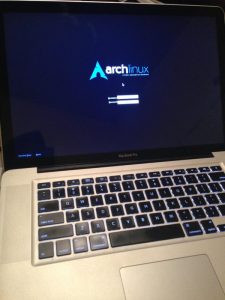 Stop wasting your lives with Mac Terminals.. or Macs. Get a real machine and then get a real shell multiplexer! For many years we all loved GNU Screen, but tmux is by far a better option today. The only time I am in the shell and not using a multiplexer, is when I'm not on one of my machines. My Arch Linux machines all run URxvt and my .bash_profiles all start tmux automataically, whether in X or single-user mode, tmux is where it's at.
Hacking, Linux linux.bash Screen shell tmux
 As an example, here is the boot line that I am using at the moment on an older Dell Desktop, just to illustrate module parameters and environment vars.
title  Arch Linux X-256
linux   /vmlinuz-linux root=UUID rw rootfstype=ext4 elevator=noop selinux=0 plymouth.enable=0 raid=noautodetect ipv6.disable=1 video=DP1:d rcutree.rcu_idle_gp_delay=1 i915.panel_ignore_lid=-1 i915.modeset=1 TERM=rxvt-256color
Linux Arch Linux Boot GRUB Kernel
List of mainly obscure security software geared more for the master pentester. These are mostly for unix, bsd, and mac and many are difficult to install and setup (require custom servers, inside access points, obscure libraries). Only programs that output data are included, so no actual exploits or anything. Most of these output extremely useful albeit extremely technical information. Security
Hacking Cheat sheet linux
The idea is to use CSS to have the browser display programming and code similar to the high-quality look of a developers machine, like this older screenshot of my VIM.
CSS Digital typography Typeface Typesetting Typography

Just a quick reference to all those delicious unicode characters and how they render on the web‽‽
Web Development symbols Unicode
 There isn't much vlan info on the net in terms of specifics and I had to learn all about it because I needed to log in to a switch that was on a different vlan. With the help of the Ettercap developers NaGA and ALoR I figured it out.
Originally Posted: 3/30/2004
Hacking Hacking security
This is part II of the Advanced SEO used on AskApache.com Series and describes how to control which urls are indexed by Search Engines and how to move them higher up in Search Results.
SEO
While testing the exploitability of your target and mapping out vulnerabilities it is important to gain access inside the targets defenses so that you can establish an internal foothold like a owned box or switch. This is so you can use a tool to discover the packet-filtering being used, and literally map out the firewall/IDS rules. Needless to say that really provides you with a lot more complete vulnerability assessment to help discover more weak spots in the system.
Security
NOT a typo.. 30x is measurable, well-documented, and easily tested. This is what open-source is about. I haven’t had time to post much the past year, I'm always working! So I wanted to make up for that by publishing an article on a topic that would blow your mind and be something that you could actually start using and really get some benefit out of it. This is one of those articles that the majority of web hosting companies would love to see in paperback, so they could burn it.
Optimization tmpfs
Looking for some advanced uses for the shell? Here is some of my best. The shell is where 70% of my work takes place, and I have at least one terminal open almost 100% of the time, for viewing tailing color-coded logs, and of course for the SSH Tunnels that I use to route various networking through, like my email. So I decided that to standardize and create a bash_profile containing the most time-saving and helpful functions that I could use on all the various hosting environments would really be some sweet sugar, so here is my constant Work-in-progress.
It works for all shells I encounter, including BackTrack, Debian, Knoppix, Arch Linux, etc. Also works for many hosting environments I use including DreamHost, HostGator, WiredTree, and pretty much any linux VPS.
I also rely on this heavily from within shell scripts I write to access all the functions and stuff in this .bash_profile, and to do that I just do like:
#!/bin/bash

source ~/.bash_profile &>/dev/nulll

pm "PM is a function to output nice messages with color"
yn "Are you enjoying the shell" && pm "Thats great!" || pm "Perhaps you're better suited for DOS"
yn "Show Calendar" && aa_calendar
yn "Show Fortune" && aa_fortune
Linux Arch Linux bash linux shell Unix shells
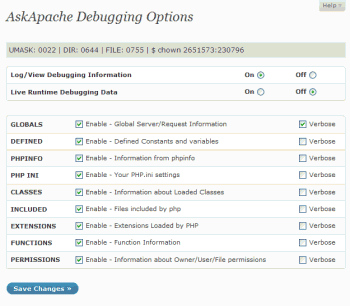 The story behind this plugin is sorta wack, but in a good way :). While doing tons of security research on permissions, authorization, access, etc.. for the Password Protection plugin (still being worked on), I needed to have unheard of debugging capabilities while working on the plugin on the various websites, webhosts, and test servers that I use to test in different environments. So I hacked together a bunch of php code that helped me debug, actually I pretty much went overkill and tried to get as much debugging info as programmatically possible, and it ended up being so much code that I took it out of my Password Protection code and made it its own plugin.
WordPress
Scrolls the latest log entries for multiple log files to the current screen or to any other monitor or TTY in color using syntax highlighting, making debugging easier and saving a lot of time for multi-monitor workstations.
Linux
Htaccess AddDescription Apache bash
The proponents of this scheme have given it names such as "trusted computing" and "palladium". We call it "treacherous computing", because the effect is to make your computer obey companies instead of you. This was implemented in 2007 as part of Windows Vista; we expect Apple to do something similar. In this scheme, it is the manufacturer that keeps the secret code, but the FBI would have little trouble getting it.
Hacking
Apache, Hosting 2.4 Apache Error


