If for some reason you need to use windows .bat batch file scripting to do some task, or you just want to learn the most universal batch programming language on Windows machines, you lucked out and found the AskApache example. My expertise is the shell, in this article the shell is Windows
 cmd.exe. It has some pretty advanced windows shell usage, including pipes and redirection, but it's the modular linux-like coding approach that earns this script it's "advanced" title.
:SETPROMPT
set PROMPT=$_[%USERNAME%@%USERDOMAIN%]$S[$P]$_$M$G && EXIT /B
 My favorite tool (and I've tried sooo many) for editing most Windows files and especially .bat files is the free and open-source Notepad++. Set that up and you will have a color-syntax-highlighted editor for Batch Scripting that works very very well.
Windows Batch File Batch Scripting Command Prompt Microsoft Windows
Find and Replace tool in Adobe DreamWeaver is useful of course, but you aren't using a fraction of the power until you use REGEX.
Software
Htaccess AddDescription Apache bash
This is awesome. I was so fed up with trying to find a fail-proof, cross-platform way to find the mime type of an image using PHP that I wrote a quick function that utilizes the same technology as the exif_imagetype, getimagesize, and finfo functions do. Ahh the joys of low-level.
PHP file filetype images mime mimetype
 I used to have a problem of controlling flash elements on my sites.. On one site we have 6 different flash flv movies that are all the same size and are in the same position on the page. But only 1 is displayed at a time based on what the user wants to watch. So the selected flash movie needs to have the highest stacking order/zIndex.
CSS
Ok I just came back up to write the intro.. I'm trying to keep it short to avoid getting bogged down by the coolness of each step. Here is what goes on. When I logon to my XP machine at work, I bring my usb key and plug it in first. On logging a window pops up first and it's a password prompt to mount my encrypted drive leonardo. It also checks a keyfile that is located on my usb key, but all I do now is type in my password. That causes my encrypted folder to be accessible to me like a normal drive, and it autoruns a startup batch file.
The batch file causes Portable versions of Firefox (all my bookmarks, my settings) to load, and launches Portable Mozilla Thunderbird (IMAP makes this work well), which is my favorite program (great GPG features and open-source!). Also Some Adobe CS4 software is loaded from the hard drive, like DreamWeaver. In the background, a service we created executes a PortaPuttY plink command to create forwarded tunnels from various remote servers and accounts, all using key-based encryption. These tunnels are automatically reconnected if they are disconnected, meaning you can use a socks 5 if you want or even better!
Hacking Backup encryption Microsoft Windows Secure Shell ssh TrueCrypt USB USB flash drive windows builtin command-line tools
A hit-list of some of my favorite mod_rewrite code snippets for .htaccess files
Htaccess
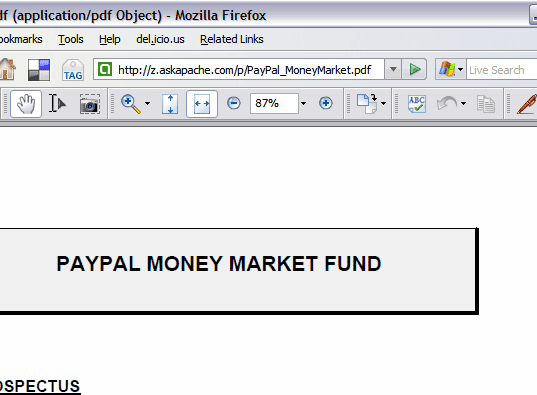
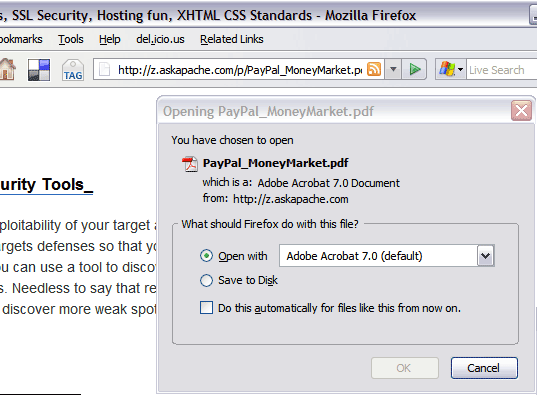
.htaccess and php example serves .pdf files to give visitors the choice to open in an external program or save to disk without having to open it in the browser
PDF Before and after Fix - Firefox
Htaccess
Htaccess Apache HTTP Server Htaccess Redirect rewrite RewriteBase RewriteCond RewriteEngine RewriteLock RewriteLog RewriteMap RewriteOptions RewriteRule
FYI, using the Mod_Rewrite Variables Cheatsheet makes this example, and all advanced .htaccess code easier to understand. This demo lets you set a cookie with 1 of 3 values, then you just request the pdf file with a normal link click and get 1 of 3 different responses. This is accomplished with a nice bit of .htaccess code.
Htaccess Htaccess HTTP cookie JavaScript PDF pdf.js Portable Document Format
If you ever wanted to know the best way to defragment and speed up your Windows-Based PC, I mean you really wanted to know, here is the 2nd part to my article on Windows Speed Optimizing that details the process I have found works really well. Definately not a quick process, and certainly not the best ever, just my best ever and one that you only have to do once to get the benefits.
This article has a lot of incredibly useful (and FREE) tools I recommend, which you can grab and use without reading the article..
Windows Defragmentation Defragmentation software Disk Defragmenter ERUNT JkDefrag Microsoft MyDefrag PageDefrag Registry cleaner UltraDefrag Windows Registry Windows XP
There are a total of 57 HTTP Status Codes recognized by the Apache Web Server. Wouldn't you like to see what all those headers and their output, ErrorDocuments look like?
Htaccess 403 404 500 503 Htaccess mod_rewrite PHP RewriteCond RewriteRule
Here's an example of validation links from the AskApache footer.
RSS | XHTML 1.1 | CSS 2.1
document.getElementById("validat").innerHTML += ' | <a href="http://feedvalidator.org/check.cgi?url=https://www.askapache.com/feed/">RSS</a> | <a href="http://validator.w3.org/check/referer?ss=1;outline=1;sp=1;debug">XHTML 1.1</a> | <a href="http://jigsaw.w3.org/css-validator/check/referer?warning=0">CSS 2.1</a>'; Javascript Firebug JavaScript
#### No https except to wp-admin -
# If the request is empty ( implies fopen or normal file access by a php script )
RewriteCond %{THE_REQUEST} ^$ [OR]

# OR if the request if for wp-admin or wp-login.php
RewriteCond %{REQUEST_URI} ^/(wp-admin|wp-login.php).*$ [NC,OR]

# OR if the Referer is https
RewriteCond %{HTTP_REFERER} ^https://www.askapache.com/.*$ [NC]

# THEN skip the following rule, basically all this does is force https or badhost to be redirected
# BUT because of the above 3 rewritecond's, this won't break poorly written admin scripts
RewriteRule .* - [S=1]

RewriteCond %{HTTPS} =on [OR]
RewriteCond %{HTTP_HOST} !^www.askapache.com$ [NC]
RewriteRule .* https://www.askapache.com%{REQUEST_URI} [R=301,L]

RewriteCond %{THE_REQUEST} ^[A-Z]{3,9} /(wp-admin/.*|wp-login.php.*) HTTP/ [NC]
RewriteCond %{HTTPS} !=on
RewriteRule .* https://%{SERVER_NAME}%{REQUEST_URI} [R=301,L]
Htaccess RewriteCond RewriteEngine RewriteRule
Using a CSS Background Image Sprite with the CSS background-position and background-image I can display all these icons: . I can even have them show up anywhere on the page!
CSS
This is the advanced example. It uses the jw flv player to create a flash proxy. This basically lets me control the youtube video as if it were a local .f4v file. With this method I can specify any options, autostart, volume, playlists, etc.. But it's rather complex so lets start with 3 other methods to embed YouTube video.
Javascript Flash Video YouTube

- I need no software, I lack for nothing when it comes to software. winners don't do warez
- Well obviously if I could have anything I would want access to NSA computing power, googles server farms as a backup, and the worlds most expensive computer monitor the size of my wall with virtual screens as big as I want and touch screen and 3d and holograms.
- I would want the best office chair made for comfort.
- Developer Wishlist …
Web Design
Become a member of the Free Software Foundation today to help us reach our goal of $450,000 by January 31st.
Net Coreboot Free Software Foundation FSF GNU GNU/Linux Microsoft Windows
 My favorite tool (and I've tried sooo many) for editing most Windows files and especially .bat files is the free and open-source Notepad++. Set that up and you will have a color-syntax-highlighted editor for Batch Scripting that works very very well.