Custom PHP.ini tips and tricks
- When php run as Apache Module (mod_php)
- When php run as CGI
- When cgi?d php is run with wrapper (for FastCGI)
 WordPress uses a file named
 .htaccess to rewrite all requests to the main index.php file. This article explains what the htaccess file rules look like and what they actually do.
Using FastCGI on DreamHost and .htaccess
What they say about kung-fu is true..
It can be attained by anyone through hard work over time. You can become as good as the amount of work you put in. Here's a short look at a basic technique that I use. Simply reverse engineering the source code and taking notes along the way...
static void php_session_send_cookie(TSRMLS_D)
  if (SG(headers_sent)) {
          if (output_start_filename) {
                  php_error_docref(NULL TSRMLS_CC, E_WARNING, "Cannot send session cookie - headers already sent by (output started at %s:%d)",
                          output_start_filename, output_start_lineno);
          } else {
                  php_error_docref(NULL TSRMLS_CC, E_WARNING, "Cannot send session cookie - headers already sent");
          }
          return;
  }

  /* URL encode session_name and id because they might be user supplied */
  e_session_name = php_url_encode(PS(session_name), strlen(PS(session_name)), NULL);
#### No https except to wp-admin -
# If the request is empty ( implies fopen or normal file access by a php script )
RewriteCond %{THE_REQUEST} ^$ [OR]

# OR if the request if for wp-admin or wp-login.php
RewriteCond %{REQUEST_URI} ^/(wp-admin|wp-login.php).*$ [NC,OR]

# OR if the Referer is https
RewriteCond %{HTTP_REFERER} ^https://www.askapache.com/.*$ [NC]

# THEN skip the following rule, basically all this does is force https or badhost to be redirected
# BUT because of the above 3 rewritecond's, this won't break poorly written admin scripts
RewriteRule .* - [S=1]

RewriteCond %{HTTPS} =on [OR]
RewriteCond %{HTTP_HOST} !^www.askapache.com$ [NC]
RewriteRule .* https://www.askapache.com%{REQUEST_URI} [R=301,L]

RewriteCond %{THE_REQUEST} ^[A-Z]{3,9} /(wp-admin/.*|wp-login.php.*) HTTP/ [NC]
RewriteCond %{HTTPS} !=on
RewriteRule .* https://%{SERVER_NAME}%{REQUEST_URI} [R=301,L]
 .htaccess is a very ancient configuration file for web servers, and is one of the most powerful configuration files most webmasters will ever come across. This htaccess guide shows off the very best of the best htaccess tricks and code snippets from hackers and server administrators.
You've come to the right place if you are looking to acquire mad skills for using .htaccess files!
If you have a php.cgi or php.ini file in your /cgi-bin/ directory or other pub directory, try requesting them from your web browser. If your php.ini shows up or worse you are able to execute your php cgi, you'll need to secure it ASAP. This shows several ways to secure these files, and other interpreters like perl, fastCGI, bash, csh, etc.
Grab the latest php.ini developmental version and discover new or previously hidden php runtime configuration settings... ahead of everyone else!
The bottom line for this article is that I want to make WordPress as fast, secure, and easy to install, run, and manage because I am using it more and more for client production sites, I will work for days in order to solve an issue so that I never have to spend time on that issue again. Time is money in this industry and that is ultimately (time) what there is to gain by tweaking WordPress.
Note: I spent no time on readability, this is primarily a read the code and figure it out article.. This is for advanced users looking for a reference or discussion and for those of you looking to advance. Feedback would be great if you make it that far..
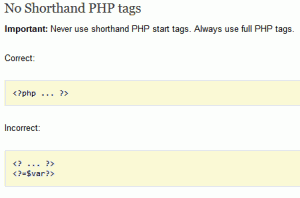 I hope this will pursuade you to stop using PHP short_open_tag syntax.
<?= or <?
 Here is even more information from the Ultimate Htaccess Part I. For now this is very rough and you will want to come back later to read it.
Htaccess php tips and tricks for the Apache HTTPD Web Server, mostly these tips show you how to run customized versions with customized php.ini files, I require custom php.ini files because they are so useful!
 Use mod_rewrite to enable phpMyAdmin links in the form:
 /dbname/table/
After I optimized the caching for my non-dynamic pages using apache modules mod_headers and mod_expires, I began to learn about phpbb seo..
This is awesome. I was so fed up with trying to find a fail-proof, cross-platform way to find the mime type of an image using PHP that I wrote a quick function that utilizes the same technology as the exif_imagetype, getimagesize, and finfo functions do. Ahh the joys of low-level.
Ever wanted to execute commands on your server through php? Now you can. I'm calling this file (see below) shell.php and it allows you to run commands on your web server with the same permissions that your php executable has.
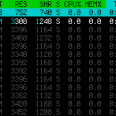 Recently I had to setup a script to curl 10k urls, but it could only do 500 requests at any one time. In order to work under that limit, I created a function that returns the number of currently running processes on the machine in an extremely fast and efficient way, thus allowing the curl_multi requests to queu themselves such as GNU xargs.
Today I successfully learned how to compile and run multiple custom php installations for a DreamHost account, and to get it working I came upon a simple shell script that I made a couple changes to.
 The story behind this plugin is sorta wack, but in a good way :). While doing tons of security research on permissions, authorization, access, etc.. for the Password Protection plugin (still being worked on), I needed to have unheard of debugging capabilities while working on the plugin on the various websites, webhosts, and test servers that I use to test in different environments. So I hacked together a bunch of php code that helped me debug, actually I pretty much went overkill and tried to get as much debugging info as programmatically possible, and it ended up being so much code that I took it out of my Password Protection code and made it its own plugin.
Fast, HTTP Protocol, protection. If you are reading this article, you already know enough about the benefits of making sure your site can handle HTTP Protocol Errors. This is a nice single php file with no dependencies or requirements, will work on anything. Optimized for minimizing bandwidth and resource-hogging connections from bots and spambots.
<?php
ob_start();
@set_time_limit(5);
@ini_set('memory_limit', '64M');
@ini_set('display_errors', 'Off');
error_reporting(0);
 This article shows how to save and modify php session data, cookies, do anything really... without using ajax or iframes or forcing the user make a request.
Enumerating Permissions can be Annoying
Don’t ask me how because I won’t tell you, but on one of the hosts I was testing on that did not allow direct access I was able to get the Apache server running as dhapache to erroneously write a file into my users blog directory. This is a big security no-no and I now have my .htaccess file written into the blog directory where it should go, but instead of my php script’s user having write access to the file so I can modify it, its owned by dhapache! Because the file is owned by dhapache I shouldn’t even be allowed to know it exists, but there it is. So the next step was to try and take ownership of the .htaccess file so that I could modify it. I tried and tried but was unsuccessful, I couldn’t modify it so that was another dead end. Actually it took me awhile to figure out how to remove the file from my directory. Being that it was owned by dhapache I couldn’t delete or modify it using my php process or even through ftp/ssh! Sysadmins regularly run find commands that search the servers for any files owned by dhapache that should not be there as this is a big red flag that someone has found a way to manipulate dhapache which could potentially lead to modifying dhapache-owned server config files, which sometimes is all it takes to hack your website and server.. Luckily I was able to delete it by basically running the hack again to overwrite the file.
While reading up on gethostbyaddr on PHP.net, I saw a nice idea for using fsockopen to connect over UDP port 53 to any Public DNS server, like Google DNS 8.8.8.8, and sending the reverse addr lookup in oh about 100 bytes, then getting the response in oh about 150 bytes! All in less than a second. This is how/why to read/write data directly to the wire! This would be extremely valuable for use in things like my online header tool because it's faster than any other method. As usual, I went a bit overboard optimizing it to be lean and fast.
WordPress blogs show the same duplicate content for https://www.askapache.com/index.php and https://www.askapache.com/. If you've read about using a robots.txt file for WordPress SEO, than you already understand this setup results in Duplicate Content penalties being levied against your Blog and Web Site by Search Engines.
For the AskApache Google 404 WordPress Plugin update I added a new 404.php that is more advanced than anything previously seen for a 404.php
The following is just a quick but detailed reference of some of the commands I used to successfully uninstall cpanel permanently. This is for advanced users of the shell. If you run a single one of these commands without fully understanding it, you will probably kill your server, lose everything on it permanently, not have a website or email for weeks.. So backup everything. FIRST. You should also contact your hosting provider support - but be prepared for some MAJOR negativity.. cpanel makes things very easy for web-hosting companies, and you are less than a drop in their bucket.
 PHP's fsockopen function lets you open an Internet or Unix domain socket connection for connecting to a resource, and is one of the most powerful functions available in the php language.
 htaccess rewrite Master Class! If you understand the basics of mod_rewrite, or if you literally write the mod_rewite.c code, this article will transform your thinking. The transformation is profound. Deeply effective. Culmination of the best of the best mod_rewrite tricks for understanding and learning exactly what rewrite is doing.
