Mod_Status tricks to View Apache Module Directives
 Quick and easy method to get a list of all Apache Modules currently loaded, a list of all the directives each module provides, a list of currently used directives, etc... These directives can be used in httpd.conf and/or .htaccess files so it is definately useful to know which ones are available and which ones are currently being used.
Crazy POWERFUL Bash Prompt
 This amazing bash linux prompt does more than meets the eye. If you want to know how to become really good with technology, linux is the secret sauce behind the AskApache articles. Open Source is elixir of the web. Thanks to everyone who helped me for the past 20 years. I use linux/bsd because homey don't play, so this is geared to be as productive a prompt as I can make it.
Don't have much time.. or just don't care? Not a problem, here are the 3 lines to copy and paste - you can just paste them right in your shell to test it, or add to a startup script.
export AA_P="export PVE=\"\\033[m\\033[38;5;2m\"\$(( \`sed -n \"s/MemFree:[\\t ]\\+\\([0-9]\\+\\) kB/\\1/p\" /proc/meminfo\` / 1024 ))\"\\033[38;5;22m/\"\$((\`sed -n \"s/MemTotal:[\\t ]\\+\\([0-9]\\+\\) kB/\\1/p\" /proc/meminfo\`/ 1024 ))MB\"\\t\\033[m\\033[38;5;55m\$(< /proc/loadavg)\\033[m\";echo -en \"\""
export PROMPT_COMMAND="history -a;((\$SECONDS % 10==0 ))&&eval \"\$AA_P\";echo -en \"\$PVE\";"
export PS1="\\[\\e[m\\n\\e[1;30m\\][\$\$:\$PPID \\j:\\!\\[\\e[1;30m\\]]\\[\\e[0;36m\\] \\T \\d \\[\\e[1;30m\\][\\[\\e[1;34m\\]\\u@\\H\\[\\e[1;30m\\]:\\[\\e[0;37m\\]\${SSH_TTY} \\[\\e[0;32m\\]+\${SHLVL}\\[\\e[1;30m\\]] \\[\\e[1;37m\\]\\w\\[\\e[0;37m\\] \\n(\$SHLVL:\\!)\\\$ " && eval $AA_P
Notes from Apache HTTPD Source Code
thought I'd take a break from coding and post about how open-source is such a great tool for finding the best answers to the toughest questions,
/** is the status code informational */
#define ap_is_HTTP_INFO(x)         (((x) >= 100)&&((x) < 200))
/** is the status code OK ?*/

#define ap_is_HTTP_SUCCESS(x)      (((x) >= 200)&&((x) < 300))
/** is the status code a redirect */
#define ap_is_HTTP_REDIRECT(x)     (((x) >= 300)&&((x) < 400))

/** is the status code a error (client or server) */
#define ap_is_HTTP_ERROR(x)        (((x) >= 400)&&((x) < 600))
/** is the status code a client error  */

#define ap_is_HTTP_CLIENT_ERROR(x) (((x) >= 400)&&((x) < 500))
/** is the status code a server error  */
#define ap_is_HTTP_SERVER_ERROR(x) (((x) >= 500)&&((x) < 600))

/** is the status code a (potentially) valid response code?  */
#define ap_is_HTTP_VALID_RESPONSE(x) (((x) >= 100)&&((x) < 600))
Easy boot.ini Hacks for Windows SysOps
Wget Trick to Download from Restrictive Sites
Before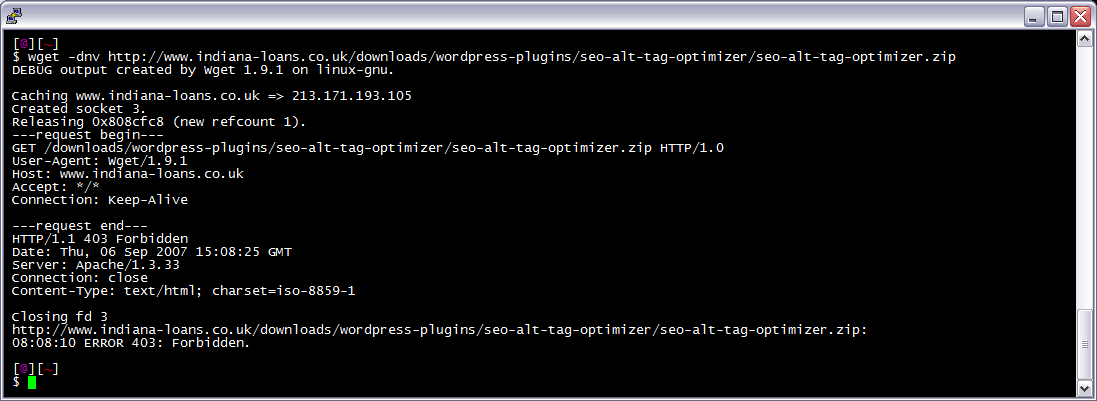 After trick
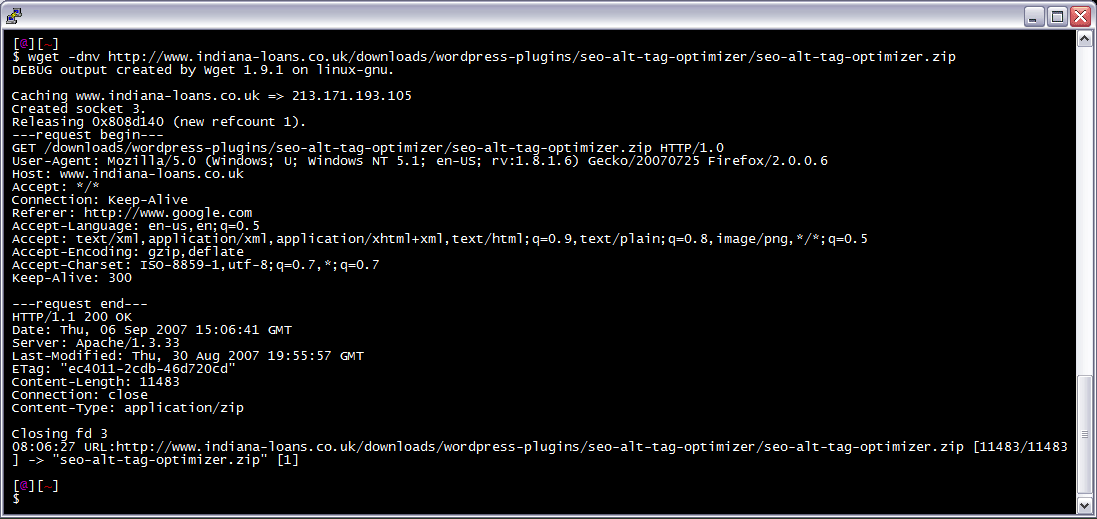 I am often logged in to my servers via SSH, and I need to download a file like a WordPress plugin. I've noticed many sites now employ a means of blocking robots like wget from accessing their files. Most of the time they use .htaccess to do this. So a permanent workaround has wget mimick a normal browser.
Htaccess File Sample
Comprehensive .htaccess example file with advanced examples in 1 htaccess sample skeleton .htaccess file with the very best apache htaccess examples... Updated frequently based on detailed info from the Apache htaccess tutorial.
Custom Boot Menu in Windows XP
 One of the first things that I do upon receiving a new Windows computer is immediately create a poweruser-style customized boot menu. Then every time I boot I can choose Safe Mode, Recovery Console, Debug, whatever I want! It's quick and easy to set-up and everyone should have one, soo sweet!
Custom PHP.ini tips and tricks
- When php run as Apache Module (mod_php)
- When php run as CGI
- When cgi?d php is run with wrapper (for FastCGI)
Racing the Windows XP ACL demon
Both of these pcs were behind a hardware/software firewall, and so each had their own host names, we'll say PEPSI and COKE, and they were both on a private network on the same subnet, so each belonged to a domain called MARKETING.Want to know how to really hack?
An interesting post by hacker explaining how to really hack, stay anonymous, and dig in deep.Originally Posted: 1/22/2003
SEO with Robots.txt
Very nice tutorial dealing with the robots.txt file. Shows examples for google and other search engines. Wordpress robots.txt and phpBB robots.txt sample files.Sending POST form data with php CURL
CURL Guide for sending POST data form request with PHP and CURL
Rewrite underscores to hyphens for SEO URL
Replace underscores in URLs with hyphens using Apache .htaccess.
Manipulating HTTP Headers with htaccess
Apache .htaccess and httpd.conf have the power to send and manipulate HTTP Header Requests like sending P3P privacy headers, Content-Type: UTF-8, Content-Language, etc. The power is immense and you can do some really cool stuff with HTTP Headers!
Prevent WP-Cache from Caching index
Disable caching on WordPress index pages when using WP-Cache with this neat mod to the famously speedy cache plugin.
Apache Directives and Modules on DreamHost
Apache .htaccess Directives and Loaded Modules allowed on DreamHost Apache Server 2 Setups.
Vetted – Top 3 WordPress Speed Plugins
There are so many WordPress plugins out there now that I wanted to post my favorite 3 plugins for speeding up a WP-Powered blog. These are the 3 plugins that I install for pretty much all of my WP-Powered sites, which I run about 300 now. They work together to provide a very optimized blog for speed.
DB-Cache Reloaded does something entirely different, it saves the mysql queries that are made to the WP-database, as well as the mysql results to static files, and then through php serves those cached-files instead of re-querying the mysql database. Most mysql databases are stored on separate servers, and although many are on the same local network there is a limit to how many queries, and how many connections can take place.
So DB-Cache Reloaded basically makes WP-Super Cache work alot faster when generating the cache files, and DB-Cache Reloaded helps in a number of areas un-related to WP-Super Cache, like in the admin panel. And DB-Cache without WP-Super-Cache is a joke because it still uses the application-level and php for everything. Gotta use both (or just WPSC).
Tips on Writing WordPress Plugins
 Thought I'd give you all the tips and tricks that I've learned and use when developing WordPress plugins.. which can be quite fun!
PHP5 Custom Install Shell Script Example
Today I successfully learned how to compile and run multiple custom php installations for a DreamHost account, and to get it working I came upon a simple shell script that I made a couple changes to.
Htaccess SetEnvIf and SetEnvIfNoCase Examples
SetEnv, SetEnvIf, and SetEnvIfNoCase directives conditionally set environment variables accessible by scripts and apache based on HTTP Headers, Variables, and Request information.
Log all .htaccess/.htpasswd logins
 Learn how to log and debug usernames and passwords used to login to a htaccess basic authorization protected website using php. This article is BOSS and will show you how to fully take control of this aspect of security using php and .htaccess, I don't believe you will find instructions to do this anywhere else on the net.
Adding Akismet Anti-Spam Protection Anywhere
Wouldn't you love to have Akismet Anti-spam protection for non-wordpress forms and pages?

The Right to Read
The proponents of this scheme have given it names such as "trusted computing" and "palladium". We call it "treacherous computing", because the effect is to make your computer obey companies instead of you. This was implemented in 2007 as part of Windows Vista; we expect Apple to do something similar. In this scheme, it is the manufacturer that keeps the secret code, but the FBI would have little trouble getting it.
Fsockopen Magic
 PHP's fsockopen function lets you open an Internet or Unix domain socket connection for connecting to a resource, and is one of the most powerful functions available in the php language.
.htaccess Plugin Blocks Spam, Hackers, and Password Protects Blog

Well what can I say, other than this is sooo DOPE! Here is a list of the modules this plugin (version 4.7 unreleased) will automatically detect. I compiled the list myself using every module included with any default Apache installation for ALL the versions listed below, 1.3 to 2.2+
Want to know something else I'm including in this plugin? For each and every module that is detected, this plugin can then detect ALL of the modules .htaccess Directives! For instance, RewriteRule, AccessFileName, AddHandler, etc.. are each a directive belonging to a module that is allowed to be used from within .htaccess files.
Talk about sick.. these tricks have the diamond disease!
Mixed SSL Content Warning Secure Fixed
I used to run into the problem of having warning messages pop up when I accessed a page with secure and non-secure information and finally I found something that let me post non-ssl encrypted content on an ssl encrypted page and no warning messages will pop up!Optimize a Website for Speed, Security, and Easy Management
Learn how to setup, configure, secure, optimize, and create a low-maintenance website the AskApache way. I'm piecing together all the hacks, tricks, methods, and ideas discussed throughout this blog and all across Netdom and glueing them all together to show you how to have the most optimized, crazy fastest, and best website setup I can think of.
MariaDB with LZ4 Compression Howto for CentOS
I really really wanted to run the latest MariaDB with LZ4 Page Compression.. it is a game changer for many types of large databases I deal with. So I compiled it manually in a way that is repeatable and follows best-practices and it's now powering this site. Now I can use InnoDB Page Compression with lzo, lzma, bzip2, snappy, or my favorite algorithm: LZ4.

Thought this would be a good chance to post a howto, and show that there is a lot you can do by compiling software yourself and breaking the package management one-click install shackles.