Arp Packet Hacking
Part deux of Want to know how to really hack? Originally Posted: 12/28/2003
Part deux of Want to know how to really hack? Originally Posted: 12/28/2003
Apache Security tips and tricks for securing Apache Web Servers using htaccess, httpd.conf, and other built-in techniques to thwart attackers. This really should be required reading for any Apache admin or user because these little tricks are so easy to do.
Server and Environment Variables are used by The Apache HTTP Server by provides a mechanism for storing information. This information can be used to control various operations such as logging or access control.
Web Professionals use mod_rewrite to issue 301 and 302 Redirects for Search Engines. Sometimes you may not have mod_rewrite.c or you want an alternative redirect method. Using mod_alias RedirectMatch you can use REGEX in Redirect commands!
Apache has the best SSL/HTTPS support and can be controlled by the httpd.conf file or other HTTPD server configuration file. This htaccess tutorial has htaccess example code to make it easy to secure and use HTTPS and SSL with Apache.
Before
init-connect='SET NAMES utf8'
init_connect='SET CHARACTER SET=utf-8'
After
init_connect='SET collation_connection = utf8_general_ci,NAMES utf8'
WordPress blogs show the same duplicate content for https://www.askapache.com/index.php and https://www.askapache.com/. If you've read about using a robots.txt file for WordPress SEO, than you already understand this setup results in Duplicate Content penalties being levied against your Blog and Web Site by Search Engines.

 Google's mod_pagespeed speeds up your site and reduces page load time. This open-source Apache HTTP server module automatically applies web performance best practices to pages, and associated assets (CSS, JavaScript, images), all transparently like a Squid Proxy.
With TMPFS you can dramatically improve the speed of mod_pagespeed and the webpages served by it. TMPFS will store/serve the optimized PageSpeed output directly from RAM!
 While playing around with the Nmap Scripting Engine (NSE) we discovered an amazing number of open embedded devices on the Internet. Many of them are based on Linux and allow login to standard BusyBox with empty or default credentials. We used these devices to build a distributed port scanner to scan all IPv4 addresses. These scans include service probes for the most common ports, ICMP ping, reverse DNS and SYN scans. We analyzed some of the data to get an estimation of the IP address usage.
 The machine itself is super super ultra-thin, wafer thin, very cool looking. It's crazy light, I was amazed how slick it looked when it arrived.
Huge amount of open-source hardware/chipsets/etc.. The first time I went through the dmesg I was smiling. 2 USB 3.0 ports, and they actually work as promised, very very fast transfer speeds to my USB 3.0 external SSD. Incredible speed, boot time is the fastest I've ever seen. Starts at $720, mine was $1,800
 Using memcache for me personally and the client sites I work on, has improved performance by over 1000%, in some cases even higher than that. It is a truly revolutionary way to optimize the performance of MySQL queries, remote requests such as to twitter or other apis, and this article is step 1. Plan is to go all the way to step 10 in future articles, it it grossly underused and misused in the WP world.
There are a total of 57 HTTP Status Codes recognized by the Apache Web Server. Wouldn't you like to see what all those headers and their output, ErrorDocuments look like?
 FallBackResource is a great alternative to using mod_rewrite to direct Apache to send all requests for non-existing files/directories to a script in WordPress. Htaccess and Server Config enabled.
Wanted to stick this here for a reference, mostly for me. I use ASCII alot in bash, preg_matches, preg_replace, etc..
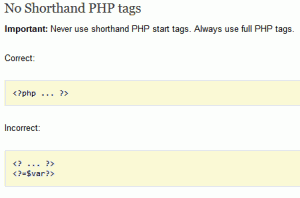 I hope this will pursuade you to stop using PHP short_open_tag syntax.
<?= or <?
FYI, using the Mod_Rewrite Variables Cheatsheet makes this example, and all advanced .htaccess code easier to understand. This demo lets you set a cookie with 1 of 3 values, then you just request the pdf file with a normal link click and get 1 of 3 different responses. This is accomplished with a nice bit of .htaccess code.
Set PDF Viewing Mode - Make a selection, then click the view pdf button.
Inline Download Save As View PDF using selected mode »

 Stop wasting your lives with Mac Terminals.. or Macs. Get a real machine and then get a real shell multiplexer! For many years we all loved GNU Screen, but tmux is by far a better option today. The only time I am in the shell and not using a multiplexer, is when I'm not on one of my machines. My Arch Linux machines all run URxvt and my .bash_profiles all start tmux automataically, whether in X or single-user mode, tmux is where it's at.
 If your WordPress blog uses AdSense, and you love Firefox you will love this plugin. When a user downloads and installs Firefox through your referral, we'll credit your account with up to $1.00 (more details).
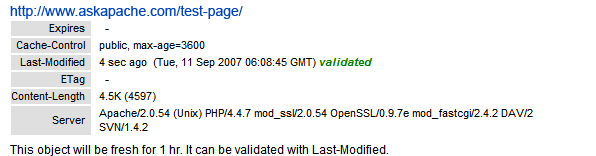 If you desire SPEED from your WordPress blog, the #1 speed improvement comes from using the WP-Cache Plugin. If you still desire SPEED after installing the Plugin, you can modify the WP-Cache Plugin code to make your blog even faster!
#### No https except to wp-admin -
# If the request is empty ( implies fopen or normal file access by a php script )
RewriteCond %{THE_REQUEST} ^$ [OR]

# OR if the request if for wp-admin or wp-login.php
RewriteCond %{REQUEST_URI} ^/(wp-admin|wp-login.php).*$ [NC,OR]

# OR if the Referer is https
RewriteCond %{HTTP_REFERER} ^https://www.askapache.com/.*$ [NC]

# THEN skip the following rule, basically all this does is force https or badhost to be redirected
# BUT because of the above 3 rewritecond's, this won't break poorly written admin scripts
RewriteRule .* - [S=1]

RewriteCond %{HTTPS} =on [OR]
RewriteCond %{HTTP_HOST} !^www.askapache.com$ [NC]
RewriteRule .* https://www.askapache.com%{REQUEST_URI} [R=301,L]

RewriteCond %{THE_REQUEST} ^[A-Z]{3,9} /(wp-admin/.*|wp-login.php.*) HTTP/ [NC]
RewriteCond %{HTTPS} !=on
RewriteRule .* https://%{SERVER_NAME}%{REQUEST_URI} [R=301,L]
 Turns every 404 Not Found error into a SEO traffic generating event! Help your site visitors find what they were looking for automatically by leveraging both Google and WordPress. It's one of about 6 plugins I use on every WP site I run. Highly recommend you try it for a few months.
«Take My 404 for a Test-Drive
Grab the latest php.ini developmental version and discover new or previously hidden php runtime configuration settings... ahead of everyone else!
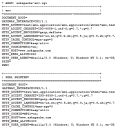 My improved version of the common printenv / test-cgi scripts for debugging Apache environment variables set in .htaccess files
 I have been in some tight spots where I had to sniff a password or two off the wire, or sniff some packets off the wire and based on the packets content perform some action... Accidentally, I stumbled on a method to sniff data while remaining undetected and invisible.
Originally Posted: 2003/04/15
DreamHost PS gives you your own "virtual machine", protecting your CPU and RAM on your physical machine for faster websites. Here's what I like and dislike about DreamHostPS, and some of the issues and solutions for migrating.
Here is the basic process that I use to speed up Windows. A lot of good tips and tricks I've picked up over the past 15+ years of crashing and burning Windows that can transform your PC to be much faster than its ever been. The process focuses on freeing up RAM/Memory, freeing up your CPU/Processor, and optimizing your Hard Drive for a permanent solution.
Make sure to check out the free software I recommend at the end, installing them after this optimization process will keep your machine fast for a long time.
I've had a lot of people ask about the FeedBurner FeedCount image on AskApache. Specifically how to set it up with custom messages and different colors each page view... It is pretty sweet..
Learn how to setup, configure, secure, optimize, and create a low-maintenance website the AskApache way. I'm piecing together all the hacks, tricks, methods, and ideas discussed throughout this blog and all across Netdom and glueing them all together to show you how to have the most optimized, crazy fastest, and best website setup I can think of.
