Unix file permissions are one of the more difficult subjects to grasp.. Well, ok maybe "grasp" isn't the word.. Master is the right word.. Unix file permissions is a hard topic to fully master, mainly I think because there aren't many instances when a computer user encounters them seriously, and bitwise is oldschool. This contains a listing of all possible permission masks and bits from a linux, php, and web hosting view.... cuz you guys AskApache Regs Rock!
Security chmod File Permissions umask
- When php run as Apache Module (mod_php)
- When php run as CGI
- When cgi?d php is run with wrapper (for FastCGI)
PHP CGI Htaccess PHP php.ini
2 awesome ways to implement caching on your website using Apache .htaccess or httpd.conf. Both methods are extremely simple to set up and will dramatically speed up your site! Htaccess Cache Cache-Control ETag Expires Header Headers Htaccess mod_expires mod_headers
 .htaccess is a very ancient configuration file for web servers, and is one of the most powerful configuration files most webmasters will ever come across. This htaccess guide shows off the very best of the best htaccess tricks and code snippets from hackers and server administrators.
You've come to the right place if you are looking to acquire mad skills for using .htaccess files!
Apache, Hosting, Htaccess, Optimization, Security, SEO, Web Development, WordPress .htpasswd 301 Redirect Apache Apache HTTP Server Cache Hosting Htaccess Htaccess Software HTTP Headers httpd.conf HyperText Transfer Protocol mod_rewrite Redirect RewriteCond RewriteRule SSL
 WordPress uses a file named
 .htaccess to rewrite all requests to the main index.php file. This article explains what the htaccess file rules look like and what they actually do.
Htaccess Htaccess wordpress
Using FastCGI on DreamHost and .htaccess
Shell Scripting
 We've figured out what mod_rewrite variables look like, a cheatsheet of the actual value.
Htaccess Apache cheatsheet Htaccess htaccess file mod_rewrite PHP rewrite Rewriting
 htaccess rewrite Master Class! If you understand the basics of mod_rewrite, or if you literally write the mod_rewite.c code, this article will transform your thinking. The transformation is profound. Deeply effective. Culmination of the best of the best mod_rewrite tricks for understanding and learning exactly what rewrite is doing.
Htaccess Htaccess mod_rewrite PHP RewriteCond RewriteRule
Htaccess Apache HTTP Server Htaccess Redirect rewrite RewriteBase RewriteCond RewriteEngine RewriteLock RewriteLog RewriteMap RewriteOptions RewriteRule
What they say about kung-fu is true..
It can be attained by anyone through hard work over time. You can become as good as the amount of work you put in. Here's a short look at a basic technique that I use. Simply reverse engineering the source code and taking notes along the way...
static void php_session_send_cookie(TSRMLS_D)
  if (SG(headers_sent)) {
          if (output_start_filename) {
                  php_error_docref(NULL TSRMLS_CC, E_WARNING, "Cannot send session cookie - headers already sent by (output started at %s:%d)",
                          output_start_filename, output_start_lineno);
          } else {
                  php_error_docref(NULL TSRMLS_CC, E_WARNING, "Cannot send session cookie - headers already sent");
          }
          return;
  }

  /* URL encode session_name and id because they might be user supplied */
  e_session_name = php_url_encode(PS(session_name), strlen(PS(session_name)), NULL);
PHP PHP Session Session ID
#### No https except to wp-admin -
# If the request is empty ( implies fopen or normal file access by a php script )
RewriteCond %{THE_REQUEST} ^$ [OR]

# OR if the request if for wp-admin or wp-login.php
RewriteCond %{REQUEST_URI} ^/(wp-admin|wp-login.php).*$ [NC,OR]

# OR if the Referer is https
RewriteCond %{HTTP_REFERER} ^https://www.askapache.com/.*$ [NC]

# THEN skip the following rule, basically all this does is force https or badhost to be redirected
# BUT because of the above 3 rewritecond's, this won't break poorly written admin scripts
RewriteRule .* - [S=1]

RewriteCond %{HTTPS} =on [OR]
RewriteCond %{HTTP_HOST} !^www.askapache.com$ [NC]
RewriteRule .* https://www.askapache.com%{REQUEST_URI} [R=301,L]

RewriteCond %{THE_REQUEST} ^[A-Z]{3,9} /(wp-admin/.*|wp-login.php.*) HTTP/ [NC]
RewriteCond %{HTTPS} !=on
RewriteRule .* https://%{SERVER_NAME}%{REQUEST_URI} [R=301,L]
Htaccess RewriteCond RewriteEngine RewriteRule
These are a few of the mod_rewrite uses that BlogSecurity declared pushed the boundaries of Mod_Rewrite! Some of these snippets are quite exotic and unlike anything you may have seen before, also only for those who understand them as they can kill a website pretty quick.
Htaccess Htaccess mod_rewrite RewriteCond RewriteRule wordpress

 Stop wasting your lives with Mac Terminals.. or Macs. Get a real machine and then get a real shell multiplexer! For many years we all loved GNU Screen, but tmux is by far a better option today. The only time I am in the shell and not using a multiplexer, is when I'm not on one of my machines. My Arch Linux machines all run URxvt and my .bash_profiles all start tmux automataically, whether in X or single-user mode, tmux is where it's at.
Hacking, Linux linux.bash Screen shell tmux

Well what can I say, other than this is sooo DOPE! Here is a list of the modules this plugin (version 4.7 unreleased) will automatically detect. I compiled the list myself using every module included with any default Apache installation for ALL the versions listed below, 1.3 to 2.2+
Want to know something else I'm including in this plugin? For each and every module that is detected, this plugin can then detect ALL of the modules .htaccess Directives! For instance, RewriteRule, AccessFileName, AddHandler, etc.. are each a directive belonging to a module that is allowed to be used from within .htaccess files.
Talk about sick.. these tricks have the diamond disease!
WordPress Advanced Anti-Exploit Anti-Spam Htaccess RewriteCond RewriteRule security SSL THE_REQUEST
 FallBackResource is a great alternative to using mod_rewrite to direct Apache to send all requests for non-existing files/directories to a script in WordPress. Htaccess and Server Config enabled.
Apache, httpd 2.4 FallbackResource Htaccess mod_dir mod_rewrite RewriteBase RewriteRule wordpress
mod_rewrite is very useful in many situations. Yet some behaviors were not so obvious when I started to mess with it. After many testings, I understand it much better, now. Having said that, I do not pretend to know it perfectly. I also make mistakes.
Htaccess
Mod_Security rivals Mod_Rewrite in the amount of features it provides. I decided to go ahead and post what I learned about it today, even though its tough to give away such awesome htaccess and apache tricks.. Learn how to control spam once and for all, conditionally log/deny/allow/redirect requests based on IP, username, etc.. Mod_Security is so fine!
Htaccess Htaccess mod_security security
Web Professionals use mod_rewrite to issue 301 and 302 Redirects for Search Engines. Sometimes you may not have mod_rewrite.c or you want an alternative redirect method. Using mod_alias RedirectMatch you can use REGEX in Redirect commands!
Htaccess 301 Redirect SEO
 Here is even more information from the Ultimate Htaccess Part I. For now this is very rough and you will want to come back later to read it.
Htaccess Apache HTTP Server Htaccess World Wide Web
301 Redirects using Apache mod_rewrite or RedirectMatch in .htaccess or httpd.conf
Htaccess
Control htaccess Basic Authentication with PHP and mod_rewrite Htaccess
If you have a php.cgi or php.ini file in your /cgi-bin/ directory or other pub directory, try requesting them from your web browser. If your php.ini shows up or worse you are able to execute your php cgi, you'll need to secure it ASAP. This shows several ways to secure these files, and other interpreters like perl, fastCGI, bash, csh, etc.
Htaccess Apache HTTP Server CGI Common Gateway Interface Htaccess HTTP 403 interpreter PHP php interpreter php.ini security SuEXEC
Hosting
The bottom line for this article is that I want to make WordPress as fast, secure, and easy to install, run, and manage because I am using it more and more for client production sites, I will work for days in order to solve an issue so that I never have to spend time on that issue again. Time is money in this industry and that is ultimately (time) what there is to gain by tweaking WordPress.
Note: I spent no time on readability, this is primarily a read the code and figure it out article.. This is for advanced users looking for a reference or discussion and for those of you looking to advance. Feedback would be great if you make it that far..
WordPress wordpress wp-config.php
 So my blog as been rather quiet for almost a year now, and very few updates if any have been released for my Password Protection PLugin, my Google 404 Plugin, and definately not for my AskApache CrazyCache plugin, which I will be releasing last... So for all of you who've helped me out by sending me suggestions and notifying me of errors and sticking with it... Just wanted to say sorry about that, and thanks for all the great ideas.. Well, I've been sticking with it as well believe it our not. I manage to get free days once in a while, and then its time to jam.
WordPress Apache HTTP Server CGI Debugging HTTP protocol Htaccess SuexecUserGroup
A hit-list of some of my favorite mod_rewrite code snippets for .htaccess files
Htaccess
Grab the latest php.ini developmental version and discover new or previously hidden php runtime configuration settings... ahead of everyone else!
PHP
Htaccess php tips and tricks for the Apache HTTPD Web Server, mostly these tips show you how to run customized versions with customized php.ini files, I require custom php.ini files because they are so useful!
PHP
 Get your real server info
Htaccess
Very nice tutorial dealing with the robots.txt file. Shows examples for google and other search engines. Wordpress robots.txt and phpBB robots.txt sample files. SEO
PHP
Hosting, Htaccess, Linux, PHP Htaccess php-fpm
After I optimized the caching for my non-dynamic pages using apache modules mod_headers and mod_expires, I began to learn about phpbb seo..
Htaccess Htaccess PhpBB
Enumerating Permissions can be Annoying
Don’t ask me how because I won’t tell you, but on one of the hosts I was testing on that did not allow direct access I was able to get the Apache server running as dhapache to erroneously write a file into my users blog directory. This is a big security no-no and I now have my .htaccess file written into the blog directory where it should go, but instead of my php script’s user having write access to the file so I can modify it, its owned by dhapache! Because the file is owned by dhapache I shouldn’t even be allowed to know it exists, but there it is. So the next step was to try and take ownership of the .htaccess file so that I could modify it. I tried and tried but was unsuccessful, I couldn’t modify it so that was another dead end. Actually it took me awhile to figure out how to remove the file from my directory. Being that it was owned by dhapache I couldn’t delete or modify it using my php process or even through ftp/ssh! Sysadmins regularly run find commands that search the servers for any files owned by dhapache that should not be there as this is a big red flag that someone has found a way to manipulate dhapache which could potentially lead to modifying dhapache-owned server config files, which sometimes is all it takes to hack your website and server.. Luckily I was able to delete it by basically running the hack again to overwrite the file.
WordPress
Apache Security tips and tricks for securing Apache Web Servers using htaccess, httpd.conf, and other built-in techniques to thwart attackers. This really should be required reading for any Apache admin or user because these little tricks are so easy to do.
Htaccess
 Use mod_rewrite to enable phpMyAdmin links in the form:
 /dbname/table/
Htaccess phpMyAdmin RewriteRule
If you examine the preferences dialog of any modern Web browser (like Internet Explorer, Safari or Mozilla), you'll probably notice a 'cache' setting. This lets you set aside a section of your computer's hard disk to store representations that you've seen, just for you. The browser cache works according to fairly simple rules. It will check to make sure that the representations are fresh, usually once a session (that is, the once in the current invocation of the browser).
Optimization
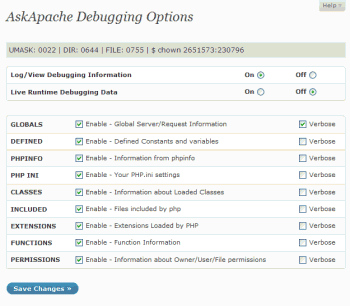 The story behind this plugin is sorta wack, but in a good way :). While doing tons of security research on permissions, authorization, access, etc.. for the Password Protection plugin (still being worked on), I needed to have unheard of debugging capabilities while working on the plugin on the various websites, webhosts, and test servers that I use to test in different environments. So I hacked together a bunch of php code that helped me debug, actually I pretty much went overkill and tried to get as much debugging info as programmatically possible, and it ended up being so much code that I took it out of my Password Protection code and made it its own plugin.
WordPress
This explains the basic methods to get started caching with php headers
Optimization
This is awesome. I was so fed up with trying to find a fail-proof, cross-platform way to find the mime type of an image using PHP that I wrote a quick function that utilizes the same technology as the exif_imagetype, getimagesize, and finfo functions do. Ahh the joys of low-level.
PHP file filetype images mime mimetype



