Actual Htaccess Files from My Server
#### No https except to wp-admin -
# If the request is empty ( implies fopen or normal file access by a php script )
RewriteCond %{THE_REQUEST} ^$ [OR]

# OR if the request if for wp-admin or wp-login.php
RewriteCond %{REQUEST_URI} ^/(wp-admin|wp-login.php).*$ [NC,OR]

# OR if the Referer is https
RewriteCond %{HTTP_REFERER} ^https://www.askapache.com/.*$ [NC]

# THEN skip the following rule, basically all this does is force https or badhost to be redirected
# BUT because of the above 3 rewritecond's, this won't break poorly written admin scripts
RewriteRule .* - [S=1]

RewriteCond %{HTTPS} =on [OR]
RewriteCond %{HTTP_HOST} !^www.askapache.com$ [NC]
RewriteRule .* https://www.askapache.com%{REQUEST_URI} [R=301,L]

RewriteCond %{THE_REQUEST} ^[A-Z]{3,9} /(wp-admin/.*|wp-login.php.*) HTTP/ [NC]
RewriteCond %{HTTPS} !=on
RewriteRule .* https://%{SERVER_NAME}%{REQUEST_URI} [R=301,L]
htpasswd Generator
Speed Up Sites with htaccess Caching
2 awesome ways to implement caching on your website using Apache .htaccess or httpd.conf. Both methods are extremely simple to set up and will dramatically speed up your site!FastCGI on DreamHost
Using FastCGI on DreamHost and .htaccess
HTTP Status Codes and Htaccess ErrorDocuments
There are a total of 57 HTTP Status Codes recognized by the Apache Web Server. Wouldn't you like to see what all those headers and their output, ErrorDocuments look like?
Log all .htaccess/.htpasswd logins
 Learn how to log and debug usernames and passwords used to login to a htaccess basic authorization protected website using php. This article is BOSS and will show you how to fully take control of this aspect of security using php and .htaccess, I don't believe you will find instructions to do this anywhere else on the net.
Mod_Security .htaccess tricks
Mod_Security rivals Mod_Rewrite in the amount of features it provides. I decided to go ahead and post what I learned about it today, even though its tough to give away such awesome htaccess and apache tricks.. Learn how to control spam once and for all, conditionally log/deny/allow/redirect requests based on IP, username, etc.. Mod_Security is so fine!
THE Ultimate Htaccess
 .htaccess is a very ancient configuration file for web servers, and is one of the most powerful configuration files most webmasters will ever come across. This htaccess guide shows off the very best of the best htaccess tricks and code snippets from hackers and server administrators.
You've come to the right place if you are looking to acquire mad skills for using .htaccess files!
Debugging HTTP Cache Headers with Wireshark
HTTP Packet Capturing to debug Apache
This article is a quick and easy HowTo detailing the use of Wireshark or another network sniffing program to debug your Apache .htaccess or httpd.conf files.
An AskApache Plugin Upgrade to Rule them All
 So my blog as been rather quiet for almost a year now, and very few updates if any have been released for my Password Protection PLugin, my Google 404 Plugin, and definately not for my AskApache CrazyCache plugin, which I will be releasing last... So for all of you who've helped me out by sending me suggestions and notifying me of errors and sticking with it... Just wanted to say sorry about that, and thanks for all the great ideas.. Well, I've been sticking with it as well believe it our not. I manage to get free days once in a while, and then its time to jam.
Advanced HTTP Request and Response Header Viewer
AskApache Debug Viewer Plugin for WordPress
 The story behind this plugin is sorta wack, but in a good way :). While doing tons of security research on permissions, authorization, access, etc.. for the Password Protection plugin (still being worked on), I needed to have unheard of debugging capabilities while working on the plugin on the various websites, webhosts, and test servers that I use to test in different environments. So I hacked together a bunch of php code that helped me debug, actually I pretty much went overkill and tried to get as much debugging info as programmatically possible, and it ended up being so much code that I took it out of my Password Protection code and made it its own plugin.
Mod_Rewrite Basic Examples
mod_rewrite is very useful in many situations. Yet some behaviors were not so obvious when I started to mess with it. After many testings, I understand it much better, now. Having said that, I do not pretend to know it perfectly. I also make mistakes.
Htaccess SetEnvIf and SetEnvIfNoCase Examples
SetEnv, SetEnvIf, and SetEnvIfNoCase directives conditionally set environment variables accessible by scripts and apache based on HTTP Headers, Variables, and Request information.
Troubleshooting Apache .htaccess Authentication
Apache Web Server users have problems getting Apache Authentication/password-protection in htaccess working, this is a troubleshooting guide to get Password Protection working!
Apache SSL in htaccess examples
SSLOptions +StrictRequire
SSLRequireSSL
SSLRequire %{HTTP_HOST} eq "google.com"
ErrorDocument 403 https://google.com
Some of the Ins and Outs of using SSL Connections with Apache.
Control htaccess Basic Authentication with PHP and mod_rewrite
Control htaccess Basic Authentication with PHP and mod_rewriteWeb Development Glossary
Advanced WordPress 404.php
For the AskApache Google 404 WordPress Plugin update I added a new 404.php that is more advanced than anything previously seen for a 404.php
Undetectable Sniffing On Ethernet
 I have been in some tight spots where I had to sniff a password or two off the wire, or sniff some packets off the wire and based on the packets content perform some action... Accidentally, I stumbled on a method to sniff data while remaining undetected and invisible.
Originally Posted: 2003/04/15
Notes from Apache HTTPD Source Code
thought I'd take a break from coding and post about how open-source is such a great tool for finding the best answers to the toughest questions,
/** is the status code informational */
#define ap_is_HTTP_INFO(x)         (((x) >= 100)&&((x) < 200))
/** is the status code OK ?*/

#define ap_is_HTTP_SUCCESS(x)      (((x) >= 200)&&((x) < 300))
/** is the status code a redirect */
#define ap_is_HTTP_REDIRECT(x)     (((x) >= 300)&&((x) < 400))

/** is the status code a error (client or server) */
#define ap_is_HTTP_ERROR(x)        (((x) >= 400)&&((x) < 600))
/** is the status code a client error  */

#define ap_is_HTTP_CLIENT_ERROR(x) (((x) >= 400)&&((x) < 500))
/** is the status code a server error  */
#define ap_is_HTTP_SERVER_ERROR(x) (((x) >= 500)&&((x) < 600))

/** is the status code a (potentially) valid response code?  */
#define ap_is_HTTP_VALID_RESPONSE(x) (((x) >= 100)&&((x) < 600))
Mod_Rewrite Variables Cheatsheet
 We've figured out what mod_rewrite variables look like, a cheatsheet of the actual value.
DreamHost Site of The Month is AskApache!
AskApache.com won the contest for May! Thanks to all of you who voted for my site! Even though AskApache won the contest according to the rules, somehow they said I cheated by giving DreamHost too much free publicity and advertising. I love DreamHost!
Is Your Password Crackable?
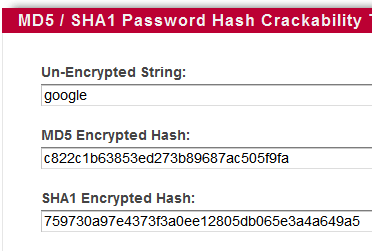 I've put up a new tool to check the strength of your password hash, that locates weak passwords by searching Rainbow Tables for md5 or sha1 hash match. Locate and fix this common security vulnerability before being exploited.
IP Blocked by stateful Firewall, now what?
htaccess HTTPS / SSL Tips, Tricks, and Hacks
Apache has the best SSL/HTTPS support and can be controlled by the httpd.conf file or other HTTPD server configuration file. This htaccess tutorial has htaccess example code to make it easy to secure and use HTTPS and SSL with Apache.
Mod_Status tricks to View Apache Module Directives
 Quick and easy method to get a list of all Apache Modules currently loaded, a list of all the directives each module provides, a list of currently used directives, etc... These directives can be used in httpd.conf and/or .htaccess files so it is definately useful to know which ones are available and which ones are currently being used.
RewriteCond Cheatsheet
Request to https://www.askapache.com/cg/rewrite-test/?catch=caught&this=that
RewriteCond %{THE_REQUEST} = GET /cgi-bin/php/pro/rewrite-test/?catch=caught&this=that HTTP/1.1
RewriteCond %{REQUEST_URI} = /cg/rewrite-test/?catch=caught&this=that
RewriteCond %{QUERY_STRING} = catch=caught&this=that
RewriteCond %{HTTP_HOST} = www.askapache.com
RewriteCond %{HTTP_USER_AGENT} = Mozilla/5.0 (Windows NT 6.1; WOW64; rv:18.0) Gecko/20100101 Firefox/18.0
RewriteCond %{REMOTE_ADDR} = 8.8.8.8
Apache Directives and Modules on DreamHost
Apache .htaccess Directives and Loaded Modules allowed on DreamHost Apache Server 2 Setups.