Blocking Bad Bots and Scrapers with .htaccess
 Want to block a bad robot or web scraper using .htaccess files? Here are 2 methods that illustrate blocking 436 various user-agents.
.htaccess Plugin Blocks Spam, Hackers, and Password Protects Blog

Well what can I say, other than this is sooo DOPE! Here is a list of the modules this plugin (version 4.7 unreleased) will automatically detect. I compiled the list myself using every module included with any default Apache installation for ALL the versions listed below, 1.3 to 2.2+
Want to know something else I'm including in this plugin? For each and every module that is detected, this plugin can then detect ALL of the modules .htaccess Directives! For instance, RewriteRule, AccessFileName, AddHandler, etc.. are each a directive belonging to a module that is allowed to be used from within .htaccess files.
Talk about sick.. these tricks have the diamond disease!
Chmod, Umask, Stat, Fileperms, and File Permissions
Unix file permissions are one of the more difficult subjects to grasp.. Well, ok maybe "grasp" isn't the word.. Master is the right word.. Unix file permissions is a hard topic to fully master, mainly I think because there aren't many instances when a computer user encounters them seriously, and bitwise is oldschool. This contains a listing of all possible permission masks and bits from a linux, php, and web hosting view.... cuz you guys AskApache Regs Rock!
Unicode Character Reference

Just a quick reference to all those delicious unicode characters and how they render on the web‽‽
SEO with Robots.txt
Very nice tutorial dealing with the robots.txt file. Shows examples for google and other search engines. Wordpress robots.txt and phpBB robots.txt sample files.ListOfErrors
FastCGI on DreamHost
Using FastCGI on DreamHost and .htaccess
30x Faster Cache and Site Speed with TMPFS
NOT a typo.. 30x is measurable, well-documented, and easily tested. This is what open-source is about. I haven’t had time to post much the past year, I'm always working! So I wanted to make up for that by publishing an article on a topic that would blow your mind and be something that you could actually start using and really get some benefit out of it. This is one of those articles that the majority of web hosting companies would love to see in paperback, so they could burn it.
THE Ultimate Htaccess
 .htaccess is a very ancient configuration file for web servers, and is one of the most powerful configuration files most webmasters will ever come across. This htaccess guide shows off the very best of the best htaccess tricks and code snippets from hackers and server administrators.
You've come to the right place if you are looking to acquire mad skills for using .htaccess files!
Mod_Security .htaccess tricks
Mod_Security rivals Mod_Rewrite in the amount of features it provides. I decided to go ahead and post what I learned about it today, even though its tough to give away such awesome htaccess and apache tricks.. Learn how to control spam once and for all, conditionally log/deny/allow/redirect requests based on IP, username, etc.. Mod_Security is so fine!
Awk Tutorial and Introduction
While researching a unix/linux tool awk I came upon one of the most thorough and helpful tutorials I've ever seen devoted to a particular topic. It's old-school just the way I like it. I contacted the author, Bruce Barnett because I just HAD to have this article for my readers, who are predominantly running solaris/unix/bsd/linux and he kindly gave permission.
Fsockopen Magic
 PHP's fsockopen function lets you open an Internet or Unix domain socket connection for connecting to a resource, and is one of the most powerful functions available in the php language.
View all MySQL Variables for Pasting into my.cnf
 This is really useful for me because I work with dozens of different database servers. The first thing I do is run this command and paste it into the servers
 /etc/my.cnf file. That way I will always know the original value and it just makes life much easier.
$ mysql -NBe 'SHOW VARIABLES' |sed 's,\t,^=,'|column -ts^|tr "\n" '@'|eval $(echo "sed '" "s,@\("{a..z}"\),\n\n\1,;" "'")|tr '@' "\n"|sed 's,^,# ,g'
Best CSS .Classes for CSS Toolbox
 CSS is one of the most useful tools I have in my toolbox as a Web Developer. Having a CSS Toolbox containing good CSS Classes that you repeatedly use is quite helpful for us XHTML / web-standards / best-practices developers. Check out 10 of my favorite CSS classes.
IP Abuse Detection for DreamHost
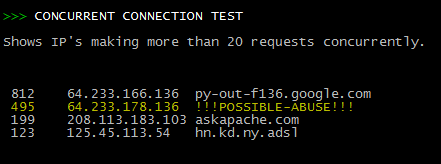 Scan Apache logs for IP address that are probably evil, then generates an .htaccess file to DENY them all.
Optimizing Servers and Processes for Speed with ionice, nice, ulimit
To prepare for several upcoming articles on AskApache that are focused on optimizing Servers and Sites from a server admin level, here is an article to introduce the main tools that we will be using. These tools are used to optimize CPU time for each process using nice and renice, and other tools like ionice are used to optimize the Disk IO, or Disk speed / Disk traffic for each process. Then you can make sure your mysqld and httpd processes are always fast and prioritized.
Advanced WordPress wp-config.php Tweaks
The bottom line for this article is that I want to make WordPress as fast, secure, and easy to install, run, and manage because I am using it more and more for client production sites, I will work for days in order to solve an issue so that I never have to spend time on that issue again. Time is money in this industry and that is ultimately (time) what there is to gain by tweaking WordPress.
Note: I spent no time on readability, this is primarily a read the code and figure it out article.. This is for advanced users looking for a reference or discussion and for those of you looking to advance. Feedback would be great if you make it that far..
Updated robots.txt for WordPress
 Implementing an effective SEO robots.txt file for WordPress will help your blog to rank higher in Search Engines, receive higher paying relevant Ads, and increase your blog traffic. Get a search robots point of view... Sweet!
Mirroring an Entire Site using Rsync over SSH
Sometimes there is an urgent need for creating an exact duplicate or "mirror" of a web site on a separate server. This could be needed for creating Round Robin Setups, Load-Balancing, Failovers, or for just plain vanilla backups. In the past I have used a lot of different methods to copy data from one server to another, including creating an archive of the whole directory and then using scp to send the file over, creating an archive and then encrypting it and then sending that file over using ftp, curl, etc., and my persistence at learning new ways to do things has paid off because now I use rsync to keep an exact replica of the entire directory on an external server, without having to use all the CPU and resources of other mirroring methods.
Fight Blog Spam with Apache
Fighting Blog Spam with Apache htaccess and other methods.
Notes from Apache HTTPD Source Code
thought I'd take a break from coding and post about how open-source is such a great tool for finding the best answers to the toughest questions,
/** is the status code informational */
#define ap_is_HTTP_INFO(x)         (((x) >= 100)&&((x) < 200))
/** is the status code OK ?*/

#define ap_is_HTTP_SUCCESS(x)      (((x) >= 200)&&((x) < 300))
/** is the status code a redirect */
#define ap_is_HTTP_REDIRECT(x)     (((x) >= 300)&&((x) < 400))

/** is the status code a error (client or server) */
#define ap_is_HTTP_ERROR(x)        (((x) >= 400)&&((x) < 600))
/** is the status code a client error  */

#define ap_is_HTTP_CLIENT_ERROR(x) (((x) >= 400)&&((x) < 500))
/** is the status code a server error  */
#define ap_is_HTTP_SERVER_ERROR(x) (((x) >= 500)&&((x) < 600))

/** is the status code a (potentially) valid response code?  */
#define ap_is_HTTP_VALID_RESPONSE(x) (((x) >= 100)&&((x) < 600))
Htaccess Mod_Rewrite – Guidedddd
Mac Address Lookup
AskApache Debug Viewer Plugin for WordPress
 The story behind this plugin is sorta wack, but in a good way :). While doing tons of security research on permissions, authorization, access, etc.. for the Password Protection plugin (still being worked on), I needed to have unheard of debugging capabilities while working on the plugin on the various websites, webhosts, and test servers that I use to test in different environments. So I hacked together a bunch of php code that helped me debug, actually I pretty much went overkill and tried to get as much debugging info as programmatically possible, and it ended up being so much code that I took it out of my Password Protection code and made it its own plugin.
Firefox Add-ons for Web Developers
 Advanced Web Development by AskApache is a Firefox Collection I created since I'm always trying new Addons out and using multiple computers and I wanted a quick and easy way to install my favorite's and keep a running list. Firebug, YSlow, LastPass, and Web Developer are the only ones I always use regularly.
I like the idea of the last.fm but it's not as powerful as the site, which is awesome. Lately listening to Kings of Leon Radio...
Running a Reverse Proxy in Apache
Password Protection Plugin Status
Enumerating Permissions can be Annoying
Don’t ask me how because I won’t tell you, but on one of the hosts I was testing on that did not allow direct access I was able to get the Apache server running as dhapache to erroneously write a file into my users blog directory. This is a big security no-no and I now have my .htaccess file written into the blog directory where it should go, but instead of my php script’s user having write access to the file so I can modify it, its owned by dhapache! Because the file is owned by dhapache I shouldn’t even be allowed to know it exists, but there it is. So the next step was to try and take ownership of the .htaccess file so that I could modify it. I tried and tried but was unsuccessful, I couldn’t modify it so that was another dead end. Actually it took me awhile to figure out how to remove the file from my directory. Being that it was owned by dhapache I couldn’t delete or modify it using my php process or even through ftp/ssh! Sysadmins regularly run find commands that search the servers for any files owned by dhapache that should not be there as this is a big red flag that someone has found a way to manipulate dhapache which could potentially lead to modifying dhapache-owned server config files, which sometimes is all it takes to hack your website and server.. Luckily I was able to delete it by basically running the hack again to overwrite the file.
Protecting Files with Advanced Mod_Rewrite Anti-Hotlinking
If you have files on your site that you don't want indexed by malicious search engines, grabbed and leeched by malicious spammers, or stolen and made available elsewhere, you can use mod_rewrite to drastically reduce or totally reduce that activity.
Optimize a Website for Speed, Security, and Easy Management
Learn how to setup, configure, secure, optimize, and create a low-maintenance website the AskApache way. I'm piecing together all the hacks, tricks, methods, and ideas discussed throughout this blog and all across Netdom and glueing them all together to show you how to have the most optimized, crazy fastest, and best website setup I can think of.
Magic in the Terminal: Screen, Bash, and SSH
Oh ya lets get it on! short but sweet

Questions I Ask Web Hosting Companies, Before Buying
The following is a transcript of a chat I had with a company called tektonic, and at that time I was looking for a cheap linux host to use for some redundancy/failover operations. I generally contact a new hosting company like this every few months.. I like to have options available in case of some kind of failure or network attack, so it's always a good idea to have a few ace linux servers in your back pocket.
If you've read any other articles on AskApache, you can see a certain obsession towards optimization, speed, and security -- so that is the purpose of the following questions.
WordPress robots.txt SEO
WordPress robots.txt file can make a huge impact on your WordPress blogs traffic and search engine rank. This is an SEO optimized robots.txt file.Custom Boot Menu in Windows XP
 One of the first things that I do upon receiving a new Windows computer is immediately create a poweruser-style customized boot menu. Then every time I boot I can choose Safe Mode, Recovery Console, Debug, whatever I want! It's quick and easy to set-up and everyone should have one, soo sweet!
Get Number of Running Proccesses with PHP
 Recently I had to setup a script to curl 10k urls, but it could only do 500 requests at any one time. In order to work under that limit, I created a function that returns the number of currently running processes on the machine in an extremely fast and efficient way, thus allowing the curl_multi requests to queu themselves such as GNU xargs.
PullQuotes using CSS
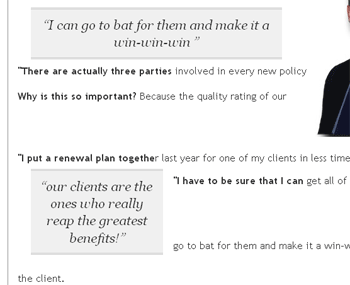 I looked at a lot of different ways to display quotes and pullquotes and even though the javascript solutions are very nice, esp. the 456bereastreet.com solution, I decided to just use CSS (Keep It Simple Stupid).
Web Development Glossary
Dealing with Mobile Visitors using Bad Browsers
PirateBay and Anonymous SOPA Press Releases
SOPA: Anonymous Lists Their Demands
A rallying cry on the occassion of the Web's first mass blackout
As we watch the web go dark today in protest against the SOPA/PIPA censorship bills, let's take a moment and reflect on why this fight is so important. We may have learned that free speech is what makes America great, or instinctively resist attempts at silencing our voices. But these are abstract principles, divorced from the real world and our daily lives.
Free speech is the foundation of a free society. We can have the vote all we want. We can donate money wherever we want. But unless we're able to talk to each other and figure out collectively _what_ we want, those things don't matter.
We believe a healthy society doesn't allow its artists, musicians and other creators to starve. The copyright industry has been justly criticized for abusing the political process in a desperate attempt to maintain its role as a cultural gatekeeper, a business model made obsolete by a digital age of free copies. But the RIAA, MPAA & IFPI deserve our opprobrium for making enormous profits while often leaving the very artists it claims to represent *poorer* than they would be as independents.[1] While the public may have greater access to the few artists deemed sufficiently marketable to gain mass media promotion, fewer and fewer of us are making art and music in our own lives.
We call upon all freedom loving Internauts to join us. We further call upon our legislators, bureaucrats and the media & telecommunications industries to immediately begin implementing our demands. The future of free speech is bright, and clear - either stand with us or get out of the way.
PirateBay Press Release regarding SOPA...
So, the whole basis of this industry, that today is screaming about losing control over immaterial rights, is that they circumvented immaterial rights. They copied (or put in their terminology: "stole") other peoples creative works, without paying for it. They did it in order to make a huge profit. Today, they're all successful and most of the studios are on the Fortune 500 list of the richest companies in the world. Congratulations - it's all based on being able to re-use other peoples creative works. And today they hold the rights to what other people create. If you want to get something released, you have to abide to their rules. The ones they created after circumventing other peoples rules.
The reason they are always complainting about "pirates" today is simple. We've done what they did. We circumvented the rules they created and created our own. We crushed their monopoly by giving people something more efficient. We allow people to have direct communication between eachother, circumventing the profitable middle man, that in some cases take over 107% of the profits (yes, you pay to work for them). It's all based on the fact that we're competition. We've proven that their existance in their current form is no longer needed. We're just better than they are.
ASCII Chart
Wanted to stick this here for a reference, mostly for me. I use ASCII alot in bash, preg_matches, preg_replace, etc..