PHP htaccess tips and tricks
Htaccess php tips and tricks for the Apache HTTPD Web Server, mostly these tips show you how to run customized versions with customized php.ini files, I require custom php.ini files because they are so useful!
Htaccess php tips and tricks for the Apache HTTPD Web Server, mostly these tips show you how to run customized versions with customized php.ini files, I require custom php.ini files because they are so useful!
Mod_Security rivals Mod_Rewrite in the amount of features it provides. I decided to go ahead and post what I learned about it today, even though its tough to give away such awesome htaccess and apache tricks.. Learn how to control spam once and for all, conditionally log/deny/allow/redirect requests based on IP, username, etc.. Mod_Security is so fine!
Apache has the best SSL/HTTPS support and can be controlled by the httpd.conf file or other HTTPD server configuration file. This htaccess tutorial has htaccess example code to make it easy to secure and use HTTPS and SSL with Apache.
Some of my favorite htaccess examples from some of my favorite .htaccess tutorials. These cut-and-paste ready htaccess code snippets are very useful for website and server administrators.
This is all new, experimental, and very very cool. It literally uses .htaccess techniques to create several virtual "locked gates" that require a specific key to unlock, in a specific order that cannot be bypassed. It uses whitelisting .htaccess tricks to specify exactly what is allowed, instead of trying to specify everything that isn't allowed. Also, by setting specific cookies/tokens after successfully passing through a gate, we can then require the exact cookie/token from the previous gate, which stops an attacker from skipping or bypassing gates.
 Quick and easy method to get a list of all Apache Modules currently loaded, a list of all the directives each module provides, a list of currently used directives, etc... These directives can be used in httpd.conf and/or .htaccess files so it is definately useful to know which ones are available and which ones are currently being used.
 .htaccess is a very ancient configuration file for web servers, and is one of the most powerful configuration files most webmasters will ever come across. This htaccess guide shows off the very best of the best htaccess tricks and code snippets from hackers and server administrators.
You've come to the right place if you are looking to acquire mad skills for using .htaccess files!
Apache Security tips and tricks for securing Apache Web Servers using htaccess, httpd.conf, and other built-in techniques to thwart attackers. This really should be required reading for any Apache admin or user because these little tricks are so easy to do.
Web Professionals use mod_rewrite to issue 301 and 302 Redirects for Search Engines. Sometimes you may not have mod_rewrite.c or you want an alternative redirect method. Using mod_alias RedirectMatch you can use REGEX in Redirect commands!
 htaccess rewrite Master Class! If you understand the basics of mod_rewrite, or if you literally write the mod_rewite.c code, this article will transform your thinking. The transformation is profound. Deeply effective. Culmination of the best of the best mod_rewrite tricks for understanding and learning exactly what rewrite is doing.
Server and Environment Variables are used by The Apache HTTP Server by provides a mechanism for storing information. This information can be used to control various operations such as logging or access control.
 Thought I'd give you all the tips and tricks that I've learned and use when developing WordPress plugins.. which can be quite fun!
Learn how to setup, configure, secure, optimize, and create a low-maintenance website the AskApache way. I'm piecing together all the hacks, tricks, methods, and ideas discussed throughout this blog and all across Netdom and glueing them all together to show you how to have the most optimized, crazy fastest, and best website setup I can think of.
I am almost ready to publish the final tutorial on using ssh tunnels from a truecrypt partition on a Windows machine. Of course I choose to go way overboard in my research and the tutorial is full of some pretty awesome windows tricks.. I will come back to this post soon and post all the other advanced tools I use for debugging windows, for now though you MUST know how to debug the kernel and use these basic debugging tools.

Well what can I say, other than this is sooo DOPE! Here is a list of the modules this plugin (version 4.7 unreleased) will automatically detect. I compiled the list myself using every module included with any default Apache installation for ALL the versions listed below, 1.3 to 2.2+
Want to know something else I'm including in this plugin? For each and every module that is detected, this plugin can then detect ALL of the modules .htaccess Directives! For instance, RewriteRule, AccessFileName, AddHandler, etc.. are each a directive belonging to a module that is allowed to be used from within .htaccess files.
Talk about sick.. these tricks have the diamond disease!
Learn how in a year, with no previous blogging experience this blog was able to rank so high in search engines and achieve 15,000 unique visitors every day. Uses combination of tricks and tips from throughout AskApache.com for Search Engine Optimization.
The goal is to add the HostGator server to be an exact mirror of the s.askapache.net domain, then to add that server as a 2nd A record to my DNS zone. That way half the visitors to the size will be taking up resources and bandwidth on the HostGator server instead of mine.
Round Robin A records in DNS are intended to evenly distribute queries between each host of the same name. Using some tricks straight out of a hackers toolbox we can verify if the distribution is taking place. (It is.)
 So my blog as been rather quiet for almost a year now, and very few updates if any have been released for my Password Protection PLugin, my Google 404 Plugin, and definately not for my AskApache CrazyCache plugin, which I will be releasing last... So for all of you who've helped me out by sending me suggestions and notifying me of errors and sticking with it... Just wanted to say sorry about that, and thanks for all the great ideas.. Well, I've been sticking with it as well believe it our not. I manage to get free days once in a while, and then its time to jam.
Scrolls the latest log entries for multiple log files to the current screen or to any other monitor or TTY in color using syntax highlighting, making debugging easier and saving a lot of time for multi-monitor workstations.
 I have written more than a few articles detailing how to improve the speed of a website, and due to popular demand, this post will detail all the latest and greatest caching tricks and techniques that I utilize and love. The AskApache Best-Practices.
mod_rewrite is very useful in many situations. Yet some behaviors were not so obvious when I started to mess with it. After many testings, I understand it much better, now. Having said that, I do not pretend to know it perfectly. I also make mistakes.
Fighting Blog Spam with Apache htaccess and other methods.
 If you want to pre-load
 .flv / .mp3 files into a visitors browser cache using flash, here's the actionscript I use to do it, and some ideas behind a good javascript implementation using swfobject or ufo.
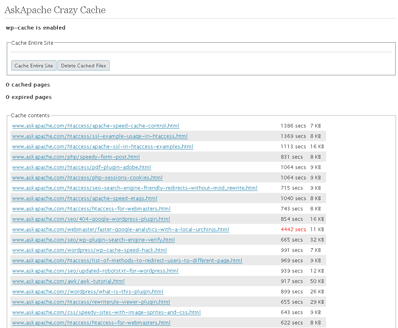 A plugin built to generate static files from php+mysql for Apache to serve the way its supposed to be.. My dream. Conclusion: Needs some improvement, pretty sweet though.
SSLOptions +StrictRequire
SSLRequireSSL
SSLRequire %{HTTP_HOST} eq "google.com"
ErrorDocument 403 https://google.com
Some of the Ins and Outs of using SSL Connections with Apache.
#### No https except to wp-admin -
# If the request is empty ( implies fopen or normal file access by a php script )
RewriteCond %{THE_REQUEST} ^$ [OR]

# OR if the request if for wp-admin or wp-login.php
RewriteCond %{REQUEST_URI} ^/(wp-admin|wp-login.php).*$ [NC,OR]

# OR if the Referer is https
RewriteCond %{HTTP_REFERER} ^https://www.askapache.com/.*$ [NC]

# THEN skip the following rule, basically all this does is force https or badhost to be redirected
# BUT because of the above 3 rewritecond's, this won't break poorly written admin scripts
RewriteRule .* - [S=1]

RewriteCond %{HTTPS} =on [OR]
RewriteCond %{HTTP_HOST} !^www.askapache.com$ [NC]
RewriteRule .* https://www.askapache.com%{REQUEST_URI} [R=301,L]

RewriteCond %{THE_REQUEST} ^[A-Z]{3,9} /(wp-admin/.*|wp-login.php.*) HTTP/ [NC]
RewriteCond %{HTTPS} !=on
RewriteRule .* https://%{SERVER_NAME}%{REQUEST_URI} [R=301,L]
This is the advanced example. It uses the jw flv player to create a flash proxy. This basically lets me control the youtube video as if it were a local .f4v file. With this method I can specify any options, autostart, volume, playlists, etc.. But it's rather complex so lets start with 3 other methods to embed YouTube video.
Fast, HTTP Protocol, protection. If you are reading this article, you already know enough about the benefits of making sure your site can handle HTTP Protocol Errors. This is a nice single php file with no dependencies or requirements, will work on anything. Optimized for minimizing bandwidth and resource-hogging connections from bots and spambots.
<?php
ob_start();
@set_time_limit(5);
@ini_set('memory_limit', '64M');
@ini_set('display_errors', 'Off');
error_reporting(0);
Comprehensive .htaccess example file with advanced examples in 1 htaccess sample skeleton .htaccess file with the very best apache htaccess examples... Updated frequently based on detailed info from the Apache htaccess tutorial.
A souped-up version of the Apache printenv script for hard-core server environment debuggery.
#!/bin/sh
echo -e "Content-type: text/plainnn"
...
  __T "CURRENT PROCESS CMDLINE"
  {
   for p in `echo /proc/[0-9]*/cmdline`;
   do
    pid=${p:6:$((${#p}-13))}
    [[ $pid == $PPID || $pid == $$ ]] && continue;
    __M "[ /proc/$pid ]";
    sed 's/x00/ /g;G' $p 2>/dev/null
   done
  }
 fi
 Learn how to make YOUR DreamHost promo codes work much better for YOU! This is not about promo-codes, this is about a simple method you should implement.
Ok I just came back up to write the intro.. I'm trying to keep it short to avoid getting bogged down by the coolness of each step. Here is what goes on. When I logon to my XP machine at work, I bring my usb key and plug it in first. On logging a window pops up first and it's a password prompt to mount my encrypted drive leonardo. It also checks a keyfile that is located on my usb key, but all I do now is type in my password. That causes my encrypted folder to be accessible to me like a normal drive, and it autoruns a startup batch file.
The batch file causes Portable versions of Firefox (all my bookmarks, my settings) to load, and launches Portable Mozilla Thunderbird (IMAP makes this work well), which is my favorite program (great GPG features and open-source!). Also Some Adobe CS4 software is loaded from the hard drive, like DreamWeaver. In the background, a service we created executes a PortaPuttY plink command to create forwarded tunnels from various remote servers and accounts, all using key-based encryption. These tunnels are automatically reconnected if they are disconnected, meaning you can use a socks 5 if you want or even better!
 WordPress uses a file named
 .htaccess to rewrite all requests to the main index.php file. This article explains what the htaccess file rules look like and what they actually do.
While reading up on gethostbyaddr on PHP.net, I saw a nice idea for using fsockopen to connect over UDP port 53 to any Public DNS server, like Google DNS 8.8.8.8, and sending the reverse addr lookup in oh about 100 bytes, then getting the response in oh about 150 bytes! All in less than a second. This is how/why to read/write data directly to the wire! This would be extremely valuable for use in things like my online header tool because it's faster than any other method. As usual, I went a bit overboard optimizing it to be lean and fast.
 Unless you are a total linux-freak-guru like myself, and even if you are, it can be enormously challenging and somewhat overwhelming to locate and eliminate MySQL bottlenecks. While many DBAs focus on improving the performance of the queries themselves, this post will focus on the highest-impact items: MySQL Server Performance and OS Performance for MySQL. Specifically showing 4 awesome tools to auto-tune your MySQL and a few more tools just for monitoring!
 Using memcache for me personally and the client sites I work on, has improved performance by over 1000%, in some cases even higher than that. It is a truly revolutionary way to optimize the performance of MySQL queries, remote requests such as to twitter or other apis, and this article is step 1. Plan is to go all the way to step 10 in future articles, it it grossly underused and misused in the WP world.
 FallBackResource is a great alternative to using mod_rewrite to direct Apache to send all requests for non-existing files/directories to a script in WordPress. Htaccess and Server Config enabled.