Unicode Character Reference

Just a quick reference to all those delicious unicode characters and how they render on the web‽‽
Just a quick reference to all those delicious unicode characters and how they render on the web‽‽
An image and technicacl achievement so profound, it will touch yoour heart.. So 3D... it'll hurt you eyes! LOL.. lol.. Man I am cracking up here. haha Ha definately the best intro ever, those really do look 3D for terminal though huh.. Sweet. Here is the little function I wrote to output that grey marble.

While researching a unix/linux tool awk I came upon one of the most thorough and helpful tutorials I've ever seen devoted to a particular topic. It's old-school just the way I like it. I contacted the author, Bruce Barnett because I just HAD to have this article for my readers, who are predominantly running solaris/unix/bsd/linux and he kindly gave permission.
Unix file permissions are one of the more difficult subjects to grasp.. Well, ok maybe "grasp" isn't the word.. Master is the right word.. Unix file permissions is a hard topic to fully master, mainly I think because there aren't many instances when a computer user encounters them seriously, and bitwise is oldschool. This contains a listing of all possible permission masks and bits from a linux, php, and web hosting view.... cuz you guys AskApache Regs Rock!
 One of the first things that I do upon receiving a new Windows computer is immediately create a poweruser-style customized boot menu. Then every time I boot I can choose Safe Mode, Recovery Console, Debug, whatever I want! It's quick and easy to set-up and everyone should have one, soo sweet!
NOT a typo.. 30x is measurable, well-documented, and easily tested. This is what open-source is about. I haven’t had time to post much the past year, I'm always working! So I wanted to make up for that by publishing an article on a topic that would blow your mind and be something that you could actually start using and really get some benefit out of it. This is one of those articles that the majority of web hosting companies would love to see in paperback, so they could burn it.
 PHP's fsockopen function lets you open an Internet or Unix domain socket connection for connecting to a resource, and is one of the most powerful functions available in the php language.
To prepare for several upcoming articles on AskApache that are focused on optimizing Servers and Sites from a server admin level, here is an article to introduce the main tools that we will be using. These tools are used to optimize CPU time for each process using nice and renice, and other tools like ionice are used to optimize the Disk IO, or Disk speed / Disk traffic for each process. Then you can make sure your mysqld and httpd processes are always fast and prioritized.
 htaccess rewrite Master Class! If you understand the basics of mod_rewrite, or if you literally write the mod_rewite.c code, this article will transform your thinking. The transformation is profound. Deeply effective. Culmination of the best of the best mod_rewrite tricks for understanding and learning exactly what rewrite is doing.

 Stop wasting your lives with Mac Terminals.. or Macs. Get a real machine and then get a real shell multiplexer! For many years we all loved GNU Screen, but tmux is by far a better option today. The only time I am in the shell and not using a multiplexer, is when I'm not on one of my machines. My Arch Linux machines all run URxvt and my .bash_profiles all start tmux automataically, whether in X or single-user mode, tmux is where it's at.
 WordPress uses a file named
 .htaccess to rewrite all requests to the main index.php file. This article explains what the htaccess file rules look like and what they actually do.
 We've figured out what mod_rewrite variables look like, a cheatsheet of the actual value.
Fighting Blog Spam with Apache htaccess and other methods.
 While playing around with the Nmap Scripting Engine (NSE) we discovered an amazing number of open embedded devices on the Internet. Many of them are based on Linux and allow login to standard BusyBox with empty or default credentials. We used these devices to build a distributed port scanner to scan all IPv4 addresses. These scans include service probes for the most common ports, ICMP ping, reverse DNS and SYN scans. We analyzed some of the data to get an estimation of the IP address usage.
 Advanced Web Development by AskApache is a Firefox Collection I created since I'm always trying new Addons out and using multiple computers and I wanted a quick and easy way to install my favorite's and keep a running list. Firebug, YSlow, LastPass, and Web Developer are the only ones I always use regularly.
I like the idea of the last.fm but it's not as powerful as the site, which is awesome. Lately listening to Kings of Leon Radio...
 If for some reason you need to use windows .bat batch file scripting to do some task, or you just want to learn the most universal batch programming language on Windows machines, you lucked out and found the AskApache example. My expertise is the shell, in this article the shell is Windows
 cmd.exe. It has some pretty advanced windows shell usage, including pipes and redirection, but it's the modular linux-like coding approach that earns this script it's "advanced" title.
:SETPROMPT
set PROMPT=$_[%USERNAME%@%USERDOMAIN%]$S[$P]$_$M$G && EXIT /B
 My favorite tool (and I've tried sooo many) for editing most Windows files and especially .bat files is the free and open-source Notepad++. Set that up and you will have a color-syntax-highlighted editor for Batch Scripting that works very very well.
The following is just a quick but detailed reference of some of the commands I used to successfully uninstall cpanel permanently. This is for advanced users of the shell. If you run a single one of these commands without fully understanding it, you will probably kill your server, lose everything on it permanently, not have a website or email for weeks.. So backup everything. FIRST. You should also contact your hosting provider support - but be prepared for some MAJOR negativity.. cpanel makes things very easy for web-hosting companies, and you are less than a drop in their bucket.
 This is not your everyday vimrc. This is my personalized vimrc.. works especially great on remote servers, in tmux, screen, etc.
This doesn't require a git checkout, a vim update, a bash update, an OS update, a plugin. No. 1 vimrc, 1 colorscheme, just use curl to download and it's on. I use this on Arch Linux, NetBSD, FreeBSD, OpenBSD, Debian, Ubuntu, Cent OS, Red Hat, and that's mostly it so far.
If you aren't already using vim as your primary editor in a powerful way, you are gonna owe me for this.
Wanted to stick this here for a reference, mostly for me. I use ASCII alot in bash, preg_matches, preg_replace, etc..

 3-Part article covering practical implementation of 3 advanced .htaccess features. Discover an easy way to boost your SEO the AskApache way (focus on visitors), a tip you might keep and use for life. Get some cool security tricks to use against spammers, crackers, and other nefarious sorts. Take your site's error handling to the next level, enhanced ErrorDocuments that go beyond 404's.
 This amazing bash linux prompt does more than meets the eye. If you want to know how to become really good with technology, linux is the secret sauce behind the AskApache articles. Open Source is elixir of the web. Thanks to everyone who helped me for the past 20 years. I use linux/bsd because homey don't play, so this is geared to be as productive a prompt as I can make it.
Don't have much time.. or just don't care? Not a problem, here are the 3 lines to copy and paste - you can just paste them right in your shell to test it, or add to a startup script.
export AA_P="export PVE=\"\\033[m\\033[38;5;2m\"\$(( \`sed -n \"s/MemFree:[\\t ]\\+\\([0-9]\\+\\) kB/\\1/p\" /proc/meminfo\` / 1024 ))\"\\033[38;5;22m/\"\$((\`sed -n \"s/MemTotal:[\\t ]\\+\\([0-9]\\+\\) kB/\\1/p\" /proc/meminfo\`/ 1024 ))MB\"\\t\\033[m\\033[38;5;55m\$(< /proc/loadavg)\\033[m\";echo -en \"\""
export PROMPT_COMMAND="history -a;((\$SECONDS % 10==0 ))&&eval \"\$AA_P\";echo -en \"\$PVE\";"
export PS1="\\[\\e[m\\n\\e[1;30m\\][\$\$:\$PPID \\j:\\!\\[\\e[1;30m\\]]\\[\\e[0;36m\\] \\T \\d \\[\\e[1;30m\\][\\[\\e[1;34m\\]\\u@\\H\\[\\e[1;30m\\]:\\[\\e[0;37m\\]\${SSH_TTY} \\[\\e[0;32m\\]+\${SHLVL}\\[\\e[1;30m\\]] \\[\\e[1;37m\\]\\w\\[\\e[0;37m\\] \\n(\$SHLVL:\\!)\\\$ " && eval $AA_P
The goal is to add the HostGator server to be an exact mirror of the s.askapache.net domain, then to add that server as a 2nd A record to my DNS zone. That way half the visitors to the size will be taking up resources and bandwidth on the HostGator server instead of mine.
Round Robin A records in DNS are intended to evenly distribute queries between each host of the same name. Using some tricks straight out of a hackers toolbox we can verify if the distribution is taking place. (It is.)
 There isn't much vlan info on the net in terms of specifics and I had to learn all about it because I needed to log in to a switch that was on a different vlan. With the help of the Ettercap developers NaGA and ALoR I figured it out.
Originally Posted: 3/30/2004
What they say about kung-fu is true..
It can be attained by anyone through hard work over time. You can become as good as the amount of work you put in. Here's a short look at a basic technique that I use. Simply reverse engineering the source code and taking notes along the way...
static void php_session_send_cookie(TSRMLS_D)
  if (SG(headers_sent)) {
          if (output_start_filename) {
                  php_error_docref(NULL TSRMLS_CC, E_WARNING, "Cannot send session cookie - headers already sent by (output started at %s:%d)",
                          output_start_filename, output_start_lineno);
          } else {
                  php_error_docref(NULL TSRMLS_CC, E_WARNING, "Cannot send session cookie - headers already sent");
          }
          return;
  }

  /* URL encode session_name and id because they might be user supplied */
  e_session_name = php_url_encode(PS(session_name), strlen(PS(session_name)), NULL);
Learn how to setup, configure, secure, optimize, and create a low-maintenance website the AskApache way. I'm piecing together all the hacks, tricks, methods, and ideas discussed throughout this blog and all across Netdom and glueing them all together to show you how to have the most optimized, crazy fastest, and best website setup I can think of.
 This is really useful for me because I work with dozens of different database servers. The first thing I do is run this command and paste it into the servers
 /etc/my.cnf file. That way I will always know the original value and it just makes life much easier.
$ mysql -NBe 'SHOW VARIABLES' |sed 's,\t,^=,'|column -ts^|tr "\n" '@'|eval $(echo "sed '" "s,@\("{a..z}"\),\n\n\1,;" "'")|tr '@' "\n"|sed 's,^,# ,g'

Well what can I say, other than this is sooo DOPE! Here is a list of the modules this plugin (version 4.7 unreleased) will automatically detect. I compiled the list myself using every module included with any default Apache installation for ALL the versions listed below, 1.3 to 2.2+
Want to know something else I'm including in this plugin? For each and every module that is detected, this plugin can then detect ALL of the modules .htaccess Directives! For instance, RewriteRule, AccessFileName, AddHandler, etc.. are each a directive belonging to a module that is allowed to be used from within .htaccess files.
Talk about sick.. these tricks have the diamond disease!
 I have been in some tight spots where I had to sniff a password or two off the wire, or sniff some packets off the wire and based on the packets content perform some action... Accidentally, I stumbled on a method to sniff data while remaining undetected and invisible.
Originally Posted: 2003/04/15
Look at the text "askapache". That's pretty boring huh? It would be cool to have a nerdy textual representation of that for extra nerdy stuff like styling my /robots.txt file, email list signatures, forum sigs, etc. But who has time to create that by hand? If only there were an online tool to create it..
Bam.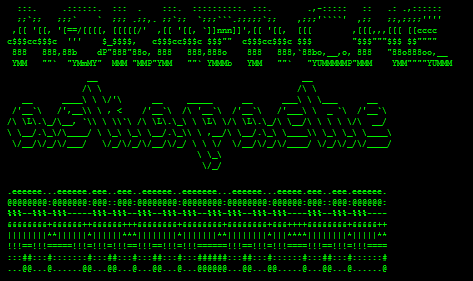
 Want to block a bad robot or web scraper using .htaccess files? Here are 2 methods that illustrate blocking 436 various user-agents.