Unicode Character Reference

Just a quick reference to all those delicious unicode characters and how they render on the web‽‽
Just a quick reference to all those delicious unicode characters and how they render on the web‽‽
There are a total of 57 HTTP Status Codes recognized by the Apache Web Server. Wouldn't you like to see what all those headers and their output, ErrorDocuments look like?
 This is a big update from the last time I looked into this, when I enumerated 57 Status Codes that Apache 2.x was capable of handling. This list contains 83 Status Codes recognized by Apache. I compiled the latest 2.4.4 Apache in order to view the actual codes sent by a live server.. very cool. You can read about the newest HTTP Status Codes in RFC 6585.
#### No https except to wp-admin -
# If the request is empty ( implies fopen or normal file access by a php script )
RewriteCond %{THE_REQUEST} ^$ [OR]

# OR if the request if for wp-admin or wp-login.php
RewriteCond %{REQUEST_URI} ^/(wp-admin|wp-login.php).*$ [NC,OR]

# OR if the Referer is https
RewriteCond %{HTTP_REFERER} ^https://www.askapache.com/.*$ [NC]

# THEN skip the following rule, basically all this does is force https or badhost to be redirected
# BUT because of the above 3 rewritecond's, this won't break poorly written admin scripts
RewriteRule .* - [S=1]

RewriteCond %{HTTPS} =on [OR]
RewriteCond %{HTTP_HOST} !^www.askapache.com$ [NC]
RewriteRule .* https://www.askapache.com%{REQUEST_URI} [R=301,L]

RewriteCond %{THE_REQUEST} ^[A-Z]{3,9} /(wp-admin/.*|wp-login.php.*) HTTP/ [NC]
RewriteCond %{HTTPS} !=on
RewriteRule .* https://%{SERVER_NAME}%{REQUEST_URI} [R=301,L]
 .htaccess is a very ancient configuration file for web servers, and is one of the most powerful configuration files most webmasters will ever come across. This htaccess guide shows off the very best of the best htaccess tricks and code snippets from hackers and server administrators.
You've come to the right place if you are looking to acquire mad skills for using .htaccess files!
Apache Security tips and tricks for securing Apache Web Servers using htaccess, httpd.conf, and other built-in techniques to thwart attackers. This really should be required reading for any Apache admin or user because these little tricks are so easy to do.
 Learn how to log and debug usernames and passwords used to login to a htaccess basic authorization protected website using php. This article is BOSS and will show you how to fully take control of this aspect of security using php and .htaccess, I don't believe you will find instructions to do this anywhere else on the net.
These are a few of the mod_rewrite uses that BlogSecurity declared pushed the boundaries of Mod_Rewrite! Some of these snippets are quite exotic and unlike anything you may have seen before, also only for those who understand them as they can kill a website pretty quick.

Well what can I say, other than this is sooo DOPE! Here is a list of the modules this plugin (version 4.7 unreleased) will automatically detect. I compiled the list myself using every module included with any default Apache installation for ALL the versions listed below, 1.3 to 2.2+
Want to know something else I'm including in this plugin? For each and every module that is detected, this plugin can then detect ALL of the modules .htaccess Directives! For instance, RewriteRule, AccessFileName, AddHandler, etc.. are each a directive belonging to a module that is allowed to be used from within .htaccess files.
Talk about sick.. these tricks have the diamond disease!
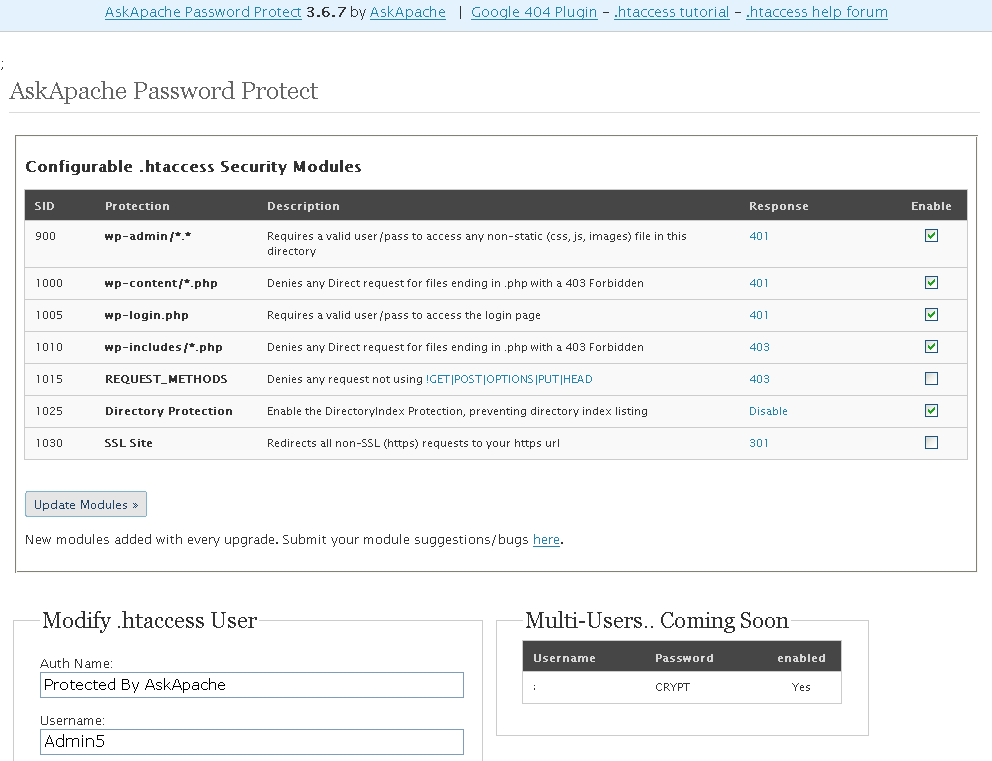
 So my blog as been rather quiet for almost a year now, and very few updates if any have been released for my Password Protection PLugin, my Google 404 Plugin, and definately not for my AskApache CrazyCache plugin, which I will be releasing last... So for all of you who've helped me out by sending me suggestions and notifying me of errors and sticking with it... Just wanted to say sorry about that, and thanks for all the great ideas.. Well, I've been sticking with it as well believe it our not. I manage to get free days once in a while, and then its time to jam.
This is all new, experimental, and very very cool. It literally uses .htaccess techniques to create several virtual "locked gates" that require a specific key to unlock, in a specific order that cannot be bypassed. It uses whitelisting .htaccess tricks to specify exactly what is allowed, instead of trying to specify everything that isn't allowed. Also, by setting specific cookies/tokens after successfully passing through a gate, we can then require the exact cookie/token from the previous gate, which stops an attacker from skipping or bypassing gates.
thought I'd take a break from coding and post about how open-source is such a great tool for finding the best answers to the toughest questions,
/** is the status code informational */
#define ap_is_HTTP_INFO(x)         (((x) >= 100)&&((x) < 200))
/** is the status code OK ?*/

#define ap_is_HTTP_SUCCESS(x)      (((x) >= 200)&&((x) < 300))
/** is the status code a redirect */
#define ap_is_HTTP_REDIRECT(x)     (((x) >= 300)&&((x) < 400))

/** is the status code a error (client or server) */
#define ap_is_HTTP_ERROR(x)        (((x) >= 400)&&((x) < 600))
/** is the status code a client error  */

#define ap_is_HTTP_CLIENT_ERROR(x) (((x) >= 400)&&((x) < 500))
/** is the status code a server error  */
#define ap_is_HTTP_SERVER_ERROR(x) (((x) >= 500)&&((x) < 600))

/** is the status code a (potentially) valid response code?  */
#define ap_is_HTTP_VALID_RESPONSE(x) (((x) >= 100)&&((x) < 600))
 If you have a Powweb Webhosting account, you will appreciate this simple skeleton .htaccess file for use on their systems.
Comprehensive .htaccess example file with advanced examples in 1 htaccess sample skeleton .htaccess file with the very best apache htaccess examples... Updated frequently based on detailed info from the Apache htaccess tutorial.
Web Professionals use mod_rewrite to issue 301 and 302 Redirects for Search Engines. Sometimes you may not have mod_rewrite.c or you want an alternative redirect method. Using mod_alias RedirectMatch you can use REGEX in Redirect commands!
 AskApache caters to the web/system elite, who's skillsets are also good for online stock trading. Heres a look at a penny stock investment.
For the AskApache Google 404 WordPress Plugin update I added a new 404.php that is more advanced than anything previously seen for a 404.php
Unix file permissions are one of the more difficult subjects to grasp.. Well, ok maybe "grasp" isn't the word.. Master is the right word.. Unix file permissions is a hard topic to fully master, mainly I think because there aren't many instances when a computer user encounters them seriously, and bitwise is oldschool. This contains a listing of all possible permission masks and bits from a linux, php, and web hosting view.... cuz you guys AskApache Regs Rock!
How to password-protect, Allow or Deny a visitor based on a condition. If you are having trouble getting htaccess-based password protection to work see: Troubleshooting htaccess Authentication: Getting it to work
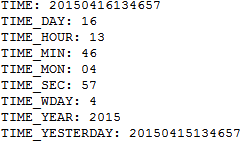 Say you want to Serve Alternate Content based on Time, but instead of serving based off the current time, you want to serve based off yesterdays time, and using .htaccess mod_rewrite rules?
Links to htaccess tutorials and howtos in the htaccess forum