Speed Tips: Turn On Compression
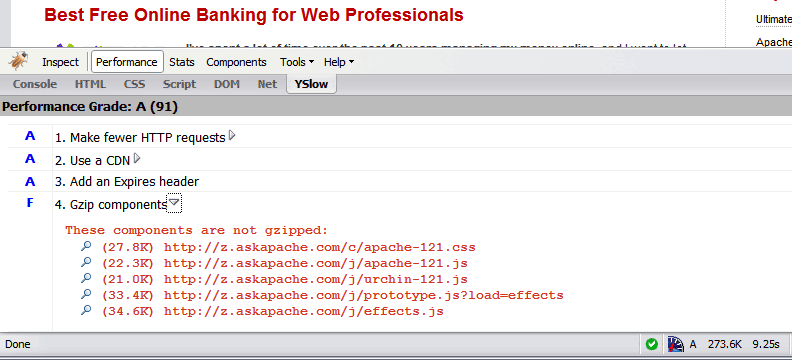 Use the Apache module mod_deflate to compress your static
 .css and .js files, speeding your site up like crazy!
Regular Expressions in Dreamweaver
Find and Replace tool in Adobe DreamWeaver is useful of course, but you aren't using a fraction of the power until you use REGEX.
Top Javascript Code Snippets for 2007
Using FilesMatch and Files in htaccess
Some good examples for how to use the Files and FilesMatch directives in .htaccess files and httpd.conf files for Apache.
<FilesMatch ".(htm|html|css|js|php)$">
AddDefaultCharset UTF-8
DefaultLanguage en-US
</FilesMatch>
.htaccess Plugin Blocks Spam, Hackers, and Password Protects Blog

Well what can I say, other than this is sooo DOPE! Here is a list of the modules this plugin (version 4.7 unreleased) will automatically detect. I compiled the list myself using every module included with any default Apache installation for ALL the versions listed below, 1.3 to 2.2+
Want to know something else I'm including in this plugin? For each and every module that is detected, this plugin can then detect ALL of the modules .htaccess Directives! For instance, RewriteRule, AccessFileName, AddHandler, etc.. are each a directive belonging to a module that is allowed to be used from within .htaccess files.
Talk about sick.. these tricks have the diamond disease!
WordPress robots.txt SEO
WordPress robots.txt file can make a huge impact on your WordPress blogs traffic and search engine rank. This is an SEO optimized robots.txt file.Preload flash .flv files into browser cache
How I was able to preload many flash flv and swf files on one of my clients sites that has a lot of online video and relatively small traffic. Their site visitors would usually watch 3-10 videos per visit and so to make the videos load almost instantly on every page I came up with a way to preload the top 10 .flv files and the swf flv player files as soon as the visitor successfully started watching the 1st video. Of course I also setup .htaccess caching on the server so that once they downloaded the files into their cache they would never request them from the server again. I was having fun with this so its pretty funky and uses some really cool combinations of javascript, swf preloader from xml, css classes to help automate it all..
SEO with Robots.txt
Very nice tutorial dealing with the robots.txt file. Shows examples for google and other search engines. Wordpress robots.txt and phpBB robots.txt sample files.Boosting Googles PageSpeed Module with TMPFS
 Google's mod_pagespeed speeds up your site and reduces page load time. This open-source Apache HTTP server module automatically applies web performance best practices to pages, and associated assets (CSS, JavaScript, images), all transparently like a Squid Proxy.
With TMPFS you can dramatically improve the speed of mod_pagespeed and the webpages served by it. TMPFS will store/serve the optimized PageSpeed output directly from RAM!
Abbr and Acronym examples
Acronym and Abbr examples from the W3C Quality Assurance Site.
Speed Tips: Use Multiple SubDomains
To make your site even faster, serve certain content from different subdomains. The reason this works is amazingly cool!
Separate favicons for the Frontend and Backend
Here's a nifty little idea I had that has some merit and is super easy. Separate favicons for separate areas of a site. Basically, I can't live without Firefox or Chrome and the way they use multiple tabs, having about 20-50 open at any one time.. But that makes it more difficult to find the right tab! 
SSI in Htaccess for ErrorDocuments, DirectoryIndexing, SEO

 3-Part article covering practical implementation of 3 advanced .htaccess features. Discover an easy way to boost your SEO the AskApache way (focus on visitors), a tip you might keep and use for life. Get some cool security tricks to use against spammers, crackers, and other nefarious sorts. Take your site's error handling to the next level, enhanced ErrorDocuments that go beyond 404's.
SEO Secrets of AskApache.com
Learn how in a year, with no previous blogging experience this blog was able to rank so high in search engines and achieve 15,000 unique visitors every day. Uses combination of tricks and tips from throughout AskApache.com for Search Engine Optimization.
Use FallbackResource for WordPress instead of mod_rewrite
 FallBackResource is a great alternative to using mod_rewrite to direct Apache to send all requests for non-existing files/directories to a script in WordPress. Htaccess and Server Config enabled.
Generating AddDescription for all Files
Setting charset in htaccess
Learning about charset's and file types maybe pretty boring, but using .htaccess it can be fun! Here's a quicklist htaccess cheatsheet for adding the correct Charset to a web document.
Creating an Offline Version of Page
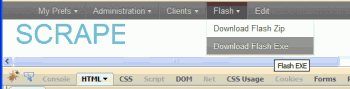 So, here's what I hacked together last night, that is being used today. It's essentially 2 files.
- A php file that scrapes uses curl to scrape all the urls for the page (favicon, css, images, pdfs, etc..)
- A simple bash shell script acting as a cgi that creates a zip file of all the urls, and a self-extracting exe file for those without a winzip tool
Show or Hide WordPress Admin Bar Plugin
 The Admin Bar in WordPress is always shown when in the backend administration area no matter what.
You are given the option to show/hide the admin bar when viewing the site, but there is no option to show/hide the admin bar when using the backend... So I created a plugin to provide that option on profile pages.
Why hide the admin bar in backend?
Normally I like the admin-bar and usually have it enabled, but it's nice to be able to switch it on/off from the "Edit Profile" page. The biggest reason for not loading/showing the admin_bar in the backend is SPEED. Here are 2 instances where I hide it-
· Sites with many authors/admins
· Moderating Comments on a Mobile Phone
Google Trends for SEO / Apache Htaccess
.htaccess Topic vs htaccess Keyword
Serve Alternate Content based on Time
 Time-dependant rewriting uses mod_rewrite and apache server time variables to display different files depending on the time, while the URL stays the same. An often requested implementation of this is to display a different home page or image depending on if its morning, noon, or night.
Mod_Rewrite Basic Examples
mod_rewrite is very useful in many situations. Yet some behaviors were not so obvious when I started to mess with it. After many testings, I understand it much better, now. Having said that, I do not pretend to know it perfectly. I also make mistakes.
Finding Global Memory Hogs in WordPress
Unicode Character Reference

Just a quick reference to all those delicious unicode characters and how they render on the web‽‽
PDF.js
 pdf.js is an HTML5 technology experiment that explores building a faithful and efficient Portable Document Format (PDF) renderer without native code assistance.
No Budget Developer Wishlist

- I need no software, I lack for nothing when it comes to software. winners don't do warez
- Well obviously if I could have anything I would want access to NSA computing power, googles server farms as a backup, and the worlds most expensive computer monitor the size of my wall with virtual screens as big as I want and touch screen and 3d and holograms.
- I would want the best office chair made for comfort.
- Developer Wishlist …
Introducing the Online Figlet ASCII Generator
Look at the text "askapache". That's pretty boring huh? It would be cool to have a nerdy textual representation of that for extra nerdy stuff like styling my /robots.txt file, email list signatures, forum sigs, etc. But who has time to create that by hand? If only there were an online tool to create it..
Bam.
Security with Apache htaccess Tutorial
Apache Security tips and tricks for securing Apache Web Servers using htaccess, httpd.conf, and other built-in techniques to thwart attackers. This really should be required reading for any Apache admin or user because these little tricks are so easy to do.
Protecting Files with Advanced Mod_Rewrite Anti-Hotlinking
If you have files on your site that you don't want indexed by malicious search engines, grabbed and leeched by malicious spammers, or stolen and made available elsewhere, you can use mod_rewrite to drastically reduce or totally reduce that activity.
Optimized Vimrc with 256 Colorscheme
 This is not your everyday vimrc. This is my personalized vimrc.. works especially great on remote servers, in tmux, screen, etc.
This doesn't require a git checkout, a vim update, a bash update, an OS update, a plugin. No. 1 vimrc, 1 colorscheme, just use curl to download and it's on. I use this on Arch Linux, NetBSD, FreeBSD, OpenBSD, Debian, Ubuntu, Cent OS, Red Hat, and that's mostly it so far.
If you aren't already using vim as your primary editor in a powerful way, you are gonna owe me for this.
WordPress Plugin for Apache .htaccess Security
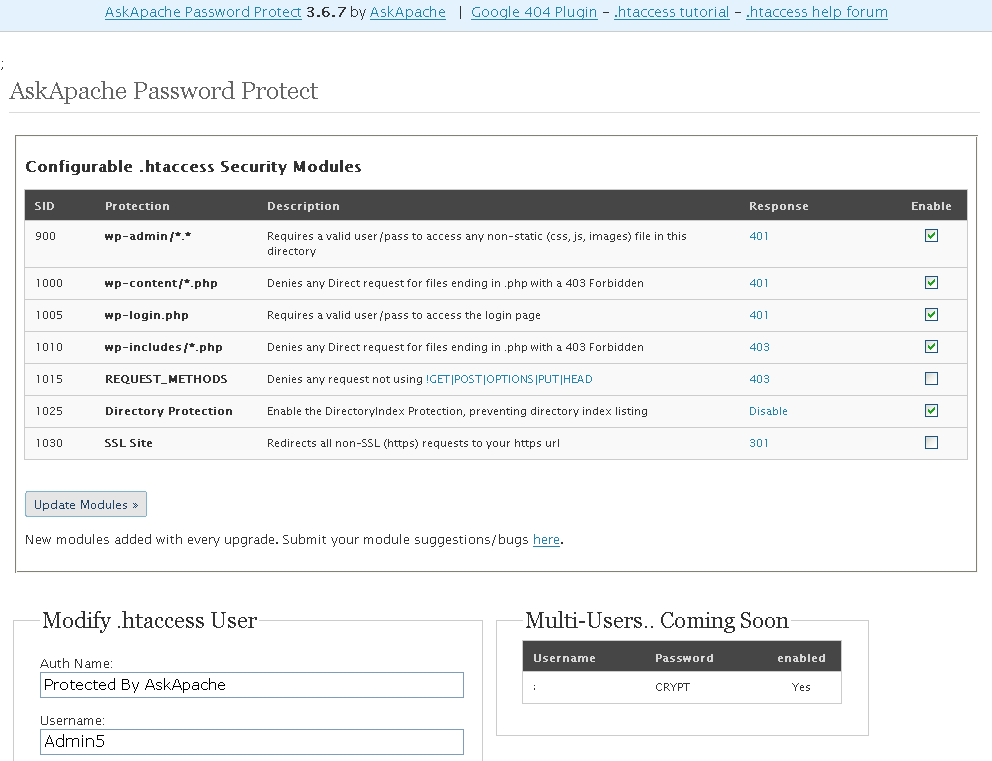
- gzip's previous .htaccess file and sends it as an attachment to the logged in users email account along with password user setup.
- Now also works for sites running on SSL (PHP version >4.3.0)
- Rewrote the security module code in the form of snort, nessus, and mod_security rules and signatures
- Added a *real* check to see if mod_rewrite is installed
- Added Modules that remove directoryindexes
- Much more on the way..
Firefox, Firebug, and yslow are REQUIRED
A lot of the past and upcoming articles on AskApache are focused on speeding up a server or website, or just making things more efficient. I'm starting several speed tip articles that require the following 3 programs if you want to follow along, that is... if you can keep up! ;)
Speed Tips: Remove Last-Modified Header
If you remove the Last-Modified and ETag header, you will totally eliminate If-Modified-Since and If-None-Match requests and their 304 Not Modified Responses.
Manipulating HTTP Headers with htaccess
Apache .htaccess and httpd.conf have the power to send and manipulate HTTP Header Requests like sending P3P privacy headers, Content-Type: UTF-8, Content-Language, etc. The power is immense and you can do some really cool stuff with HTTP Headers!
htaccess Tricks for Webmasters
Some of my favorite htaccess examples from some of my favorite .htaccess tutorials. These cut-and-paste ready htaccess code snippets are very useful for website and server administrators.
.htaccess – Wikipedia
Crazy Cache WordPress Plugin Released
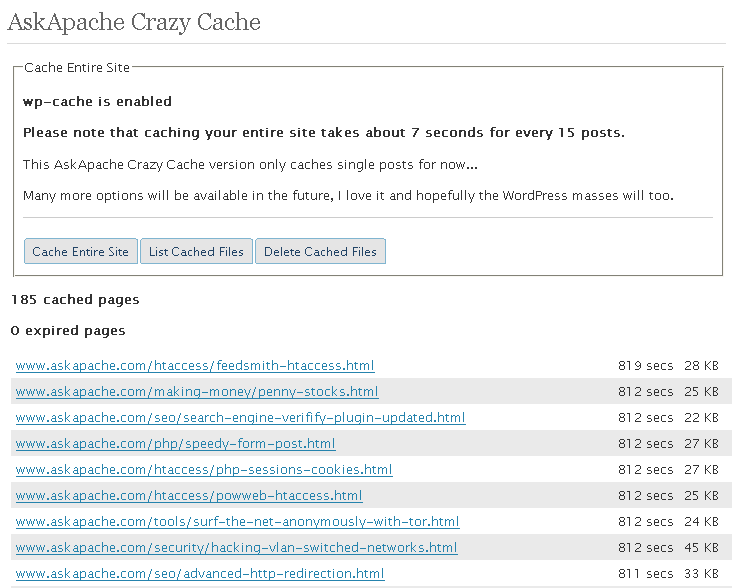 A WordPress plugin that caches your entire blog for WP-Cache, I love this plugin and finally released it to the public!
Fsockopen Magic
 PHP's fsockopen function lets you open an Internet or Unix domain socket connection for connecting to a resource, and is one of the most powerful functions available in the php language.