Get the Most from Search Engines
One of the most cost-effective ways to drive traffic to your Web site is to optimize it for search engines. Many of them use automated programs called "crawlers" or "spiders" to create an index of the Web, which they use to determine what sites are most relevant to users' queries. These programs essentially visit Web sites, read the pages' content, and follow any links to other pages, repeating the process
100 Alternative Search Engines
 Check out ReadWriteWeb's fantastic list of uniquely useful search engines, its a lot of fun!
SEO in WordPress
Search Engine Optimization for WordPressInstruct Search Engines to come back to site after you finish working on it
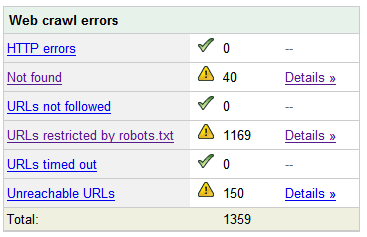 Nifty SEO tip to get Search Engine Bots to check your site every hour until you finish working on it and tell them you are finished.
Protecting Files with Advanced Mod_Rewrite Anti-Hotlinking
If you have files on your site that you don't want indexed by malicious search engines, grabbed and leeched by malicious spammers, or stolen and made available elsewhere, you can use mod_rewrite to drastically reduce or totally reduce that activity.
SEO
OpenSearch description document
Updated robots.txt for WordPress
 Implementing an effective SEO robots.txt file for WordPress will help your blog to rank higher in Search Engines, receive higher paying relevant Ads, and increase your blog traffic. Get a search robots point of view... Sweet!
SEO with Robots.txt
Very nice tutorial dealing with the robots.txt file. Shows examples for google and other search engines. Wordpress robots.txt and phpBB robots.txt sample files.SEO Secrets of AskApache.com
Learn how in a year, with no previous blogging experience this blog was able to rank so high in search engines and achieve 15,000 unique visitors every day. Uses combination of tricks and tips from throughout AskApache.com for Search Engine Optimization.
AskApache Search Engine Verify
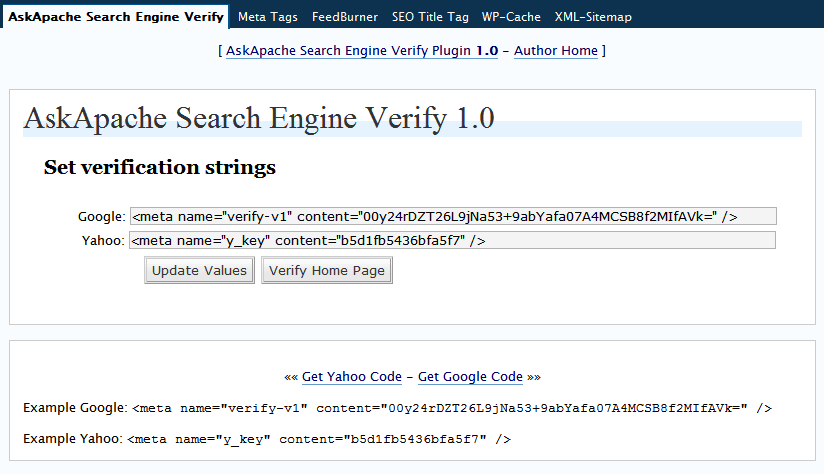 You may not think much about verifying your website with these search engines, but I am of the opinion it is extremely good for Search Engine Optimization (SEO). In fact, I read the other day on Google that if you buy a domain with a checkered past that has been punished by the search engines and you want it to be reincluded in the index this is what they recommended. Verify your sites.
Firefox Add-ons for Web Developers
 Advanced Web Development by AskApache is a Firefox Collection I created since I'm always trying new Addons out and using multiple computers and I wanted a quick and easy way to install my favorite's and keep a running list. Firebug, YSlow, LastPass, and Web Developer are the only ones I always use regularly.
I like the idea of the last.fm but it's not as powerful as the site, which is awesome. Lately listening to Kings of Leon Radio...
SEO Redirects without mod_rewrite
Web Professionals use mod_rewrite to issue 301 and 302 Redirects for Search Engines. Sometimes you may not have mod_rewrite.c or you want an alternative redirect method. Using mod_alias RedirectMatch you can use REGEX in Redirect commands!
SEO Secrets of AskApache Part 2
This is part II of the Advanced SEO used on AskApache.com Series and describes how to control which urls are indexed by Search Engines and how to move them higher up in Search Results.
Website SEO Score Tool
 Check out this free online SEO site-scoring tool. The SEO generated report is simple, neat, and helpful. The main thing I like about it is how it is a stand-alone website, a residual money making machine.
WordPress robots.txt SEO
WordPress robots.txt file can make a huge impact on your WordPress blogs traffic and search engine rank. This is an SEO optimized robots.txt file.CSS Cross-Browser Compatibility Tip
 What I used to do when I was still learning CSS was to check the web page in each of the various problematic browsers to make sure the display stayed the same. I have several actual machines and several vmware virtual machines running various browers but I decided to skip all that extra time and effort and just use an online tool to do it for me. The tool views my page in all the various browsers and generates a screenshot image from each browser so that I can see if there are issues with my CSS.
Redirect index.php to root
WordPress blogs show the same duplicate content for https://www.askapache.com/index.php and https://www.askapache.com/. If you've read about using a robots.txt file for WordPress SEO, than you already understand this setup results in Duplicate Content penalties being levied against your Blog and Web Site by Search Engines.
Htaccess Rewrites for Moving Urls
PortaPutty Auto-Reconnecting SSH Tunnels on an Encrypted TrueCrypt Portable USB Key w GPG
Ok I just came back up to write the intro.. I'm trying to keep it short to avoid getting bogged down by the coolness of each step. Here is what goes on. When I logon to my XP machine at work, I bring my usb key and plug it in first. On logging a window pops up first and it's a password prompt to mount my encrypted drive leonardo. It also checks a keyfile that is located on my usb key, but all I do now is type in my password. That causes my encrypted folder to be accessible to me like a normal drive, and it autoruns a startup batch file.
The batch file causes Portable versions of Firefox (all my bookmarks, my settings) to load, and launches Portable Mozilla Thunderbird (IMAP makes this work well), which is my favorite program (great GPG features and open-source!). Also Some Adobe CS4 software is loaded from the hard drive, like DreamWeaver. In the background, a service we created executes a PortaPuttY plink command to create forwarded tunnels from various remote servers and accounts, all using key-based encryption. These tunnels are automatically reconnected if they are disconnected, meaning you can use a socks 5 if you want or even better!
Google: Let’s Make the Web Faster
Dealing with Mobile Visitors using Bad Browsers
Alternate robots.txt files with Htaccess
 So here's the basic idea: There are 2 sites, a development site and a live site. They are essentially mirrors of each other in terms of they have the same files. You need to disallow all search engine robots from indexing and crawling the development site, while allowing full crawling of your live site. Htaccess to the rescue!
Boost SEO, Drive Traffic with the 404 Error Page Plugin
The best (so far) AskApache Plugin is now even bestester! Turns every 404 Not Found error on your blog into a search engine optimized, traffic driving event!
Online Tool compares Packer, JSMin, Dojo, and YUI Compressor
Search Engine Verify Plugin Updated
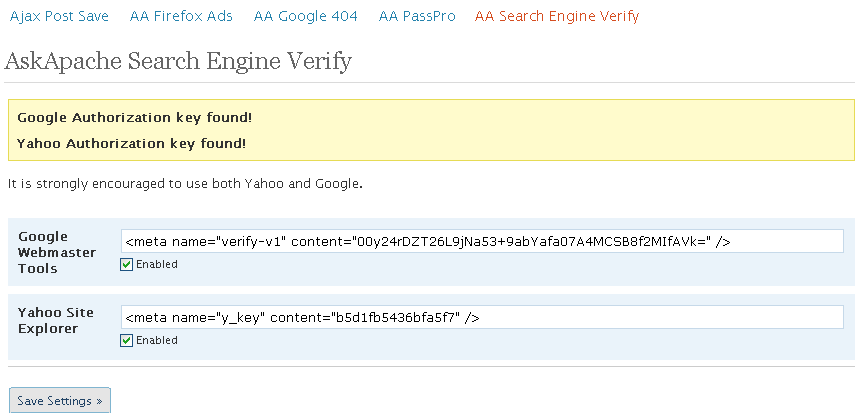 This plugin has been updated for WordPress 2.5 and includes more options to get your site indexed by Google and Yahoo.
Updated: AskApache Search Engine Verify
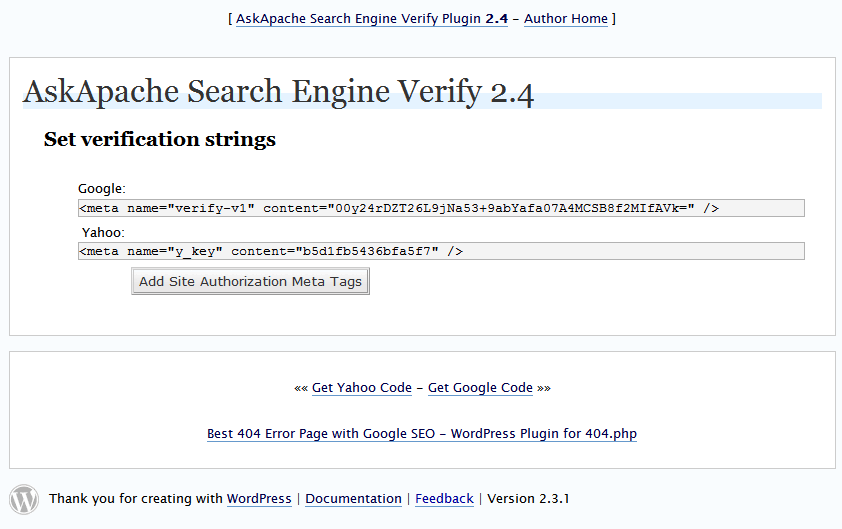 I just updated the AskApache Search Engine Verify Plugin for WordPress. Short and Sweet, it won't slow down your blog at all, except for the additional crawling of your site by Slurp and Googlebot.
Robots.txt Secrets From Matt Cutts
 The secrets in this post were really more of enlightening bits of seo wisdom. The secret is how to combine robots.txt with meta robots tags to control pagerank, juice, whatever.
Google SEO Boost with WordPress 404 Plugin
 Turns every 404 Not Found error into a SEO traffic generating event! Help your site visitors find what they were looking for automatically by leveraging both Google and WordPress. It's one of about 6 plugins I use on every WP site I run. Highly recommend you try it for a few months.
«Take My 404 for a Test-Drive
htaccess Tricks for Webmasters
Some of my favorite htaccess examples from some of my favorite .htaccess tutorials. These cut-and-paste ready htaccess code snippets are very useful for website and server administrators.
HTTP Status Codes and Htaccess ErrorDocuments
There are a total of 57 HTTP Status Codes recognized by the Apache Web Server. Wouldn't you like to see what all those headers and their output, ErrorDocuments look like?
Redirecting RSS to Feedburner
 FeedBurner is so RAD! I love it. Here's an alternative method to redirect scrapers and feed requests to your feedburner url, in my case, I use Branding by feedburner, which is so hot, taking advantage of CNAMEs in your DNS record.
Caching Tutorial for Webmasters
If you examine the preferences dialog of any modern Web browser (like Internet Explorer, Safari or Mozilla), you'll probably notice a 'cache' setting. This lets you set aside a section of your computer's hard disk to store representations that you've seen, just for you. The browser cache works according to fairly simple rules. It will check to make sure that the representations are fresh, usually once a session (that is, the once in the current invocation of the browser).
Speed Up Sites with htaccess Caching
2 awesome ways to implement caching on your website using Apache .htaccess or httpd.conf. Both methods are extremely simple to set up and will dramatically speed up your site!Make phpBB SEO friendly with htaccess
After I optimized the caching for my non-dynamic pages using apache modules mod_headers and mod_expires, I began to learn about phpbb seo..
MySQL Performance Tuning Scripts and Know-How
 Unless you are a total linux-freak-guru like myself, and even if you are, it can be enormously challenging and somewhat overwhelming to locate and eliminate MySQL bottlenecks. While many DBAs focus on improving the performance of the queries themselves, this post will focus on the highest-impact items: MySQL Server Performance and OS Performance for MySQL. Specifically showing 4 awesome tools to auto-tune your MySQL and a few more tools just for monitoring!