Fight Blog Spam with Apache
Fighting Blog Spam with Apache htaccess and other methods.
Fighting Blog Spam with Apache htaccess and other methods.
This is all new, experimental, and very very cool. It literally uses .htaccess techniques to create several virtual "locked gates" that require a specific key to unlock, in a specific order that cannot be bypassed. It uses whitelisting .htaccess tricks to specify exactly what is allowed, instead of trying to specify everything that isn't allowed. Also, by setting specific cookies/tokens after successfully passing through a gate, we can then require the exact cookie/token from the previous gate, which stops an attacker from skipping or bypassing gates.
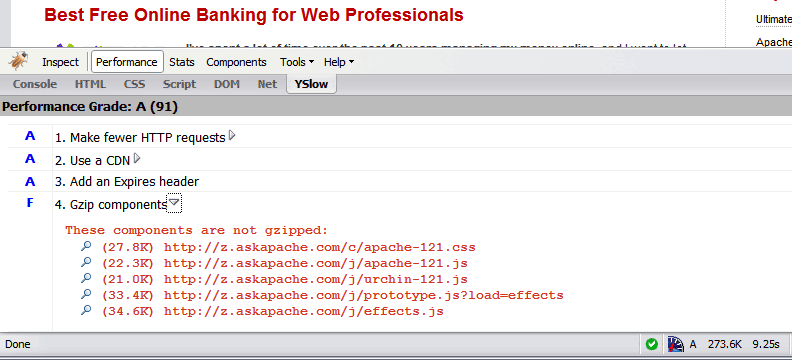 Use the Apache module mod_deflate to compress your static
 .css and .js files, speeding your site up like crazy!
Here's a nifty little idea I had that has some merit and is super easy. Separate favicons for separate areas of a site. Basically, I can't live without Firefox or Chrome and the way they use multiple tabs, having about 20-50 open at any one time.. But that makes it more difficult to find the right tab! 
Want to redirect all links with any uppercase characters to lowercase using pure mod_rewrite within an .htaccess file? Sure why not! OR how to use RewriteMap and mod_speling for those with access to httpd.conf
An image and technicacl achievement so profound, it will touch yoour heart.. So 3D... it'll hurt you eyes! LOL.. lol.. Man I am cracking up here. haha Ha definately the best intro ever, those really do look 3D for terminal though huh.. Sweet. Here is the little function I wrote to output that grey marble.

 Use mod_rewrite to enable phpMyAdmin links in the form:
 /dbname/table/
Caching with .htaccess and Apache will take your website and your web skills to the next level. This is some technical and advanced methods condensed to simple htaccess code examples for you.
This quick tutorial will show you the steps to change and reset any user password on a windows computer, and also show you how to protect your computer from people doing this to you!
 There isn't much vlan info on the net in terms of specifics and I had to learn all about it because I needed to log in to a switch that was on a different vlan. With the help of the Ettercap developers NaGA and ALoR I figured it out.
Originally Posted: 3/30/2004
Its really nice to be able to print out a webpage you are reading using your browsers built-in print feature. Using CSS you can easily transform your site into a print-friendly site.
Today I received an email from a visitor to my site requesting that I add a way to print site articles on AskApache
Tons of awesome tips and tricks using netcat. Port redirector, nessus wrapper, capture exploits being sent by vuln scanners, etc. This is very useful for doing stuff like redirecting traffic through your firewall out to other places like web servers and mail hubs, while posing no risk to the firewall machine itself.
 This article shows how to save and modify php session data, cookies, do anything really... without using ajax or iframes or forcing the user make a request.
Disable caching on WordPress index pages when using WP-Cache with this neat mod to the famously speedy cache plugin.
Using a CSS Background Image Sprite with the CSS background-position and background-image I can display all these icons: . I can even have them show up anywhere on the page!
This is the advanced example. It uses the jw flv player to create a flash proxy. This basically lets me control the youtube video as if it were a local .f4v file. With this method I can specify any options, autostart, volume, playlists, etc.. But it's rather complex so lets start with 3 other methods to embed YouTube video.
4.6 just released.... Check It Out.
:p
 AskApache Password Protect adds some serious password protection to your WordPress Blog. Not only does it protect your wp-admin directory, but also your wp-includes, wp-content, plugins, etc. plugins as well. Imagine a HUGE brick wall protecting your frail .php scripts from the endless attacks of automated web robots and password-guessing exploit-serving scripts.
Example shell scripts (bash or sh) that automate and easyate tasks from within the dreamhost ssh env
 My improved version of the common printenv / test-cgi scripts for debugging Apache environment variables set in .htaccess files
Htaccess php tips and tricks for the Apache HTTPD Web Server, mostly these tips show you how to run customized versions with customized php.ini files, I require custom php.ini files because they are so useful!
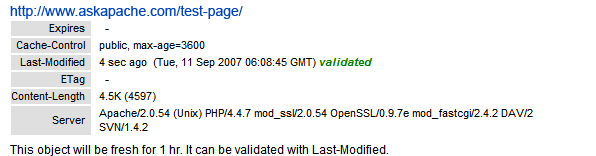 If you desire SPEED from your WordPress blog, the #1 speed improvement comes from using the WP-Cache Plugin. If you still desire SPEED after installing the Plugin, you can modify the WP-Cache Plugin code to make your blog even faster!
Apache has the best SSL/HTTPS support and can be controlled by the httpd.conf file or other HTTPD server configuration file. This htaccess tutorial has htaccess example code to make it easy to secure and use HTTPS and SSL with Apache.
 Learn how to make YOUR DreamHost promo codes work much better for YOU! This is not about promo-codes, this is about a simple method you should implement.
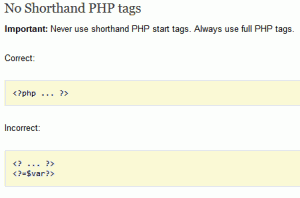 I hope this will pursuade you to stop using PHP short_open_tag syntax.
<?= or <?
 Learn about the 7 different HTTP response codes specifically reserved for redirection. 301, 302, 303, 304, 305, and 307.
 Learn how to log and debug usernames and passwords used to login to a htaccess basic authorization protected website using php. This article is BOSS and will show you how to fully take control of this aspect of security using php and .htaccess, I don't believe you will find instructions to do this anywhere else on the net.
This explains the basic methods to get started caching with php headers
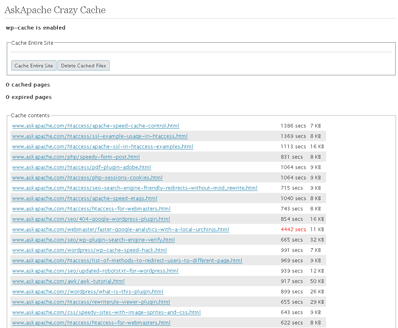 A plugin built to generate static files from php+mysql for Apache to serve the way its supposed to be.. My dream. Conclusion: Needs some improvement, pretty sweet though.
