What they say about kung-fu is true..
It can be attained by anyone through hard work over time. You can become as good as the amount of work you put in. Here's a short look at a basic technique that I use. Simply reverse engineering the source code and taking notes along the way...
static void php_session_send_cookie(TSRMLS_D)
  if (SG(headers_sent)) {
          if (output_start_filename) {
                  php_error_docref(NULL TSRMLS_CC, E_WARNING, "Cannot send session cookie - headers already sent by (output started at %s:%d)",
                          output_start_filename, output_start_lineno);
          } else {
                  php_error_docref(NULL TSRMLS_CC, E_WARNING, "Cannot send session cookie - headers already sent");
          }
          return;
  }

  /* URL encode session_name and id because they might be user supplied */
  e_session_name = php_url_encode(PS(session_name), strlen(PS(session_name)), NULL);
PHP PHP Session Session ID
I really really wanted to run the latest MariaDB with LZ4 Page Compression.. it is a game changer for many types of large databases I deal with. So I compiled it manually in a way that is repeatable and follows best-practices and it's now powering this site. Now I can use InnoDB Page Compression with lzo, lzma, bzip2, snappy, or my favorite algorithm: LZ4.

Thought this would be a good chance to post a howto, and show that there is a lot you can do by compiling software yourself and breaking the package management one-click install shackles.
Linux, MySQL centos compression InnoDB lz4 MariaDB MySQL
Grab the latest php.ini developmental version and discover new or previously hidden php runtime configuration settings... ahead of everyone else!
PHP
 I've tried 100's of Anti-virus, Anti-Rootkit, and Anti-Spyware tools over the last 10 years, but it's always good to re-examine your system's security every couple of months.
Security
The bottom line for this article is that I want to make WordPress as fast, secure, and easy to install, run, and manage because I am using it more and more for client production sites, I will work for days in order to solve an issue so that I never have to spend time on that issue again. Time is money in this industry and that is ultimately (time) what there is to gain by tweaking WordPress.
Note: I spent no time on readability, this is primarily a read the code and figure it out article.. This is for advanced users looking for a reference or discussion and for those of you looking to advance. Feedback would be great if you make it that far..
WordPress wordpress wp-config.php
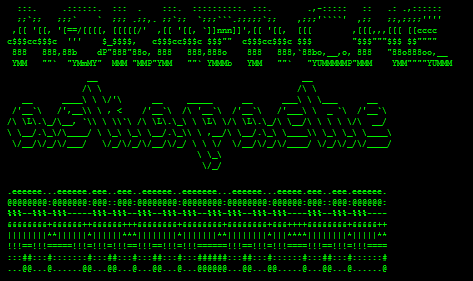
Look at the text "askapache". That's pretty boring huh? It would be cool to have a nerdy textual representation of that for extra nerdy stuff like styling my /robots.txt file, email list signatures, forum sigs, etc. But who has time to create that by hand? If only there were an online tool to create it..
Bam.
Web Design
The following is just a quick but detailed reference of some of the commands I used to successfully uninstall cpanel permanently. This is for advanced users of the shell. If you run a single one of these commands without fully understanding it, you will probably kill your server, lose everything on it permanently, not have a website or email for weeks.. So backup everything. FIRST. You should also contact your hosting provider support - but be prepared for some MAJOR negativity.. cpanel makes things very easy for web-hosting companies, and you are less than a drop in their bucket.
Hacking bash cpanel linux whm
This is awesome. I was so fed up with trying to find a fail-proof, cross-platform way to find the mime type of an image using PHP that I wrote a quick function that utilizes the same technology as the exif_imagetype, getimagesize, and finfo functions do. Ahh the joys of low-level.
PHP file filetype images mime mimetype
 We've figured out what mod_rewrite variables look like, a cheatsheet of the actual value.
Htaccess Apache cheatsheet Htaccess htaccess file mod_rewrite PHP rewrite Rewriting

Hacking, Net, PHP cURL Error PHP
Hosting
 There isn't much vlan info on the net in terms of specifics and I had to learn all about it because I needed to log in to a switch that was on a different vlan. With the help of the Ettercap developers NaGA and ALoR I figured it out.
Originally Posted: 3/30/2004
Hacking Hacking security
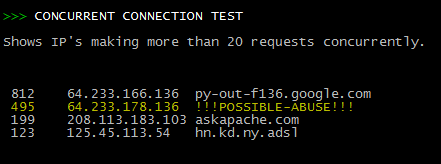 Scan Apache logs for IP address that are probably evil, then generates an .htaccess file to DENY them all.
Security
Windows boot.ini
 I have been in some tight spots where I had to sniff a password or two off the wire, or sniff some packets off the wire and based on the packets content perform some action... Accidentally, I stumbled on a method to sniff data while remaining undetected and invisible.
Originally Posted: 2003/04/15
Hacking capturing ethernet Hacking network packet sniffing Wireshark
Search Engine Optimization for WordPress WordPress
 Advanced Web Development by AskApache is a Firefox Collection I created since I'm always trying new Addons out and using multiple computers and I wanted a quick and easy way to install my favorite's and keep a running list. Firebug, YSlow, LastPass, and Web Developer are the only ones I always use regularly.
I like the idea of the last.fm but it's not as powerful as the site, which is awesome. Lately listening to Kings of Leon Radio...
Software Addons Firefox Mozilla

Well what can I say, other than this is sooo DOPE! Here is a list of the modules this plugin (version 4.7 unreleased) will automatically detect. I compiled the list myself using every module included with any default Apache installation for ALL the versions listed below, 1.3 to 2.2+
Want to know something else I'm including in this plugin? For each and every module that is detected, this plugin can then detect ALL of the modules .htaccess Directives! For instance, RewriteRule, AccessFileName, AddHandler, etc.. are each a directive belonging to a module that is allowed to be used from within .htaccess files.
Talk about sick.. these tricks have the diamond disease!
WordPress Advanced Anti-Exploit Anti-Spam Htaccess RewriteCond RewriteRule security SSL THE_REQUEST
NOT a typo.. 30x is measurable, well-documented, and easily tested. This is what open-source is about. I haven’t had time to post much the past year, I'm always working! So I wanted to make up for that by publishing an article on a topic that would blow your mind and be something that you could actually start using and really get some benefit out of it. This is one of those articles that the majority of web hosting companies would love to see in paperback, so they could burn it.
Optimization tmpfs

 Stop wasting your lives with Mac Terminals.. or Macs. Get a real machine and then get a real shell multiplexer! For many years we all loved GNU Screen, but tmux is by far a better option today. The only time I am in the shell and not using a multiplexer, is when I'm not on one of my machines. My Arch Linux machines all run URxvt and my .bash_profiles all start tmux automataically, whether in X or single-user mode, tmux is where it's at.
Hacking, Linux linux.bash Screen shell tmux
 As an example, here is the boot line that I am using at the moment on an older Dell Desktop, just to illustrate module parameters and environment vars.
title  Arch Linux X-256
linux   /vmlinuz-linux root=UUID rw rootfstype=ext4 elevator=noop selinux=0 plymouth.enable=0 raid=noautodetect ipv6.disable=1 video=DP1:d rcutree.rcu_idle_gp_delay=1 i915.panel_ignore_lid=-1 i915.modeset=1 TERM=rxvt-256color
Linux Arch Linux Boot GRUB Kernel
If you ever wanted to know the best way to defragment and speed up your Windows-Based PC, I mean you really wanted to know, here is the 2nd part to my article on Windows Speed Optimizing that details the process I have found works really well. Definately not a quick process, and certainly not the best ever, just my best ever and one that you only have to do once to get the benefits.
This article has a lot of incredibly useful (and FREE) tools I recommend, which you can grab and use without reading the article..
Windows Defragmentation Defragmentation software Disk Defragmenter ERUNT JkDefrag Microsoft MyDefrag PageDefrag Registry cleaner UltraDefrag Windows Registry Windows XP
Learn how to setup, configure, secure, optimize, and create a low-maintenance website the AskApache way. I'm piecing together all the hacks, tricks, methods, and ideas discussed throughout this blog and all across Netdom and glueing them all together to show you how to have the most optimized, crazy fastest, and best website setup I can think of.
Hosting Apache HTTP Server Caching Htaccess HTTP linux operating systems round-robin DNS technology Web Developer Web server
Its really nice to be able to print out a webpage you are reading using your browsers built-in print feature. Using CSS you can easily transform your site into a print-friendly site.
Today I received an email from a visitor to my site requesting that I add a way to print site articles on AskApache
CSS Cascading Style Sheets nicer printing Style sheet


