Security Enhancing with htaccess
Securing Subdirectories using unique apache htaccess solutions.
Securing Subdirectories using unique apache htaccess solutions.
There are a total of 57 HTTP Status Codes recognized by the Apache Web Server. Wouldn't you like to see what all those headers and their output, ErrorDocuments look like?
How to password-protect, Allow or Deny a visitor based on a condition. If you are having trouble getting htaccess-based password protection to work see: Troubleshooting htaccess Authentication: Getting it to work
To make your site even faster, serve certain content from different subdomains. The reason this works is amazingly cool!
 Check out this free online SEO site-scoring tool. The SEO generated report is simple, neat, and helpful. The main thing I like about it is how it is a stand-alone website, a residual money making machine.
While testing the exploitability of your target and mapping out vulnerabilities it is important to gain access inside the targets defenses so that you can establish an internal foothold like a owned box or switch. This is so you can use a tool to discover the packet-filtering being used, and literally map out the firewall/IDS rules. Needless to say that really provides you with a lot more complete vulnerability assessment to help discover more weak spots in the system.
 For the good of your followers,
for the good of mankind,
and for our own enjoyment,
we shall proceed to expel you from the Internet and systematically dismantle the Church of Scientology in its present form.
For the AskApache Google 404 WordPress Plugin update I added a new 404.php that is more advanced than anything previously seen for a 404.php
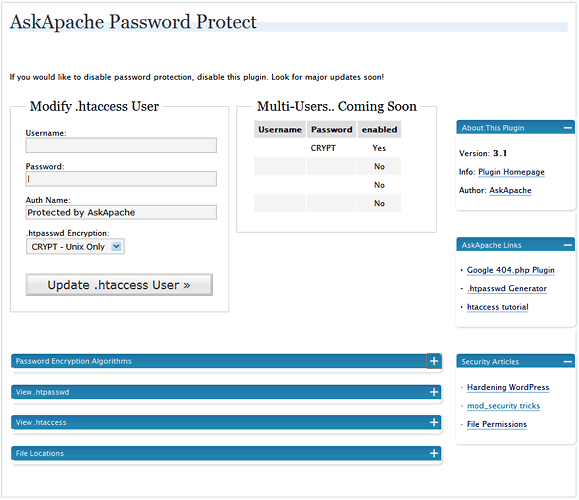 WordPress plugin gives you control over HTTP Basic Authentication for your WordPress blog which among other things, stops most automated hacking attempts and exploits being attempted, cutting down on the number of requests, connections, and mysql queries for all WordPress blogs on the Internet.
Learn how in a year, with no previous blogging experience this blog was able to rank so high in search engines and achieve 15,000 unique visitors every day. Uses combination of tricks and tips from throughout AskApache.com for Search Engine Optimization.
What they say about kung-fu is true..
It can be attained by anyone through hard work over time. You can become as good as the amount of work you put in. Here's a short look at a basic technique that I use. Simply reverse engineering the source code and taking notes along the way...
static void php_session_send_cookie(TSRMLS_D)
  if (SG(headers_sent)) {
          if (output_start_filename) {
                  php_error_docref(NULL TSRMLS_CC, E_WARNING, "Cannot send session cookie - headers already sent by (output started at %s:%d)",
                          output_start_filename, output_start_lineno);
          } else {
                  php_error_docref(NULL TSRMLS_CC, E_WARNING, "Cannot send session cookie - headers already sent");
          }
          return;
  }

  /* URL encode session_name and id because they might be user supplied */
  e_session_name = php_url_encode(PS(session_name), strlen(PS(session_name)), NULL);
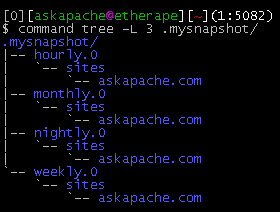
This simple unix shell script automatically creates backups of a specific folder at regular hourly, nightly, weekly, and monthly intervals. Instead of the usual method for copying directory trees using tar with fifo, pipes, rsync, or NFS methods this script uses cpio which is much much faster and has cool options like saving m/a/c times, symlinks, relative paths, and weird file names.
 PHP's fsockopen function lets you open an Internet or Unix domain socket connection for connecting to a resource, and is one of the most powerful functions available in the php language.
 htaccess rewrite Master Class! If you understand the basics of mod_rewrite, or if you literally write the mod_rewite.c code, this article will transform your thinking. The transformation is profound. Deeply effective. Culmination of the best of the best mod_rewrite tricks for understanding and learning exactly what rewrite is doing.
Learn how to setup, configure, secure, optimize, and create a low-maintenance website the AskApache way. I'm piecing together all the hacks, tricks, methods, and ideas discussed throughout this blog and all across Netdom and glueing them all together to show you how to have the most optimized, crazy fastest, and best website setup I can think of.
Unix file permissions are one of the more difficult subjects to grasp.. Well, ok maybe "grasp" isn't the word.. Master is the right word.. Unix file permissions is a hard topic to fully master, mainly I think because there aren't many instances when a computer user encounters them seriously, and bitwise is oldschool. This contains a listing of all possible permission masks and bits from a linux, php, and web hosting view.... cuz you guys AskApache Regs Rock!
Looking for some advanced uses for the shell? Here is some of my best. The shell is where 70% of my work takes place, and I have at least one terminal open almost 100% of the time, for viewing tailing color-coded logs, and of course for the SSH Tunnels that I use to route various networking through, like my email. So I decided that to standardize and create a bash_profile containing the most time-saving and helpful functions that I could use on all the various hosting environments would really be some sweet sugar, so here is my constant Work-in-progress.
It works for all shells I encounter, including BackTrack, Debian, Knoppix, Arch Linux, etc. Also works for many hosting environments I use including DreamHost, HostGator, WiredTree, and pretty much any linux VPS.
I also rely on this heavily from within shell scripts I write to access all the functions and stuff in this .bash_profile, and to do that I just do like:
#!/bin/bash

source ~/.bash_profile &>/dev/nulll

pm "PM is a function to output nice messages with color"
yn "Are you enjoying the shell" && pm "Thats great!" || pm "Perhaps you're better suited for DOS"
yn "Show Calendar" && aa_calendar
yn "Show Fortune" && aa_fortune