The bottom line for this article is that I want to make WordPress as fast, secure, and easy to install, run, and manage because I am using it more and more for client production sites, I will work for days in order to solve an issue so that I never have to spend time on that issue again. Time is money in this industry and that is ultimately (time) what there is to gain by tweaking WordPress.
Note: I spent no time on readability, this is primarily a read the code and figure it out article.. This is for advanced users looking for a reference or discussion and for those of you looking to advance. Feedback would be great if you make it that far..
WordPress wordpress wp-config.php
Search Engine Optimization for WordPress WordPress
 This is a brief explanation of what is needed for an awesome theme, well awesome from my perspective. This is good stuff, memorize it.
Web Development, WordPress css web builder
 Using memcache for me personally and the client sites I work on, has improved performance by over 1000%, in some cases even higher than that. It is a truly revolutionary way to optimize the performance of MySQL queries, remote requests such as to twitter or other apis, and this article is step 1. Plan is to go all the way to step 10 in future articles, it it grossly underused and misused in the WP world.
Optimization, WordPress Cache Load memcache memcached performance server speed
Here's the problem I was having while working on a custom theme for a client. Certain pages, posts, tag pages, archive pages, and custom pages either had the sidebar, or did not have the sidebar. The main content div #ContentW had a 72% width when the sidebar was present, otherwise it was 96%. The problem was that I dislike having to do things manually when they can be automated through code. What I was having to do was manually add/remove page-specific classes to the css file to reflect whether the sidebar was present on that page or not.
WordPress Sidebar wordpress
 I am now about 1 week away from publishing the much-anticipated 4.7 update to the AskApache Password Protection WordPress plugin. It's an upgrade I've been working on for almost 2 years (off and on)! I have been using the new version for quite some time now, and have made a lot of improvements to it, and finally I decided enough users have suffered with the old version. I am very excited for this release, it fixes all known bugs in the older versions, and brings some heavy-duty improvements to all facets of this plugin.. not to mention way better security modules (Lots more COOKIE use) based on code I use with clients.
WordPress Plug-in wordpress
Enumerating Permissions can be Annoying
Don’t ask me how because I won’t tell you, but on one of the hosts I was testing on that did not allow direct access I was able to get the Apache server running as dhapache to erroneously write a file into my users blog directory. This is a big security no-no and I now have my .htaccess file written into the blog directory where it should go, but instead of my php script’s user having write access to the file so I can modify it, its owned by dhapache! Because the file is owned by dhapache I shouldn’t even be allowed to know it exists, but there it is. So the next step was to try and take ownership of the .htaccess file so that I could modify it. I tried and tried but was unsuccessful, I couldn’t modify it so that was another dead end. Actually it took me awhile to figure out how to remove the file from my directory. Being that it was owned by dhapache I couldn’t delete or modify it using my php process or even through ftp/ssh! Sysadmins regularly run find commands that search the servers for any files owned by dhapache that should not be there as this is a big red flag that someone has found a way to manipulate dhapache which could potentially lead to modifying dhapache-owned server config files, which sometimes is all it takes to hack your website and server.. Luckily I was able to delete it by basically running the hack again to overwrite the file.
WordPress
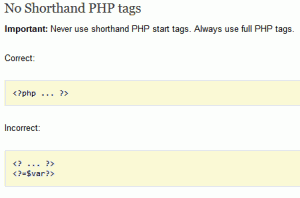 I hope this will pursuade you to stop using PHP short_open_tag syntax.
<?= or <?
PHP PEAR wordpress
 .htaccess is a very ancient configuration file for web servers, and is one of the most powerful configuration files most webmasters will ever come across. This htaccess guide shows off the very best of the best htaccess tricks and code snippets from hackers and server administrators.
You've come to the right place if you are looking to acquire mad skills for using .htaccess files!
Apache, Hosting, Htaccess, Optimization, Security, SEO, Web Development, WordPress .htpasswd 301 Redirect Apache Apache HTTP Server Cache Hosting Htaccess Htaccess Software HTTP Headers httpd.conf HyperText Transfer Protocol mod_rewrite Redirect RewriteCond RewriteRule SSL
Using FastCGI on DreamHost and .htaccess
Shell Scripting
 Advanced Web Development by AskApache is a Firefox Collection I created since I'm always trying new Addons out and using multiple computers and I wanted a quick and easy way to install my favorite's and keep a running list. Firebug, YSlow, LastPass, and Web Developer are the only ones I always use regularly.
I like the idea of the last.fm but it's not as powerful as the site, which is awesome. Lately listening to Kings of Leon Radio...
Software Addons Firefox Mozilla
Disable caching on WordPress index pages when using WP-Cache with this neat mod to the famously speedy cache plugin.
WordPress
This past week I updated my sites apache.css file for a site-redesign. I wanted to make changes to the .css file that only I could see, so that my regular traffic and site-visitors would still see the old version. Here's the elegant solution I came up with using .htaccess and mod_rewrite that works so well I'm sharing it with all you wonderful and incredible people reading my blog :)
Htaccess
Learn how in a year, with no previous blogging experience this blog was able to rank so high in search engines and achieve 15,000 unique visitors every day. Uses combination of tricks and tips from throughout AskApache.com for Search Engine Optimization.
SEO
I was over at Alex King's blog today checking out his mobile web plugin for wordpress and I noticed some fresh podcasts from some of the industry's finest. The feeds are .mp3 and are easy to find and browse on the search-this.com site. They have some pretty nice articles over there as well..
Web Design
 Check out this free online SEO site-scoring tool. The SEO generated report is simple, neat, and helpful. The main thing I like about it is how it is a stand-alone website, a residual money making machine.
Software
Wouldn't you love to have Akismet Anti-spam protection for non-wordpress forms and pages?
PHP
 This article shows how to save and modify php session data, cookies, do anything really... without using ajax or iframes or forcing the user make a request.
PHP
 If you are using Disqus on your site, you will see that annoyingly the default sort order for listing comments is 'best'.
I have implemented disqus on many sites and the number 1 request I get is to change the default sort order to newest.
There is no documentation or hints anywhere to solve this. So I solved it.
Javascript Disqus
How to password-protect, Allow or Deny a visitor based on a condition. If you are having trouble getting htaccess-based password protection to work see: Troubleshooting htaccess Authentication: Getting it to work
Htaccess AuthName AuthType FilesMatch Htaccess Password Password Protection Require
NOT a typo.. 30x is measurable, well-documented, and easily tested. This is what open-source is about. I haven’t had time to post much the past year, I'm always working! So I wanted to make up for that by publishing an article on a topic that would blow your mind and be something that you could actually start using and really get some benefit out of it. This is one of those articles that the majority of web hosting companies would love to see in paperback, so they could burn it.
Optimization tmpfs