Building strace-plus
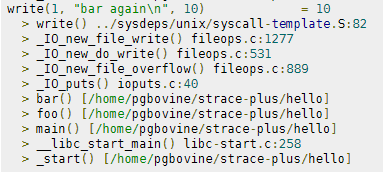 strace+ is an improved version of strace that collects stack traces associated with each system call. Since system calls require an expensive user-kernel context switch, they are often sources of performance bottlenecks. strace+ allows programmers to do more detailed system call profiling and determine, say, which call sites led to costly syscalls and thus have potential for optimization.
LFT traceroute tool
Trace Email Back to the Sender
Locate the sender of an email and their geographical location, including messages sent through anonymous email services like Gmail, Yahoo, and Hotmail.
Fsockopen Magic
 PHP's fsockopen function lets you open an Internet or Unix domain socket connection for connecting to a resource, and is one of the most powerful functions available in the php language.
DNS Tracer
Notes from Apache HTTPD Source Code
thought I'd take a break from coding and post about how open-source is such a great tool for finding the best answers to the toughest questions,
/** is the status code informational */
#define ap_is_HTTP_INFO(x)         (((x) >= 100)&&((x) < 200))
/** is the status code OK ?*/

#define ap_is_HTTP_SUCCESS(x)      (((x) >= 200)&&((x) < 300))
/** is the status code a redirect */
#define ap_is_HTTP_REDIRECT(x)     (((x) >= 300)&&((x) < 400))

/** is the status code a error (client or server) */
#define ap_is_HTTP_ERROR(x)        (((x) >= 400)&&((x) < 600))
/** is the status code a client error  */

#define ap_is_HTTP_CLIENT_ERROR(x) (((x) >= 400)&&((x) < 500))
/** is the status code a server error  */
#define ap_is_HTTP_SERVER_ERROR(x) (((x) >= 500)&&((x) < 600))

/** is the status code a (potentially) valid response code?  */
#define ap_is_HTTP_VALID_RESPONSE(x) (((x) >= 100)&&((x) < 600))
Internet Census 2012 – Port scanning using insecure embedded devices – Carna Botnet
 While playing around with the Nmap Scripting Engine (NSE) we discovered an amazing number of open embedded devices on the Internet. Many of them are based on Linux and allow login to standard BusyBox with empty or default credentials. We used these devices to build a distributed port scanner to scan all IPv4 addresses. These scans include service probes for the most common ports, ICMP ping, reverse DNS and SYN scans. We analyzed some of the data to get an estimation of the IP address usage.
27 Request Methods for Apache rewritecond htaccess
Advanced HTTP Request and Response Header Viewer
An AskApache Plugin Upgrade to Rule them All
 So my blog as been rather quiet for almost a year now, and very few updates if any have been released for my Password Protection PLugin, my Google 404 Plugin, and definately not for my AskApache CrazyCache plugin, which I will be releasing last... So for all of you who've helped me out by sending me suggestions and notifying me of errors and sticking with it... Just wanted to say sorry about that, and thanks for all the great ideas.. Well, I've been sticking with it as well believe it our not. I manage to get free days once in a while, and then its time to jam.
Request Method Security Scanner
Pen-testing Security Tools
While testing the exploitability of your target and mapping out vulnerabilities it is important to gain access inside the targets defenses so that you can establish an internal foothold like a owned box or switch. This is so you can use a tool to discover the packet-filtering being used, and literally map out the firewall/IDS rules. Needless to say that really provides you with a lot more complete vulnerability assessment to help discover more weak spots in the system.
ListOfErrors
COMPUTER SECURITY TOOLBOX
List of mainly obscure security software geared more for the master pentester. These are mostly for unix, bsd, and mac and many are difficult to install and setup (require custom servers, inside access points, obscure libraries). Only programs that output data are included, so no actual exploits or anything. Most of these output extremely useful albeit extremely technical information.THE Ultimate Htaccess
 .htaccess is a very ancient configuration file for web servers, and is one of the most powerful configuration files most webmasters will ever come across. This htaccess guide shows off the very best of the best htaccess tricks and code snippets from hackers and server administrators.
You've come to the right place if you are looking to acquire mad skills for using .htaccess files!
The Latest and Greatest php.ini
Grab the latest php.ini developmental version and discover new or previously hidden php runtime configuration settings... ahead of everyone else!
Mod_Status tricks to View Apache Module Directives
 Quick and easy method to get a list of all Apache Modules currently loaded, a list of all the directives each module provides, a list of currently used directives, etc... These directives can be used in httpd.conf and/or .htaccess files so it is definately useful to know which ones are available and which ones are currently being used.
Google: Let’s Make the Web Faster
30x Faster Cache and Site Speed with TMPFS
NOT a typo.. 30x is measurable, well-documented, and easily tested. This is what open-source is about. I haven’t had time to post much the past year, I'm always working! So I wanted to make up for that by publishing an article on a topic that would blow your mind and be something that you could actually start using and really get some benefit out of it. This is one of those articles that the majority of web hosting companies would love to see in paperback, so they could burn it.
Debugging Tools for Windows
I am almost ready to publish the final tutorial on using ssh tunnels from a truecrypt partition on a Windows machine. Of course I choose to go way overboard in my research and the tutorial is full of some pretty awesome windows tricks.. I will come back to this post soon and post all the other advanced tools I use for debugging windows, for now though you MUST know how to debug the kernel and use these basic debugging tools.
HTTP Status Codes and Htaccess ErrorDocuments
There are a total of 57 HTTP Status Codes recognized by the Apache Web Server. Wouldn't you like to see what all those headers and their output, ErrorDocuments look like?
Arp Packet Hacking
Part deux of Want to know how to really hack? Originally Posted: 12/28/2003
Story by Author of PING for UNIX
Yes, it's true! I'm the author of ping for UNIX. Ping is a little thousand-line hack that I wrote in an evening which practically everyone seems to know about. :-)
Crazy POWERFUL Bash Prompt
 This amazing bash linux prompt does more than meets the eye. If you want to know how to become really good with technology, linux is the secret sauce behind the AskApache articles. Open Source is elixir of the web. Thanks to everyone who helped me for the past 20 years. I use linux/bsd because homey don't play, so this is geared to be as productive a prompt as I can make it.
Don't have much time.. or just don't care? Not a problem, here are the 3 lines to copy and paste - you can just paste them right in your shell to test it, or add to a startup script.
export AA_P="export PVE=\"\\033[m\\033[38;5;2m\"\$(( \`sed -n \"s/MemFree:[\\t ]\\+\\([0-9]\\+\\) kB/\\1/p\" /proc/meminfo\` / 1024 ))\"\\033[38;5;22m/\"\$((\`sed -n \"s/MemTotal:[\\t ]\\+\\([0-9]\\+\\) kB/\\1/p\" /proc/meminfo\`/ 1024 ))MB\"\\t\\033[m\\033[38;5;55m\$(< /proc/loadavg)\\033[m\";echo -en \"\""
export PROMPT_COMMAND="history -a;((\$SECONDS % 10==0 ))&&eval \"\$AA_P\";echo -en \"\$PVE\";"
export PS1="\\[\\e[m\\n\\e[1;30m\\][\$\$:\$PPID \\j:\\!\\[\\e[1;30m\\]]\\[\\e[0;36m\\] \\T \\d \\[\\e[1;30m\\][\\[\\e[1;34m\\]\\u@\\H\\[\\e[1;30m\\]:\\[\\e[0;37m\\]\${SSH_TTY} \\[\\e[0;32m\\]+\${SHLVL}\\[\\e[1;30m\\]] \\[\\e[1;37m\\]\\w\\[\\e[0;37m\\] \\n(\$SHLVL:\\!)\\\$ " && eval $AA_P
SEO Redirects without mod_rewrite
Web Professionals use mod_rewrite to issue 301 and 302 Redirects for Search Engines. Sometimes you may not have mod_rewrite.c or you want an alternative redirect method. Using mod_alias RedirectMatch you can use REGEX in Redirect commands!
HTTP Status Codes
 This is a big update from the last time I looked into this, when I enumerated 57 Status Codes that Apache 2.x was capable of handling. This list contains 83 Status Codes recognized by Apache. I compiled the latest 2.4.4 Apache in order to view the actual codes sent by a live server.. very cool. You can read about the newest HTTP Status Codes in RFC 6585.
Htaccess Mod_Rewrite – Guidedddd
Magic in the Terminal: Screen, Bash, and SSH
Oh ya lets get it on! short but sweet

About AskApache
Debugging HTTP Cache Headers with Wireshark
Bash Functions and Aliases for Traps, Kills, and Signals
Bash Functions and Aliases for Traps, Kills, and Signals. Useful for translating signal numbers/signal names and getting more info about signals.
Htaccess File Sample
Comprehensive .htaccess example file with advanced examples in 1 htaccess sample skeleton .htaccess file with the very best apache htaccess examples... Updated frequently based on detailed info from the Apache htaccess tutorial.
PDF.js
 pdf.js is an HTML5 technology experiment that explores building a faithful and efficient Portable Document Format (PDF) renderer without native code assistance.
Network Packet Crafting
Javascript Snippet to Add HTML, CSS, and FEED Validation Links
Here's an example of validation links from the AskApache footer.
RSS | XHTML 1.1 | CSS 2.1
document.getElementById("validat").innerHTML += ' | <a href="http://feedvalidator.org/check.cgi?url=https://www.askapache.com/feed/">RSS</a> | <a href="http://validator.w3.org/check/referer?ss=1;outline=1;sp=1;debug">XHTML 1.1</a> | <a href="http://jigsaw.w3.org/css-validator/check/referer?warning=0">CSS 2.1</a>';
Security with Apache htaccess Tutorial
Apache Security tips and tricks for securing Apache Web Servers using htaccess, httpd.conf, and other built-in techniques to thwart attackers. This really should be required reading for any Apache admin or user because these little tricks are so easy to do.
IP Blocked by stateful Firewall, now what?
HTTP Packet Capturing to debug Apache
This article is a quick and easy HowTo detailing the use of Wireshark or another network sniffing program to debug your Apache .htaccess or httpd.conf files.
DNS Round Robin Configuration using Rsync over SSH
The goal is to add the HostGator server to be an exact mirror of the s.askapache.net domain, then to add that server as a 2nd A record to my DNS zone. That way half the visitors to the size will be taking up resources and bandwidth on the HostGator server instead of mine.
Round Robin A records in DNS are intended to evenly distribute queries between each host of the same name. Using some tricks straight out of a hackers toolbox we can verify if the distribution is taking place. (It is.)