Learn how to setup, configure, secure, optimize, and create a low-maintenance website the AskApache way. I'm piecing together all the hacks, tricks, methods, and ideas discussed throughout this blog and all across Netdom and glueing them all together to show you how to have the most optimized, crazy fastest, and best website setup I can think of.
Hosting Apache HTTP Server Caching Htaccess HTTP linux operating systems round-robin DNS technology Web Developer Web server
Say you want to deny access to your entire site except when you access it. The following htaccess code does just that.
Instead of a Static IP you could also use a hostname, or part of a hostname..
Htaccess
2 awesome ways to implement caching on your website using Apache .htaccess or httpd.conf. Both methods are extremely simple to set up and will dramatically speed up your site! Htaccess Cache Cache-Control ETag Expires Header Headers Htaccess mod_expires mod_headers
There are so many WordPress plugins out there now that I wanted to post my favorite 3 plugins for speeding up a WP-Powered blog. These are the 3 plugins that I install for pretty much all of my WP-Powered sites, which I run about 300 now. They work together to provide a very optimized blog for speed.
DB-Cache Reloaded does something entirely different, it saves the mysql queries that are made to the WP-database, as well as the mysql results to static files, and then through php serves those cached-files instead of re-querying the mysql database. Most mysql databases are stored on separate servers, and although many are on the same local network there is a limit to how many queries, and how many connections can take place.
So DB-Cache Reloaded basically makes WP-Super Cache work alot faster when generating the cache files, and DB-Cache Reloaded helps in a number of areas un-related to WP-Super Cache, like in the admin panel. And DB-Cache without WP-Super-Cache is a joke because it still uses the application-level and php for everything. Gotta use both (or just WPSC).
WordPress Cache Web server wordpress
DreamHost PS gives you your own "virtual machine", protecting your CPU and RAM on your physical machine for faster websites. Here's what I like and dislike about DreamHostPS, and some of the issues and solutions for migrating.
Hosting DreamHost
Using FastCGI on DreamHost and .htaccess
Shell Scripting
Apache server performance can be improved by adding additional hardware resources such as RAM, faster CPU, etc. Optimization
thought I'd take a break from coding and post about how open-source is such a great tool for finding the best answers to the toughest questions,
/** is the status code informational */
#define ap_is_HTTP_INFO(x)         (((x) >= 100)&&((x) < 200))
/** is the status code OK ?*/

#define ap_is_HTTP_SUCCESS(x)      (((x) >= 200)&&((x) < 300))
/** is the status code a redirect */
#define ap_is_HTTP_REDIRECT(x)     (((x) >= 300)&&((x) < 400))

/** is the status code a error (client or server) */
#define ap_is_HTTP_ERROR(x)        (((x) >= 400)&&((x) < 600))
/** is the status code a client error  */

#define ap_is_HTTP_CLIENT_ERROR(x) (((x) >= 400)&&((x) < 500))
/** is the status code a server error  */
#define ap_is_HTTP_SERVER_ERROR(x) (((x) >= 500)&&((x) < 600))

/** is the status code a (potentially) valid response code?  */
#define ap_is_HTTP_VALID_RESPONSE(x) (((x) >= 100)&&((x) < 600))
Hacking
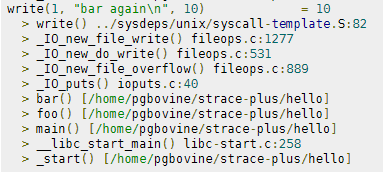 strace+ is an improved version of strace that collects stack traces associated with each system call. Since system calls require an expensive user-kernel context switch, they are often sources of performance bottlenecks. strace+ allows programmers to do more detailed system call profiling and determine, say, which call sites led to costly syscalls and thus have potential for optimization.
Linux gcc linux strace
NOT a typo.. 30x is measurable, well-documented, and easily tested. This is what open-source is about. I haven’t had time to post much the past year, I'm always working! So I wanted to make up for that by publishing an article on a topic that would blow your mind and be something that you could actually start using and really get some benefit out of it. This is one of those articles that the majority of web hosting companies would love to see in paperback, so they could burn it.
Optimization tmpfs
Become a member of the Free Software Foundation today to help us reach our goal of $450,000 by January 31st.
Net Coreboot Free Software Foundation FSF GNU GNU/Linux Microsoft Windows
Hosting compile inittab ssh
I really really wanted to run the latest MariaDB with LZ4 Page Compression.. it is a game changer for many types of large databases I deal with. So I compiled it manually in a way that is repeatable and follows best-practices and it's now powering this site. Now I can use InnoDB Page Compression with lzo, lzma, bzip2, snappy, or my favorite algorithm: LZ4.

Thought this would be a good chance to post a howto, and show that there is a lot you can do by compiling software yourself and breaking the package management one-click install shackles.
Linux, MySQL centos compression InnoDB lz4 MariaDB MySQL
What they say about kung-fu is true..
It can be attained by anyone through hard work over time. You can become as good as the amount of work you put in. Here's a short look at a basic technique that I use. Simply reverse engineering the source code and taking notes along the way...
static void php_session_send_cookie(TSRMLS_D)
  if (SG(headers_sent)) {
          if (output_start_filename) {
                  php_error_docref(NULL TSRMLS_CC, E_WARNING, "Cannot send session cookie - headers already sent by (output started at %s:%d)",
                          output_start_filename, output_start_lineno);
          } else {
                  php_error_docref(NULL TSRMLS_CC, E_WARNING, "Cannot send session cookie - headers already sent");
          }
          return;
  }

  /* URL encode session_name and id because they might be user supplied */
  e_session_name = php_url_encode(PS(session_name), strlen(PS(session_name)), NULL);
PHP PHP Session Session ID
Hosting, Net DNS
 .htaccess is a very ancient configuration file for web servers, and is one of the most powerful configuration files most webmasters will ever come across. This htaccess guide shows off the very best of the best htaccess tricks and code snippets from hackers and server administrators.
You've come to the right place if you are looking to acquire mad skills for using .htaccess files!
Apache, Hosting, Htaccess, Optimization, Security, SEO, Web Development, WordPress .htpasswd 301 Redirect Apache Apache HTTP Server Cache Hosting Htaccess Htaccess Software HTTP Headers httpd.conf HyperText Transfer Protocol mod_rewrite Redirect RewriteCond RewriteRule SSL
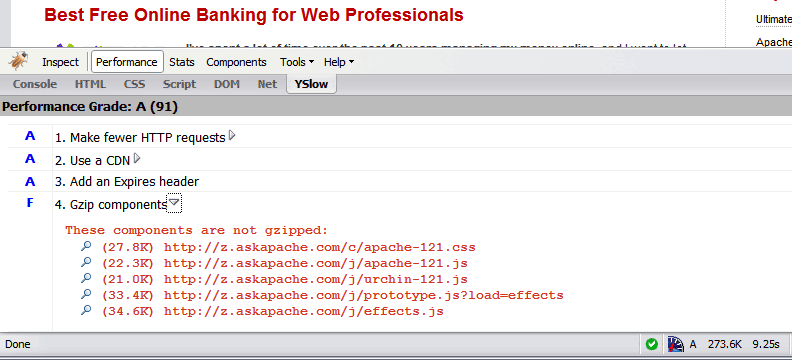
High Performance Web Site list of the best and newest methods to make web pages super fast using caching, compression, cache-control, etc. Optimization
Mod_Security rivals Mod_Rewrite in the amount of features it provides. I decided to go ahead and post what I learned about it today, even though its tough to give away such awesome htaccess and apache tricks.. Learn how to control spam once and for all, conditionally log/deny/allow/redirect requests based on IP, username, etc.. Mod_Security is so fine!
Htaccess Htaccess mod_security security
If you have a php.cgi or php.ini file in your /cgi-bin/ directory or other pub directory, try requesting them from your web browser. If your php.ini shows up or worse you are able to execute your php cgi, you'll need to secure it ASAP. This shows several ways to secure these files, and other interpreters like perl, fastCGI, bash, csh, etc.
Htaccess Apache HTTP Server CGI Common Gateway Interface Htaccess HTTP 403 interpreter PHP php interpreter php.ini security SuEXEC
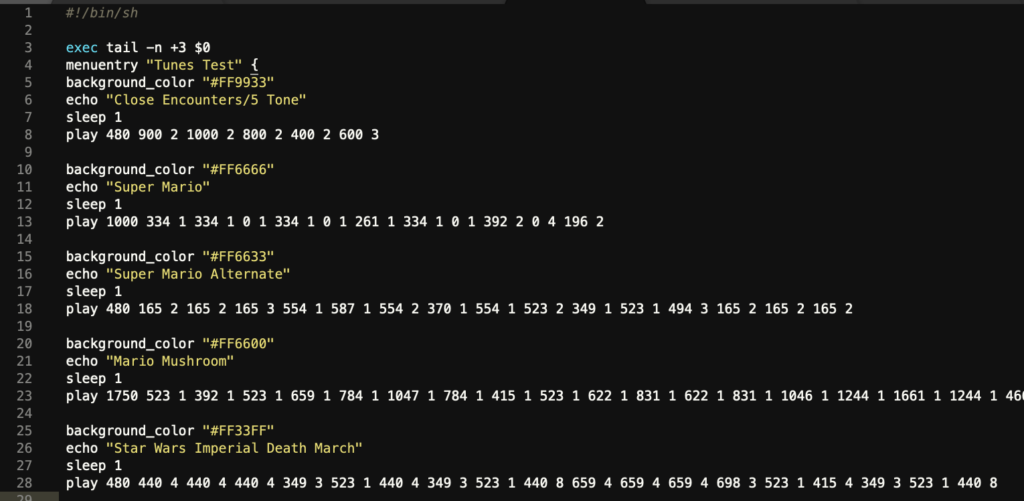 Play a tune directly on your pcspeaker right before the grub boot manager loads.
Linux GRUB GRUB_INIT_TUNE grub.cfg speaker
The goal is to add the HostGator server to be an exact mirror of the s.askapache.net domain, then to add that server as a 2nd A record to my DNS zone. That way half the visitors to the size will be taking up resources and bandwidth on the HostGator server instead of mine.
Round Robin A records in DNS are intended to evenly distribute queries between each host of the same name. Using some tricks straight out of a hackers toolbox we can verify if the distribution is taking place. (It is.)
Optimization DNS HostGator Rackspace Round-Robin WiredTree
Top 3 ways to speed up websites that use Google Analytics. Host Script Locally, Fix Google-Analytics Cookie Domain, and Failsafe Loading for optimum tracking statistics.
Google
The following is just a quick but detailed reference of some of the commands I used to successfully uninstall cpanel permanently. This is for advanced users of the shell. If you run a single one of these commands without fully understanding it, you will probably kill your server, lose everything on it permanently, not have a website or email for weeks.. So backup everything. FIRST. You should also contact your hosting provider support - but be prepared for some MAJOR negativity.. cpanel makes things very easy for web-hosting companies, and you are less than a drop in their bucket.
Hacking bash cpanel linux whm
Here's the problem I was having while working on a custom theme for a client. Certain pages, posts, tag pages, archive pages, and custom pages either had the sidebar, or did not have the sidebar. The main content div #ContentW had a 72% width when the sidebar was present, otherwise it was 96%. The problem was that I dislike having to do things manually when they can be automated through code. What I was having to do was manually add/remove page-specific classes to the css file to reflect whether the sidebar was present on that page or not.
WordPress Sidebar wordpress
These are a few of the mod_rewrite uses that BlogSecurity declared pushed the boundaries of Mod_Rewrite! Some of these snippets are quite exotic and unlike anything you may have seen before, also only for those who understand them as they can kill a website pretty quick.
Htaccess Htaccess mod_rewrite RewriteCond RewriteRule wordpress
 FallBackResource is a great alternative to using mod_rewrite to direct Apache to send all requests for non-existing files/directories to a script in WordPress. Htaccess and Server Config enabled.
Apache, httpd 2.4 FallbackResource Htaccess mod_dir mod_rewrite RewriteBase RewriteRule wordpress
There are a total of 57 HTTP Status Codes recognized by the Apache Web Server. Wouldn't you like to see what all those headers and their output, ErrorDocuments look like?
Htaccess 403 404 500 503 Htaccess mod_rewrite PHP RewriteCond RewriteRule
If you examine the preferences dialog of any modern Web browser (like Internet Explorer, Safari or Mozilla), you'll probably notice a 'cache' setting. This lets you set aside a section of your computer's hard disk to store representations that you've seen, just for you. The browser cache works according to fairly simple rules. It will check to make sure that the representations are fresh, usually once a session (that is, the once in the current invocation of the browser).
Optimization
Disable caching on WordPress index pages when using WP-Cache with this neat mod to the famously speedy cache plugin.
WordPress
 Use the Apache module mod_deflate to compress your static
 .css and .js files, speeding your site up like crazy!
Htaccess compression Htaccess mod_deflate mod_gzip SetOutputFilter

Well what can I say, other than this is sooo DOPE! Here is a list of the modules this plugin (version 4.7 unreleased) will automatically detect. I compiled the list myself using every module included with any default Apache installation for ALL the versions listed below, 1.3 to 2.2+
Want to know something else I'm including in this plugin? For each and every module that is detected, this plugin can then detect ALL of the modules .htaccess Directives! For instance, RewriteRule, AccessFileName, AddHandler, etc.. are each a directive belonging to a module that is allowed to be used from within .htaccess files.
Talk about sick.. these tricks have the diamond disease!
WordPress Advanced Anti-Exploit Anti-Spam Htaccess RewriteCond RewriteRule security SSL THE_REQUEST
Very nice tutorial dealing with the robots.txt file. Shows examples for google and other search engines. Wordpress robots.txt and phpBB robots.txt sample files. SEO
Sometimes there is an urgent need for creating an exact duplicate or "mirror" of a web site on a separate server. This could be needed for creating Round Robin Setups, Load-Balancing, Failovers, or for just plain vanilla backups. In the past I have used a lot of different methods to copy data from one server to another, including creating an archive of the whole directory and then using scp to send the file over, creating an archive and then encrypting it and then sending that file over using ftp, curl, etc., and my persistence at learning new ways to do things has paid off because now I use rsync to keep an exact replica of the entire directory on an external server, without having to use all the CPU and resources of other mirroring methods.
Security rsync ssh
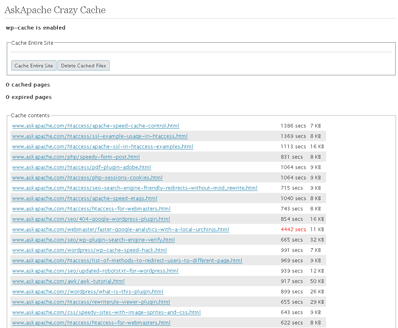
 A plugin built to generate static files from php+mysql for Apache to serve the way its supposed to be.. My dream. Conclusion: Needs some improvement, pretty sweet though.
Optimization
Hosting
 I have written more than a few articles detailing how to improve the speed of a website, and due to popular demand, this post will detail all the latest and greatest caching tricks and techniques that I utilize and love. The AskApache Best-Practices.
Optimization

 Stop wasting your lives with Mac Terminals.. or Macs. Get a real machine and then get a real shell multiplexer! For many years we all loved GNU Screen, but tmux is by far a better option today. The only time I am in the shell and not using a multiplexer, is when I'm not on one of my machines. My Arch Linux machines all run URxvt and my .bash_profiles all start tmux automataically, whether in X or single-user mode, tmux is where it's at.
Hacking, Linux linux.bash Screen shell tmux
The bottom line for this article is that I want to make WordPress as fast, secure, and easy to install, run, and manage because I am using it more and more for client production sites, I will work for days in order to solve an issue so that I never have to spend time on that issue again. Time is money in this industry and that is ultimately (time) what there is to gain by tweaking WordPress.
Note: I spent no time on readability, this is primarily a read the code and figure it out article.. This is for advanced users looking for a reference or discussion and for those of you looking to advance. Feedback would be great if you make it that far..
WordPress wordpress wp-config.php
This explains the basic methods to get started caching with php headers
Optimization